

Scenario
Consider a table named Employees with the columns Id, Name, Designation and Salary and you have been asked to display the data on a web page. 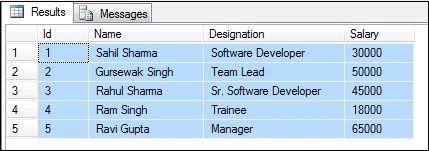
The requirement is quite simple and can be done using a Grid View. Now consider a case when your query fetches no data and there is nothing to display in the Grid View. In that case, we need to display a custom message or an alert to the user that there is no data available. There are several ways to do that but I will show you a simple method to do it.
Suppose we need to find the list of Employees with Salary < 10,000. If you look at the preceding table, it is clear that no employee have a Salary less than 10,000. So our query fetches nothing for the Grid View.
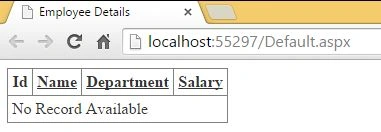
In that case, we need to show the empty Grid View with a message that the records are not available. To do that, we need to enable the Boolean property ShowHeaderWhenEmpty to True. Be sure you're using the ASP.NET 4.0 or later version to use this property.
Also, we need to add the <EmptyDataTemplate></EmptyDataTemplate> property inside the grid view to display the message.
Code
The following is the EmployeeDetails.aspx page:
- <%@ Page Language="C#" AutoEventWireup="true" CodeBehind="EmployeeDetails.aspx.cs" Inherits="GridView.EmployeeDetails" %>
- <!DOCTYPE html>
- <html
- xmlns="http://www.w3.org/1999/xhtml">
- <head runat="server">
- <title>Employee Details</title>
- </head>
- <body>
- <form id="form1" runat="server">
- <div>
- <h3>Employee Details</h3>
- <asp:GridView ID="gvEmployee" runat="server"
- AutoGenerateColumns="False" ShowHeaderWhenEmpty=”True”>
- <Columns>
- <asp:BoundField DataField="Id" HeaderText="Id" />
- <asp:BoundField DataField="Name" HeaderText="Name" />
- <asp:BoundField DataField="Designation" HeaderText="Designation" />
- <asp:BoundField DataField="Salary" HeaderText="Salary" />
- </Columns>
- <EmptyDataTemplate>No Record Available</EmptyDataTemplate>
- </asp:GridView>
- </div>
- </form>
- </body>
- </html>
- using System;
- using System.Collections.Generic;
- using System.Configuration;
- using System.Data.SqlClient;
- using System.Linq;
- using System.Web;
- using System.Web.UI;
- using System.Web.UI.WebControls;
- namespace GridView
- {
- public partial class EmployeeDetails: System.Web.UI.Page
- {
- protected void Page_Load(object sender, EventArgs e)
- {
- string connect = ConfigurationManager.ConnectionStrings["SQLConnect"].ConnectionString;
- using(SqlConnection con = new SqlConnection(connect))
- {
- var query = "SELECT * from Employees where Salary < 10000";
- SqlCommand cmd = new SqlCommand(query, con);
- con.Open();
- SqlDataReader dr = cmd.ExecuteReader();
- if (dr.hasRows)
- {
- gvEmployee.DataSource = dr;
- gvEmployee.DataBind();
- }
- else
- {
- //Empty DataTable to execute the “else-condition”
- DataTable dt = new Datatable();
- gvEmployee.DataSource = dt;
- gvEmployee.DataBind();
- }
- }
- }
- }
- }
Conclusion
Your feedback and constructive criticism is always appreciated, keep it coming. Until then, try to put a ding in the universe!
Vithal WadjePosted Mar 26, 2015, 2:22 PM
nice
Sourabh SomaniPosted Mar 24, 2015, 3:43 PM
nice
Sahil SharmaPosted Mar 24, 2015, 1:26 PM
thanks guys
Khargesh RajputPosted Mar 24, 2015, 6:52 AM
nice
RakeshPosted Mar 23, 2015, 6:35 PM
Good one :)
Tom MohanPosted Mar 23, 2015, 4:57 AM
<EmptyDataTemplate> useful one.