

Introduction
Toggle keys are a great feature of Microsoft Windows. Whenever you turn on/off a toggle key in Windows 10 you can hear a tone when you press the key. The most common toggle key is Caps Lock that toggles the letter keys between lowercase and uppercase mode. Some keyboards also have other toggle keys like (Num Lock, Scroll Lock, and Insert). There is a Toggle Keys button in Windows 10 that specifies whether to make a sound when certain keys are press by you.
Sometimes you press a wrong key when typing and it is very confusing when you press a Caps Lock, Num Lock and Scroll Lock keys without your knowledge. The Toggle Key option is there for solving your problem. After you turn it on, you will be able to hear a tone whenever you press a wrong key, like Caps Lock, Num Lock, and Scroll Lock. A Toggle Key is really helpful during typing. Using the Toggle key you get notified about the changes.
Step 1
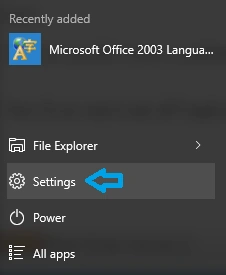
Click on the Home button and go to the setting.
 Step 2
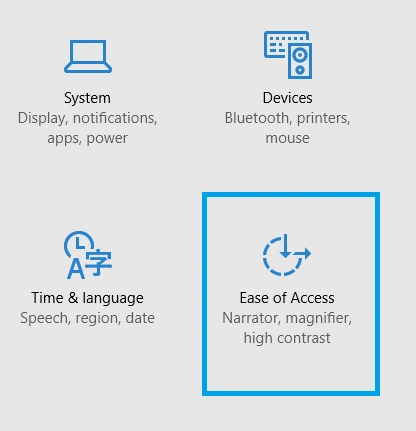
After clicking on Settings you will get a new window, click on Ease of Access.
Step 2
After clicking on Settings you will get a new window, click on Ease of Access.
 Step 3
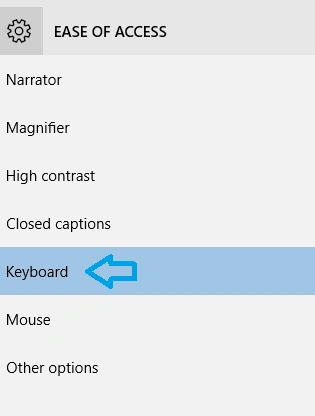
Now you will get many options in your left sidebar when you click on Keyboard.
Step 3
Now you will get many options in your left sidebar when you click on Keyboard.
 Step 4
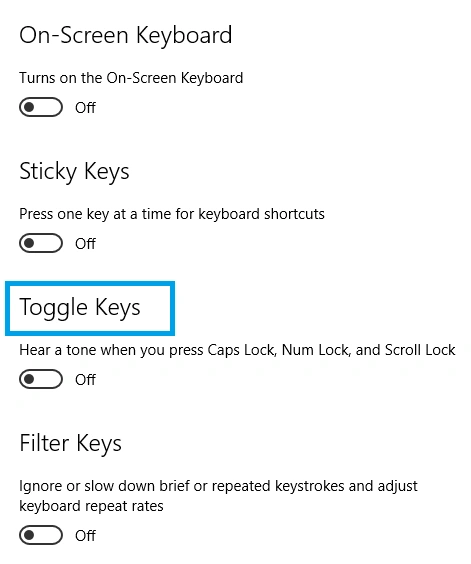
After clicking on the keyboard you will get many options from your right side, see the third option.
Step 4
After clicking on the keyboard you will get many options from your right side, see the third option.
 Step 5
procedure to turn on/off your system toggle keys
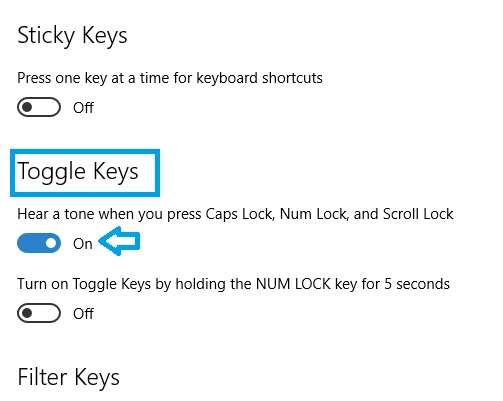
Now you can hear a sound notification whenever you press the Caps Lock, Num Lock or Scroll Lock keys.
Note
If you want to turn off the Toggle keys, simply move the slider right to the left.
Summary
This article showed how to turn on/off toggle keys in Windows 10.
Yashwanth MuthineniPosted Aug 27, 2015, 4:41 AM
Nice Share
Ankit BansalPosted Aug 13, 2015, 7:42 AM
good one..
Sumit JoshiPosted Aug 13, 2015, 5:26 AM
good ..
Sibeesh VenuPosted Aug 13, 2015, 4:29 AM
Nice Share :)
Nilesh JadavPosted Aug 13, 2015, 2:55 AM
Nice features in win 10, soon i upgrade too . thanks for sharing
Vaikesh K PPosted Aug 13, 2015, 12:52 AM
Good One.
Santhakumar MunuswamyPosted Aug 12, 2015, 3:40 PM
Good one. Thanks for sharing