
This article contains explanation about how to draw and render Ellipse in F# using WPF. Ellipse shape is like an object which draw Ellipse and contain Height and Width of the Ellipse. The Height and width of the Ellipse is represented by the width and height properties of Ellipse. If you want to set the width of the Outline of the ellipse you will use the stroke property of the Ellipse. It also used to present the thickness and color of the outline. Steps are given below.
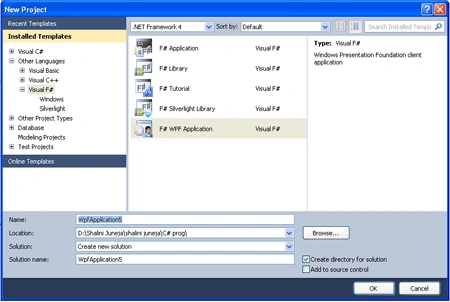
Step 1: Firstly Open a new Project in F# using Visual Studio, Select F# WPF application template and named it as shown in below image.
Step 2: Now add below given references in your project by right clicking on your project in solution Explorer.
PresentationCore
PresentationFramework
System
System.Xaml
UIAutomationTypes
WindowsBase
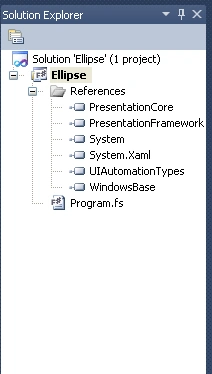
Step 3: When You will add all these References, Your Solution Explorer will look like below.
Step 4: Then click on
Program.fs file and write the below code in Program.fs Window, Your Window will
look like below.


#light
open System
open
System.Windows
open
System.Windows.Controls
open
System.Windows.Input
open
System.Windows.Media
let
mutable private
initFillProperty : DependencyProperty =
null
let
mutable private
initStrokeProperty : DependencyProperty = null
type Elps() =
class
inherit FrameworkElement()
static member
FillProperty =
if initFillProperty =
null then
initFillProperty <- DependencyProperty.Register
("Color Filled", typeof<Brush>,typeof<Elps>,
new FrameworkPropertyMetadata
(null,
FrameworkPropertyMetadataOptions.AffectsRender))
initFillProperty
else
initFillProperty
static member
StrokeProperty =
if initStrokeProperty =
null then
initStrokeProperty <- DependencyProperty.Register
("Stroke Property", typeof<Pen>,typeof<Elps>,
new FrameworkPropertyMetadata
(null,
FrameworkPropertyMetadataOptions.AffectsMeasure))
initStrokeProperty
else
initStrokeProperty
member this.Fill
with get() = (this.GetValue(Elps.FillProperty)
:?> Brush)
and set (value :Brush) =
this.SetValue(Elps.FillProperty,value)
member this.Stroke
with get() = (this.GetValue(Elps.StrokeProperty)
:?> Pen )
and set (value :Pen) =
this.SetValue(Elps.StrokeProperty,value)
override this.MeasureOverride (sizeAvailable:Size)
=
if this.Stroke <>
null then
new
Size(this.Stroke.Thickness,this.Stroke.Thickness)
else
base.MeasureOverride(sizeAvailable)
override this.OnRender (dc:DrawingContext) =
let drawElps widthElps heightElps =
dc.DrawEllipse
(this.Fill, this.Stroke,
new Point(this.RenderSize.Width
/2.0, this.RenderSize.Height /2.0),
widthElps/2.0,heightElps/2.0)
if this.Stroke <>
null then
let widthElps =
Math.Max(0.0,this.RenderSize.Width - this.Stroke.Thickness)
let heightElps =
Math.Max(0.0,this.RenderSize.Height - this.Stroke.Thickness)
drawElps widthElps heightElps
else
drawElps this.RenderSize.Width this.RenderSize.Height
end
type WpfElps()
as this =
inherit Window()
do this.Title <-
"Ellipse in WPF using F#"
let elps =
new Elps()
elps.Fill <- Brushes.Pink
elps.Stroke <- new Pen
(new LinearGradientBrush(Colors.SkyBlue,
Colors.Yellow,
new Point(1.0,
0.0), new Point(0.0, 1.0)),24.0)
this.Content <- elps
#if
COMPILED
[<STAThread()>]
do
let app = Application()
in
app.Run(new WpfElps()) |> ignore
#endif
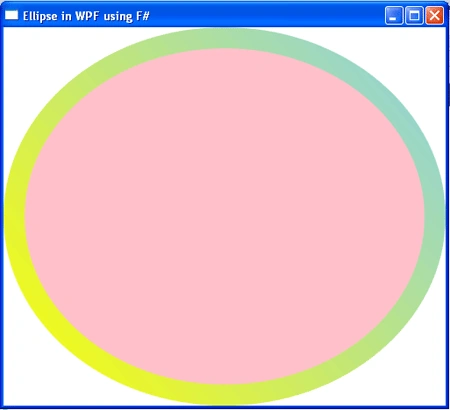
Step 5: Now Press F5 to execute the Code.
Output
Summary
In this article I have discussed that how to draw an Ellipse in F# using WPF.
Rohatash KumarPosted Aug 16, 2011, 8:00 AM
Good Article for beginners. thanks