

Introduction
in today' s article you will learn what a menu is and how to create a bar using awt.
Menu
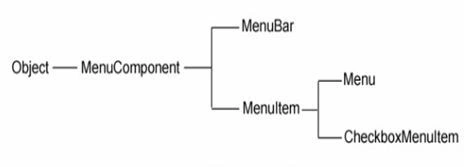
Menus are very familiar to programmers in the Windows environment. A menu has a pull-down list of menu items from which the user can select one at a time. When many options in multiple categories exist for selection by the user, menus are the best choice since they take less space on the frame. A click on the MenuItem generates an ActionEvent and is handled by an ActionListener. A Menu and a MenuItem are not components since they are not subclasses of the java.awt.Component class. They are derived from the MenuComponent class. The following hierarchy illustrates that.
Menu Hierarchy
Menu creation involves many classes, like MenuBar, MenuItem and Menu and one is added to the other.
MenuComponent
A MenuComponent is the highest level class of all menu classes; like a Component, it is the super most class for all component classes like Button, Frame etc. A MenuBar is capable of holding the menus and a Menu can hold menu items. Menus are placed on a menu bar.
Procedure for Creating Menus
The following is the procedure for creating menus:
- Create menu bar
- Add menu bar to the frame
- Create menus
- Add menus to menu bar
- Create menu items
- Add menu items to menus
- Event handling
In the following program, a menu is created and populated with menu items. User's selected menu item or sub-menu item's
- import java.awt.*;
- class AWTMenu extends Frame
- {
- MenuBar mbar;
- Menu menu,submenu;
- MenuItem m1,m2,m3,m4,m5;
- public AWTMenu()
- {
- // Set frame properties
- setTitle("AWT Menu"); // Set the title
- setSize(300,300); // Set size to the frame
- setLayout(new FlowLayout()); // Set the layout
- setVisible(true); // Make the frame visible
- setLocationRelativeTo(null); // Center the frame
- // Create the menu bar
- mbar=new MenuBar();
- // Create the menu
- menu=new Menu("Menu");
- // Create the submenu
- submenu=new Menu("Sub Menu");
- // Create MenuItems
- m1=new MenuItem("Menu Item 1");
- m2=new MenuItem("Menu Item 2");
- m3=new MenuItem("Menu Item 3");
- m4=new MenuItem("Menu Item 4");
- m5=new MenuItem("Menu Item 5");
- // Attach menu items to menu
- menu.add(m1);
- menu.add(m2);
- menu.add(m3);
- // Attach menu items to submenu
- submenu.add(m4);
- submenu.add(m5);
- // Attach submenu to menu
- menu.add(submenu);
- // Attach menu to menu bar
- mbar.add(menu);
- // Set menu bar to the frame
- setMenuBar(mbar);
- }
- public static void main(String args[])
- {
- new AWTMenu();
- }
- }
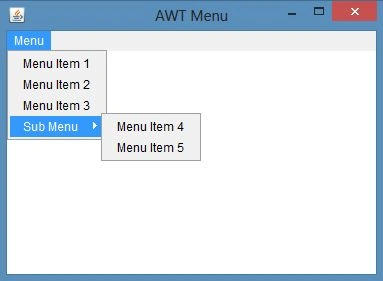
Sample output of this program:
Join the conversation! Your thoughts help the community grow.