

In this Article we will Learn about Joins in SQL Server.I Will Explain all SQL Join With Example.
Introduction
Joins are used to Fetch data from two or more then two tables based on some conditions.Joins is one of the most important concept of SQL Server.We can retrieve Data from multiple Table using JoinsClassification Of Joins
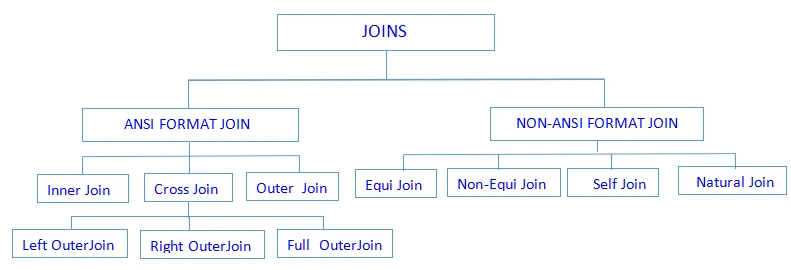
When we retrieve data from multiple Tables Based on Where Keyword condition Then it call as NON ANSI format Joins
Note:Inner Join is the Default Join in Joins
Syntax of Joins
- Select */<List of column> from Tablename1 <Join>Tablename2 on/where (Joins Condition)
Create Two Tables
- Create Table customer(Id int,Name varchar(50),Mobile int,CustomerId int)
- Create Table company(Companyid int, CompanyName varchar(50),Salary decimal(6,2))
Insert some data into these Tables
- insert into customer values(1,'A',89898989,101)
- insert into customer values(2,'B',78787877,102)
- insert into customer values(3,'C',98323232,103)
- insert into company values(101,'C1 Tech',5000)
- insert into company values(102,'Cone Tech',1000)
- insert into company values(104,'Netvision Tech',3500)
- insert into company values(105,'S Tech',1500)
Equi Join: When we Retrieve the data from multiple Tables based on an Equality Condition then this is called an Equi Join
This Join Process support only one Operator Equal Operator (=)
When we Use Equi Join we should maintain a common column name and that column should contain same data type
- select c.id,c.name,c.mobile,c.CustomerId,com.Companyid,com.CompanyName,com.Salary from customer c, company com where c.CustomerId=com.Companyid
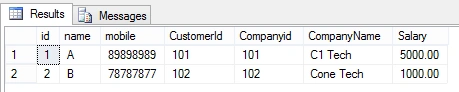
We can Define alias Name in two Levels
1. Column Level alias Name
2. Table Level alias Name
1. When we create a Duplicate Name for a column then it called column level alias Name.
Syntax <Column Name> AS <column alias Name>
2. When we create the alternative Name for the Tables in the database then it called Table level alias Names.
Syntax: <Table Name> AS <Table alias Name>
Note:Alias Names mostly implemented in Joins
Inner Join: Inner Join is used for retrieving Data from multiple Tables .When we use Inner Join we should used a common column Name and Datatype is also same in the Table.
- select * from customer c inner join company com on c.CustomerId=com.Companyid

Outer Join:Outer Join is an extension of Inner join.
In Inner join mechanism the user will get match data from the Tables and leave unmatch data from the Tables.
To overcome the drawback we use outer join .By using outer we can retrieve matching data and also Unmatching data from the Tables at a Time.
Type of Outer Join
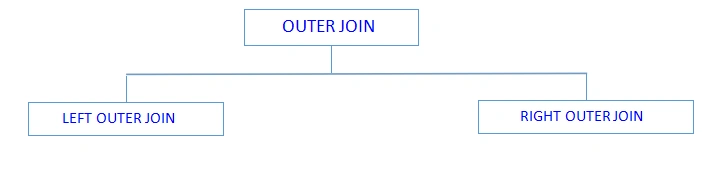
1. Left Outer Join:It Retrieves matching data from multiple Tables and also Unmatching data from Left hand side Table Only.
2. Right Outer Join:It Retrieves matching data from multiple Tables and also Unmatching data from Right hand side Table Only.
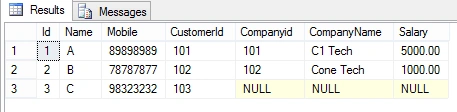
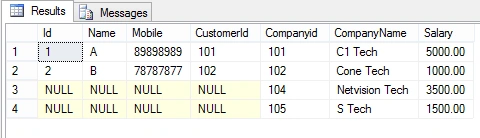
Example of Left Outer Join: Write a Query to display matching data from customer,company and unmatching data from customer Table
- select * from customer c left outer join company com on c.CustomerId=com.Companyid
Example of Right Outer Join: Write a Query to display matching data from customer,company and unmatching data from company Table
- select * from customer c right outer join company com on c.CustomerId=com.Companyid
Cross Join:When we Joins the two Table information without any condition is known as cross Join
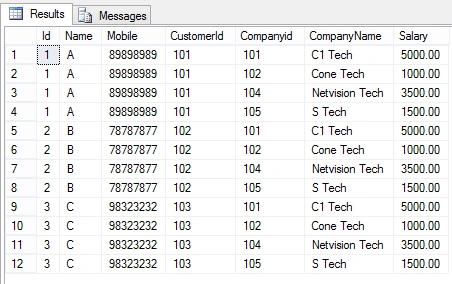
In cross join mechanism each record of a first Table is joins with each record of second Table.
For example if the first table contain A no of records and the second Table contains B no of records Then we will get the cross product A*B records.
- select * from customer cross join company
Non-Equi Join:When we Retrieve the data from multiple Table based on any conditions Except an Equality condition is known as Non-Equi Join
When we implement Non-equi Join there is no required to maintain a common column in the Table.
It supports all operators. To understand this Lets create two table and insert values
- create table employee (id int, name varchar(50),salary int ,Mid int)
- create table salary_Range(sno int,Lowsal int,Highsal int)
- insert into employee values(1,'A',2500,101)
- insert into employee values(2,'B',3200,108)
- insert into employee values(3,'C',400,103)
- insert into employee values(4,'D',8200,109)
- insert into employee values(5,'E',1100,101)
- INSERT INTO salary_Range VALUES(1,1500,2800)
- INSERT INTO salary_Range VALUES(2,3500,5200)
- INSERT INTO salary_Range VALUES(3,6500,8500)
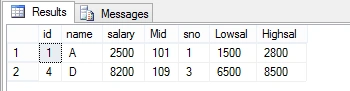
Example :Write a Query to retrieve employee details whose salary is greate than lowsal and less then highsal
- select * from employee,salary_Range where (salary>Lowsal)and (salary<Highsal)
Self Join:A Table joining by itself is known as self Join.
Self Join can be implemented when any 2 column have some Relation within same Table then we use self join mechanism
It can be worked on a single Table Only.
When we use self Join on a Table then we should create Alias Names to the Table.
Without alias Names we cannot implement self Join.
A Table contains any No of Alias Names.
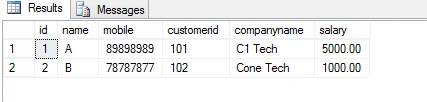
Natural Join:Natural Join is used for avoiding the duplicate columns from a Result set.
- select id,name,mobile,customerid,companyname ,salary from customer c ,company com where c.customerid=com.companyid
- Select */<Column name> from <Table1> <Join Key><Table2> On <condition> <Join key> <Table3> on <Condition>
- create table Reg(Regno int,Regdate datetime,cid int)
- insert into Reg values(1,'1-3-2017',101)
- insert into Reg values(1,'12-4-2017',102)
- insert into Reg values(1,'9-6-2017',108)
- select * from customer c ,company com,Reg r where c.customerid=com.companyid and com.companyid=r.cid

Summary: In this Article I have explained Join in SQL,Join is one of the most Useful Part in Database,in this article we discussed Joins with Example This article is very helpful for beginners.
Jaipal ReddyPosted Aug 25, 2015, 10:50 PM
Thank you Bruno P?terson.
Bruno PétersonPosted Aug 25, 2015, 8:56 AM
this is good to remember the concept. Thanks!
Jaipal ReddyPosted Jun 15, 2015, 12:48 AM
Its always glad to hear that, thank you Gopi Chand.
Gopi ChandPosted Jun 15, 2015, 12:37 AM
Nice explanation....good work..congrats
Santhakumar MunuswamyPosted Jun 14, 2015, 2:35 AM
Thanks for nice article :)
Santhakumar MunuswamyPosted Jun 14, 2015, 2:34 AM
Good Start
Pankaj Kumar ChoudharyPosted Jun 13, 2015, 8:09 PM
Nice Start @Jaipal Sir.........