

Contents
- Abstract
- Introduction
- Code Example
- Additional Tools
- Important points
- Want to contribute
Abstract
In this article let's welcome Visual Studio Code as a new member of the Visual Studio family.
Introduction
Visual Studio Code is a new member of the Visual Studio family. This article shows how to get started with this. In Build 2015 , there was a presentation by Scott Hanselman, where he announced the new tool called Visual Studio Code. It was a great presentation, where he explained everything about this cool tool.
I can't stop myself from trying. So, let's get started.
In this article let's welcome Visual Studio Code as a new member of the Visual Studio family.
Introduction
Visual Studio Code is a new member of the Visual Studio family. This article shows how to get started with this. In Build 2015 , there was a presentation by Scott Hanselman, where he announced the new tool called Visual Studio Code. It was a great presentation, where he explained everything about this cool tool.
I can't stop myself from trying. So, let's get started.
- Download Visual Studio Code from MepeHe
- This is cross-platform, so, you can choose whatever platform you want to work with.

- I selected Download Code for Windows.
- I was amazed to see that it installed within two minutes. I liked it.
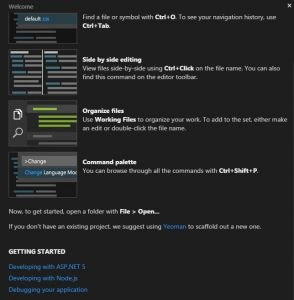
- It has a cool Welcome screen.
- Love to see that I can use Scafolding using Yeoman.
- Great, I am ready to start.
Code Example
I just tried my existing WebAPI Code. Just select my existing folder by File and then Open Folder. I got everything there. It seems to be nearly similar to Notepad++ or Sublime text, but I am sure it is much more than just an editor.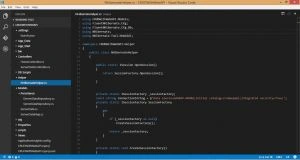
It provides Intellisense.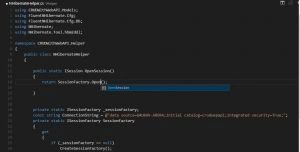
I can navigate within files. Need to press Ctrl + O. It reminds me of Resharper.

Additional Tools
Visual Studio Code has the ability to use the existing code chain:
- ASP.NET5
- NodeJS (with NPM)
- Yeoman
- Hottowel
- Gulp
- Express
- Mocha
- Bower
- TypeScript
- and so on
Important points
- Visual Studio Code is cross-platform.
- It does not matter whether you work with Windows, Mac or Linux.
- It provides intelligence similar to Visual Studio.
- You can navigate within files in a flavor of Resharper.
- If you don't really have any project setup, you can start with scaffolding using Yeoman.
Want to Contribute
If you want to contribute or want to add your own idea, then post here: Contribution
Asfend YarPosted Feb 22, 2016, 2:12 PM
very valuable information in this article
Navneeth KrishnaPosted Jul 23, 2015, 9:24 AM
nice
Navneeth KrishnaPosted Jul 23, 2015, 9:23 AM
nice
Pooja BaraskarPosted Jul 4, 2015, 1:43 PM
Good article, thanks for sharing :)
Suraj SahooPosted Jul 4, 2015, 1:02 PM
Really nice Sir..:)
Karthik Muthu KaruppanPosted May 4, 2015, 2:20 PM
nice
Gaurav Kumar AroraPosted May 3, 2015, 10:25 AM
Tom Mohan thanks a ton
Gaurav Kumar AroraPosted May 3, 2015, 10:25 AM
Nitin Tyagi thanks a ton
Gaurav Kumar AroraPosted May 3, 2015, 10:25 AM
Afzaal Ahmad Zeeshan cool. Great thoughts. I did not think in this way, Thanks for drawing my attention on that aspect
Tom MohanPosted May 2, 2015, 11:31 AM
Nice one.
Afzaal Ahmad ZeeshanPosted May 2, 2015, 10:34 AM
Gaurav Kumar Arora, yes more probably it is faster than using the user-interface. Console works a lot faster and completes the task in a very efficient way that graphical user-interface cannot match. GUI has to make sure that the GUI is also stable and many other features in which GUI lags behing CLI.
Gaurav Kumar AroraPosted May 2, 2015, 10:24 AM
Afzaal Ahmad Zeeshan - I agreed, I am also great lover of command prompt. I liked this. Glad to read that you liked this.
Gaurav Kumar AroraPosted May 2, 2015, 10:23 AM
Nitin Tyagi thanks a ton
Afzaal Ahmad ZeeshanPosted May 1, 2015, 5:30 AM
The thing that I would love about it would be the command line support! Thanks for sharing this new product Gaurav Kumar Arora.
NitinPosted May 1, 2015, 3:35 AM
nice article Sir
Mahesh ChandPosted Apr 30, 2015, 7:06 AM
Great Gaurav. Already jumped on it. Nicely done!
Manoj KulkarniPosted Apr 30, 2015, 3:50 AM
Nice article. Thank you for sharing
Vijay SPosted Apr 30, 2015, 3:10 AM
Good Article will be helpful for beginners