
Here we discuss the ArcSegment Class. It creates an arc which is basically based on the starting point of the PathFigure object. Now we take an example of the ArcSegment Class.
<Grid>
<Path Stroke="Green" Fill="Pink" StrokeThickness="1" Width="Auto">
<Path.Data>
<PathGeometry>
<PathGeometry.Figures>
<PathFigureCollection>
<PathFigure StartPoint="150,200">
<PathFigure.Segments>
<PathSegmentCollection>
<ArcSegment
Point="300,300"
Size="700,100"
RotationAngle="90"
IsLargeArc="False" SweepDirection="Clockwise"
/>
</PathSegmentCollection>
</PathFigure.Segments>
</PathFigure>
</PathFigureCollection>
</PathGeometry.Figures>
</PathGeometry>
</Path.Data>
</Path>
</Grid>
The output will be: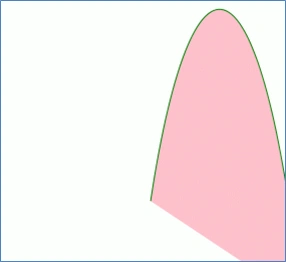
Now we look at the code:

Working With ArcSegment Class in WPF
Join the conversation! Your thoughts help the community grow.
Sign in to leave a comment
It is the same account you read, post and publish with — and you will come straight back to this page.
Jason McclinseyPosted Apr 29, 2017, 9:24 AM
Thanks for this excellent example!