

Building Android Applications using C#
MonoDroid is a software product developed by Novell to build Android-based mobile applications using C# and .NET. To install and work with MonoDroid, you need Visual Studio 2010. MonoDroid works as an add-on of Visual Studio 2010. Once installed successfully, the MonoDroid project templates are available in Visual Studio 2010. MonoDroid does not work with Visual Studio Express.
In this tutorial, we will learn how to build our very first Android-based application using MonoDroid and Visual Studio 2010.
Installing MonoDroid
You can download the latest version of the MonoDroid from www.monodroid.net and follow the installation instructions here: http://monodroid.net/Installation
Once you have successfully installed the Android SDK, MonoDroid and all required software, you are all set to build your very first Android-based application using C# and .NET.
Hello Android!
We are going to build our very first Android-based application. In this application, we will display the Hello Android text on the screen.
Open Visual Studio 2010 and create a new project. Select Visual C# as the language, MonoDroid as the category in the left side bar list of the project template categories. See Figure 1.
Once you select the MonoDroid category, you will see the following three templates.
- MonoDroid Application
- OpenGL MonoDroid Application
- MonoDroid Class Library
In this topic, we will use the MonoDroid Application project type. I will discuss OpenGL and Class Library project types later in this chapter.
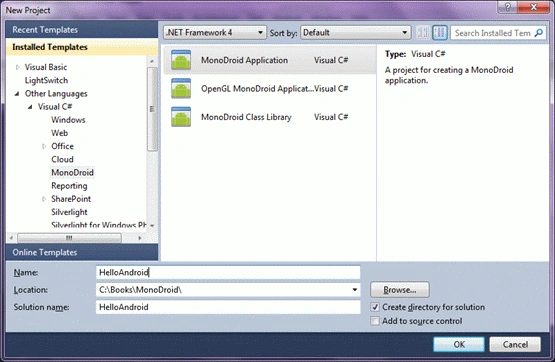
Figure 1
As you see in Figure 1, I select MonoDroid Application on the project templates, enter my project name HelloAndroid and click OK. This action will create a new project and add default files and code to the project as shown in Figure 2.
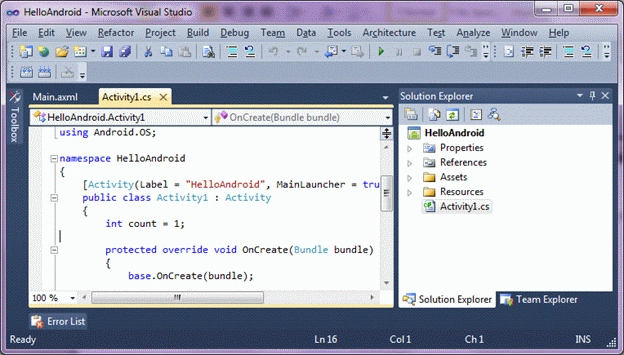
Figure 2
The default file opened in the editor is Activity1.cs.
If you look at the code of Activity1 class listed in Listing 1, you will see there are six Android namespaces are added to the file. The default namespace of the project is the project name you created in Visual Studio.
- using System;
- using Android.App;
- using Android.Content;
- using Android.Runtime;
- using Android.Views;
- using Android.Widget;
- using Android.OS;
- namespace HelloAndroid
- {
- [Activity(Label = "HelloAndroid", MainLauncher = true)]
- public class Activity1 : Activity
- {
- int count = 1;
- protected override void OnCreate(Bundle bundle)
- {
- base.OnCreate(bundle);
- // Set our view from the "main" layout resource
- SetContentView(Resource.Layout.Main);
- // Get our button from the layout resource,
- // and attach an event to it
- Button button = FindViewById<Button>(Resource.Id.MyButton);
- button.Click += delegate { button.Text = string.Format("{0} clicks!", count++); };
- }
- }
- }
The Activity1 class is inherited from the Activity class. Each Android application must have at least one Activity. The class also has an overridden OnCreate method. This is the most useful method and gets executed when an application starts. You should write all the initialization and UI related code here. Before we discuss this in more detail, let's take a look at the other files in the project.
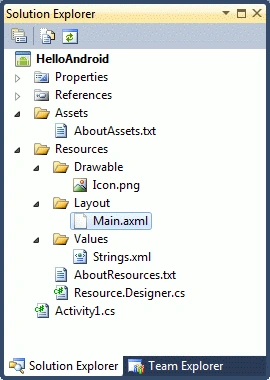
Figure 3
If you look at the Solution Explorer more closely (See Figure 3), you will notice Assets, Resources and Values folders. You can also expand these folders to see what default files are added to the project. We are going to discuss these files one at a time.
Before we get into more details, let's add code for our Hello Android display on the screen. I change the code of the OnCreate method and add a TextView object and set its Text property to Hello Android!. The TextView object works as a TextBox control. It is used to display and manage text on the screen.
- protected override void OnCreate(Bundle bundle)
- {
- base.OnCreate(bundle);
- var tv = new TextView (this);
- tv.Text = "Hello, Android!";
- // Set our view from the "main" layout resource
- SetContentView(tv);
- }
The SetContentView method is responsible for pushing and displaying the contents to the screen.
Now let's build and run the application. Select Build and Run menu item in Visual Studio.
The first thing you will see is a screen to select devices. If you have an Android enabled device attached to your computer, you will see that listed here. I use the emulator for testing. To view all emulator images, click on the Start emulator image link on the screen.
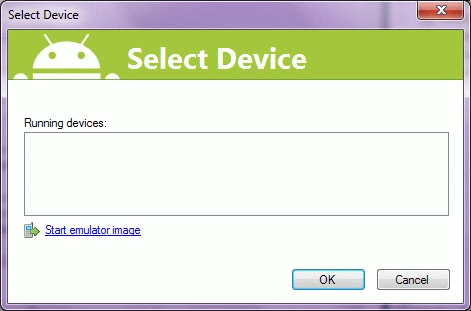
Figure 4
This action will load all the emulator images on your computer. As you can see from Figure 5, I have two emulator images on my computer.
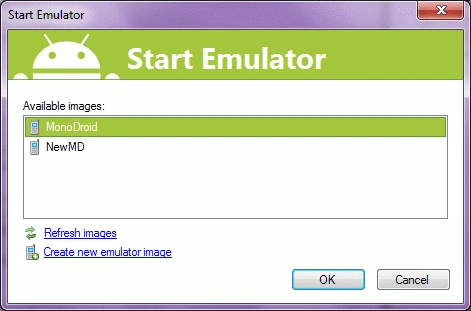
Figure 5
Now click OK button. After that, you see a screen with various options that checks your emulator and deploys the latest application on the device.
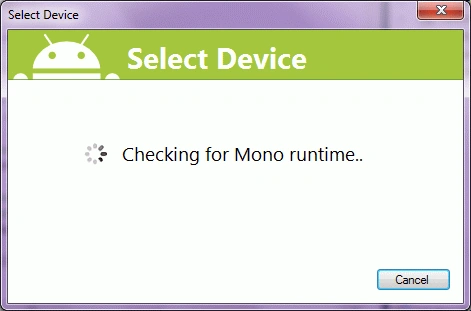
Figure 6
Once an application is successfully deployed, you can go to Applications and search for it. I search and find HelloAndroid application on my device. See Figure 7.
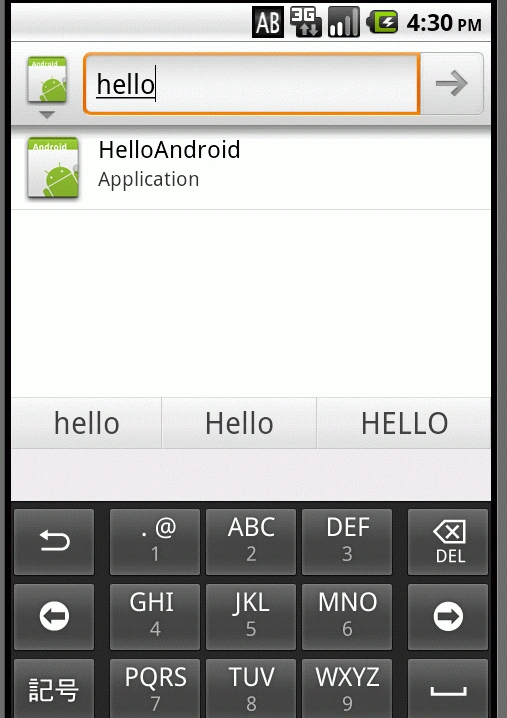
Figure 7
Summary
MonoDroid is a framework that is used to build Android-based mobile applications using C# and .NET. In this tutorial, we learned how to get started with the MonoDroid framework and Android SDK and build and deploy a simple Android-based application.
Sanghdeep SanghratnePosted Feb 21, 2020, 1:51 AM
Very nice article, thanks sir! for sharing.
Madan ShekarPosted Jan 21, 2019, 5:11 AM
Very interesting topic thanks for sharing
Kishor MorePosted Mar 13, 2018, 7:26 AM
Sir, can i create an android app in c#?
kalu singh raoPosted Jul 12, 2016, 6:24 AM
Nice...
Pranav J.DevPosted Mar 29, 2016, 6:42 AM
I am also need development tutorial for Android App in Visual Studio
Bhanu Prakash GadiPosted Aug 19, 2015, 3:34 AM
Could you please explain How can I install this in my Android mobile.
Vivek SharmaPosted Aug 9, 2015, 3:35 AM
You can download Xamarin free for students !
karthi keyanPosted Jun 24, 2015, 2:10 AM
Please help me. I need Development tutorial for Android App in Visual studio.
Suresh MPosted Sep 17, 2014, 7:46 AM
Deepak kumar ,xamarian is paid .its free for 30days .
Deepak KumarPosted Jun 3, 2014, 7:08 AM
Xamarian is free download or paid
Vithal WadjePosted Feb 23, 2014, 12:58 PM
that"s power of C#
Ehtesham MehmoodPosted Feb 22, 2014, 7:57 PM
Mahesh sir please write article about C# programming language ? what c# can do for you ? please explain in your words i am lover of your website and also lover of C# language so want to know more and more about C# power ?
Sahil MaheshwaryPosted Feb 22, 2014, 1:22 PM
Is it free of cost? Is it provide by microsoft?
Rishabh ShuklaPosted Jul 21, 2013, 9:01 AM
The Monodroid runtime is bundled with your app, so your apk ends up being bloated at more than 6MB. A better programming solution for C# would be dot42. Both Mono and dot42 are licensed products. What can be complications in using dot42 if you know of any?
DEEPAK KUMARPosted May 27, 2013, 12:53 PM
Is there any license issue if i publish mobile app on google store developed by using monoroid C#
Jamal KhanPosted Jan 13, 2013, 2:39 AM
Where I can get the free visual studio 2010 ????
Tej MauryaPosted Nov 25, 2012, 2:26 PM
is monodroid free for developemnt
narendra bhardwajPosted Nov 17, 2012, 9:10 AM
i have already installed jdk for installed monodroid i have to again install the jdk?
MARIO FERNANDEZPosted Feb 10, 2012, 12:26 AM
hey guys I wanted to know if this apps if for c# 2008 also
bruce yuanPosted Dec 24, 2011, 7:11 AM
I have a question that if i already have the android software develop kit ,can i use it to replace a real phone?
David ThorntonPosted Oct 11, 2011, 4:33 AM
You had me all excited Mahesh..... until I visited the Monodroid site and saw its $US399
Dharmesh SharmaPosted Jun 28, 2011, 10:10 AM
but we work on eclipse ............. its good one.
Suhani ModyPosted May 5, 2011, 1:02 AM
Very good article mahesh. Hope to see some more articles on the same :)
shauny mphoPosted Mar 14, 2011, 7:28 AM
Thanks man. I started with Android API last night / rather this morning, and the experience wasn't too accommodating, I did not mind the XML based declaration, but getting deep with Java was my biggest issue. I don't have problems programming in java but the language itself is not one of my favorite language for some reasons I only use it for school assignments, I was considering the native development with C++ but if this is really working with C# big up to the guys at Mono. I have one more question though. Since we will be using C# and .NET for development, how far can one get? in respect to the API itself since its written in java and exec by the Dalv... VM. can i use native .NET libraries such as the System.Net, System.Data and etc? or is it just a framework converting every piece of code from one language to the other then building the byte code? or is it directly from .NET to byte code exec by the VM? Thanks
Ibrahim ErsoyPosted Mar 11, 2011, 5:17 PM
I might have a look at it some time.
jayakrishnan MorayurPosted Mar 10, 2011, 11:07 PM
Tanks
shahin pendarPosted Mar 5, 2011, 8:17 AM
pleas send an learning PDF for me. tnx
Blocked AccountPosted Mar 3, 2011, 6:57 AM
Good work Sir.
Jean PaulPosted Feb 26, 2011, 4:26 AM
It will definitely help the C# dev like java dev to leverage the Android platform
Raj KumareditedPosted Feb 25, 2011, 10:12 PMEdited Mar 14, 2011, 11:51 AM
good article for android beginning.