

An HScrollBar control is a supporting control that is used to add horizontal scrolling capability to a control that does not have built-in scrolling such as a container control. You do not need this control for the controls that already have built-in scrolling.
In this article, I will discuss how to create an HScrollBar control and apply horizontal scrolling on Windows Forms controls that do not have built-in scrolling feature. After that, I will discuss various properties and methods available for the HScrollBar control.
Creating an HScrollBar
We can create an HScrollBar control using a Forms designer at design-time or using the HScrollBar class in code at run-time (also known as dynamically).
To create an HScrollBar control at design-time, you simply drag and drop an HScrollBar control from Toolbox to a Form in Visual Studio. After you drag and drop an HScrollBar on a Form, the HScrollBar looks like Figure 1. Once an HScrollBar is on the Form, you can move it around and resize it using the mouse and set its properties and events.
In this article, I will discuss how to create an HScrollBar control and apply horizontal scrolling on Windows Forms controls that do not have built-in scrolling feature. After that, I will discuss various properties and methods available for the HScrollBar control.
Creating an HScrollBar
We can create an HScrollBar control using a Forms designer at design-time or using the HScrollBar class in code at run-time (also known as dynamically).
To create an HScrollBar control at design-time, you simply drag and drop an HScrollBar control from Toolbox to a Form in Visual Studio. After you drag and drop an HScrollBar on a Form, the HScrollBar looks like Figure 1. Once an HScrollBar is on the Form, you can move it around and resize it using the mouse and set its properties and events.
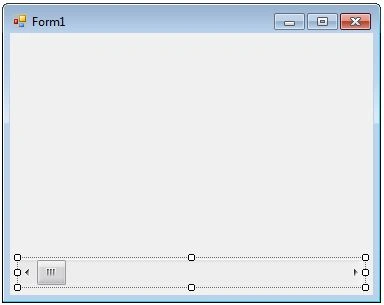
Figure 1
Creating an HScrollBar control at run-time is merely a work of creating an instance of HScrollBar class, setting its properties and adding HScrollBar class to the Form controls.
The first step to create a dynamic HScrollBar is to create an instance of HScrollBar class. The following code snippet creates an HScrollBar control object.
The first step to create a dynamic HScrollBar is to create an instance of HScrollBar class. The following code snippet creates an HScrollBar control object.
- HScrollBar hScroller = newHScrollBar();
In the next step, you may set properties of an HScrollBar control. The following code snippet sets the height and width properties of an HScrollBar.
- hScroller.Height = 40;
- hScroller.Width = 300;
Once an HScrollBar control is ready with its properties, the next step is to add the HScrollBar control to the Form. To do so, we use Form.Controls.Add method. The following code snippet adds an HScrollBar control to the current Form.
- this.Controls.Add(hScroller);
Setting HScrollBar Properties
After you place an HScrollBar control on a Form, the next step is to set properties.
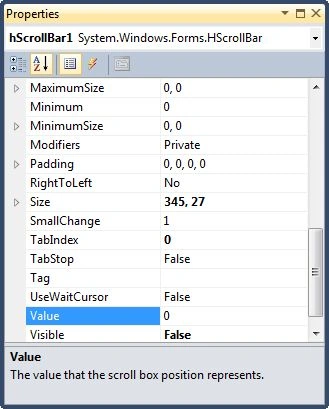
The easiest way to set properties is from the Properties Window. You can open Properties window by pressing F4 or right click on a control and select Properties menu item. The Properties window looks like Figure 2.
After you place an HScrollBar control on a Form, the next step is to set properties.
The easiest way to set properties is from the Properties Window. You can open Properties window by pressing F4 or right click on a control and select Properties menu item. The Properties window looks like Figure 2.
azhagu arasanPosted Nov 15, 2019, 1:23 AM
<Grid x:Name="gridLocation" Margin="55,180,204,0" VerticalAlignment="Top" Height="435" HorizontalAlignment="Center" Width="1015" ShowGridLines="False" Background="#66FFFFFF"> <ScrollViewer x:Name="ScrollSchenker" VerticalScrollBarVisibility="Disabled" HorizontalScrollBarVisibility="Visible" Margin="0,-1,0,0"> <Grid x:Name="gridLocationdisplay" Margin="10,0" Background="#66FFFFFF" ShowGridLines="False" HorizontalAlignment="Center" VerticalAlignment="Center"> <StackPanel Orientation="Horizontal" Width="1000" Height="20" /> </Grid> </ScrollViewer> <Grid> From the above grid i need to perform HScroll bar..help me out! will be appreciated.Thanks
aya amerPosted Nov 16, 2018, 5:49 AM
How can i mix the speed of car with value of scroll to get it as screter
Asbath CheditedPosted Feb 2, 2012, 6:38 PMEdited Feb 2, 2012, 7:25 PM
How can i show the value from the horizontal scroll bar?? because im using it to adjust the size of characters thanks IGNORE IT I FIGURED IT OUT LOL