

This tutorial shows you how to create and use a ProgressBar control available in Windows Presentation Foundation (WPF) and XAML.
Introduction
The ProgressBar tag in XAML represents a WPF ProgressBar control.
<ProgressBar></ProgressBar>
The Width and Height properties represent the width and the height of a ProgressBar. The Name property represents the name of the control, which is a unique identifier of a control. The Margin property tells the location of a ProgressBar on the parent control. The HorizontalAlignment and vertical alignment properties are used to set horizontal and vertical alignments.
The following code snippet sets the name, height, and width of a ListView control. The code also sets the horizontal alignment to the left and the vertical alignment to the top.
<ProgressBar Margin="10,10,0,13" Name="ListView1" HorizontalAlignment="Left" VerticalAlignment="Top" Width="300" Height="30"/>
The progress bar looks like Figure 1.
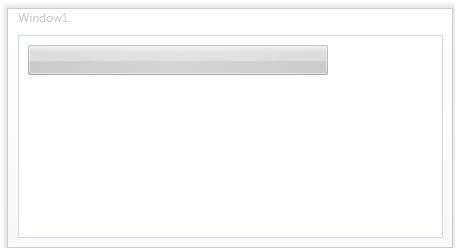
Figure 1.
Setting up ProgressBar Value
The Value property of ProgressBar sets up the current value of a ProgressBar control. In the following code, I set the Value property to 60 and now ProgressBar looks like Figure 2.
<ProgressBar Margin="10,10,0,13" Name="PBar" HorizontalAlignment="Left" VerticalAlignment="Top" Width="300" Height="30" Value="60">
</ProgressBar>
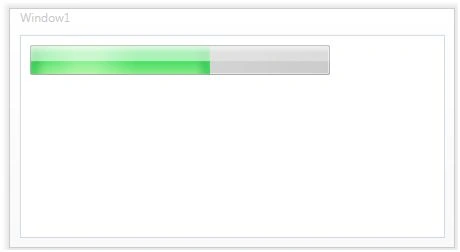
Figure 2.
Dynamically Setting a ProgressBar Value
We can use a Timer or animation to set a ProgressBar value dynamically. The following code creates a DoubleAnimation object and sets ProgressBar.Value by using the ProgressBar.BeginAnimation method.
private void Window_Loaded(object sender, RoutedEventArgs e)
{
    Duration duration = new Duration(TimeSpan.FromSeconds(20));
    DoubleAnimation doubleanimation = new DoubleAnimation(200.0, duration);
    PBar.BeginAnimation(ProgressBar.ValueProperty, doubleanimation);
}
If you run the application, the ProgressBar run looks like Figure 3.
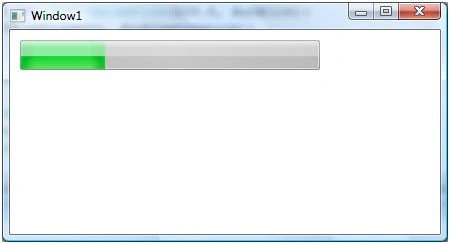
Figure 3.
Flow Direction
The FlowDirection property sets the flow of ProgressBar. You can set this value to either LeftToRight or RightToLeft. The default value is LeftToRight.
FlowDirection="RightToLeft"
Adding a ProgressBar to a StatusBar
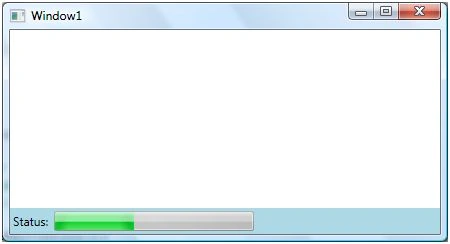
You probably saw several applications like Internet Explorer where you can see the status of a page load in the status bar at the bottom by using a progress bar that looks like Figure 4.
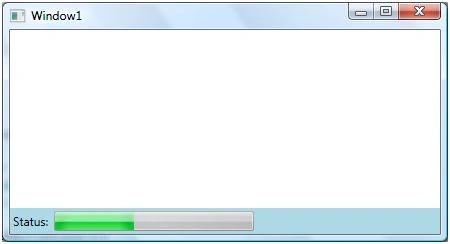
Figure 4.
The following code adds a StatusBar to WPF using XAML.
<StatusBar Name="SBar" Grid.Column="0" Grid.Row="5" VerticalAlignment="Bottom" Background="LightBlue">
    <StatusBarItem>
        <TextBlock>Status:</TextBlock>
    </StatusBarItem>
</StatusBar>
The following code creates a ProgressBar dynamically and adds it to the StatusBar and sets the duration for changing the value of the ProgressBar.
private void CreateDynamicProgressBarControl()
{
    ProgressBar PBar2 = new ProgressBar();
    PBar2.IsIndeterminate = false;
    PBar2.Orientation = Orientation.Horizontal;
    PBar2.Width = 200;
    PBar2.Height = 20;
    Duration duration = new Duration(TimeSpan.FromSeconds(20));
    DoubleAnimation doubleanimation = new DoubleAnimation(200.0, duration);
    PBar2.BeginAnimation(ProgressBar.ValueProperty, doubleanimation);
    SBar.Items.Add(PBar2);
}
Summary
In this article, I discussed how to create and use a ProgressBar control available in WPF.
Eyck BlankPosted Jun 9, 2021, 9:14 AM
Thank you for that tutorial! Allow me to make an observation:The developers of this UI component have unfortunately done only half the job!The control of the progressbar, which has to be done in the code via worker thread, belongs in the programming of the UI component. Instead, it requires complicated tutorials and the user is suggested incompetence.
Gabriel AcevedoPosted Oct 9, 2019, 2:49 AM
Thank, it worked the first time.
Alice NguyenPosted Dec 10, 2018, 2:24 AM
So great an Article
Mohammad Hussein FakhravariPosted Oct 5, 2015, 5:18 AM
At the same time does not run
gene howellPosted Sep 23, 2011, 12:41 PM
I implemented the code above and the progress bar does not look like it does in the illustration. It has the block style instead of continuous. Is there an easy way to set the style to continuous like there is in windows.forms progrsss bars? I've been hunting around and haven't been able to find anything. Thanks.
Roshini JohriPosted Jan 6, 2011, 8:30 PM
hey is it possible to also control the width of the progress bar.. i want increase and decrease the width of the bar along with the increase and decrease in values dynamically. is that possible?
ankara kervan nakliyateditedPosted Sep 28, 2010, 5:04 PMEdited Nov 7, 2010, 5:13 PM
great post dude
zafiPosted Nov 12, 2009, 6:15 AM
Thank you Mahesh for this article. I have a web browser control on my form and I want to associate a progress bar to that control. i.e. until the site in it opens, the progress bar should show the status. Can you please suggest me how I can do that? Thanks in advance
AbbottPosted Oct 3, 2009, 8:28 AM
Sorry about the last post. I was looking in the created ProgressBar object, not the control definition. Tnx
AbbottPosted Oct 3, 2009, 8:20 AM
My ProgressBar does not expose ValueProperty, only Value. Is there atrick to the definition? Abbott
Mohamed SabryPosted Jun 26, 2009, 9:58 PM
Thank you Mahesh but I want to control this progress bar by anther .cs progress bar in WPF --->internal System.Windows.Controls.ProgressBar PBar; but i want to convert it into extern this is invalid could you help me please thanks in advance
Bechir BejaouiPosted Aug 15, 2008, 9:41 AM
The new WPF technology is splendid but I still miss the MDI forms
Bechir BejaouiPosted Aug 15, 2008, 9:41 AM
The new WPF technology is splendid but I still miss the MDI forms
Bechir BejaouiPosted Aug 15, 2008, 9:41 AM
The new WPF technology is splendid but I still miss the MDI forms
Bechir BejaouiPosted Aug 15, 2008, 9:41 AM
The new WPF technology is splendid but I still miss the MDI forms