

- Unary: In unary operators, only one operand is used.
Eg: operator operand
- Binary: In binary operators, two operands are used.
Eg: operator1 operand operator2
Types of operators in Oracle
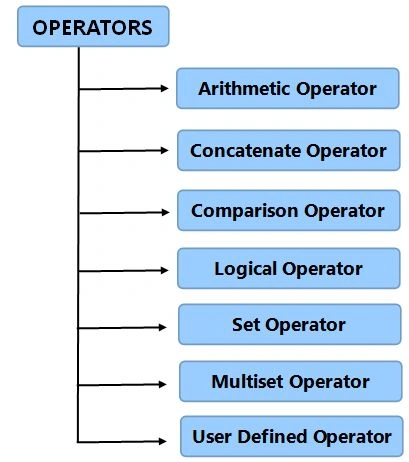
1. To perform mathematical computations on numeric operands, arithmetic operators are used.
- Addition (+)
To add two or more numbers the (+) operator is used.
- Substraction (-)
To subtract two numeric values the (-) operator is used.
- Multiply (*)
The (*) operator multiplies one number by another.
- Division (/)
The (/) operator divides one number by another.
Syntax
SELECT <Expression> [arithmetic operator] <Expression>.....
FROM [table_name]
WHERE [Expression];
Example
BEGIN
DBMS_OUTPUT.PUT_LINE(7 * 3); --multiplication
DBMS_OUTPUT.PUT_LINE(18 / 5); --division
DBMS_OUTPUT.PUT_LINE(15 + 6); --addition
DBMS_OUTPUT.PUT_LINE(32 - 16); --subtraction
END;
2. Concatenate Operator (||)
The Concatenate operator concates two strings and returns another string as the result.
Syntax
String_1 ||String_2 || String_n
Example
- ‘Friday’ || ‘January 20th’
Note: It returns Friday 20th January
-
'2' || '0' || '1' || '4'
Note: It returns 2014
3. Comparison Operator
The Comparison operator is used when we want to compare one expression with another. It returns TRUE, FALSE or NULL.
Here are the comparison operators:
- = Equals to
- < Less than
- > Greater than
- <= Less than equal to
- >= Greater than equal to
- IN Operator
To determine if a column's value exists in a given set of values we use the IN operator and if the column value is equal to any of the values specified in a given set then the condition is validated. The condition that is defined using the IN operator is also known as a membership condition.
Example
SELECT Emp_id
FROM Employees
WHERE Salary IN (24000, 50000, 35000);
- LIKE Operator
For wildcard searches and pattern dependent matching in a SELECT query we use the “LIKE” operator. If we know any portion of the column value a wildcard can be used to find the rest of the portion. It uses a wildcard for the search string; that’s why it is also known as a "wildcard search". The two wildcard operators are: Percentile (%) and Underscore (_). Percentile is used to replace more than one character and underscore is used to replace a single character.
Example
SELECT First_Name
FROM Students
WHERE Last_Name LIKE 'Arora';
- BETWEEN
It is used to compare a column value within a specified range having a lower and upper limit. It is generally the same as the composite inequality operators (<= and >=).
Example
SELECT Emp_Name
FROM Employees
WHERE Salry BETWEEN (22000 AND 45000);
- IS(NOT) NULL
NULL values are normally unknown and also unassigned whereas the equality operator tests for a definite value, that’s why it cannot be tested using the equality operator. The NULL operator serves as an equality operator to check for NULL values of a column.
Example
SELECT Emp_Name
FROM Employees
WHERE Bonus_Pct IS NULL;
4. Logical Operator
Oracle includes three types of logical operators: AND, OR and NOT. These operators operate on Boolean operands and produce Boolean results.
- AND Operator: If the value of both of the operands that we used are TRUE then the condition will automatically be TRUE.
Syntax: Boolean Expression AND Boolean Expression
For Example: Assume the following table to understand the examples:
Cust_ID First Name Last Name Country 111 ABC Gupta Australia 116 QWE Williams Russia 114 XYZ Dayal Australia 112 PQR Tayal America 113 TRY Merchant India 115 ASD Rai America To find the first and the last names of the Customers between the id 111 to 114 years, the query will be like:
QuerySELECT First_name, Last_name, Country
FROM Customers
WHERE Cust_Id >= 111 OR Id <= 113
The output will be:
Cust_ID First Name Last Name Country 111 ABC Gupta Australia 114 XYZ Dayal Australia 112 PQR Tayal America 113 TRY Merchant India
Note: The following table describes how logical the "AND" operator selects a row.
Column 1 Satisfied Column 2 Satisfied Row Selected Yes Yes Yes Yes No No No Yes No No No No
OR Operator: By using the logical operator “OR”, if any of the two operands are true then the condition will automatically become TRUE.
Syntax: Boolean Expression OR Boolean Expression
For example
If you want to find the first and last names of the Customers belonging to the country Australia or America, the query will be like:
Query
SELECT First_name, Last_name, Country
FROM Customers
WHERE Country = 'America' OR Country = 'Australia'
The output will be:
First Name Last Name Country ABC Gupta Australia XYZ Dayal Australia PQR Tayal America ASD Rai America
Note: The following table describes how the logical "OR" operator selects a row.
Column 1 Satisfied Column 2 Satisfied Row Selected Yes Yes Yes Yes No Yes No Yes Yes No No No
NOT Operator: It is used to reverse the logical state of its operand. If the condition of the operand is TRUE then using the NOT operator makes it FALSE.
Syntax: NOT Boolean Expression
For example: If you want to determine the Customers who do not belong to the country Australia, the query will be like:
SELECT First_name, Last_name, Country
FROM Customers
WHERE NOT Country = 'Australia'
The output will be:
Cust_ID First Name Last Name Country 116 QWE Williams Russia 112 PQR Tayal America 113 TRY Merchant India 115 ASD Rai America
Note: The following table describes how the logical "NOT" operator selects a row.
Column 1 Satisfied Column 2 Satisfied Row Selected Yes No No No Yes Yes
Next Article: Oracle Operators: Part 2
Join the conversation! Your thoughts help the community grow.