

Introduction
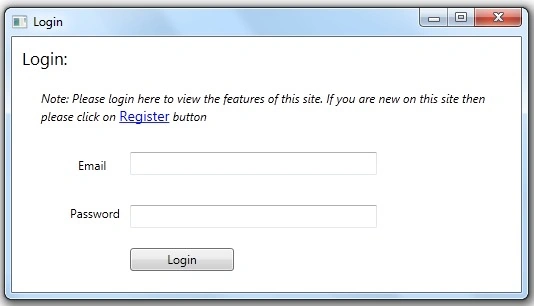
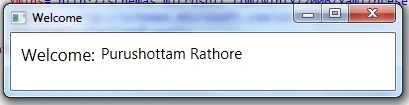
In this article, I am creating a simple application for login and registration using WPF in Visual Studio 2010. In this application, I am creating two window forms one is for Registration and another is for login. First of all user will register after then he/she can login.
Now I am going to discuss in brief about this application.
Step 1. Open Visual Studio 2010 -> File -> New -> Project.
The new project template will display and select WPF Applications as follows.

Figure 1
Step 2. Enter your project name and click on the OK button.
Step 3. You will get the MainWindow.xaml window form, if you want to change then rename it and also change the StartupUri property of the application into App.xaml like as follows.
App. xaml
<Application x:Class="Login_WPF.App"
             xmlns="http://schemas.microsoft.com/winfx/2006/xaml/presentation"
             xmlns:x="http://schemas.microsoft.com/winfx/2006/xaml"
             StartupUri="Registration.xaml">
    <Application.Resources>
    </Application.Resources>
</Application>
Step 4. Now design your Registration page as Figure 2 or copy and page following the inline code.
Registration.xaml
<Window x:Class="Login_WPF.Registration"
        xmlns="http://schemas.microsoft.com/winfx/2006/xaml/presentation"
        xmlns:x="http://schemas.microsoft.com/winfx/2006/xaml"
        Title="Registration" Height="387" Width="528" Background="Black">
    <Grid Height="350" Width="525" Background="Bisque">
        <TextBlock Height="23" HorizontalAlignment="Left" Margin="10,5,0,0"
                   Name="textBlockHeading" Text="Registration:" VerticalAlignment="Top"
                   Width="110" FontSize="17" FontStretch="ExtraCondensed"/>

        <!-- Button as a Link button using style -->
        <Button Margin="451,5,12,288" Content="Login" Cursor="Hand" Click="Login_Click">
            <Button.Template>
                <ControlTemplate TargetType="Button">
                    <TextBlock TextDecorations="Underline">
                        <ContentPresenter/>
                    </TextBlock>
                </ControlTemplate>
            </Button.Template>
            <Button.Style>
                <Style TargetType="Button">
                    <Setter Property="Foreground" Value="Navy"/>
                    <Style.Triggers>
                        <Trigger Property="IsMouseOver" Value="true">
                            <Setter Property="Foreground" Value="Red"/>
                        </Trigger>
                    </Style.Triggers>
                </Style>
            </Button.Style>
        </Button>
        <!-- End Button as a Link button using style -->

        <Grid Margin="31,0,29,23" Background="White" Height="264" VerticalAlignment="Bottom">
            <Grid.RowDefinitions>
                <RowDefinition Height="252*"/>
                <!-- <RowDefinition Height="12*"/> -->
            </Grid.RowDefinitions>
            <TextBlock Height="20" HorizontalAlignment="Left" Margin="67,0,0,0"
                       x:Name="errormessage" VerticalAlignment="Top" Width="247"
                       OpacityMask="Crimson" Foreground="#FFE5572C"/>
            <TextBlock Height="23" HorizontalAlignment="Left" Margin="67,20,0,0"
                       Name="textBlockFirstname" Text="First Name:" VerticalAlignment="Top"
                       Width="110"/>
            <TextBlock Height="23" HorizontalAlignment="Left" Margin="67,50,0,0"
                       Name="textBlockLastName" Text="Last Name:" VerticalAlignment="Top"
                       Width="110"/>
            <TextBlock Height="23" HorizontalAlignment="Left" Margin="67,80,0,0"
                       Name="textBlockEmailId" Text="EmailId" VerticalAlignment="Top"
                       Width="110"/>
            <TextBlock Height="23" HorizontalAlignment="Left" Margin="67,107,0,0"
                       Name="textBlockPassword" Text="Password:" VerticalAlignment="Top"
                       Width="110"/>
            <TextBlock Height="23" HorizontalAlignment="Left" Margin="67,136,0,0"
                       Name="textBlockConfirmPwd" Text="ConfirmPassword:" VerticalAlignment="Top"
                       Width="110" Grid.RowSpan="2"/>
            <TextBlock Height="23" HorizontalAlignment="Left" Margin="67,166,0,0"
                       Name="textBlockAddress" Text="Address" VerticalAlignment="Top"
                       Width="110"/>
            <TextBox Height="23" HorizontalAlignment="Left" Margin="183,20,0,0"
                     Name="textBoxFirstName" VerticalAlignment="Top" Width="222"/>
            <TextBox Height="23" HorizontalAlignment="Left" Margin="183,50,0,0"
                     Name="textBoxLastName" VerticalAlignment="Top" Width="222"/>
            <TextBox Height="23" HorizontalAlignment="Left" Margin="183,80,0,0"
                     Name="textBoxEmail" VerticalAlignment="Top" Width="222"/>
            <PasswordBox Height="23" HorizontalAlignment="Left" Margin="183,107,0,0"
                         Name="passwordBox1" VerticalAlignment="Top" Width="222"/>
            <!-- For password -->
            <PasswordBox Height="23" HorizontalAlignment="Left" Margin="183,136,0,0"
                         Name="passwordBoxConfirm" VerticalAlignment="Top" Width="222"/>
            <TextBox Height="23" HorizontalAlignment="Left" Margin="183,0,0,66"
                     Name="textBoxAddress" VerticalAlignment="Bottom" Width="222"/>
            <Button Content="Submit" Height="23" HorizontalAlignment="Left" Margin="183,204,0,0"
                    Name="Submit" VerticalAlignment="Top" Width="70" Click="Submit_Click"/>
            <Button Content="Reset" Height="23" HorizontalAlignment="Left" Margin="259,204,0,0"
                    Name="button2" VerticalAlignment="Top" Width="70" Click="button2_Click"/>
            <Button Content="Cancel" Height="23" HorizontalAlignment="Right" Margin="0,204,60,0"
                    Name="button3" VerticalAlignment="Top" Width="70" Click="button3_Click"/>
        </Grid>
    </Grid>
</Window>

Join the conversation! Your thoughts help the community grow.