

This article has been
excerpted from book "A Programmer's Guide to ADO.NET in C#".
One more interesting and practical approach to passing an order entry is to pass
it using an XML node. SOAP enables you to pass an XML of data. This way the data
will have more useful node names such as OrderName rather than a constant
representing the order name. You won't have to worry so much about tracking
integer constants. Listing 8-7 shows InsertOrderFormNode method for taking an
XmlNode with your customer order information. You populate the new DataRow by
extracting InnerText from each ChildNode of XmlNode.
Note: You'll need to include the using System.Xml namespace to utilize
XmlNode.
Listing 8-7 web service method populating an order from XML
[WebMethod(Description = " Insert order from
XML")]
public int
InsertOrderFromNode(XmlNode aNode)
{
DataSet1 ds = new DataSet1();
oleDbDataAdapter1.SelectCommand.CommandText =
"Select * From Orders ORDER BY OredrID";
oledbDataAdapter1.Fill(ds, "Orders");
DataRow drLast =
ds.Orders.Rows[ds.Orders.Rows.Count - 1];
int LastOrderID =
Convert.ToInt32(drLast["OrderID"]);
DataSet1.OrdersRow dr = ds.Orders.NewOrdersRow();
dr.OrderID = LastOrderID + 1;
dr.OrderDate = Convert.ToDateTime(aNode["OrderDate"].InnerText);
dr.ShipName = aNode["ShipName"].InnerText;
dr.ShipAddress = aNode["ShipAddress"].InnerText;
dr.ShipCity = aNode["ShipCity"].InnerText;
dr.ShipCountry = aNode["ShipCountry"].InnerText;
dr.ShipPostalCode = aNode["ShipPostalCode"].InnerText;
ds.Orders.AddOrdersRow(dr);
oleDbDataAdapter1.Update(ds, "Orders");
return dr.OrderID;
}
Now you add the InsertOrderFromNode method to your existing Web service and test
the method as you've been doing in the previous two samples.
Then, on the client side, you use the same client as in the previous sample. You
add one more button to the page, so now it looks like figure 8-26.
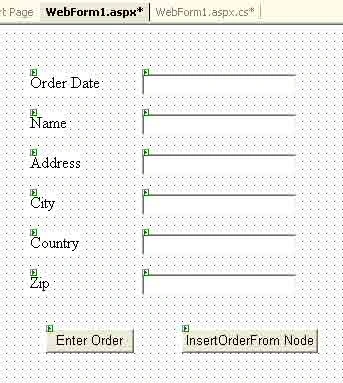
Figure 8-26. Calling the InsertOrderFromNode Web method
This time, instead of passing an array to your Web service, you can simply pass
an XML node with the named nodes of the customer order. You use the XmlDocument
class to create the initial node and then populate it with the LoadXml method.
The node passes to your new web method, which takes an XmlNode instead of a
string array. Listing 8-8 shows how to pass XmlDocument as an input for the
InsertorderFromNode method.
Listing 8-8. Client event handler for executing the Web service
private void
Button2_Click(object sender, System.EventArgs
e)
{
XmlDocument node = new XmlDocument();
node.LoadXml(
"<Order>" +
"<OrderDate>" + TextBox1.Text +
"</OrderDate>" +
"<ShipName >" + TextBox2.Text +
"</ShipName>" +
"<ShipAddress>" + TextBox3.Text +
"</ShipAddress >" +
"<ShipCity>" + TextBox4.Text +
"</ShipCity>" +
"<ShipCountry>" + TextBox5.Text +
"</ShipCountry >" +
"<ShipPostalCode>" +
TextBox6.Text + "</ShipPostalCode>" +
"</Order>");
mcb.Service1 myWebService = new
mcb.Service1();
myWebService.InsertOrderFromNode(node);
}
Note: The Web service automatically strips out the root node <#document>
when it receives the node, so the root element node on the Web service side is
<order>.
Now compile and run application. Insert data to the text boxes and click the
InsertOrderFromNode button. To see if program worked, see the orders table of
the database.
Conclusion
Hope this article would have helped you in understanding passing XML to the Web
Service. See other articles on
the website also for further reference.
 |
This essential guide to Microsoft's ADO.NET overviews C#, then leads you toward deeper understanding of ADO.NET. |
omarPosted Aug 3, 2014, 2:27 AM
its help me a lot, but when the WS response with another XML, how can i decode the information