

This article demonstrates how to use the jQuery dialog feature in ASP.Net.
You can download the jQuery files from here: http://jqueryui.com/
First of all make a new website in ASP.Net and add a new stylesheet and add .js files and put images in the images folder and make a reference to the page.
<title>JQuery Dialog</title>
<link href="css/jquery-ui.css" rel="stylesheet" type="text/css" />
<script src="js/jquery-1.8.3.js" type="text/javascript"></script>
<script src="js/jquery-ui.js" type="text/javascript"></script>
You can find scripts and stylesheets online from here:
<link rel="stylesheet" href="http://code.jquery.com/ui/1.10.0/themes/base/jquery-ui.css" />
<script src="http://code.jquery.com/jquery-1.8.3.js"></script>
<script src="http://code.jquery.com/ui/1.10.0/jquery-ui.js"></script>
This is my login and message div code:
<div id="loginDiv" title="Login Dialog" style="display:none;">
<p>
<asp:Label ID="lblEMail" runat="server" Text="Email: "></asp:Label>
<asp:TextBox ID="txtEmail" runat="server"></asp:TextBox>
</p>
<p>
<asp:Label ID="lblPassword" runat="server" Text="Password: "></asp:Label>
<asp:TextBox ID="txtPassword" runat="server"></asp:TextBox>
</p>
<p>
<asp:Button ID="btnSubmit" runat="server" Text="Submit" />
</p>
</div>
<div id="messageDiv" title="Message Dialog" style="display:none;">Successfully Logged In.
</div>
<a href="#" id="openDialog">Click here to open dialog</a>
Now write button click events:
<script>
$(document).ready(function () {
$("#openDialog").bind('click', function () {
$("#loginDiv").show();
$("#loginDiv").dialog();
});
$("#btnSubmit").bind('click', function () {
$("#loginDiv").hide();
$("#messageDiv").show();
$("#messageDiv").dialog();
});
});
</script>
Now run the application to see the result.
When the link button is clicked this dialog will open: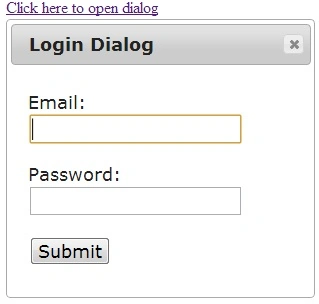
Image 1.
When the submit button is clicked the message dialog will be opened, as in: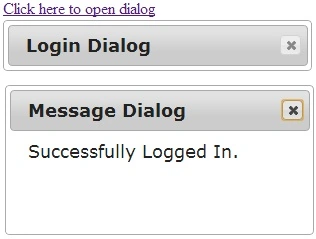
Image 2.
For more information, please download the attached sample application.
Join the conversation! Your thoughts help the community grow.