

This article is a brief introduction to the use of unit testing in MVC 4 using Entity Framework with Repository Pattern.
What is Unit testing: The basic purpose of unit testing is to test the methods of business logic of ASP.NET or MVC projects.
What is Entity Framework
Entity Framework (EF) is an object-relational mapper that enables .NET developers to work with relational data using domain-specific objects. It eliminates the need for most of the data-access code that developers usually need to write. For more see: http://msdn.microsoft.com/en-us/data/ef.aspx
What is Repository Pattern in MVC
The Repository Pattern is useful for decoupling entity operations from presentation, which allows easy mocking and unit testing.
"The Repository will delegate to the appropriate infrastructure services to get the job done. Encapsulating in the mechanisms of storage, retrieval and query is the most basic feature of a Repository implementation" .... "Most common queries should also be hardcoded to the Repositories as methods." For more see: http://webmasterdriver.blogspot.in/2012/05/what-is-repository-pattern-in-aspnet.html
Getting Started
Create a new Project. Open Visual Studio 2012.
Go to "File" => "New" => "Project...".
Select "Web" in installed templates.
Select "ASP.NET MVC 4 Web Application".
Enter the Name and choose the location.
Click "OK".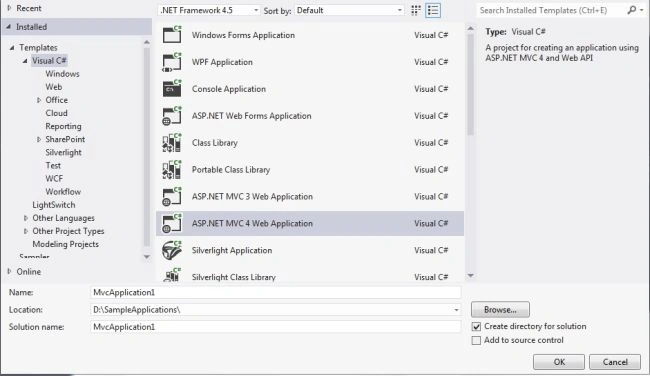
Image 1.
After clicking the OK button in the next wizard there is a check box for creating a unit test project. If you want to create a unit test project then enable that check box, you can add it later or also add a new item feature.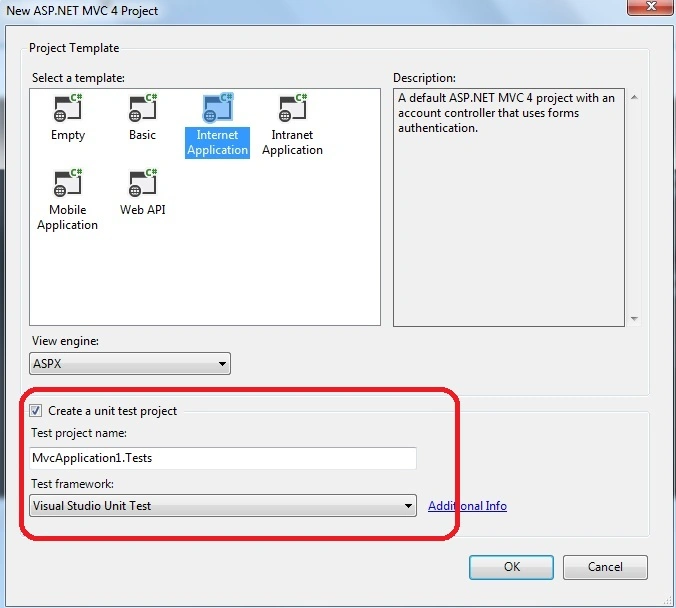
Image 2.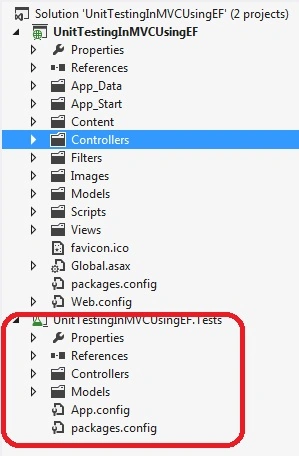
Image 3.
First of all we are going to add a new ADO.NET Entity Data Model and provide it a relevant name.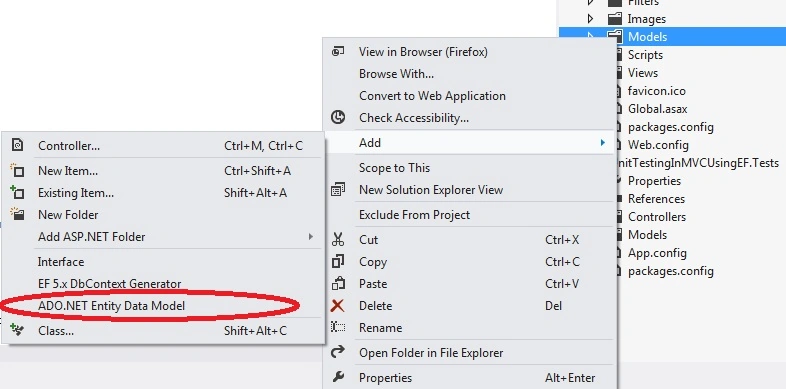
Image 4.
In the next wizard select "Generate from database" and click Next and create a new connection and select a database name. In my sample I am making a sqlexpress connection and my database is located in the App_Data folder. The attached sample has a NORTHWND database.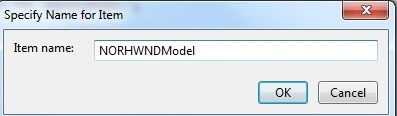
Image 5. 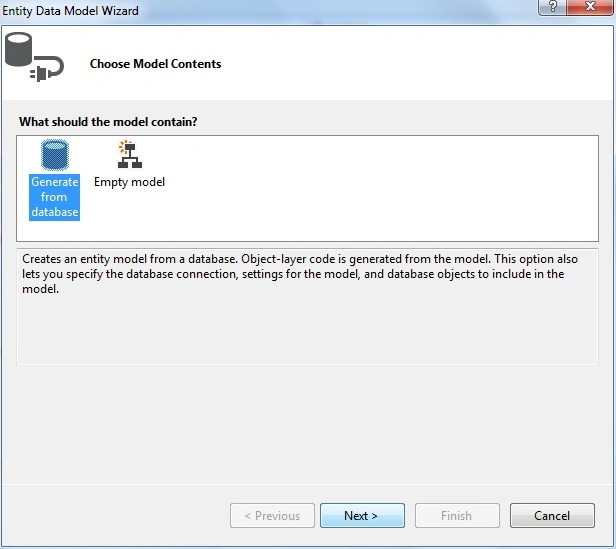
Image 6.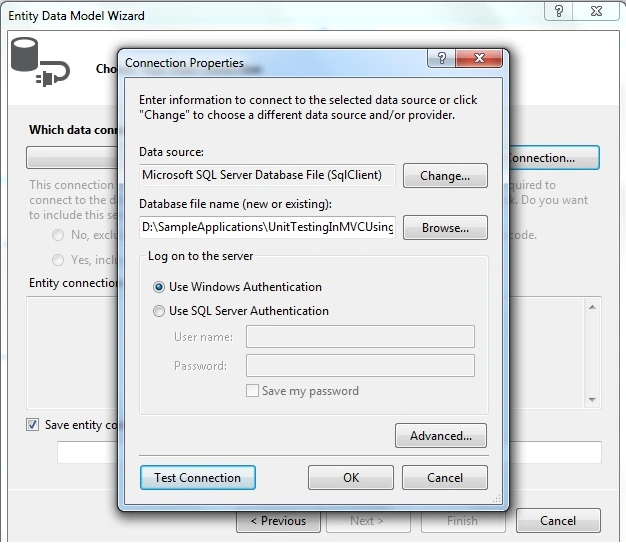
Image 7.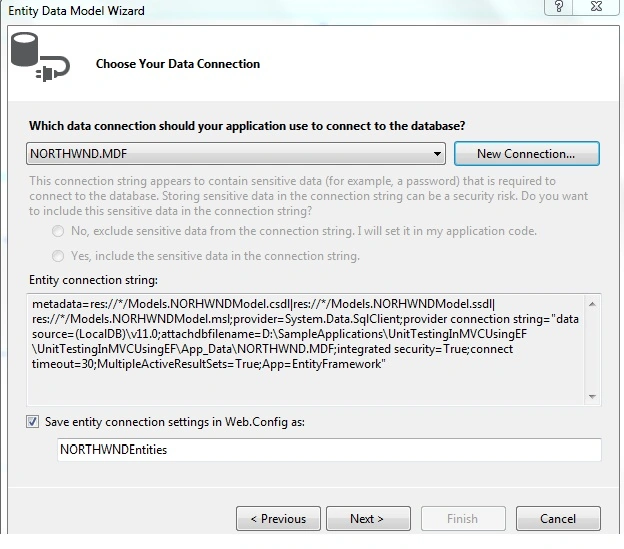
Image 8.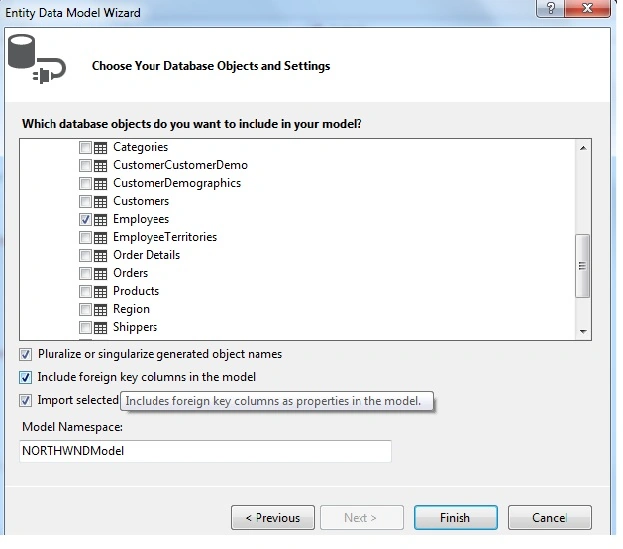
Image 9.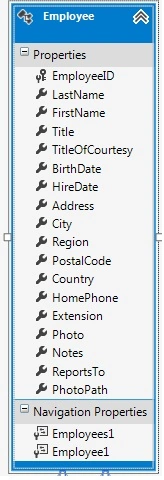
Image 10.
As you can see the connection string has been added to the web.config file:
- <connectionStrings>
- <add name="NORTHWNDEntities" connectionString="metadata=res://*/Models.NORHWNDModel.csdl|res://*/Models.NORHWNDModel.ssdl|res://*/Models.NORHWNDModel.msl;provider=System.Data.SqlClient;provider connection string="data source=(LocalDB)\v11.0;attachdbfilename=|DataDirectory|\NORTHWND.MDF;integrated security=True;connect timeout=30;MultipleActiveResultSets=True;App=EntityFramework"" providerName="System.Data.EntityClient" /> </connectionStrings>
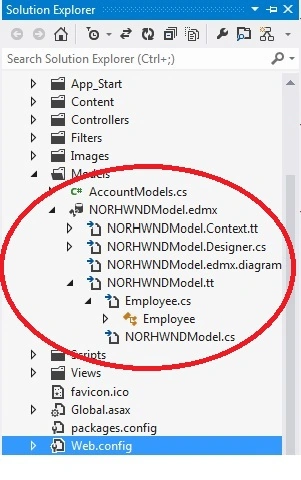
Image 11.
Now add a new class in models "EmployeeRepository" and start working on it. The following is my code:
- public class EmployeeRepository : IEmployeeRepository
- {
- /// <summary>
- /// Northwnd entity object
- /// </summary>
- private NORTHWNDEntities _db = new NORTHWNDEntities();
- /// <summary>
- /// This method used to get all employee listing
- /// </summary>
- /// <returns></returns>
- public IEnumerable<Employee> GetAllEmployee()
- {
- return _db.Employees.ToList();
- }
- /// <summary>
- /// This method used to filter employee by id
- /// </summary>
- /// <param name="id"></param>
- /// <returns></returns>
- public Employee GetEmployeeByID(int id)
- {
- return _db.Employees.FirstOrDefault(d => d.EmployeeID == id);
- }
- /// <summary>
- /// This method is used to create new employee
- /// </summary>
- /// <param name="contactToCreate"></param>
- public void CreateNewEmployee(Employee employeeToCreate)
- {
- _db.Employees.Add(employeeToCreate);
- _db.SaveChanges();
- // return contactToCreate;
- }
- /// <summary>
- /// Save chages functions
- /// </summary>
- /// <returns></returns>
- public int SaveChanges()
- {
- return _db.SaveChanges();
- }
- /// <summary>
- /// This method used to delete employee
- /// </summary>
- /// <param name="id"></param>
- public void DeleteEmployee(int id)
- {
- var conToDel = GetEmployeeByID(id);
- _db.Employees.Remove(conToDel);
- _db.SaveChanges();
- }
- }
As you can see, this class is inheriting an IEmployeeRepository interface. Now add a new interface.
- public interface IEmployeeRepository
- {
- IEnumerable<Employee> GetAllEmployee();
- void CreateNewEmployee(Employee employeeToCreate);
- void DeleteEmployee(int id);
- Employee GetEmployeeByID(int id);
- int SaveChanges();
- }
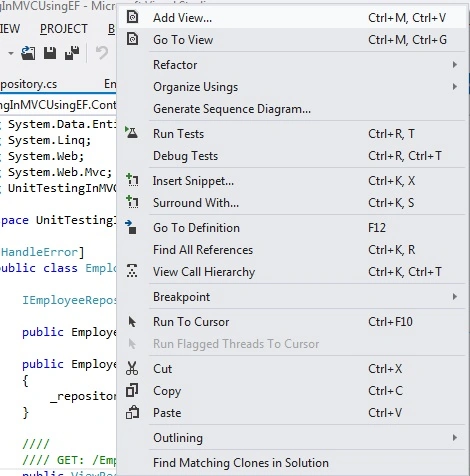
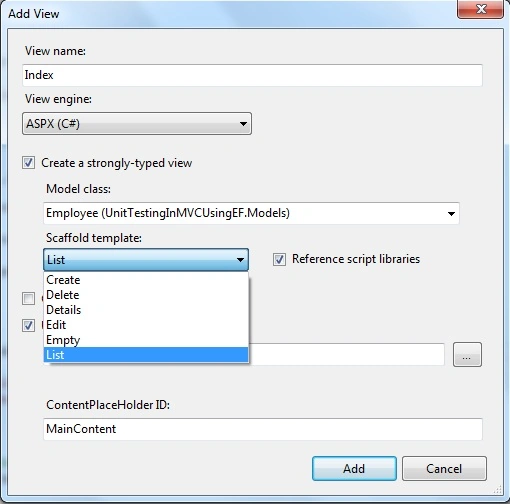
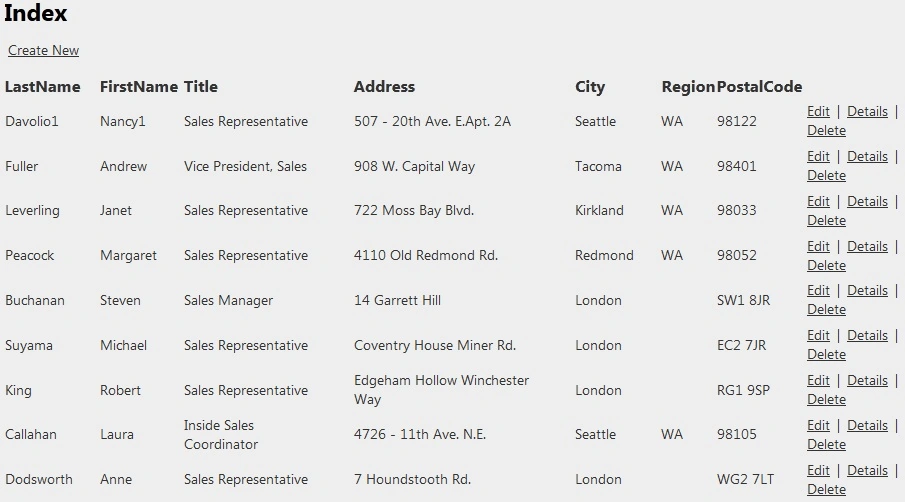
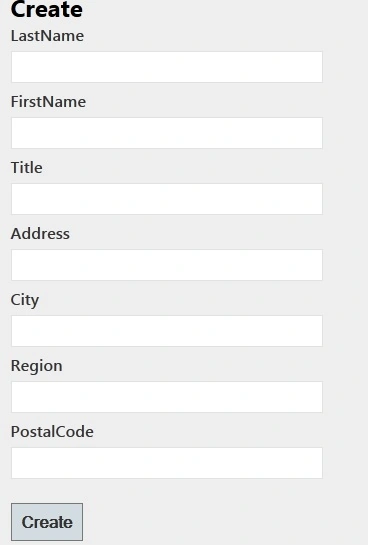
We are good so far. It is now time to add a new controller in the Controllers directory.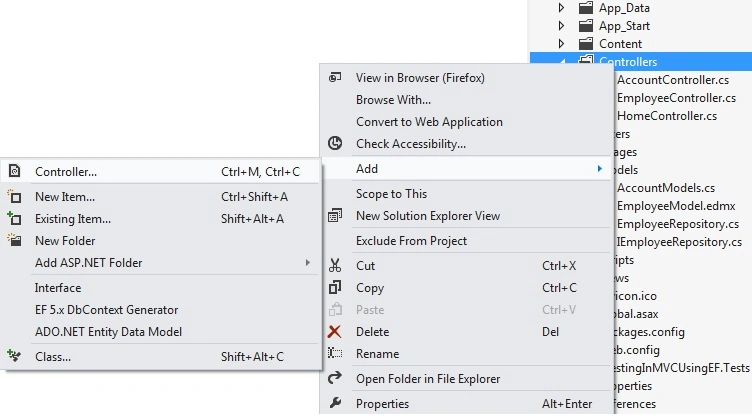
Image 12.
My controller name is EmployeeController; see:
- public class EmployeeController : Controller
- {
- IEmployeeRepository _repository;
- public EmployeeController() : this(new EmployeeRepository()) { }
- public EmployeeController(IEmployeeRepository repository)
- {
- _repository = repository;
- }
- ////
- //// GET: /Employee/
- public ViewResult Index()
- {
- ViewData["ControllerName"] = this.ToString();
- return View("Index", _repository.GetAllEmployee());
- }
- ////
- //// GET: /Employee/Details/5
- public ActionResult Details(int id = 0)
- {
- //int idx = id.HasValue ? (int)id : 0;
- Employee cnt = _repository.GetEmployeeByID(id);
- return View("Details", cnt);
- }
- //
- // GET: /Employee/Create
- public ActionResult Create()
- {
- return View("Create");
- }
- //
- // POST: /Employee/Create
- [HttpPost]
- public ActionResult Create([Bind(Exclude = "Id")] Employee employeeToCreate)
- {
- try
- {
- if (ModelState.IsValid)
- {
- _repository.CreateNewEmployee(employeeToCreate);
- return RedirectToAction("Index");
- }
- }
- catch (Exception ex)
- {
- ModelState.AddModelError("", ex);
- ViewData["CreateError"] = "Unable to create; view innerexception";
- }
- return View("Create");
- }
- //
- // GET: /Employee/Edit/5
- public ActionResult Edit(int id = 0)
- {
- var employeeToEdit = _repository.GetEmployeeByID(id);
- return View(employeeToEdit);
- }
- //
- // GET: /Employee/Edit/5
- [HttpPost]
- public ActionResult Edit(int id, FormCollection collection)
- {
- Employee cnt = _repository.GetEmployeeByID(id);
- try
- {
- if (TryUpdateModel(cnt))
- {
- _repository.SaveChanges();
- return RedirectToAction("Index");
- }
- }
- catch (Exception ex)
- {
- if (ex.InnerException != null)
- ViewData["EditError"] = ex.InnerException.ToString();
- else
- ViewData["EditError"] = ex.ToString();
- }
- #if DEBUG
- foreach (var modelState in ModelState.Values)
- {
- foreach (var error in modelState.Errors)
- {
- if (error.Exception != null)
- {
- throw modelState.Errors[0].Exception;
- }
- }
- }
- #endif
- return View(cnt);
- }
- //
- // GET: /Employee/Delete/5
- public ActionResult Delete(int id)
- {
- var conToDel = _repository.GetEmployeeByID(id);
- return View(conToDel);
- }
- //
- // POST: /Employee/Delete/5
- [HttpPost]
- public ActionResult Delete(int id, FormCollection collection)
- {
- try
- {
- _repository.DeleteEmployee(id);
- return RedirectToAction("Index");
- }
- catch
- {
- return View();
- }
- }
- }
Barath Kumar MPosted Feb 4, 2021, 11:36 AM
Please give me the same example, without ADO.NET Entity Data Model
Hamid KhanPosted Sep 12, 2017, 11:57 AM
Hope for next article, Crud operation with model pop up and bind data in angular UI Grid........
Hamid KhanPosted Sep 12, 2017, 11:55 AM
Very nice..................................
Karunakar BhogyariPosted Apr 22, 2016, 1:41 AM
nice article....well elaborated...
Khan EngineerPosted Feb 5, 2015, 2:58 AM
Not Related and not clear
anil babuPosted Jul 9, 2013, 2:55 AM
Thank you so much,Can you give me the same example include Insert images also Including All curd operations,plz help us