
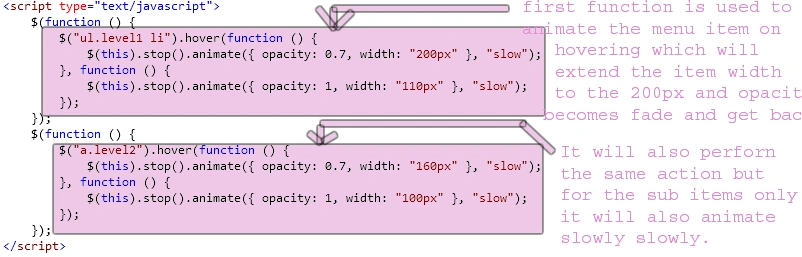
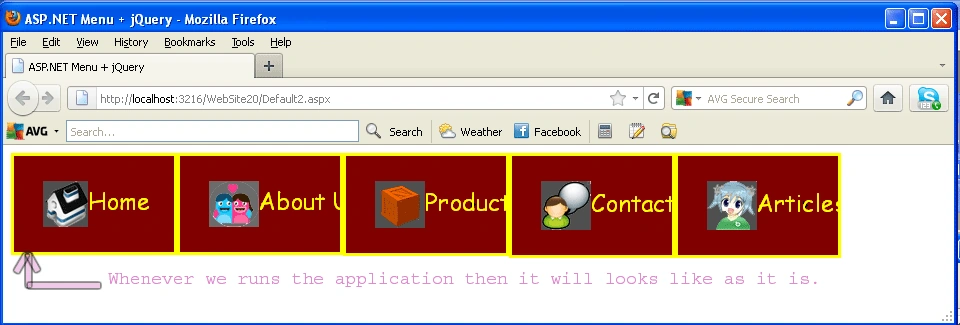
Introduction: In this article we are going to explore how we use jQuery in an ASP.NET menu control. Further in this article we will see that how it is possible to create a flexible menu in ASP.NET menu control by using jQuery in which we are taking some menu items and also we will add their children items in the menu control. Both the parent item and the children items will animate whenever we plac the mouse over an item. Here in this article we are going to implement the animate as well as hover attributes to build to get such type of effects using jQuery. The functionality of that attributes is whenever we hover on the item of the menu control it will animate or extend their size at the given width and will get back to their position, and their sub items as well. Let's see how we will produce such type of effects inside the ASP.NET control.
Step 1: Firstly we have to create a Web Application
- Go to Visual Studio 2010
- Create the web Application
- Click OK

Step 2: Secondly you have to add a new page to the website
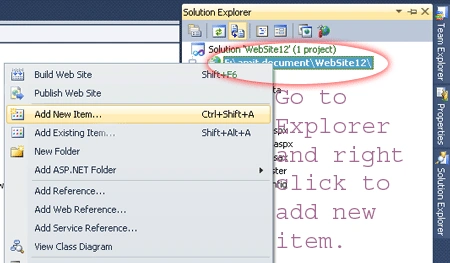
- Go to the Solution Explorer
- Right Click on Project name
- Select add new item
- Add new web page and give it a name
- Click OK

Step 3: In this step we have to placed a menu item to the page with adding some items and with their sub items let see the code given below:
Code:
<asp:Menu
ID="m1"
runat="server"
Orientation="Horizontal"
RenderingMode="List">
<Items>
<asp:MenuItem
NavigateUrl="~/Default2.aspx"
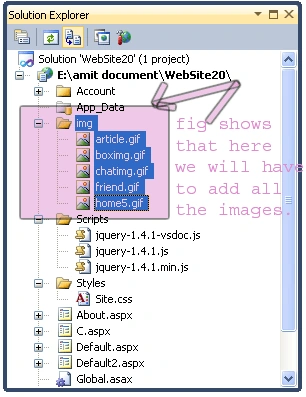
ImageUrl="~/img/home5.gif"
Text="Home"
Value="Home"
/>
<asp:MenuItem
NavigateUrl="~/About.aspx"
ImageUrl="~/img/friend.gif"
Text="About Us"
Value="AboutUs"
/>
<asp:MenuItem
NavigateUrl="~/P.aspx"
ImageUrl="~/img/boximg.gif"
Text="Products"
Value="Products"
>
<asp:MenuItem
Text="iPhone"
Value="iPhone"></asp:MenuItem>
<asp:MenuItem
Text="Smartphones"
Value="Smartphones"></asp:MenuItem>
<asp:MenuItem
Text="iPod"
Value="iPod"></asp:MenuItem>
</asp:MenuItem>
<asp:MenuItem
NavigateUrl="~/C.aspx"
ImageUrl="~/img/chatimg.gif"
Text="Contact Us"
Value="ContactUs"
/>
<asp:MenuItem
Text="Articles"
Value="Articles"
ImageUrl="~/img/article.gif">
<asp:MenuItem
Text="ASP.NET"
Value="ASP.NET"></asp:MenuItem>
<asp:MenuItem
Text="JAVA"
Value="JAVA"></asp:MenuItem>
<asp:MenuItem
Text="PHP"
Value="PHP"></asp:MenuItem>
</asp:MenuItem>
</Items>
</asp:Menu>
Step 4: Further the above code which is
the code for the ASP.NET menu control having items and sub items also have the
navigate url and the imageurl.
Let see what will the HTML code generated by the
browser for the this ASP.NET menu control which is given below:
Browser Code:
<ul
class="level1">
<li><a
class="level1"
href="Default2.aspx"><img
src="img/home5.gif"
alt=""
title=""
class="icon"
/>Home</a></li>
<li><a
class="level1"
href="About.aspx"><img
src="img/friend.gif"
alt=""
title=""
class="icon"
/>About Us</a></li>
<li><a
class="popout level1"
href="P.aspx"><img
src="img/boximg.gif"
alt=""
title=""
class="icon"
/>Products</a>
<ul
class="level2">
<li><a
class="level2"
href="#"
onclick="__doPostBack('Menu1','Products\\iPhone')">iPhone</a></li>
<li><a
class="level2"
href="#"
onclick="__doPostBack('Menu1','Products\\Smartphones')">Smartphones</a></li>
<li><a
class="level2"
href="#"
onclick="__doPostBack('Menu1','Products\\iPod')">iPod</a></li>
</ul>
</li>
<li><a
class="level1"
href="C.aspx"><img
src="img/chatimg.gif"
alt=""
title=""
class="icon"
/>Contact Us</a></li>
<li><a
class="popout level1"
href="#"
onclick="__doPostBack('Menu1','Articles')"><img
src="img/article.gif"
alt=""
title=""
class="icon"
/>Articles</a>
<ul
class="level2">
<li><a
class="level2"
href="#"
onclick="__doPostBack('Menu1','Articles\\ASP.NET')">ASP.NET</a></li>
<li><a
class="level2"
href="#"
onclick="__doPostBack('Menu1','Articles\\JAVA')">JAVA</a></li>
<li><a
class="level2"
href="#"
onclick="__doPostBack('Menu1','Articles\\PHP')">PHP</a></li>
</ul>
</li>
</ul>
Step 5: In this step we are
going to see that see from where the js reference will be added to the source
page of the default2.aspx page.






Ram SharmaPosted Jan 7, 2012, 12:36 AM
R/Sapna Madam, thanks a lot plez sent sqldatasouce and gridview functionality something special amar sharma 9873324791