

Introduction
This
article describes a quick and simple approach to programmatically completing a
PDF document through the use of the iTextSharp DLL. The article also discusses
how one might go about using the iTextSharp DLL to discover and map the fields
available within an existing PDF if the programmer has only the PDF but does not
have Adobe Designer or even a list of the names of the fields present in the
PDF.
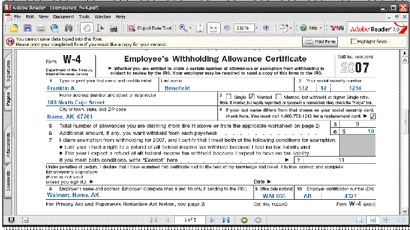
Figure 1:Resulting PDF after Filling in Fields Programmatically.
iTextSharp is a C# port of a Java library written to support the creation and
manipulation of PDF document; the project is available for download through
SourceForge.net here:
http://sourceforge.net/projects/itextsharp/
With the
iTextSharp DLL, it is possible to not only populate fields in an existing PDF
document but also to dynamically create PDFs. The examples here are limited to a
description of the procedures associated with completion of a PDF; the download
will contain examples of PDF creation in both Visual Basic and C#.
The
examples contained herein are dependent upon the availability of the iTextSharp
DLL; use the link provided previously in order to download the DLL locally to
your development machine.
In order
to demonstrate filling out a PDF using the iTextSharp DLL, I downloaded a copy
of the W-4 PDF form from the IRS website. The form contains controls and may be
filled out programmatically so it serves as a good example.
PDF
documents that do not contain controls; those meant to be printed and filled in
with a pencil, cannot be completed using this approach. Of course if you have
access to the Adobe tools (Adobe Professional, Adobe Designer), you can always
create your own PDFs with controls, or can add controls to existing PDFs.
Further, though not demonstrated here, one can also use iTextSharp to create a
PDF document with embedded controls.
Getting Started
In order
to get started, fire up the Visual Studio 2005 IDE and open the attached
solution. The solution consists of a single Win Forms project with a single
form.
I have
also included a PDF that will be used for demonstration purposes; this form is
the IRS W-4 form completed by US taxpayers; however, any PDF with embedded
controls (text boxes, check boxes, etc.) is fair game for this approach. Note
that a reference to the iTextSharp DLL has been included in the project.
All of
the project code is contained with the single Windows form. The form itself
contains only a docked textbox used to display all of the field names from an
existing PDF document. The completed PDF is generated and stored in the local
file system; the PDF is not opened for display by the application.
The
application uses the existing PDF as a template and from that template; it
creates and populates the new PDF. The template PDF itself is never populated
and it is used only to define the format and contents of the completed PDF.
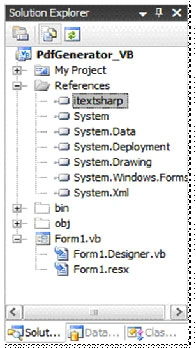
Figure 2:Solution Explorer.
The
Code: Main Form
As was
previously mentioned, all of the code used in the demonstration application is
contained entirely in the project's single Windows form. The following section
will describe the contents of the code file.
The file
begins with the appropriate library imports needed to support the code. Note
that the iTextSharp libraries have been included into the project. The class
declaration is in the default configuration.
- Imports System
- Imports System.Collections
- Imports System.ComponentModel
- Imports System.Data
- Imports System.Drawing
- Imports System.Text
- Imports System.Windows.Forms
- Imports iTextSharp
- Imports iTextSharp.text
- Imports iTextSharp.text.pdf
- Imports iTextSharp.text.xml
- Imports System.IO
- Public Class Form1
- ''' <summary>
- ''' Application main form Load event handler
- ''' </summary>
- ''' <param name="sender"></param>
- ''' <param name="e"></param>
- ''' <remarks></remarks>
- Private Sub Form1_Load(ByVal sender As Object, ByVal e As System.EventArgs) Handles Me.Load
- ' Load all field names from template PDF
- ListFieldNames()
- ' Fill the target PDF form with canned values
- FillForm()
- End Sub
The next section of code
contained in the demo application defines a function used to collect the names
of all of the fields from the target PDF. The field names are displayed in a
text box contained in the application's form.
- ''' <summary>
- ''' List all of the form fields into a textbox. The
- ''' form fields identified can be used to map each of the
- ''' fields in a PDF.
- ''' </summary>
- Private Sub ListFieldNames()
- Dim pdfTemplate As String = "c:\Temp\PDF\fw4.pdf"
- ' title the form
- Me.Text += " - " + PdfTemplate
- ' create a new PDF reader based on the PDF template document
- Dim pdfReader As PdfReader = New PdfReader(pdfTemplate)
- ' create and populate a string builder with each of the
- ' field names available in the subject PDF
- Dim sb As New StringBuilder()
- Dim de As New DictionaryEntry
- For Each de In pdfReader.AcroFields.Fields
- sb.Append(de.Key.ToString() + Environment.NewLine)
- Next
- ' Write the string builder's content to the form's textbox
- textBox1.Text = sb.ToString()
- textBox1.SelectionStart = 0
- End Sub
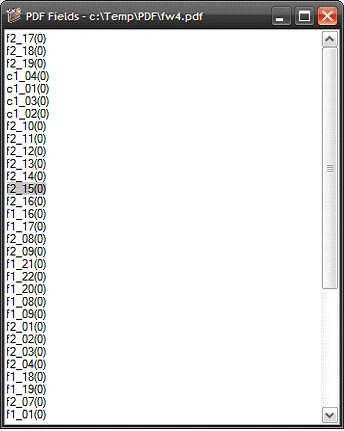
Figure 3 shows the field
names collected from the target PDF using the ListFieldNames function
call. In order to map these fields to specific fields in the PDF, one need only
copy this list and pass values to each of the fields to identify them. For
example, if the form contains ten fields, setting the value (shown next) to a
sequential number will result in the display of the numbers 1 to 10 in each of
the fields. One can then track that field value back to the field name using
this list as the basis for the map. Once the fields have been identified, the
application can be written to pass the correct values to the related field.
Rohan WPosted Feb 7, 2013, 12:58 PM
Hi Scott, thanks for the lovely article. It really helped me get started with iTextSharp. I was able to add text to the textfields on my PDF and am anle to view the text when the PDF is not flattened. But when I flatten the same all the dynamic data disappear and only a blank PDF is displayed. Is there any other steps I can try to get it working?