

Introduction and Goal
Can you explain the concept of trace listener?
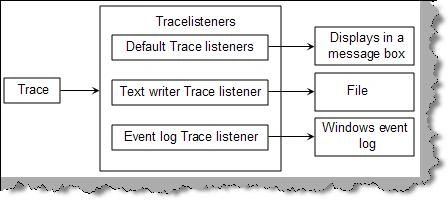

What are the readymade trace events and they are available for which WCF objects?
|
Assembly Name |
Description |
|
System.ServiceModel |
Logs the following:
|
|
System.ServiceModel.MessageLogging |
Generates tracing information for every message that flows through the system. |
|
System.ServiceModel.IdentityModel |
Generate trace data for authentication and authorization. |
|
System.ServiceModel.Activation |
Emits information regarding activation of the service. |
|
System.Runtime.Serialization |
Emits information when objects are serialized or deserialized. WCF always serializes and de-serializes information during request so it's a good event to see the content of the request. |
|
System.IO.Log |
Emits messages with respect to Common Log File System (CLFS). |
|
CardSpace |
Emits trace messages related to any CardSpace identity processing that occurs within WCF context. |
How can we enable tracing on the readymade tracing WCF objects?
How can we enable tracing on the readymade tracing WCF objects?
- <system.diagnostics>
- <sources>
- <source name="System.ServiceModel"
- switchValue="Information, ActivityTracing">
- <listeners>
- <add name="log"
- type="System.Diagnostics.XmlWriterTraceListener"
- initializeData="c:\Traces.svclog" />
- </listeners>
- </source>
- </sources>
- </system.diagnostics>
- <E2ETraceEvent xmlns="http://schemas.microsoft.com/2004/06/E2ETraceEvent">
- <System xmlns="http://schemas.microsoft.com/2004/06/windows/eventlog/system">
- <EventID>0</EventID>
- <Type>3</Type>
- <SubType Name="Transfer">0</SubType>
- <Level>255</Level>
- <TimeCreated SystemTime="2009-04-30T03:21:09.5625000Z" />
- <Source Name="System.ServiceModel" />
- <Correlation ActivityID="{00000000-0000-0000-0000-000000000000}" RelatedActivityID="{d11829b7-d2db-46d5-a4ac-49a37a56376e}"
- />
- <Execution ProcessName="WebDev.WebServer" ProcessID="2660" ThreadID="8" />
- <Channel/>
- <Computer>COMPAQ-JZP37MD0</Computer>
- </System>
- <ApplicationData></ApplicationData>
- </E2ETraceEvent>
What is the concept of tracelevel in trace listeners?
| Trace Level | Description |
| Off | Ignore all trace messages |
| Critical | Log unexpected processing events or unhandled exceptions have occurred. The application will terminate immediately or shortly. |
| Error | An unexpected processing event or exception has occurred. The application is still capable of continuing its processing. |
| Warning | Indicates there is a possible problem but the application will continue running. |
| Information | Application is running smoothly only that informative message is recorded. In this case messages are just milestones. |
| Verbose | Very similar to information but provides more details as compared. |
| ActivityTracing | In this case messages are related to communication between components and the activities. |
| All | In this case all messages are captured. |
Trace level value is specified in 'source' tag in switch vale. For instance the below 'web.config' snippet indicates the trace type as 'Information'.
- <system.diagnostics>
- <sources>
- <source name="System.ServiceModel"
- switchValue="Information, ActivityTracing">
- ............
- ............
- ............
- ............
What is a service level message and transport level message?
- <system.serviceModel>
- <diagnostics>
- <messageLogging
- logEntireMessage="true"
- logMalformedMessages="false"
- logMessagesAtServiceLevel="false"
- logMessagesAtTransportLevel="true"
- maxMessagesToLog="3000"
- maxSizeOfMessageToLog="10000"/>
- </diagnostics>
- </system.serviceModel>
| Attribute | Description |
| logEntireMessage | Should the entire message be logged on only the header. |
| logMalformedMessages | Should malformed messages be logged. |
| logMessagesAtServiceLevel | Should service-level messages be logged. |
| logMessagesAtTransportLevel | Should transport level messages be logged. |
| maxMessageToLog | Number indicating how many messages should be logged. |
| maxSizeOfMessageToLog | The default value is 256Kb. Max size of the message log. |
Vithal WadjePosted Sep 24, 2014, 11:07 AM
super keep it up
Justin HallsPosted Jun 30, 2010, 5:44 AM
Hi thats really useful as i need to log my errors from a Silverlight Application which uses WCF to retrieve (processed) data from a databse on the server. I handle all the exceptions so that the program can continue but I would like to know that they have happened. I have added the <system.diagnostics> section from your example to my web.config in the <configuration> section - however I do not get a log file produced. Do I need to create the file explicitly first? or am I missing something? Also is it possible to identify the folder containing the html/aspx page used for the Silverlight app as I am not sure that the server host will appreciate having files written to the root of C: thanks Justin
Mumtaz SuraniPosted Sep 18, 2009, 2:48 AM
hi, Iam exploring wcf.I have created a chat application using wcf in c#.net.It works properly but i want to add a feature where private chat between 2 clients must be allowed.When i send message all clients can view it.but what if i want to give a direct message to a particular client.Iam using netpeertcp. According to the concept i think, i will have to create a new chat mesh between 2 clients required to pass message.I need to use pnrp tp resolve the addresses of clients so that i can identify the peer to chat with. But i really dont knw how can i achieve this through code.iam new to wcf but know the concept as i went through number of msdn articles.how should i start the code?where should i write it?i just want a start n support so i can explore it further. I really would be pleased n thankful if someone would help me in any way they can.waiting for reply THANKS. Mumtaz
Ranjan bhuyaneditedPosted May 20, 2009, 10:06 AMEdited May 20, 2009, 10:07 AM
Really it will be helpful for interview.It is a nice article.Thanks a lot Ranjan Bhuyan