Introduction
In this article, we will see how to Export an ASP.Net 2.0 GridView to Excel.
The focus of the article is the Export to Excel functionality - the Gridview and it's data binding are only for demonstrating the Export functionality.
The code fragments for the Export to Excel functionality below are not linked to the backend structure and can be re-used across projects for the common functionality provided.
Step 1: Setup your web page with the Gridview
In this article, we will assume you are starting with a web page which holds a GridView named GridView1. The GridView in our demo code is bound to a table named "ContactPhone" in a SQL Express database. The following code which exports the databound GridView to Excel is not dependent on the specific databindings and can be used without changes for your scenario.
ContactPhone Table Structure:
| Column Name |
Type |
| ContactID |
Int (Identity) |
| FName |
Varchar(50) |
| LName |
Varchar(50) |
| ContactPhone |
Varchar(20) |
Step: The Actual Export
The code to do the Excel Export is very straightforward. You can also export to different application type by changing the content-disposition and ContentType.
string attachment = "attachment; filename=Contacts.xls";
Response.ClearContent();
Response.AddHeader("content-disposition", attachment);
Response.ContentType = "application/ms-excel";
StringWriter sw = new StringWriter();
HtmlTextWriter htw = new HtmlTextWriter(sw);
GridView1.RenderControl(htw);
Response.Write(sw.ToString());
Response.End();
If you run the code as above, it will result in an HttpException as follows:
Control 'GridView1' of type 'GridView' must be placed inside a form tag with runat=server."
To avoid this error, add the following code:
public override void VerifyRenderingInServerForm(Control control)
{
}
Step: Convert the contents
If the GridView contains any controls, such as Checkboxes, Dropdownlists, we need to replace the contents with their relevant values. The following recursive function uses Reflection to determine the type of control. The control is deleted in preparation for the Excel export and the relevant value of the control is added.
private void PrepareGridViewForExport(Control gv)
{
    LinkButton lb = new LinkButton();
    Literal l = new Literal();
    string name = String.Empty;
    for (int i = 0; i < gv.Controls.Count; i++)
    {
        if (gv.Controls[i].GetType() == typeof(LinkButton))
        {
            l.Text = (gv.Controls[i] as LinkButton).Text;
            gv.Controls.Remove(gv.Controls[i]);
            gv.Controls.AddAt(i, l);
        }
        else if (gv.Controls[i].GetType() == typeof(DropDownList))
        {
            l.Text = (gv.Controls[i] as DropDownList).SelectedItem.Text;
            gv.Controls.Remove(gv.Controls[i]);
            gv.Controls.AddAt(i, l);
        }
        else if (gv.Controls[i].GetType() == typeof(CheckBox))
        {
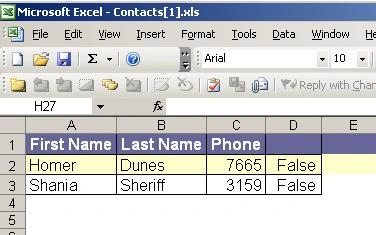
            l.Text = (gv.Controls[i] as CheckBox).Checked? "True" : "False";
            gv.Controls.Remove(gv.Controls[i]);
            gv.Controls.AddAt(i, l);
        }
        if (gv.Controls[i].HasControls())
        {
            PrepareGridViewForExport(gv.Controls[i]);
        }
}
Code Listing
Image: Page Design
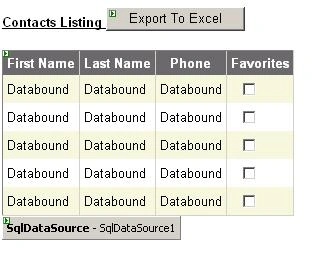
Image : Sample in action
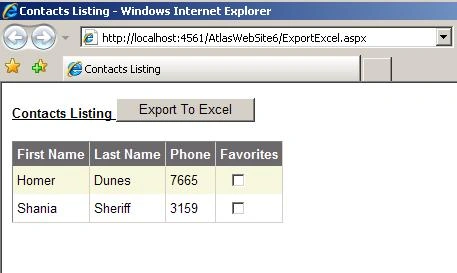
Image: Export to Excel button is clicked
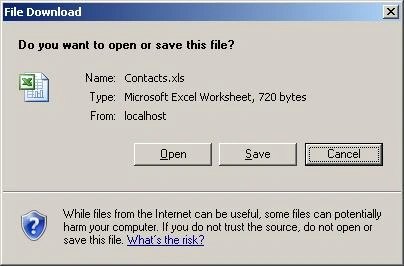
Image: GridView contents exported to Excel
ExcelExport.aspx
<%@ Page Language="C#" AutoEventWireup="true" CodeFile="ExportExcel.aspx.cs" Inherits="DeleteConfirm" %>
<!DOCTYPE html PUBLIC "-//W3C//DTD XHTML 1.0 Transitional//EN" "http://www.w3.org/TR/xhtml1/DTD/xhtml1-transitional.dtd">
<html xmlns="http://www.w3.org/1999/xhtml" >
<head runat="server">
<title>Contacts Listing</title>
</head>
<body>
<form id="form1" runat="server">
<div>
<strong><span style="font-size: small; font-family: Arial; text-decoration: underline">
Contacts Listing
    <asp:Button ID="Button1" runat="server" OnClick="Button1_Click" Text="Export To Excel" /></span></strong><br />
<br />
<asp:GridView ID="GridView1" runat="server" AutoGenerateColumns="False" DataKeyNames="ContactID"
DataSourceID="SqlDataSource1" EmptyDataText="There are no data records to display." style="font-size: small; font-family: Arial" BackColor="White" BorderColor="#DEDFDE" BorderStyle="None" BorderWidth="1px" CellPadding="4" ForeColor="Black" GridLines="Vertical">
<Columns>
<asp:BoundField DataField="ContactID" HeaderText="ContactID" ReadOnly="True" SortExpression="ContactID" Visible="False" />
<asp:BoundField DataField="FName" HeaderText="First Name" SortExpression="FName" />
<asp:BoundField DataField="LName" HeaderText="Last Name" SortExpression="LName" />
<asp:BoundField DataField="ContactPhone" HeaderText="Phone" SortExpression="ContactPhone" />
<asp:TemplateField HeaderText="Favorites">
<ItemTemplate>

    <asp:CheckBox ID="CheckBox1" runat="server" />
</ItemTemplate></asp:TemplateField>
</Columns>
<FooterStyle BackColor="#CCCC99" />
<RowStyle BackColor="#F7F7DE" />
<SelectedRowStyle BackColor="#CE5D5A" Font-Bold="True" ForeColor="White" />
<PagerStyle BackColor="#F7F7DE" ForeColor="Black" HorizontalAlign="Right" />
<HeaderStyle BackColor="#6B696B" Font-Bold="True" ForeColor="White" />
<AlternatingRowStyle BackColor="White" />
</asp:GridView>
<asp:SqlDataSource ID="SqlDataSource1" runat="server" ConnectionString="<%$ ConnectionStrings:ContactsConnectionString1 %>"
DeleteCommand="DELETE FROM [ContactPhone] WHERE [ContactID] = @ContactID" InsertCommand="INSERT INTO [ContactPhone] ([FName], [LName], [ContactPhone]) VALUES (@FName, @LName, @ContactPhone)"
ProviderName="<%$ ConnectionStrings:ContactsConnectionString1.ProviderName %>"
SelectCommand="SELECT [ContactID], [FName], [LName], [ContactPhone] FROM [ContactPhone]"
UpdateCommand="UPDATE [ContactPhone] SET [FName] = @FName, [LName] = @LName, [ContactPhone] = @ContactPhone WHERE [ContactID] = @ContactID">
<InsertParameters>
<asp:Parameter Name="FName" Type="String" />
<asp:Parameter Name="LName" Type="String" />
<asp:Parameter Name="ContactPhone" Type="String" />
</InsertParameters>
<UpdateParameters>
<asp:Parameter Name="FName" Type="String" />
<asp:Parameter Name="LName" Type="String" />
<asp:Parameter Name="ContactPhone" Type="String" />
<asp:Parameter Name="ContactID" Type="Int32" />
</UpdateParameters>
<DeleteParameters>
<asp:Parameter Name="ContactID" Type="Int32" />
</DeleteParameters>
</asp:SqlDataSource>

<br />
</div>
</form>
</body>
</html>
ExcelExport.aspx.cs
using System;
using System.Data;
using System.Configuration;
using System.Collections;
using System.Web;
using System.Web.Security;
using System.Web.UI;
using System.Web.UI.WebControls;
using System.Web.UI.WebControls.WebParts;
using System.Web.UI.HtmlControls;
using System.Text;
using System.IO;
public partial class DeleteConfirm : System.Web.UI.Page
{
    protected void Page_Load(object sender, EventArgs e)
    {
    }
    protected void Button1_Click(object sender, EventArgs e)
    {
        //Export the GridView to Excel
        PrepareGridViewForExport(GridView1);
        ExportGridView();
    }
    private void ExportGridView()
    {
        string attachment = "attachment; filename=Contacts.xls";
        Response.ClearContent();
        Response.AddHeader("content-disposition", attachment);
        Response.ContentType = "application/ms-excel";
        StringWriter sw = new StringWriter();
        HtmlTextWriter htw = new HtmlTextWriter(sw);
        GridView1.RenderControl(htw);
        Response.Write(sw.ToString());
        Response.End();
    }
    public override void VerifyRenderingInServerForm(Control control)
    {
    }
    private void PrepareGridViewForExport(Control gv)
    {
        LinkButton lb = new LinkButton();
        Literal l = new Literal();
        string name = String.Empty;
        for (int i = 0; i < gv.Controls.Count; i++)
        {
            if (gv.Controls[i].GetType() == typeof(LinkButton))
            {
                l.Text = (gv.Controls[i] as LinkButton).Text;
                gv.Controls.Remove(gv.Controls[i]);
                gv.Controls.AddAt(i, l);
            }
            else if (gv.Controls[i].GetType() == typeof(DropDownList))
            {
                l.Text = (gv.Controls[i] as DropDownList).SelectedItem.Text;
                gv.Controls.Remove(gv.Controls[i]);
                gv.Controls.AddAt(i, l);
            }
            else if (gv.Controls[i].GetType() == typeof(CheckBox))
            {
                l.Text = (gv.Controls[i] as CheckBox).Checked ? "True" : "False";
                gv.Controls.Remove(gv.Controls[i]);
                gv.Controls.AddAt(i, l);
            }
            if (gv.Controls[i].HasControls())
            {
                PrepareGridViewForExport(gv.Controls[i]);
            }
        }
    }
}
Implementation Options
In quite a few cases, developers face an error in the Export functionality - typically the error message is "RegisterForEventValidation can only be called during Render();".
Our website readers have contributed some good suggestions in the article comments below. I would particularly like to highlight the suggestion by Marianna, who provides an alternative implementation to the VerifyRenderingInServerForm override. This approach is described below:
- Step 1: Implement the Export functionality as described above.
- Step 2: Remove the code to override the VerifyRenderingInServerForm method.
- Step 3: Modify the code for the ExportGridView function as below. The code highlighted in green creates and HtmlForm on the fly, before exporting the gridview, adds the gridview to this new form and renders the form (instead of rendering the gridview in our original implementation)
private void ExportGridView()
{
    string attachment = "attachment; filename=Contacts.xls";
    Response.ClearContent();
    Response.AddHeader("content-disposition", attachment);
    Response.ContentType = "application/ms-excel";
    StringWriter sw = new StringWriter();
    HtmlTextWriter htw = new HtmlTextWriter(sw);
    // Create a form to contain the grid
    HtmlForm frm = new HtmlForm();
    GridView1.Parent.Controls.Add(frm);
    frm.Attributes["runat"] = "server";
    frm.Controls.Add(GridView1);
    frm.RenderControl(htw);
    //GridView1.RenderControl(htw);
    Response.Write(sw.ToString());
    Response.End();
}
This implementation has the advantage that it can be setup as re-usable code in a separate library, without having to override the base class method each time.
Note to readers
Thank you for your comments and feedback! Happy coding!!!
ASP.Net 2.0: Export GridView to Excel - Part II
This version of the article includes handling of the Hyperlink columns in the GridView export to Excel and also re-factors our original logic to use more general features of Reflection
Conclusion
In this article, we saw how to Export an ASP.Net 2.0 GridView to Excel. The code fragments are not linked to the backend structure and can be re-used across projects for the common functionality provided.
The focus of the article is the Export to Excel functionality - the Gridview and it's data binding are only for demonstrating the following functionality.
Disclaimer: This article is for purely educational purposes and is a compilation of notes, material and my understanding on this subject. Any resemblance to other material is an un-intentional coincidence and should not be misconstrued as malicious, slanderous, or any anything else hereof.

kumar vijayendraPosted May 24, 2021, 2:11 AM
I have one button column in GridView in last which I don't want to download in excel please help
kalu singh raoPosted Jul 7, 2016, 1:40 AM
Nice...
Thiruppathi RPosted Jun 3, 2016, 2:45 AM
Nice...
SharadPosted Jul 17, 2015, 3:41 AM
good one...
Ruchika SrivastavaPosted Feb 20, 2015, 1:15 AM
Thanku soo much ... it worked for me.. :)
kkkk kkkkPosted Jul 19, 2013, 7:16 AM
i have two grids on same aspx page with different no of columns like 8 & 2 .. but when i export that page to excel the second column of the second grid takes the width of the first grid column!! so that the format in excel will not proper !! plz help me in this
ShaunePosted Apr 12, 2013, 12:58 PM
I have used this code (very useful thanks) and been able to export to an excel file. I have now been asked to try to embed VBA code into the excel file. Is this possible in a web based app?
kadiyala santhankadiyalaPosted Mar 22, 2013, 8:46 AM
thank you it is very us
snPosted Dec 6, 2012, 11:10 AM
I have a column with leading Zeros data. Example 0030. when export to excel somehow the leading zeros not showing on the excel instead just 30 is there anyways to have everything shows?
Prahalad GaggareditedPosted Nov 28, 2012, 8:57 AMEdited Nov 30, 2012, 12:32 AM
What if i want the excel in .xlsx form. Your possible answer may be to change the response.header (mime extension) application/vnd.openxmlformats-officedocument.spreadsheetml.sheet but it doesn't work. Waiting for your reply!!!
Former memberPosted Sep 30, 2012, 1:13 PM
This is really nice article http://www.dotnetpools.com/Article/ArticleDetiail/?articleId=22&title=Gridview%20Export%20To%20Excel%20In%20Asp.Net%20C#
Vinod KumareditedPosted Apr 26, 2012, 7:54 AMEdited Apr 26, 2012, 7:55 AM
Hi. Thanks for the post. Its working fine for one page in gridview. But the problem is its unable to export whole data if i have paging. Secondly am using filter for gridview. But the result is not afftecing in the export. Everytime, its exporting the whole data leaving the filtered data aside. FYI.. I did Filter as per this link http://www.eggheadcafe.com/tutorials/asp-net/c67c4daa-83c2-4baa-aea4-2c8855527acb/aspnet-gridview-filtering-with-dropdownlist.aspx
Mike GledhillPosted Dec 2, 2011, 5:37 AM
It's amazing how many "Export GridView to Excel" articles there are out there, and how many of them recommend just sending out a load of values to the "HttpContext.Current.Response". Here's full source code to create *real* Office 2007 files, using the OpenXML libraries. You just need to include this class in your application, and call one function. DataSet ds = CreateSampleData(); CreateExcelFile.CreateExcelDocument(ds, "C:\\Sample.xlsx"); Full source code, and a demo application are provided, free of charge. http://www.mikesknowledgebase.com/pages/CSharp/ExportToExcel.htm Good luck !
Stephen StaplePosted Jul 13, 2011, 11:55 AM
I have tried using the code given at the top of the page, with a few minor alterations. It exports the entire web page, and not just the gridview. Here is my code: public static void ExportGridToExcel(Page webPageInstance, GridView grdGridView, string fileName1) { string attachment = "attachment; filename="+fileName1; webPageInstance.Response.ClearContent(); webPageInstance.Response.AddHeader("content-disposition", attachment); webPageInstance.Response.ContentType = "application/ms-excel"; StringWriter sw = new StringWriter(); HtmlTextWriter htw = new HtmlTextWriter(sw); grdGridView.RenderControl(htw); webPageInstance.Response.Write(sw.ToString()); webPageInstance.Response.End(); }
RickPosted Jun 8, 2011, 9:38 AM
I've chewed the same dirt trying to export a FormView and solved every problem except that when I open the exported spreadsheet gridlines are always turned off. I've had code to do this for ten years exporting Grid contents and never had this particular problem. And I've verified that Excel is defaulted to open with gridlines, etc. to no avail. I finally built a table on the fly, transferred the FormView contents to it and got gridlines in the FormView itself but no joy on the Worksheet in Excel. Any help is appreciated. Rick
sinoai aronPosted Apr 22, 2011, 4:17 PM
check this out: http://officehelper.codeplex.com
sinoai aronPosted Apr 22, 2011, 4:15 PM
yet another nice library to export to excel: http://officehelper.codeplex.com
deepti khatujaeditedPosted Mar 25, 2011, 4:07 PMEdited Mar 25, 2011, 4:08 PM
hi i want to export grid view to excel but i dont want check box col to be true or false i just want to remove that column in excel. what to do.
colum whelanPosted Mar 4, 2011, 6:47 AM
I had the same problem exporting to excel, I was using Ajax controls on the page. I resolved the issue by setting the ToolkitScriptManager property "EnablePartialRenderign" to False.
thuong HoangPosted Feb 28, 2011, 9:42 PM
thank you for this post!it's very good!
sharad vermaPosted Feb 15, 2011, 6:33 AM
iouoopklkjloipioklkkkkkkkkkkkkkkkkkkkkkkkkkkkkkkkkkkkkkkkkkkkkkkkkkkkkkkkkkkkkkkkkkkkkkkkkkkkkkkkkkkkkkkkkkkkkkkkkkkkkkkkkkkkkkkkkkkkkk
siva sankarPosted Feb 26, 2010, 1:51 AM
Hi, In my web application, I am showing an image dynamically in the gridview based on another column value. Images are retrived from a folder. The images are not exported to excel when exporting the gridview data to excel. How to export the images to excel? Can any one give solution? very urgent..... thanks in advance.
Marcelo OlivaresPosted Jan 14, 2010, 5:16 PM
Hi, If you want to export to excel using MS-Ajax you must do the following: Use the previus method's and in html code, inside the update panel, create a trigger, add a, postbacktrigger,and choose the Control Id´s that trigger's the excel export : <asp:UpdatePanel ID="UpdatePanel1" runat="server"> <Triggers> <asp:PostBackTrigger ControlID="ImageButton1" /> </Triggers> and then the rest of the code inside the contenttemplate.... as you need <ContentTemplate>
Nilesh PatelPosted Apr 25, 2009, 3:48 PM
Your solution saved lot of time for me. Regards, Nilesh Patel
KathleeneditedPosted Mar 26, 2009, 2:27 PMEdited Mar 26, 2009, 4:39 PM
It has been working fine except now I want to move the script to a SharePoint server and cannot get it to work. I get the following error. missing file: c:\_layouts\1033\core.css C:\Program Files\Common Files\Microsoft Shared\web server extensions\12\TEMPLATE\LAYOUTS\1033\STYLES\core.css does exist on the SharePoint server. Help please.
Srinivasa Reddy SattiPosted Mar 1, 2009, 6:24 PM
HI
Jahan KarimPosted Nov 17, 2008, 6:52 AM
Export working very good for office 2003 but not to office 2007 excel .. I m still compiling my asp. net site with visual studio 2005 not with visual studio 2008 .. is it the reason as can be visual studio 2005 do not know 'office 2007' .. please somebody reply me
Mandar DeodharPosted Nov 4, 2008, 10:08 AM
hi, I can export from a normal window. But I am not able to export from a Modal Popup Window. the code is running but the Dialog Box asking for download does not appear. Need your help badly. Kindly reply... Warm Regards, Mandar
Bidhan ChakrabortyPosted Feb 5, 2008, 10:27 PM
It was very helpful for exporting from a dnn module( ASP.Net 3.5) to a MS Excel file.
Ettore CefalaPosted Jan 22, 2008, 11:52 AM
Sorry but this is just an HTML Export which Excel is just able to read. Never tried to export a few hundred records this way? Well you'll discover that the exported data are very large and that Excel takes a lot of time to load them. If you need a real XML/XLSX Export to Excel you should try http://www.gridviewtoexcel.com. Regards
Sarah NeuhausPosted Oct 17, 2007, 1:16 PM
I get RegisterForEventValidation can only be called during Render(); when I deploy it to the server it works on my local. Do I need office on my server?
Elanchezhiyan DPosted Aug 24, 2007, 9:52 AM
I have included label and textbox for editing purpose and i did the same , again i faced the same problem
Elanchezhiyan DPosted Aug 24, 2007, 9:52 AM
I have included label and textbox for editing purpose and i did the same , again i faced the same problem
Shoham SimonPosted May 14, 2007, 1:15 PM
Hi, I am using Marianna code in the following way: Code of the form where the grid view is: protected void ExportToExcelImageButton_Click(object sender, ImageClickEventArgs e) { Util.ExportGridViewToExcel(TreatmentsGridView); } Just sending the gridview to be handled elsewhere in order to reuse the code and then: public static void ExportGridViewToExcel(Control gv) { ExportGridView(PrepareGridViewForExport(gv)); } private static Control PrepareGridViewForExport(Control gv) { LinkButton lb = new LinkButton(); Literal l = new Literal(); string name = String.Empty; for (int i = 0; i < gv.Controls.Count; i++) { if (gv.Controls[i].GetType() == typeof(LinkButton)) { l.Text = (gv.Controls[i] as LinkButton).Text; gv.Controls.Remove(gv.Controls[i]); gv.Controls.AddAt(i, l); } else if (gv.Controls[i].GetType() == typeof(DropDownList)) { l.Text = (gv.Controls[i] as DropDownList).SelectedItem.Text; gv.Controls.Remove(gv.Controls[i]); gv.Controls.AddAt(i, l); } else if (gv.Controls[i].GetType() == typeof(CheckBox)) { l.Text = (gv.Controls[i] as CheckBox).Checked ? "True" : "False"; gv.Controls.Remove(gv.Controls[i]); gv.Controls.AddAt(i, l); } if (gv.Controls[i].HasControls()) { PrepareGridViewForExport(gv.Controls[i]); } } return gv; } private static void ExportGridView(Control gv) { // Create a form to contain the grid HtmlForm frm = new HtmlForm(); gv.Parent.Controls.Add(frm); frm.Attributes["runat"] = "server"; frm.Controls.Add(gv); StringWriter sw = new StringWriter(); HtmlTextWriter htw = new HtmlTextWriter(sw); frm.RenderControl(htw); } Do you have an idea why this isn't woring? Thanks, Shoham
Shoham SimonPosted May 14, 2007, 1:08 PM
Hi, I am using Marianna code in the following way: Code of the form where the grid view is: protected void ExportToExcelImageButton_Click(object sender, ImageClickEventArgs e) { Util.ExportGridViewToExcel(TreatmentsGridView); } Just sending the gridview to be handled elsewhere in order to reuse the code and then: public static void ExportGridViewToExcel(Control gv) { ExportGridView(PrepareGridViewForExport(gv)); } private static Control PrepareGridViewForExport(Control gv) { LinkButton lb = new LinkButton(); Literal l = new Literal(); string name = String.Empty; for (int i = 0; i < gv.Controls.Count; i++) { if (gv.Controls[i].GetType() == typeof(LinkButton)) { l.Text = (gv.Controls[i] as LinkButton).Text; gv.Controls.Remove(gv.Controls[i]); gv.Controls.AddAt(i, l); } else if (gv.Controls[i].GetType() == typeof(DropDownList)) { l.Text = (gv.Controls[i] as DropDownList).SelectedItem.Text; gv.Controls.Remove(gv.Controls[i]); gv.Controls.AddAt(i, l); } else if (gv.Controls[i].GetType() == typeof(CheckBox)) { l.Text = (gv.Controls[i] as CheckBox).Checked ? "True" : "False"; gv.Controls.Remove(gv.Controls[i]); gv.Controls.AddAt(i, l); } if (gv.Controls[i].HasControls()) { PrepareGridViewForExport(gv.Controls[i]); } } return gv; } private static void ExportGridView(Control gv) { // Create a form to contain the grid HtmlForm frm = new HtmlForm(); gv.Parent.Controls.Add(frm); frm.Attributes["runat"] = "server"; frm.Controls.Add(gv); StringWriter sw = new StringWriter(); HtmlTextWriter htw = new HtmlTextWriter(sw); frm.RenderControl(htw); } Do you have an idea why this isn't woring? Thanks, Shoham
Dipal ChoksiPosted Apr 3, 2007, 1:41 AM
Mike, The new update to this article contains information on exporting columns containing Hyperlinks too: http://www.c-sharpcorner.com/UploadFile/DipalChoksi/exportxl_asp22_dc04022007235740PM/exportxl_asp22_dc.aspx?ArticleID=1195fe8c-c6f5-4d52-925b-953f4b9de344
MikePosted Mar 29, 2007, 10:20 AM
I have a GridView that has the first field as a HyperLinkField. I cannot figure out how to change this when exporting to be just text when it gets to Excel, instead of a link. How can I do this?
RobertPosted Mar 26, 2007, 12:34 PM
Dipal, Thank you for this article. It has been very helpful. On my most recent usage of it I'm getting an error with the following code after I click the export to Excel option: -------------------------------- protected void gvSearchResults_OnRowDataBound(object sender, GridViewRowEventArgs e) { if (e.Row.RowType == DataControlRowType.DataRow) { string dispPrefEmail = DataBinder.Eval(e.Row.DataItem, "dispPrefEmail").ToString(); HyperLink hplPrefEmail = (HyperLink)e.Row.FindControl("hplPrefEmail"); hplPrefEmail.NavigateUrl = "mailto:" + dispPrefEmail; -------------------------------- "Object reference not set to an instance of an object." error occurs when NavigateUrl is hit. Do you know why this would happen when the exporting to Excel? Thanks, Happy Monday,
Nathan MeekPosted Mar 6, 2007, 8:17 PM
This system works quite well!! one other question.. when the export takes place, can the database be setup to delete the copied out data? Thank you for any input
srikanth marriPosted Feb 19, 2007, 5:58 AM
Hi Dipal, I need to Export bulk data (Gridview contains more than 60000 records). Please Help me. Thank You. Regards Srikanth Marri [email protected]
furryyuriPosted Jan 24, 2007, 4:43 PM
I am using Mariana's code. Can it be modified to allow sorting - by disabling the sorting before export? I am binding my gridview at design time. Layla
cochangeditedPosted Jan 24, 2007, 10:58 AMEdited Jan 24, 2007, 11:01 AM
When you deploy this to a remote server it does not work. I have no intention of installing office in the server. Help!
mary jackowiakPosted Jan 9, 2007, 3:14 PM
I receive this error based on this line of code: PrepareGridViewForExport(GridView1); My gridview id="GridView1", so I don't understand why I'm receiving this error message. This is my .aspx code and .cs file. Any help you can provide is greatly appreciated. <%@ Page Language="C#" AutoEventWireup="true" CodeFile="ExportExcel.aspx.cs" Inherits="DeleteConfirm" %> <!DOCTYPE html PUBLIC "-//W3C//DTD XHTML 1.0 Transitional//EN" "http://www.w3.org/TR/xhtml1/DTD/xhtml1-transitional.dtd"> <script runat="server"> </script> <html xmlns="http://www.w3.org/1999/xhtml" > <head runat="server"> <title>FRC Intranet</title> <link rel="stylesheet" href="http://www.frcnet.com/frctemplate.css" type="text/css" media="screen"> <style type="text/css"> .gridhead1 {font-size: 75%;font-weight:bold;font-family: veranda,arial,tahoma,helvetica;text-align:left;padding:0;border-bottom:1px;} .gridbody1 {font-size: 75%;font-family:veranda,arial,tahoma,helvetica; text-align:left;color: black;} .gridbody2 {font-size: 75%;font-family:veranda,arial,tahoma,helvetica; text-align:left;color: black;background-color:#66CCFF} .gridcell {padding:5px;} .gridfooter {font-size: 75%;font-family: veranda,arial,tahoma,helvetica;text-align:left} </style> </head> <body> <form id="form1" runat="server"> <table style="z-index: 102; left: 63px; width: 700px; position: absolute; top: 31px"> <tr> <h1>FRC Intranet</h1> </tr> <tr> <p> <a href="home010907.aspx">HOME</a> </p> </tr> <tr> <td style="width: 476px" align="left" valign="bottom"> <asp:DropDownList ID="DropDownList1" runat="server" AutoPostBack="True" DataSourceID="ActiveCustList" DataTextField="Customer Name" DataValueField="Customer"> </asp:DropDownList></td> <td><asp:Button ID="Button1" runat="server" OnClick="Button1_Click" Text="Export To Excel" /></td> </tr> <tr> <td style="width: 476px" align="left" valign="top"> <asp:GridView ID="GridView1" runat="server" AllowPaging="True" AllowSorting="True" AutoGenerateColumns="False" DataKeyNames="ID" DataSourceID="ActiveCustSubscr" Width="680px"> <Columns> <asp:BoundField DataField="ID" HeaderText="ID" InsertVisible="False" ReadOnly="True" SortExpression="ID" Visible="False" /> <asp:BoundField DataField="Customer" HeaderText="Customer" SortExpression="Customer" Visible="False" /> <asp:BoundField DataField="Customer Name" HeaderText="Customer Name" SortExpression="Customer Name" /> <asp:BoundField DataField="Inv Prefx" HeaderText="Inv Prefx" SortExpression="Inv Prefx" Visible="False" /> <asp:BoundField DataField="Inv No" HeaderText="Inv No" SortExpression="Inv No" Visible="False" /> <asp:BoundField DataField="Inv Date" DataFormatString="{0:d}" HeaderText="Invoice Date" HtmlEncode="False" SortExpression="Inv Date" /> <asp:BoundField DataField="SME" HeaderText="Subject" SortExpression="SME" /> <asp:BoundField DataField="Product" HeaderText="Product" SortExpression="Product" /> <asp:BoundField DataField="Invoiced Amount" HeaderText="Invoiced Amount" SortExpression="Invoiced Amount" Visible="False" /> <asp:BoundField DataField="Start Date" DataFormatString="{0:d}" HeaderText="Start Date" HtmlEncode="False" SortExpression="Start Date" /> <asp:BoundField DataField="End Date" DataFormatString="{0:d}" HeaderText="End Date" HtmlEncode="False" SortExpression="End Date" /> <asp:BoundField DataField="Sales Person" HeaderText="Sales Person" SortExpression="Sales Person" /> </Columns> <RowStyle CssClass="gridbody1" /> <HeaderStyle CssClass="gridhead1" /> </asp:GridView> <asp:AccessDataSource ID="ActiveCustSubscr" runat="server" DataFile="~/App_Data/Clientsubscription.mdb" SelectCommand="SELECT TblInvoice.ID, TblInvoice.Customer, TblInvoice.[Customer Name], TblInvoice.[Inv Prefx], TblInvoice.[Inv No], TblInvoice.[Inv Date], TblInvoice.SME, TblInvoice.Product, TblInvoice.[Invoiced Amount], TblInvoice.[Start Date], TblInvoice.[End Date], TblInvoice.[Sales Person]FROM TblInvoice WHERE (((TblInvoice.[End Date])>Date()) and TblInvoice.Customer=?);"> <SelectParameters> <asp:ControlParameter ControlID="DropDownList1" Name="customer" PropertyName="SelectedValue" Type="String" /> </SelectParameters> </asp:AccessDataSource> </td> </tr> <tr> <td style="width: 476px"> </td> </tr> <tr> <td style="width: 476px; height: 21px;" align="left" valign="bottom" > </td> </tr> <tr> <td style="width: 476px"> </td> </tr> </table> <br /> <asp:AccessDataSource ID="AccessDataSource1" runat="server" DataFile="~/App_Data/Clientsubscription.mdb" SelectCommand="SELECT TblEvents.Eventid, TblEvents.sdate, TblEvents.edate, TblEvents.stime, TblEvents.etime, TblEvents.ECategory, TblEvents.Participants,TblEvents.EDescr,TblEvents.Location FROM TblEvents WHERE (((TblEvents.sdate)>=Date())) ORDER BY TblEvents.sdate,TblEvents.stime;" InsertCommand="INSERT INTO TblEvents(sdate, edate, stime, etime, ECategory, EDescr) VALUES (,,,,,)"> </asp:AccessDataSource> <asp:AccessDataSource ID="ActiveCustList" runat="server" DataFile="~/App_Data/Clientsubscription.mdb" SelectCommand="SELECT TblInvoice.Customer, TblInvoice.[Customer Name]FROM TblInvoice WHERE (((TblInvoice.[End Date])>Date()))GROUP BY TblInvoice.Customer, TblInvoice.[Customer Name]ORDER BY TblInvoice.[Customer Name];"> </asp:AccessDataSource> </form> </body> </html> using System; using System.Data; using System.Configuration; using System.Collections; using System.Web; using System.Web.Security; using System.Web.UI; using System.Web.UI.WebControls; using System.Web.UI.WebControls.WebParts; using System.Web.UI.HtmlControls; using System.Text; using System.IO; public partial class DeleteConfirm : System.Web.UI.Page { protected void Page_Load(object sender, EventArgs e) { } protected void Button1_Click(object sender, EventArgs e) { //Export the GridView to Excel PrepareGridViewForExport(GridView1); ExportGridView(); } private void ExportGridView() { string attachment = "attachment; filename=Client.xls"; Response.ClearContent(); Response.AddHeader("content-disposition", attachment); Response.ContentType = "application/ms-excel"; StringWriter sw = new StringWriter(); HtmlTextWriter htw = new HtmlTextWriter(sw); // Create a form to contain the grid HtmlForm frm = new HtmlForm(); GridView1.Parent.Controls.Add(frm); frm.Attributes["runat"] = "server"; frm.Controls.Add(GridView1); frm.RenderControl(htw); //GridView1.RenderControl(htw); Response.Write(sw.ToString()); Response.End(); } private void PrepareGridViewForExport(Control gv) { LinkButton lb = new LinkButton(); Literal l = new Literal(); string name = String.Empty; for (int i = 0; i < gv.Controls.Count; i++) { if (gv.Controls[i].GetType() == typeof(LinkButton)) { l.Text = (gv.Controls[i] as LinkButton).Text; gv.Controls.Remove(gv.Controls[i]); gv.Controls.AddAt(i, l); } else if (gv.Controls[i].GetType() == typeof(DropDownList)) { l.Text = (gv.Controls[i] as DropDownList).SelectedItem.Text; gv.Controls.Remove(gv.Controls[i]); gv.Controls.AddAt(i, l); } else if (gv.Controls[i].GetType() == typeof(CheckBox)) { l.Text = (gv.Controls[i] as CheckBox).Checked ? "True" : "False"; gv.Controls.Remove(gv.Controls[i]); gv.Controls.AddAt(i, l); } if (gv.Controls[i].HasControls()) { PrepareGridViewForExport(gv.Controls[i]); } } } }
djspellmanPosted Nov 24, 2006, 11:51 AM
I am having the same problem others have had. I removed allowsorting and still have the same problem. I can set EnableEventValidation="false" but the controls show in the Excel document. My datagrid: <body> <form id="form1" runat="server"> <div> <asp:TextBox ID="UserTextBox" runat="server" Width="330px"></asp:TextBox> <asp:Button ID="Button_ExportToExcel" runat="server" Text="Export To Excel" OnClick="Button_ExportToExcel_Click" /> <asp:GridView ID="GridView1" runat="server" AllowSorting="True" AutoGenerateColumns="False" DataKeyNames="C001_UserID" DataSourceID="SqlDataSource1" CellPadding="4" ForeColor="#333333" GridLines="None"> <Columns> <asp:CommandField ShowDeleteButton="True" /> <asp:BoundField DataField="C001_UserID" HeaderText="UserID" InsertVisible="False" ReadOnly="True" SortExpression="C001_UserID" /> <asp:BoundField DataField="C001_Login" HeaderText="Login" SortExpression="C001_Login" /> <asp:BoundField DataField="C001_FirstName" HeaderText="First Name" SortExpression="C001_FirstName" /> <asp:BoundField DataField="C001_LastName" HeaderText="Last Name" SortExpression="C001_LastName" /> <asp:BoundField DataField="C001_Password" HeaderText="Password" SortExpression="C001_Password" /> <asp:BoundField DataField="C001_UserStatus" HeaderText="User Status" SortExpression="C001_UserStatus" /> <asp:BoundField DataField="C001_Created" HeaderText="Date Created" InsertVisible="False" ReadOnly="True" SortExpression="C001_Created" DataFormatString="{0:MM-dd-yyyy}" HtmlEncode="False" /> </Columns> <FooterStyle BackColor="#507CD1" Font-Bold="True" ForeColor="White" /> <RowStyle BackColor="#EFF3FB" /> <EditRowStyle BackColor="#2461BF" /> <SelectedRowStyle BackColor="#D1DDF1" Font-Bold="True" ForeColor="#333333" /> <PagerStyle BackColor="#2461BF" ForeColor="White" HorizontalAlign="Center" /> <HeaderStyle BackColor="#507CD1" Font-Bold="True" ForeColor="White" /> <AlternatingRowStyle BackColor="White" /> </asp:GridView> <asp:SqlDataSource ID="SqlDataSource1" runat="server" ConnectionString="<%$ ConnectionStrings:WebSecurityDBConnectionString %>" DeleteCommandType="StoredProcedure" DeleteCommand="usp_DeleteUser" SelectCommand="usp_GetUsers" SelectCommandType="StoredProcedure"> <DeleteParameters> <asp:Parameter Name="C001_UserID" Type="Int32" /> </DeleteParameters> </asp:SqlDataSource> </div> </form> </body>
probashiPosted Nov 22, 2006, 12:49 PM
<?xml:namespace prefix = o ns = "urn:schemas-microsoft-com:office:office" /><o:p></o:p> Here is an alternate implementation of VerifyRenderingInServerForm<o:p></o:p> <o:p> </o:p> Very good articale, I gave a rating of 5.<o:p></o:p> Thanks<o:p></o:p> public override void VerifyRenderingInServerForm(Control control) { //This method is getting called for all the controls in your page to verify that that an HtmlForm control is rendered. //We want to ignore this only when we are exporting to XL and only for the grid view control. //For all other controls we are calling method of the base class. if (exportingToXL && control.ID == GridView1.ID ) { //Doing nothing return; } //calling base implementation base.VerifyRenderingInServerForm(control); }
Gary StaffordeditedPosted Nov 9, 2006, 9:03 PMEdited Jan 11, 2007, 9:46 PM
Thank you for the code. However, when I added you code to a page with an existing gridview, the following error was reported.Any suggestions? RegisterForEventValidation can only be called during Render(); Description: An unhandled exception occurred during the execution of the current web request. Please review the stack trace for more information about the error and where it originated in the code. Exception Details: System.InvalidOperationException: RegisterForEventValidation can only be called during Render(); Source Error: Line 267: StringWriter sw = new StringWriter(); Line 268: HtmlTextWriter htw = new HtmlTextWriter(sw); Line 269: gvSalesReport.RenderControl(htw); Line 270: Response.Write(sw.ToString()); Line 271: Response.End();