

Introduction
This article explains how to bind images with text in a dropdownlist from your table.
Requirement
- A table as in the following.
Table design: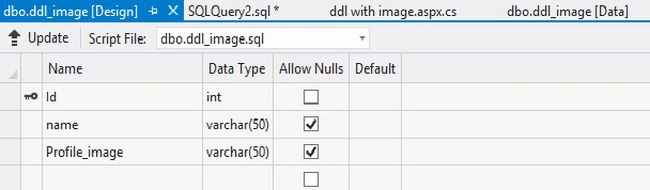
Table data:
Code.aspx
I have used a DropdownList control to bind data from the table "ddl_image". Before doing the design you need the files "ddl.css", "jquery-1.6.1.min.js" and "jquery.dd.js". You can download them from here.
Add the following code in the aspx page:
- <html xmlns="http://www.w3.org/1999/xhtml">
- <head id="Head1" runat="server">
- <title>Dropdownlist with Images</title>
- <link rel="stylesheet" type="text/css" href="dropdown/ddl.css" />
- <script type="text/javascript" src="dropdown/js/jquery-1.6.1.min.js"></script>
- <script type="text/javascript" src="dropdown/js/jquery.dd.js"></script>
- <!-- Script is used to call the jQuery for dropdown -->
- <script type="text/javascript" language="javascript">
- $(document).ready(function (e) {
- try {
- $("#ddlprofile").msDropDown();
- } catch (e) {
- alert(e.message);
- }
- });
- </script>
- </head>
- <body>
- <form id="form1" runat="server">
- <table>
- <tr>
- <td align="right">
- <b>Profile:</b>
- </td>
- <td>
- <asp:DropDownList ID="ddlprofile" runat="server" Width="150px" onselectedindexchanged="ddlCountry_SelectedIndexChanged" AutoPostBack="true"></asp:DropDownList>
- </td>
- </tr>
- </table>
- </form>
- </body>
- </html>

kalpesh shahPosted Jul 8, 2025, 7:52 AM
Did not understand where the images are stored and from where it is picking up to show in DropDownList control? Can you please explain.
AMEER ALIPosted Jul 26, 2013, 7:09 AM
"ddl.css", "jquery-1.6.1.min.js" and "jquery.dd.js" those files cannot be found can u give link of the file