

Visual Studio and jQuery
Microsoft has partnered with jQuery and because of that, Visual Studio will now include jQuery; if you have downloaded the latest version of ASP.NET MVC, you should find that jQuery was included although it is version 1.2.6 (the current version is 1.3.2).
jQuery is a JavaScript framework that is comprehensive in its current form and constantly improving; the jQuery community has developed a number of terrific plug-ins that continually make the kit more attractive, valuable, and useful; it you have not tried it out, it is definitely worth looking into. As far as the plug-ins go, the tablesorter and tablesorter pager really make the whole thing worthwhile if you are working with MVC at all; I think it is a far better solution than using the paged list option demonstrated in the latest "Nerd Dinner" application made available by Guthrie, Hanselman, Haack, et al., if for no other reason than it handles both paging and sorting rather than just sorting. Other plug-ins also support filtering lists such that if you wanted to display a filtered, sorted, paged list, you can do that with jQuery in a few lines of code, or you can spend quite a bit more time trying to accomplish the same thing in the controller and model code in an MVC application.
There is a lot to love about jQuery; the selectors alone will save a lot time in selecting single or categorized elements without fumbling around with the DOM. To quote the blurb about the project found on their website, jQuery, "...is a new kind of JavaScript Library. jQuery is a fast and concise JavaScript Library that simplifies HTML document traversing, event handling, animating, and Ajax interactions for rapid web development. jQuery is designed to change the way that you write JavaScript".
If you have not looked it over, you owe it to yourself to take it for a test ride: http://jquery.com/
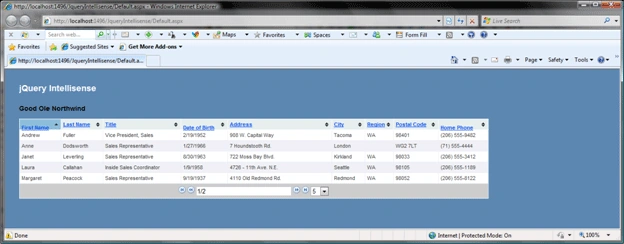
Figure 1: ASP.NET Application Running with jQuery Tablesorter and Pager Plug-ins
Intellisense and jQuery
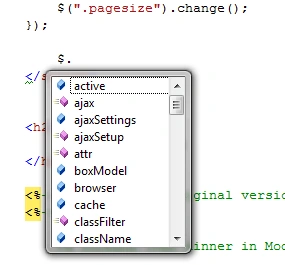
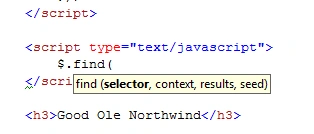
Scott Guthrie's wrote an entry on jQuery Intellisense; if you missed Scott Guthrie's original comments on it, you can see them here:
http://weblogs.asp.net/scottgu/archive/2008/11/21/jquery-intellisense-in-vs-2008.aspx
Per Scott Guthrie original entry, these steps are necessary to get intellisense going on with jQuery. You can check out the original article or just follow the steps he outlined; they are as follows.
- Install VS2008 SP1: http://www.microsoft.com/downloads/details.aspx?FamilyId=FBEE1648-7106-44A7-9649-6D9F6D58056E&displaylang=en
- Install the Support Patch that cues Visual Studio to look for JavaScript documentation files: http://code.msdn.microsoft.com/KB958502/Release/ProjectReleases.aspx?ReleaseId=1736
- Download the latest version of jQuery and the associated documentation file: http://docs.jquery.com/Downloading_jQuery#Download_jQuery
-
When downloading
the jQuery files, there are at least two to get, they are:
- Jquery-1.2.6.js (that is what MS distributes now, current version is 1.3.2; there is a minified version and an uncompressed version available)
- Jquery-1.2.6-vsdoc.js (follow the documentation link to get that)
Join the conversation! Your thoughts help the community grow.