

Introduction
Today, I am creating the second article of my ASP.NET MVC 5 using Visual Basic Series and in this article we'll learn to add a new controller. In the previous article we learned Getting Started with MVC 5 using Visual Basic.
Overview
Let me provide you a basic introduction to MVC. MVC is an acronym of Model View Controller. It is the design pattern for developing ASP.NET Web Applications and used to do the decoupled architecture. There are mainly three main characteristics used here, given below:
- Model: It represents the data (entities) defined in the web application and use the validation to implement the business rules for the data.
- View: It generates dynamically the HTML response for the application. These are the template files.
- Controller: It handles the request of the browser, communicate with the model and designates the view that is returned as a response to the browser.
So, let's start to work with this and add a new controller with the following procedure:
- Adding Controller
- Working with Controller
- Running the Controller
Adding Controller
In this section, we'll add the new controller to the Controllers folder in the application. Use the following procedure to do that.
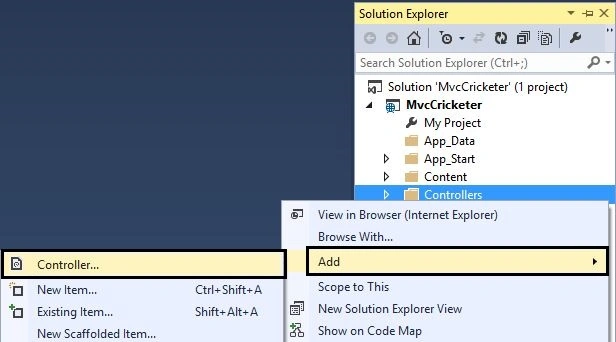
Step 1: Just right-click on the Controllers folder and click on the Controller
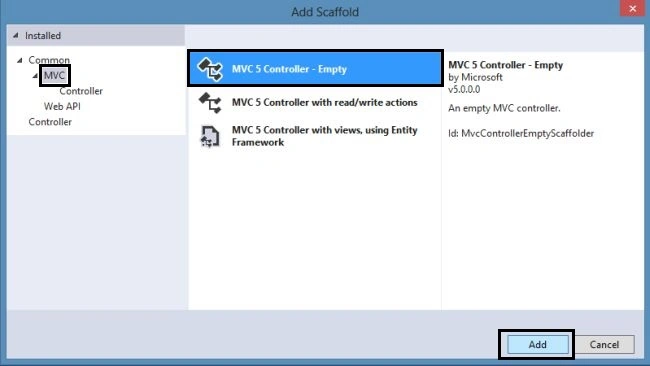
Step 2: Choose the MVC 5 Empty Controller in the Add Scaffold wizard.
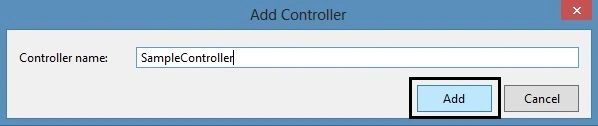
Step 3: Enter the controller name as "SampleController".
Step 4: Edit the new controller code with the following code:
- Imports System.Web.Mvc
- Namespace Controllers
- Public Class SampleController
- Inherits Controller
- ' GET: Sample
- Function Index() As ActionResult
- Return View()
- End Function
- Function SampleCricketer() As String
- Return "This is Sample Controller of <b>Crickter</b> App"
- End Function
- End Class
- End Namespace
In the code above, a new SampleCricketer() function is created. This function returns a string of HTML. Let's request the new controller method named SampleCricketer() in the browser.
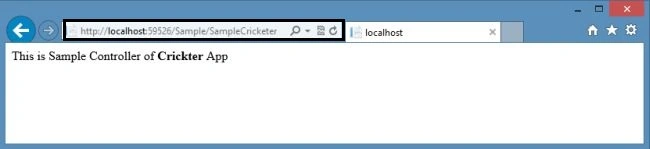
Step 5: Run the application and enter the URL in the browser like: http://localhost:59526/Sample/SampleCricketer. The browser will look at the SampleCricketer method in the Sample Controller and it'll look like this:
Working with Controller
As you see in the URL, the browser is invoked by ASP.NET MVC. It can request many controllers that depend upon the URL. The default URL routing format used by MVC is as in the following:
/[Controller]/[ActionName]/[Parameters]
The default routing URL for the MVC application is as follows:
- Public Module RouteConfig
- Public Sub RegisterRoutes(ByVal routes As RouteCollection)
- routes.IgnoreRoute("{resource}.axd/{*pathInfo}")
- routes.MapRoute(
- name:="Default",
- url:="{controller}/{action}/{id}",
- defaults:=New With {.controller = "Home",
- .action = "Index", .id = UrlParameter.Optional}
- )
- End Sub
- End Module
Join the conversation! Your thoughts help the community grow.