

Introduction
This article can
be separated into four important parts:
- Fundamentals of Model, View, and ViewModel (MVVM)
- With the Only jQuery on MVC
- Short introduction: Knockout.js
- Simple Usage Knockout on MVC
Fundamentals of MVVM
The MVVM design
pattern in Silverlight / WPF is on the way to becoming indispensable for
developers. The basics of the MVVM architecture is based on Martin Fowler's
Presentation Model that collects power MVC and MVP flexible structure.
The purpose of the UI design patterns with Code-Behind is to separate each other
completely or partially.
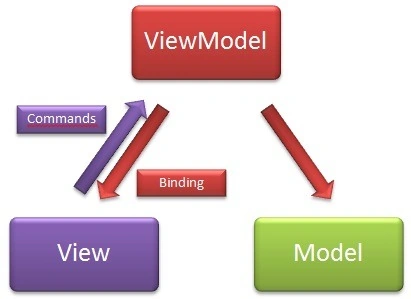
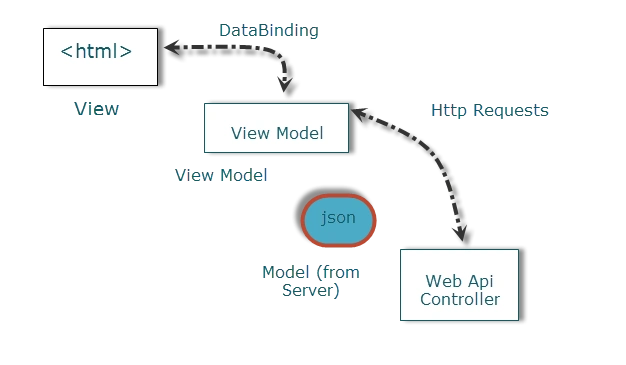
MVVM consists of three main things: Model, View, and ViewModel. ViewModel references the Model
when the View is completely unaware of the model. In this way, the developer is not facing to face the business logic interface in any way.
With Only jQuery on MVC
Let's talk about
jQuery. jQuery has a strong binding mechanism that uses HTML tag ids, a CSS
class and a HTML tag name. Values
are pushed from the source object into the HTML elements, thus requiring a line
of code for each mapping from the source value to the target element. It's
much easier with KO. It lets you scale up in complexity without fear of
introducing inconsistencies. jQuery is simple to bind with values and tags.
jQuery cannot
serve us in the following ways:
- Any source object changes will not reflected on HTML elements. (You can push values and call again.)
- Any changes in the HTML elements won't be reflected on source objects.
Code:
- <h2>Using Jquery
- Without Knockout</h2>
- <span>StudentNumber:</span><span id="StudentNumber"></span>
- <br />
- <span>Surname:</span><input id="StudentSurName" />
- <span>Name:</span><input id="StudentName" />
- <script type="text/javascript">
- $(document).ready(function() {
- var student = {
- Number: "A123456",
- Surname: "Karatoprak",
- Name: "Yusuf"
- };
- $("#StudentNumber").text(student.Number);
- $("#StudentSurName").val(student.Surname);
- $("#StudentName").val(student.Name);
- });
- </script>
You can bind
your values to HTML tags using the HTML tag's id and CSS classes. jQuery is an
excellent low-level way to manipulate elements and event handlers on a web page.
jQuery doesn't have a concept of an underlying data model. If you bind the values of
any object like above, you will not observe any changes in the UI after any
change of the Model. You must refresh web pages to observe View changes. On the
other hand; if you change the HTML element's value then your model won't be
fired.
Short Introduction: knockout.js
- What is knockout.js?
 KO is not an alternative to jQuery or other js libraries (Prototype, MooTools). KO focuses on MVVM to manipulate the Model to the View from AJAX calls. KO manages between the ViewModel and View the automatic relation that is triggered by user interface calls.Model: Business Logic.View: HTML/CSS. If you change the ViewModel's objects, the View will be effected automatically.ViewModel: He is a middle man to observable connection Model and View because the Model doesn't have any knowledge of the View.Observable and Binding: KO's focus is on the Data-Driven js concepts; in other words, any changes in the View will fire the model; also the model's changes will automatically fire the View's updates. KO is on the alert to communicate between them in both directions.
Code:
- <h2>With Knockout</h2>
- <span>Student Number:</span><span data-bind="text: Number"></span>
- <br />
- <span>Surname:</span><input data-bind="value: Surname" />
- <span>Name:</span><input data-bind="value: Name" />
- <script type="text/javascript">
- var student = {
- Number: "A123456",
- Surname: "Karatoprak",
- Name: "Yusuf"
- }
- // Activates knockout.js
- ko.applyBindings(student);
- </script>
The HTML tag binding is unable to observe the Data-Bind structure. KO
concentrates on data-binding via the data-bind tag. But the preferred usage is
the following. It is useful to control the View's changes for values of the
Model's objects. Observable property is one of the most important things.
MVVM needs to observe any changes in UI. KO will consider any changes to the
View. Actually, when you edit one of those text boxes, it does update the
underlying ViewModel data.
Update your
ViewModel to make the Name and Surname properties observable using
ko.observable:
- <script type="text/javascript">
- var student = {
- Number: ko.observable("A123456"),
- Surname: ko.observable("Karatoprak"),
- Name: ko.observable("Yusuf")
- }
- // Activates knockout.js
- ko.applyBindings(student);
- </script>

Now re-run the application and edit the
text boxes. This time you'll see not only that the underlying ViewModel data is
being updated when you edit, but that all associated UI is updating in sync with
it too.
Rupali ShindePosted Feb 9, 2016, 4:53 AM
thanks for such nice article about knockout JS.
Santhakumar MunuswamyPosted May 23, 2015, 3:46 PM
Thanks for nice article
Gowtham RajamanickamPosted Apr 25, 2015, 5:54 AM
ting
Gowtham RajamanickamPosted Apr 25, 2015, 5:54 AM
good
Tom MohanPosted Mar 3, 2015, 12:07 AM
Interesting one.
sreenivasa kPosted Mar 2, 2015, 2:48 PM
very nice article for learning on knockout basics
Former memberPosted Mar 2, 2015, 12:48 PM
curious any one still using KO ? if yes then they need replacement of their software architect ! sorry for being bit candid ! :) but yes very good article ! nice explanation !
Vithal WadjePosted Sep 26, 2014, 2:15 PM
super explanation keep it up
sudhakaran SakkaraiPosted Jun 30, 2014, 6:44 AM
I feel this one is a nice start up from Jquery,MVC to KO, and the explanation also very fine...
Mahak GuptaPosted Nov 28, 2013, 12:59 AM
gr8 explanation
Abhineet SrivastavaPosted Sep 23, 2013, 8:19 AM
Well,How can we add item in list?
Abhineet SrivastavaPosted Sep 23, 2013, 6:42 AM
Excellent one :)
chamrong keoPosted Feb 22, 2013, 12:20 PM
'Unable to open WampServer's config file, please change path in index.php file.' I was working away today and saw this file flashing before my eyes and I appeared to have caused this error. Please can you offer a solution? What is the path to the file and what do I change? Many thanks.
Amit PatelPosted Feb 18, 2013, 1:26 PM
Excellent...
satish allamsettiPosted Feb 14, 2013, 9:00 AM
nice
Venkatesh KumarPosted Feb 14, 2013, 1:58 AM
Excellent post. Short and simple explanation..
Raj KumarPosted Feb 13, 2013, 4:06 AM
Could't find any article better then this. very nice explanation in easy way.
Yusuf KaratoprakPosted Feb 13, 2013, 2:07 AM
Thanks alot :)
Anil KumarPosted Feb 13, 2013, 12:43 AM
Very nice & cool.
Mahesh ChandPosted Feb 12, 2013, 11:41 PM
Very nice! LOL. I like knockout image :)