

Introduction
Sending email currently is important for applications for attracting people to use applications/websites. Sending email through websites is a better way to not allow any third party into your application. Some features like Feedback, Newsletter, Messages, Contact Us etc. are similar to sending email. That is because these features in a website sends email to the specified person.
There is also the need to send emails in ASP.Net.
Requirement
To integrate a Send email feature in your website, the most important requirement is for Simple Mail Transfer Protocol (SMTP). The other side requires a good design to show whatever you want to send in the email and code to do it.
The following namespace is required to add Simple Mail Transfer Protocol (SMTP) :
Source code
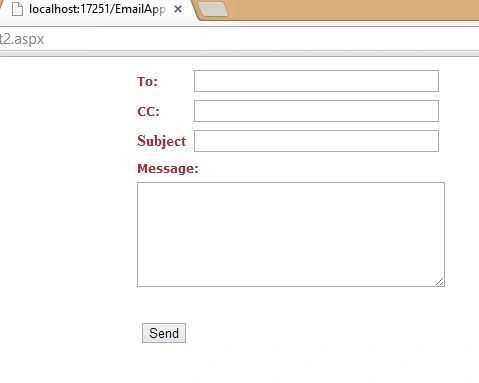
Add the following code in the source code page:
- using System.Net.Mail
Add the following code in the source code page:
- <%@ Page Language="C#" AutoEventWireup="true" CodeFile="Default2.aspx.cs" Inherits="Default2" %>
- <!DOCTYPE html>
- <html xmlns="http://www.w3.org/1999/xhtml">
- <head runat="server">
- <title></title>
- <style type="text/css">
- .auto-style1 {
- color: #A52A2A;
- }
- </style>
- </head>
- <body>
- <form id="form1" runat="server">
- <div>
- <table align=center>
- <tr>
- <td><span style="font-family:Verdana; font-size:12px; font-weight:bold;color:Brown;">To:</span></td>
- <td><asp:textbox id="txtName" Width="241" Runat="server"></asp:textbox></td>
- </tr>
- <tr>
- <td><span style="font-family:Verdana; font-size:12px; font-weight:bold;color:Brown;">CC:</span></td>
- <td><asp:textbox id="txtEmail" Width="241" Runat="server"></asp:textbox></td>
- </tr>
- <tr>
- <td class="auto-style1"><strong>Subject </strong></td>
- <td>
- <asp:TextBox ID="TextBox1" runat="server" Width="241"></asp:TextBox>
- </td>
- </tr>
- <tr>
- <td colSpan="2" ><span style="font-family:Verdana; font-size:12px; font-weight:bold; color:Brown;">Message:</span></td>
- </tr>
- <tr>
- <td align="center" colSpan="2" width=100%><asp:textbox id="txtMessage" Width="100%" Runat="server" Height="99" TextMode="MultiLine" MaxLength="400"></asp:textbox></td>
- </tr>
- <tr>
- <td colSpan="2"> </td>
- </tr>
- <tr>
- <td align=center>
- <asp:Button ID="Button1" runat="server" OnClick="Button1_Click" Text="Send" />
- </td>
- <td align=center> </td>
- </tr>
- <tr>
- <td colSpan="2"><asp:label id="lblStatus" Runat="server" EnableViewState="False"></asp:label></td>
- </tr>
- </table>
- </div>
- </form>
- </body>
- </html>

Hamid KhanPosted Mar 26, 2021, 3:42 PM
Nice article.............
Rohan RaoPosted Sep 10, 2019, 5:49 AM
Will this piece of code work if I want to send an email to a domain specific emails? For example, if I want to send to [email protected].. Will your code work?
Sagar patilPosted Oct 4, 2015, 5:30 AM
hello this code work on only local server not on web
Pramod KumarPosted Jul 22, 2013, 5:39 AM
it's super bcz its a way of the to easy understanding to someone else.....i like
Neha SharmaPosted Feb 16, 2013, 2:23 AM
Thanks Vithal :)
Vithal WadjePosted Feb 15, 2013, 11:11 PM
super keep posting