

In this article, I will use a TextBox Control for examples.
- How to create ASP.NET server control
- How to use an ASP.NET server control in a webpage (.aspx)
How to create ASP.NET server control
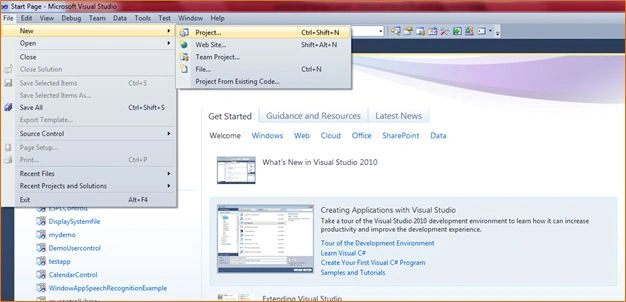
Step 1 : Go to Visual Studio 2010 and select "File" -> "New" -> "Project...".
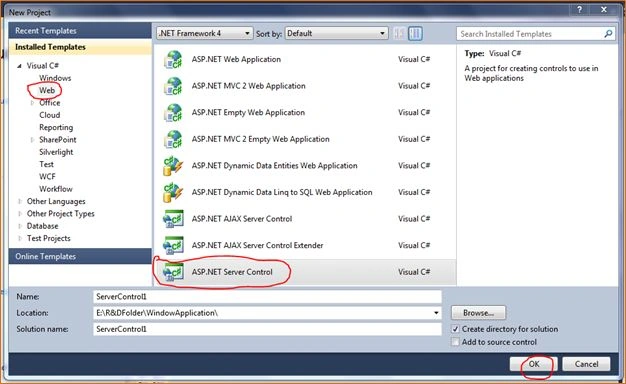
Step 2 : Go to "Web" -> "ASP.NET Server Control" -> "Ok".
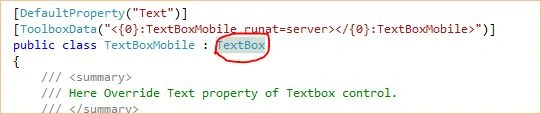
Step 3 : After adding a Server Control go to the code file and inherit a TextBox Control class.
You can inherit any other control (TextBox, Dropdownlist or CheckBoxList) that you want to create.
Step 4 : Then override the property of the control and write your own customized code in it.
using System.Linq;
using System.Text;
using System.Web;
using System.Web.UI;
using System.Web.UI.WebControls;
using System.Drawing;

namespace MyServerControl
{
    [DefaultProperty("Text")]
    [ToolboxData("<{0}:TextBoxMobile runat=server </{0}:TextBoxMobile>")]
    public class TextBoxMobile : TextBox
    {
        /// <summary>
        /// Here Override Text property of Textbox control.
        /// </summary>
        public override string Text
        {
            get
            {
                return ((base.Text == null) ?
                string.Empty : base.Text);
            }
            set
            {
                if (this.Page.IsPostBack)
                {
                    base.Text = value;
                    //Here you can write for validate control at server side.
                    if (this.Text == string.Empty) this.BackColor = Color.Yellow;
                }

            }
        }

        /// <summary>
        /// Here Override Width property of textbox control.
        /// </summary>
        public override Unit Width
        {
            get
            {
                return 200;
            }}

        /// <summary>
        /// Here Override MaxLength Property of TextBox Control.
        /// </summary>
        public sealed override int MaxLength
        {
            get
            {
                return 10;
            }
        }
        /// <summary>
        /// This Method Render html tag.
        /// </summary>
        /// <param name="output"></param>

        protected override void RenderContents(HtmlTextWriter output)
        {
            output.Write(Text);
        }
        /// <summary>
        /// In this method write code for <asp:TextBox ></TextBox> tag
        /// which attribute you want to add in  html tag.
        /// </summary>
        /// <param name="writer"></param>
        protected override void AddAttributesToRender(HtmlTextWriter writer)
        {
            writer.AddAttribute("onkeypress", "return ValidateTextBox(event,this,
                                 'Mobile','" + MaxLength + "');");
            writer.AddStyleAttribute(HtmlTextWriterStyle.Width, this.Width.ToString());
            if (Text == String.Empty)
            {
                Text = (String)base.ViewState["Text"];
            }
            writer.AddAttribute("Text", Text);
            base.AddAttributesToRender(writer);
        }
        /// <summary>
        /// on this event you have to attached your Javascript file
        /// and css file to the paricular control.
        /// </summary>
        /// <param name="e"></param>
        protected override void OnInit(EventArgs e)
        {
            base.OnInit(e);
            if(this.Page.ClientScript.IsClientScriptIncludeRegistered(
            ControlScript"))
                return;
            this.Page.ClientScript.RegisterClientScriptInclude("ControlScript",
            this.Page.ClientScript.GetWebResourceUrl(this.GetType(),
            "MyServerControl.ClientSideValidation.js"));
        }
    }
}
tej pratap singhPosted Sep 11, 2014, 2:17 AM
thanks
pratikPosted Aug 26, 2014, 1:19 AM
Nice Example Thanks
sherry shairPosted Mar 28, 2014, 6:32 AM
nice work Priti Kumari :)
Faiz MirzaPosted Feb 24, 2014, 10:56 AM
nice practical example !!! Thanks