
1. The Authentication Problem
Every system that holds data worth protecting must answer one question before anything else: Who is this person, and can I trust them?
That question — authentication — is the front door of your application. Get it wrong and no amount of firewall rules, rate limiting, or encryption will save you. Yet developers frequently mix up authentication methods, misuse token formats, or reach for the most modern solution when a simpler one fits better.
This guide covers every major authentication type — from basic credentials to modern federated identity — explains how each works mechanically, shows working C# / ASP.NET Core examples, and gives you a clear decision framework for choosing the right approach.
One clarification before we begin:
Authentication answers: Who are you? → Verifies identity → Returns
401 Unauthorizedon failureAuthorization answers: What can you do? → Verifies permissions → Returns
403 Forbiddenon failure
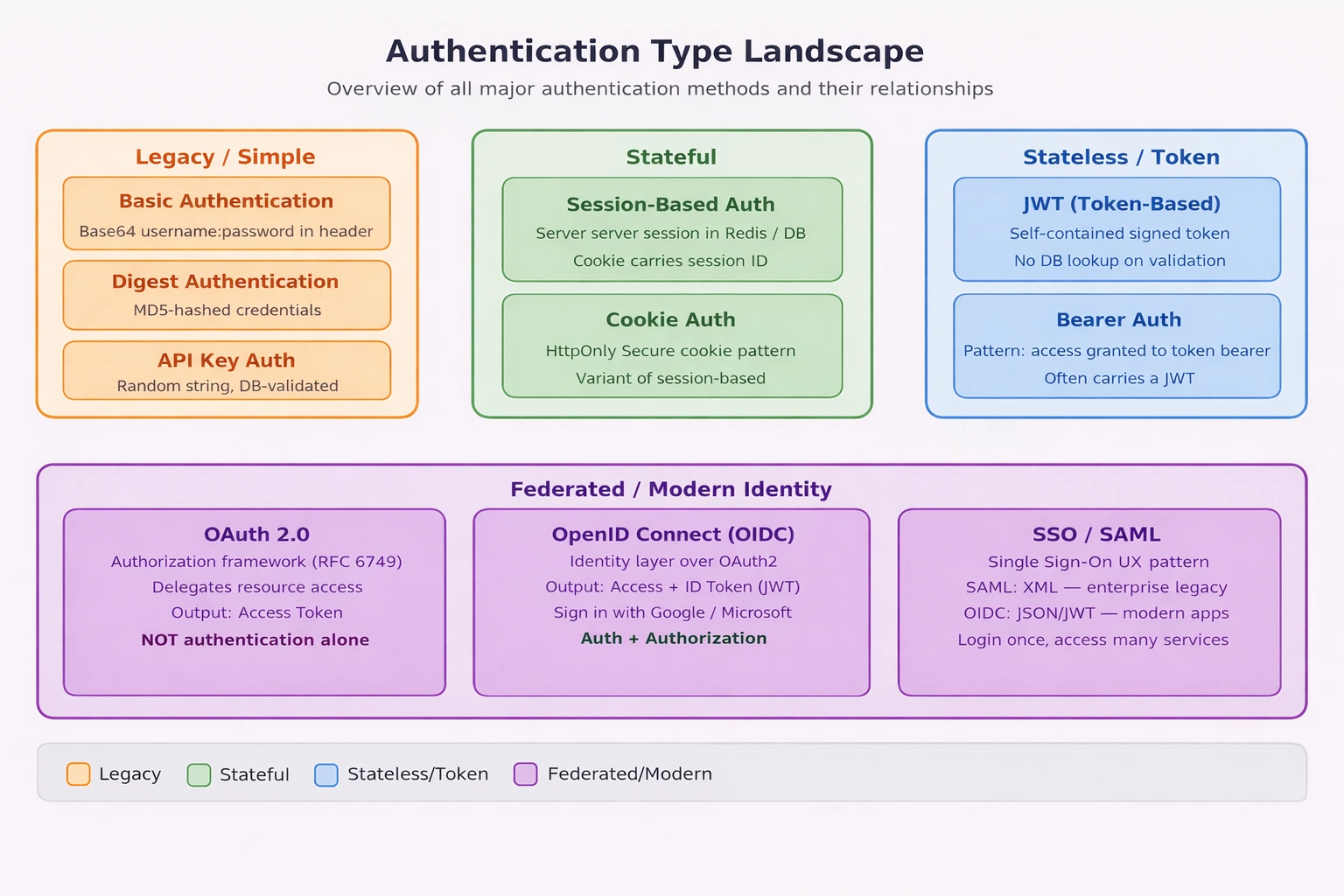
Authentication Type Landscape — visual map of all auth types and their relationships.
2. Clearing the Confusion — Common Misconceptions
Before comparing authentication types, let us eliminate four of the most common misconceptions in the industry:
| Concept | What Developers Think It Is | What It Actually Is |
|---|---|---|
| JWT | An authentication method | A token format (RFC 7519) |
| Bearer Auth | The same as JWT | A pattern — access granted to whoever holds the token |
| OAuth2 | An authentication protocol | An authorization framework (RFC 6749) |
| SSO | A standalone auth method | A UX pattern enabled by identity protocols (SAML, OIDC) |
Understanding these distinctions prevents architectural mistakes — like using OAuth2 alone to verify a user’s identity, or treating a JWT as inherently secure just because it looks like a token.
3. Legacy Methods — Basic & Digest Authentication
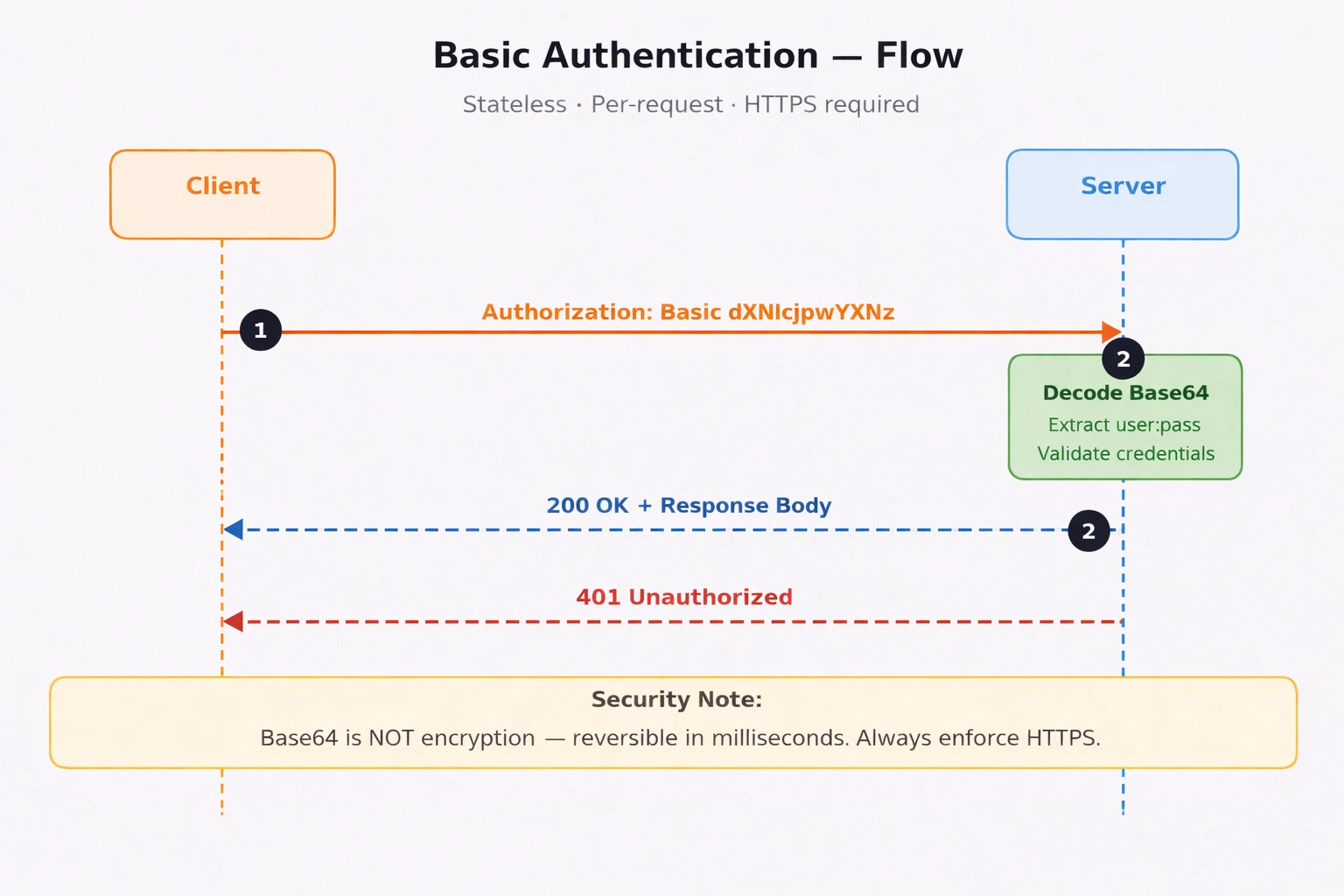
Basic Authentication Flow — per-request credential validation sequence.
Basic Authentication
The client encodes username:password in Base64 and sends it in every request header:
Authorization: Basic dXNlcjpwYXNzd29yZA==Base64 is not encryption — it is trivially reversible in milliseconds. Basic Auth is only acceptable over HTTPS, and strictly for internal tooling or development environments.
// Middleware: Validate Basic Auth header
app.Use(async (context, next) =>
{
    var authHeader = context.Request.Headers["Authorization"].ToString();

    if (authHeader.StartsWith("Basic "))
    {
        var encoded  = authHeader["Basic ".Length..].Trim();
        var decoded  = Encoding.UTF8.GetString(Convert.FromBase64String(encoded));
        var parts    = decoded.Split(':', 2);
        var username = parts[0];
        var password = parts[1];

        // Step 1: Validate against your user store
        // Replace this hardcoded check with IUserService.ValidateAsync() in production
        if (username == "admin" && password == "secret")
        {
            await next(); // Step 2: Allow through
            return;
        }
    }

    // Step 3: Reject with proper WWW-Authenticate challenge header
    context.Response.StatusCode = 401;
    context.Response.Headers["WWW-Authenticate"] = "Basic realm=\"MyApp\"";
});
What the code does:
Reads and decodes the
Authorizationheader on every requestSplits the decoded value into username and password
Validates credentials — replace the hardcoded check with
IUserService.ValidateAsync()in real codeReturns
401with aWWW-Authenticateheader to prompt re-authentication
When to use: Internal admin dashboards, local dev tools, legacy system integrations only.
When NOT to use: Any public-facing endpoint, production APIs, mobile apps.
Digest Authentication
Digest Auth improves on Basic Auth by using MD5 hashing instead of plain Base64. Rather than sending credentials directly, it uses a challenge-response handshake — the server issues a nonce (one-time random value), the client hashes its credentials combined with that nonce, and sends the hash back. The server independently computes the same hash and compares. This prevents replay attacks — intercepting the hash is useless because the nonce changes every request.
// Step 1 — Server sends a 401 challenge with a nonce
HTTP/1.1 401 Unauthorized
WWW-Authenticate: Digest realm="MyApp", nonce="dcd98b7102dd2f0e", algorithm=MD5

// Step 2 — Client hashes credentials + nonce and replies
Authorization: Digest username="admin",
               realm="MyApp",
               nonce="dcd98b7102dd2f0e",
               uri="/api/data",
               response="6629fae49393a05397450978507c4ef1"
               // response = MD5(MD5(user:realm:pass) + ":" + nonce + ":" + MD5(method:uri))

// Step 3 — Server recomputes the same MD5 hash independently
//           If hashes match → 200 OK
//           If hashes differ → 403 Forbidden
How it works in .NET — conceptual flow:
ASP.NET Core has no built-in Digest Auth middleware. It was supported in classic ASP.NET / IIS via Windows Authentication but was not carried forward into the modern pipeline. In practice, you would implement it as custom middleware — but you should not.
// Conceptual flow — how a custom Digest Auth middleware would work in ASP.NET Core
// (Illustrative only — do not implement this in new systems)

app.Use(async (context, next) =>
{
    var authHeader = context.Request.Headers["Authorization"].ToString();

    if (!authHeader.StartsWith("Digest "))
    {
        // Step 1: No Digest header — issue a challenge with a fresh nonce
        var nonce = Convert.ToBase64String(Guid.NewGuid().ToByteArray());
        context.Response.StatusCode = 401;
        context.Response.Headers["WWW-Authenticate"] =
            $"Digest realm=\"MyApp\", nonce=\"{nonce}\", algorithm=MD5";
        return;
    }

    // Step 2: Parse the Digest header fields (username, nonce, response hash, uri)
    var digestParams = ParseDigestHeader(authHeader);

    // Step 3: Retrieve the stored password hash for the username
    var storedPasswordHash = await userStore.GetPasswordHashAsync(digestParams["username"]);

    // Step 4: Recompute the expected MD5 response hash server-side
    // HA1 = MD5(username:realm:password)
    // HA2 = MD5(httpMethod:requestUri)
    // ExpectedResponse = MD5(HA1:nonce:HA2)
    var ha1 = ComputeMD5($"{digestParams["username"]}:MyApp:{storedPasswordHash}");
    var ha2 = ComputeMD5($"{context.Request.Method}:{digestParams["uri"]}");
    var expectedResponse = ComputeMD5($"{ha1}:{digestParams["nonce"]}:{ha2}");

    // Step 5: Compare server-computed hash with client-supplied hash
    if (expectedResponse != digestParams["response"])
    {
        context.Response.StatusCode = 403;
        return;
    }

    await next(); // Step 6: Hashes match — allow through
});
What the flow shows:
The server never sees the plain password — only compares MD5 hashes
The nonce binds the hash to this specific request — replaying the same hash on a new request fails
ASP.NET Core has no native support — any real implementation requires fully custom middleware
MD5 is broken cryptographically — collision attacks are practical, making this unsafe for new systems
Why ASP.NET Core dropped Digest Auth: MD5 was deprecated by NIST in 2011. Modern .NET security guidance (Microsoft and OWASP) recommends JWT, OIDC, or API Keys for all new development. If you are integrating with a legacy system that requires Digest Auth, use an intermediary gateway (e.g., Azure API Management) to handle the handshake rather than implementing it in application code.
When to use: Legacy integrations that explicitly require it — nothing else.
When NOT to use: Any new system. Use JWT or OIDC instead.
4. API Key Authentication
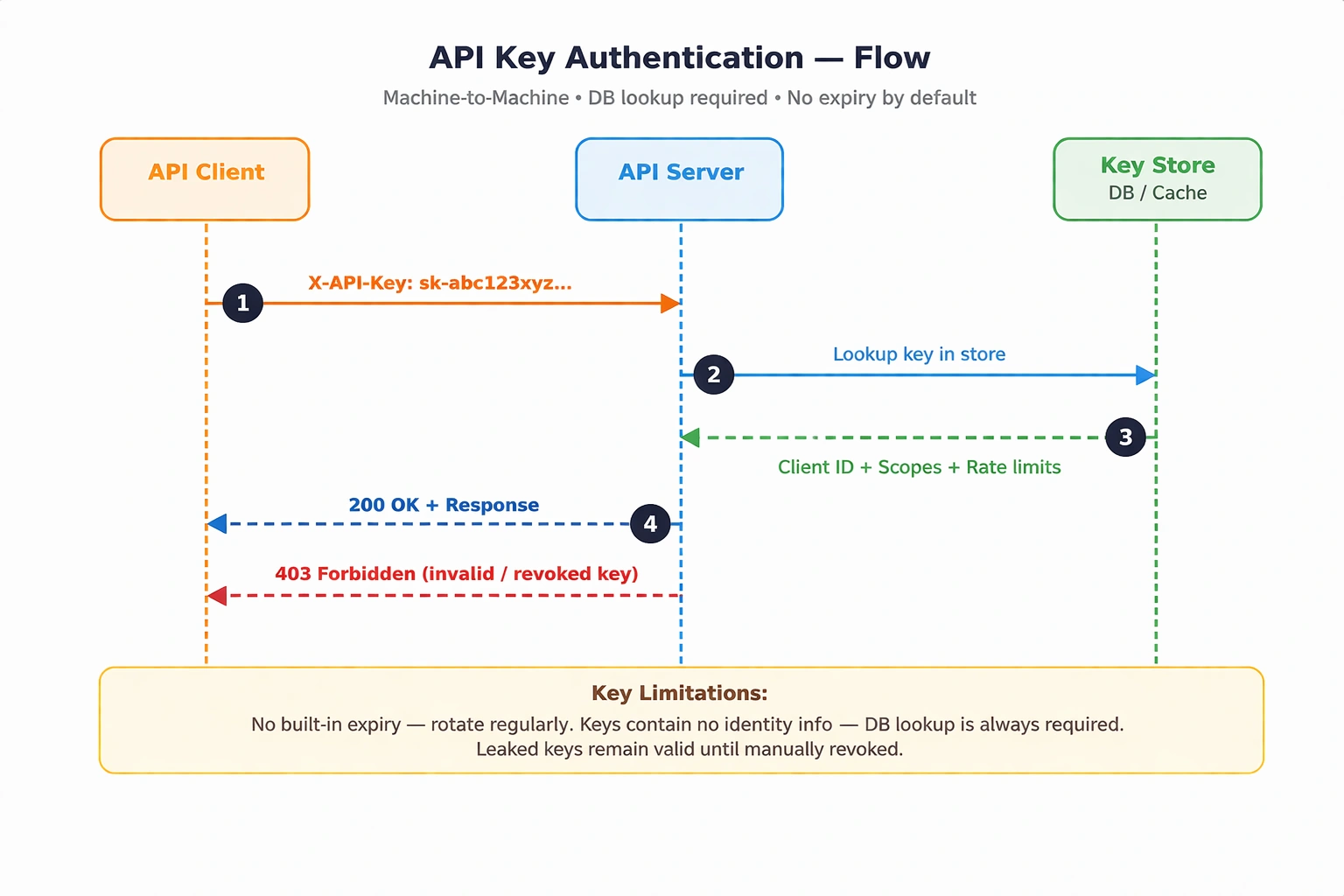
API Key Authentication Flow — database lookup required on every request.
A unique random string is generated per client and sent with each request — either in a custom header or as a query parameter.
X-API-Key: sk-abc123xyz789...Unlike JWTs, API keys contain no embedded information. Every validation requires a database lookup to resolve the key to a client identity and its associated scopes.
Security note: API keys have no built-in expiration. If a key is leaked, it remains valid until manually revoked. Always store only a hash of the key in your database — never the raw value. Use HMACSHA256 or SHA256 when hashing.
Required NuGet package: None — uses standard ASP.NET Core middleware.
// Step 1: Register IApiKeyService in DI container (Program.cs)
builder.Services.AddScoped<IApiKeyService, ApiKeyService>();

// Step 2: Define API Key validation middleware
app.Use(async (context, next) =>
{
    if (!context.Request.Headers.TryGetValue("X-API-Key", out var extractedApiKey))
    {
        context.Response.StatusCode = 401;
        await context.Response.WriteAsync("API Key missing.");
        return;
    }

    // Step 3: Resolve IApiKeyService via DI and validate
    var apiKeyService = context.RequestServices
        .GetRequiredService<IApiKeyService>();
    var isValid = await apiKeyService.ValidateAsync(extractedApiKey!);

    if (!isValid)
    {
        context.Response.StatusCode = 403;
        await context.Response.WriteAsync("Invalid or revoked API Key.");
        return;
    }

    // Step 4: Proceed to next middleware
    await next();
});
What the code does:
Checks for the
X-API-Keyheader — returns401if absentResolves
IApiKeyServicefrom the DI container for clean testabilityValidates the key against your store — returns
403if invalid or revokedCalls
next()only when the key is confirmed valid
When to use: Machine-to-machine communication, public APIs with rate-limiting, webhooks, IoT device auth.
When NOT to use: User-facing login flows, or scenarios requiring granular per-resource permission scopes.
5. Session-Based Authentication (Stateful)
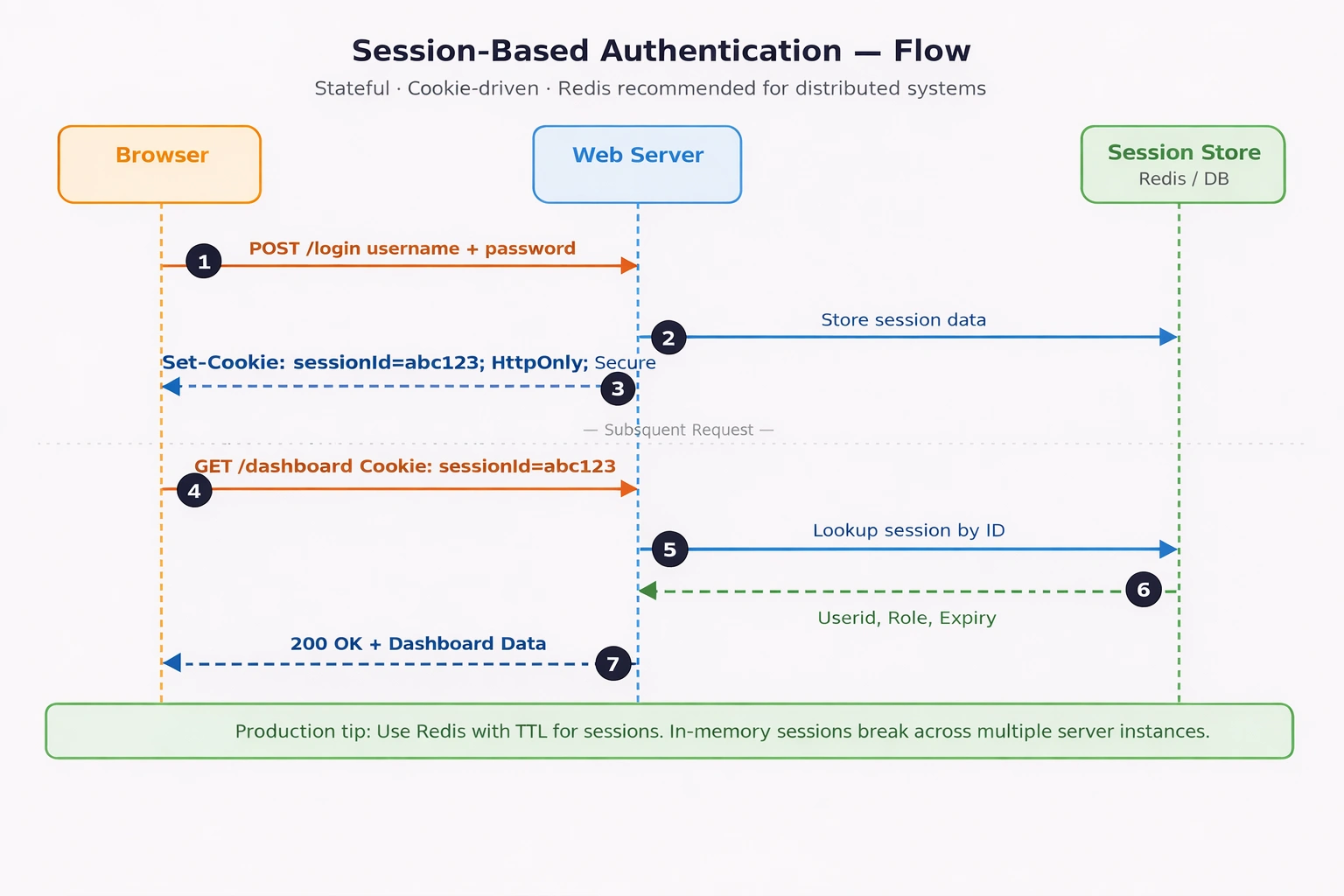
Session-Based Authentication Flow — login, session creation, and per-request validation sequence.
The traditional web authentication model. Upon successful login, the server creates a session record in a store (Redis, SQL, or in-memory) and returns a session ID via a cookie. Every subsequent request carries that cookie, and the server resolves it back to the session.
Set-Cookie: sessionId=abc123; HttpOnly; Secure; SameSite=Strict// Step 1: Register session services in Program.cs
builder.Services.AddScoped<IUserService, UserService>();
builder.Services.AddDistributedMemoryCache(); // use AddStackExchangeRedisCache() in production
builder.Services.AddSession(options =>
{
options.IdleTimeout = TimeSpan.FromMinutes(30);
options.Cookie.HttpOnly = true;
options.Cookie.IsEssential = true;
options.Cookie.SecurePolicy = CookieSecurePolicy.Always;
});
var app = builder.Build();
// Step 2: Register session middleware — must appear before UseAuthentication()
// Omitting app.UseSession() means sessions are registered but silently inactive
app.UseSession();
app.UseAuthentication();
app.UseAuthorization();
// Step 3: Login endpoint — IUserService injected via minimal API DI
app.MapPost("/login", async (HttpContext context, LoginRequest req,
IUserService userService) =>
{
var user = await userService.ValidateAsync(req.Username, req.Password);
if (user is null) return Results.Unauthorized();
// Step 4: Persist identity into session store
context.Session.SetString("UserId", user.Id.ToString());
context.Session.SetString("Role", user.Role);
return Results.Ok("Logged in successfully.");
});
// Step 5: Protected endpoint — read and validate session
app.MapGet("/dashboard", (HttpContext context) =>
{
var userId = context.Session.GetString("UserId");
if (userId is null) return Results.Unauthorized();
return Results.Ok($"Welcome, user {userId}");
});What the code does:
Registers session with
HttpOnly,Secure, and 30-minute idle timeoutapp.UseSession()activates session middleware in the pipeline — this call is mandatory; without it sessions silently do not workLogin endpoint validates via injected
IUserService, storesUserIdandRolein sessionProtected endpoint reads
UserIdfrom session — returns401if missing (expired or not logged in)
Production note: Replace
AddDistributedMemoryCache()withAddStackExchangeRedisCache(). In-memory sessions are node-local — they break silently when running multiple instances or after a pod restart.

When to use: Server-rendered web apps, monolithic architectures, admin portals requiring instant revocation.
When NOT to use: Distributed microservices, mobile apps, public APIs, serverless architectures.
6. Token-Based Authentication — JWT (Stateless)
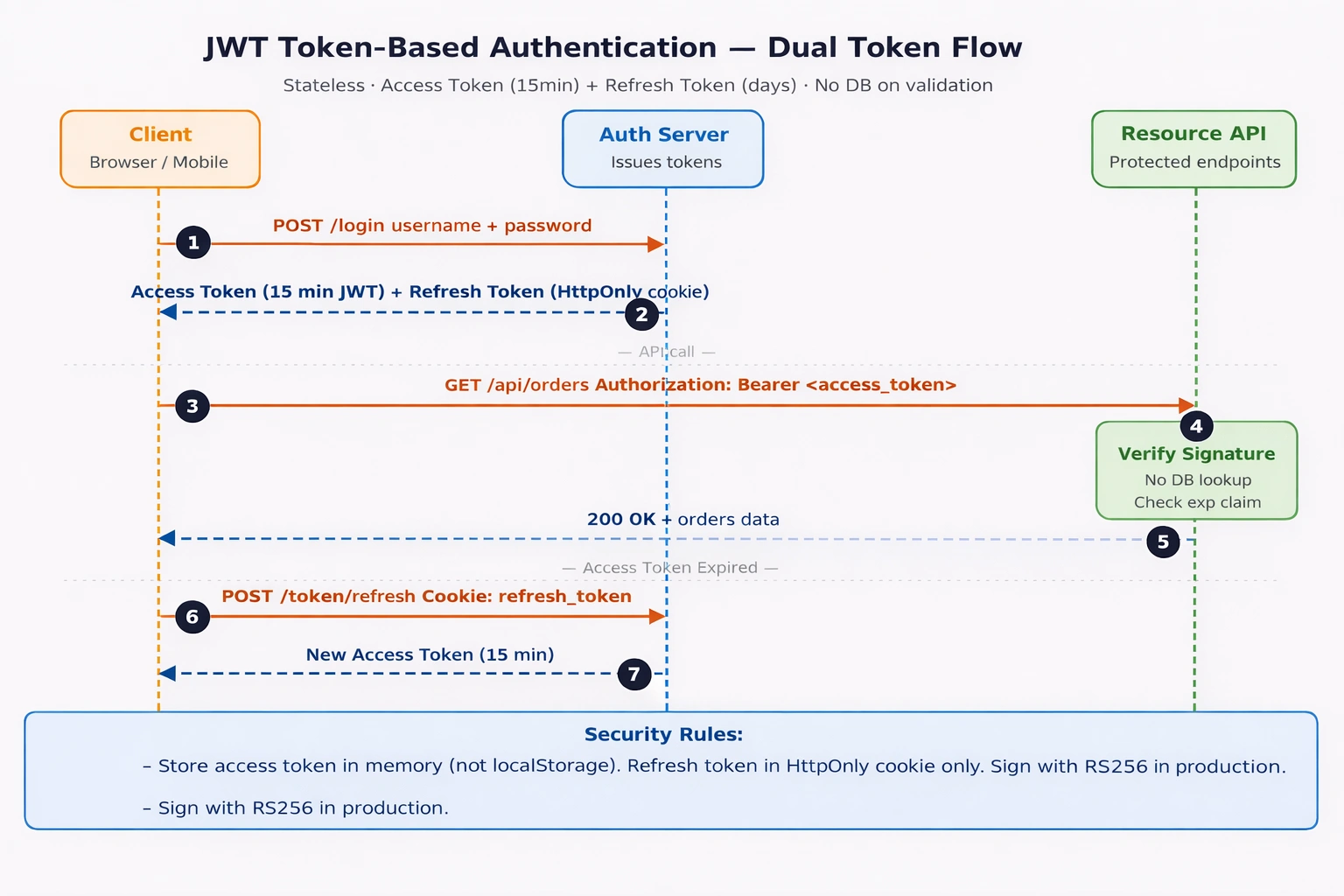
JWT Dual-Token Flow — login, access token usage, expiry, and silent refresh sequence.
JSON Web Tokens (JWT) are self-contained, signed tokens that carry identity claims directly inside them. The server validates the signature locally — no database lookup required. This is the core stateless advantage.
A JWT has three Base64URL-encoded parts separated by dots:
Header.Payload.Signature
eyJhbGciOiJIUzI1NiJ9.eyJzdWIiOiJ1c2VyMSIsInJvbGUiOiJhZG1pbiIsImV4cCI6MTcwMDAwMH0.SflKxwRJSMeKKF2QT4fwpMeJf36P
Header: Algorithm —
HS256(symmetric) orRS256(asymmetric, recommended for production)Payload: Claims —
sub,role,exp,iat,jti(unique token ID for revocation)Signature: Cryptographic proof the token was not tampered with
How signature verification works — no DB needed: The server re-computes the expected signature using its own secret key (or public key for RS256) and compares it to the incoming token’s signature. If they match, the payload is trusted as-is. If the token was modified at all, the signatures will not match and the request is rejected — entirely without a network call.
Dual-Token Strategy
| Token | Lifetime | Recommended Storage | Purpose |
|---|---|---|---|
| Access Token | 15 min – 1 hour | JS memory variable (not localStorage) | Authenticate API calls |
| Refresh Token | Days – weeks | HTTP-only cookie | Silently obtain a new access token |
OWASP guidance: Store refresh tokens in HTTP-only cookies only. localStorage is accessible to JavaScript — a single XSS vulnerability exposes every token stored there.
JWT Token Revocation
JWT’s stateless nature is also its main limitation: you cannot invalidate a token before it expires without extra infrastructure. Two production strategies:
Short access token lifetime (15 min) — limits the damage window without any DB overhead
Token blocklist in Redis — on logout or compromise, store the token’s
jtiin Redis with a TTL matching the token’s remaining lifetime. Reject any request whosejtiappears in the blocklist.
Required NuGet packages:
Microsoft.AspNetCore.Authentication.JwtBearer
System.IdentityModel.Tokens.Jwt
StackExchange.Redis  (for blocklist only)
// Step 1: Register Redis and JWT Bearer in Program.cs
builder.Services.AddSingleton<IConnectionMultiplexer>(
ConnectionMultiplexer.Connect(builder.Configuration["Redis:ConnectionString"]!));
builder.Services.AddAuthentication(JwtBearerDefaults.AuthenticationScheme)
.AddJwtBearer(options =>
{
options.TokenValidationParameters = new TokenValidationParameters
{
ValidateIssuer = true,
ValidateAudience = true,
ValidateLifetime = true,
ValidateIssuerSigningKey = true,
ClockSkew = TimeSpan.Zero, // enforce exact expiry — ASP.NET Core default adds 5 extra minutes
ValidIssuer = builder.Configuration["Jwt:Issuer"],
ValidAudience = builder.Configuration["Jwt:Audience"],
IssuerSigningKey = new SymmetricSecurityKey(
Encoding.UTF8.GetBytes(builder.Configuration["Jwt:Key"]!))
// Production: replace SymmetricSecurityKey with RsaSecurityKey for RS256
};
});
// Step 2: Add JWT blocklist middleware — runs after JWT is validated
app.Use(async (context, next) =>
{
if (context.User.Identity?.IsAuthenticated == true)
{
// Step 3: Extract jti claim from the validated ClaimsPrincipal (context.User)
var jti = context.User.FindFirst(JwtRegisteredClaimNames.Jti)?.Value;
if (jti != null)
{
// Step 4: Resolve IConnectionMultiplexer from DI — never use an undeclared variable
var redis = context.RequestServices
.GetRequiredService<IConnectionMultiplexer>()
.GetDatabase();
if (await redis.KeyExistsAsync($"blocklist:{jti}"))
{
context.Response.StatusCode = 401;
await context.Response.WriteAsync("Token has been revoked.");
return;
}
}
}
await next();
});
// Step 5: Generate short-lived access token — IConfiguration injected as explicit parameter
string GenerateAccessToken(User user, IConfiguration configuration)
{
var claims = new[]
{
new Claim(JwtRegisteredClaimNames.Sub, user.Id.ToString()),
new Claim(ClaimTypes.Role, user.Role),
new Claim(JwtRegisteredClaimNames.Jti, Guid.NewGuid().ToString())
};
// Note: HS256 used here for simplicity.
// In production, use RS256 with RsaSecurityKey — private key stays on the auth server only.
var key = new SymmetricSecurityKey(
Encoding.UTF8.GetBytes(configuration["Jwt:Key"]!));
var token = new JwtSecurityToken(
issuer: configuration["Jwt:Issuer"],
audience: configuration["Jwt:Audience"],
claims: claims,
expires: DateTime.UtcNow.AddMinutes(15), // Step 6: short-lived
signingCredentials: new SigningCredentials(key, SecurityAlgorithms.HmacSha256)
);
return new JwtSecurityTokenHandler().WriteToken(token);
}
// Step 7: Protected endpoint
app.MapGet("/api/orders", [Authorize] (ClaimsPrincipal user) =>
{
var userId = user.FindFirst(ClaimTypes.NameIdentifier)?.Value;
return Results.Ok($"Orders for user {userId}");
});What the code does:
Registers
IConnectionMultiplexer(Redis) as singleton — shared efficiently across requestsClockSkew = TimeSpan.Zeroenforces exact expiry — the 5-minute default buffer is a common security oversightBlocklist middleware reads the validated
ClaimsPrincipalfromcontext.User— no re-parsing neededjtiis resolved from DI-injected Redis — no ambient or undefined variable usedGenerateAccessToken()takesIConfigurationas an explicit parameter — fully testable, no magic globalsHS256 is used for the example; the inline comment directs production readers to RS256 with RSA keys
Production tip: Swap SymmetricSecurityKey + HmacSha256 for RsaSecurityKey + RsaSha256. With RS256, the auth server signs with a private key and all resource servers verify with the public key — the private key never leaves the auth server.
When to use: REST APIs, microservices, mobile backends, SPAs, distributed systems.
When NOT to use: When you need instant revocation without Redis infrastructure — use session-based instead.
7. OAuth2, OpenID Connect & SSO
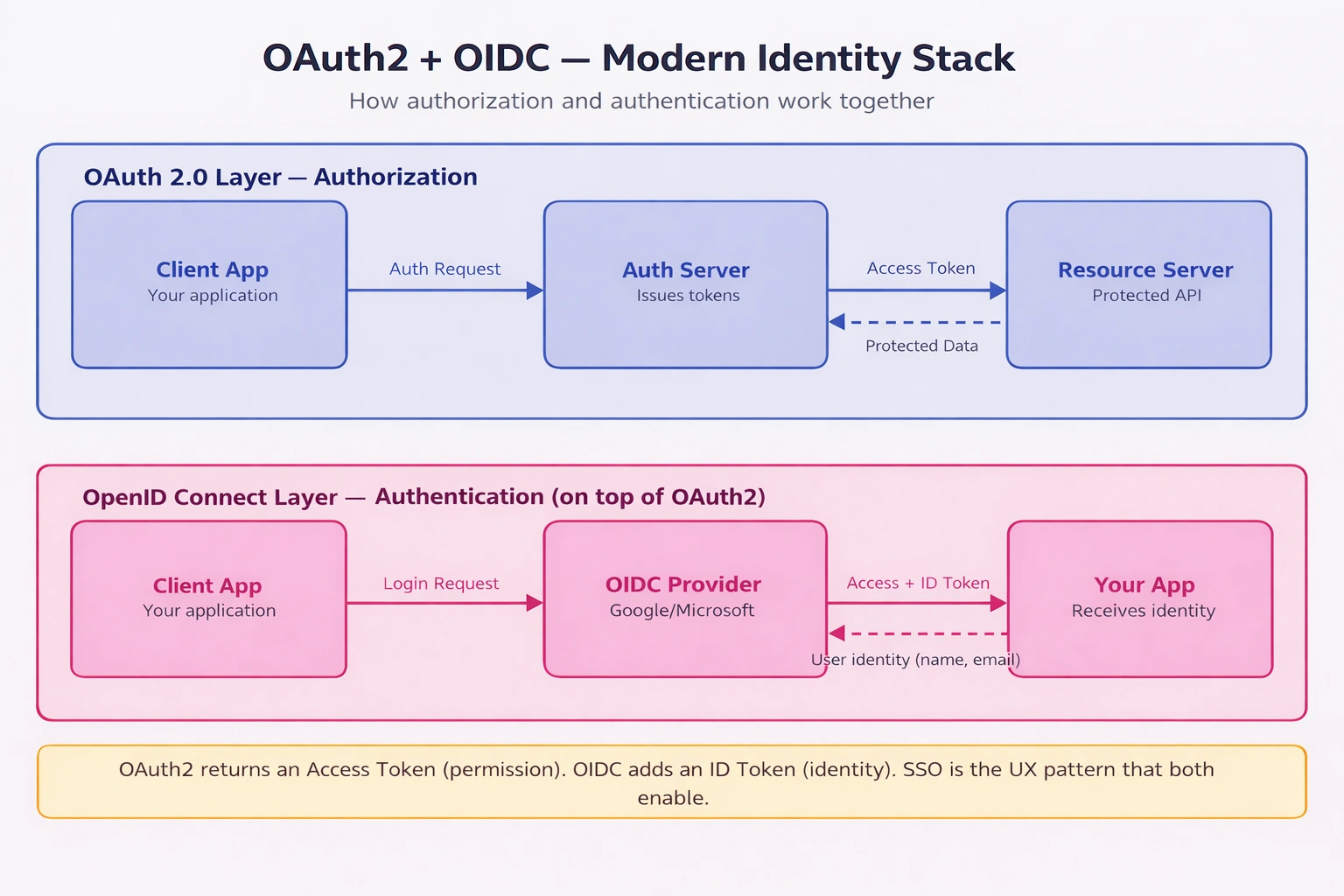
OAuth2 + OIDC Big Picture — how the authorization and authentication layers connect.
OAuth2 — Authorization, Not Authentication
OAuth2 enables a user to grant a third-party app limited access to their resources without sharing credentials. The output is an access token — proof of permission, not proof of identity.
Example: “Allow this app to read my Google Drive files.”
OAuth2 defines four grant types — choose based on your client type:
| Grant Type | Use Case | Notes |
|---|---|---|
| Authorization Code + PKCE | Web apps, mobile apps, SPAs | Most secure — always prefer for user-facing flows |
| Client Credentials | Machine-to-machine (no user) | Service accounts, background jobs, daemons |
| Device Code | CLI tools, smart TVs, IoT | For clients with no browser |
| Implicit (deprecated) | Legacy SPAs | Avoid — superseded by Auth Code + PKCE |
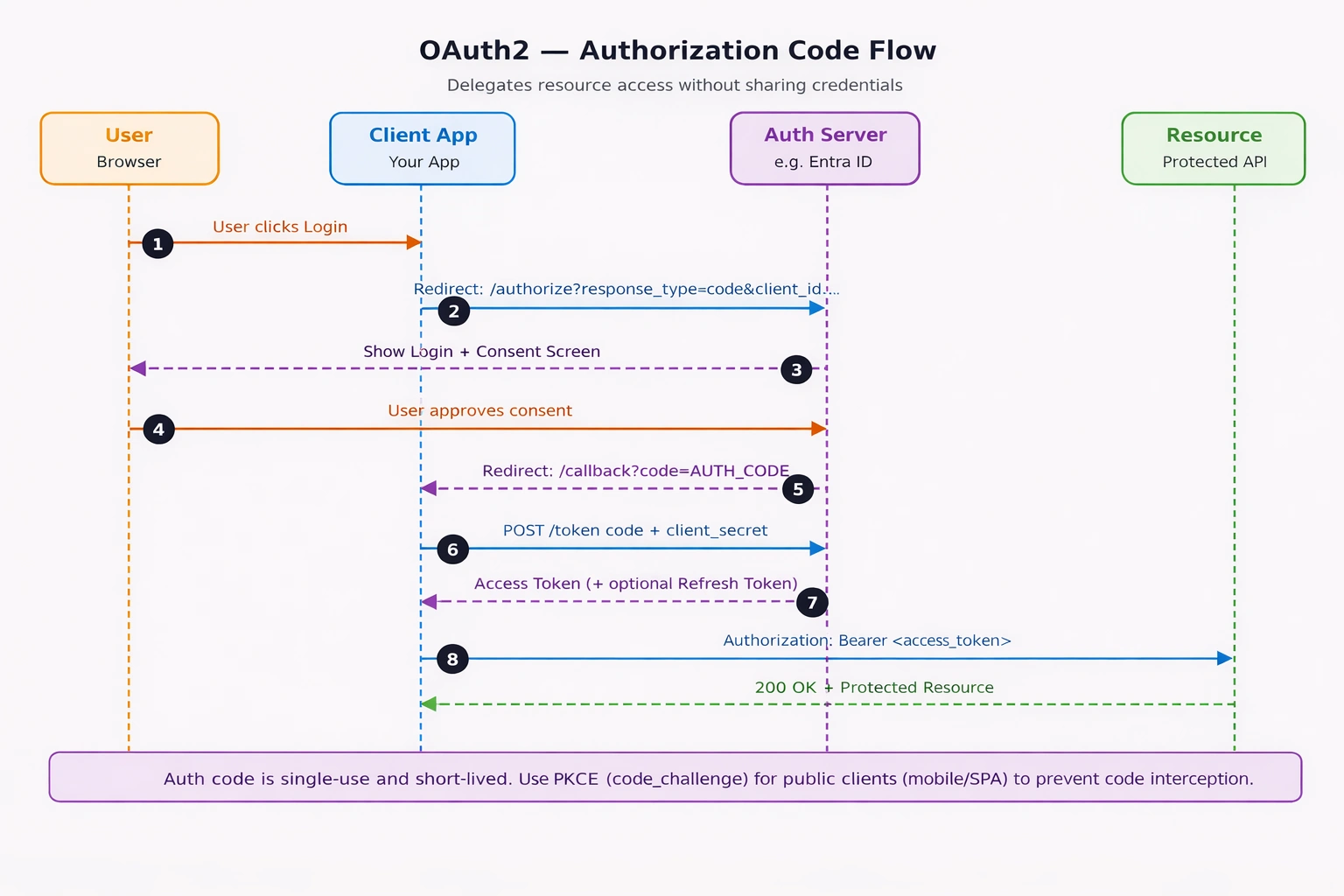
OAuth2 Authorization Code Flow — 8-step sequence from user click to protected resource access.
OpenID Connect (OIDC) — Authentication Layer on OAuth2
OIDC adds an ID token (a JWT) on top of OAuth2’s access token. The ID token contains the user’s verified identity — email, name, user ID. This is what enables “Sign in with Google / Microsoft / GitHub”.
| OAuth2 | OIDC | |
|---|---|---|
| Purpose | Authorization only | Authentication + Authorization |
| Output | Access Token | Access Token + ID Token (JWT) |
| Answers | “Can this app access X?” | “Who is this user?” |
| Standard | RFC 6749 | OpenID Connect Core 1.0 |
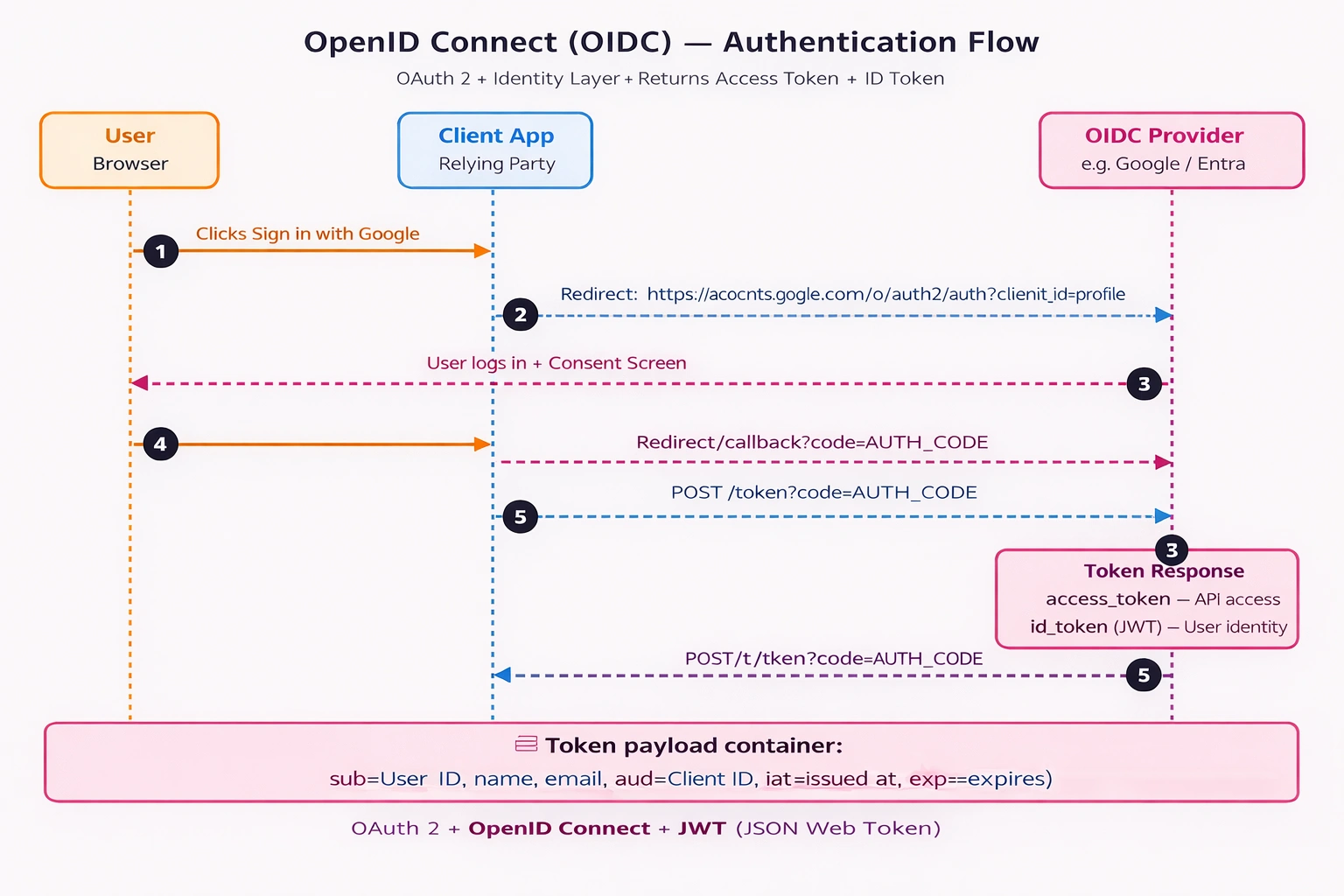
OpenID Connect Flow — authentication returning both access token and signed ID token.
Required NuGet packages:
Microsoft.Identity.Web
Microsoft.Identity.Web.UI   (if using Razor Pages / MVC login UI)
// Step 1: Add OIDC via Microsoft.Identity.Web (NuGet: Microsoft.Identity.Web)
builder.Services.AddAuthentication(OpenIdConnectDefaults.AuthenticationScheme)
.AddMicrosoftIdentityWebApp(builder.Configuration.GetSection("AzureAd"));
// Step 2: Add middleware — Authentication must come before Authorization
app.UseAuthentication();
app.UseAuthorization();
// Step 3: Read verified identity claims from the ID token
app.MapGet("/profile", [Authorize] (ClaimsPrincipal user) =>
{
var email = user.FindFirst("preferred_username")?.Value;
var name = user.FindFirst("name")?.Value;
return Results.Ok(new { name, email });
});{
"AzureAd": {
"Instance": "https://login.microsoftonline.com/",
"TenantId": "your-tenant-id",
"ClientId": "your-client-id",
"CallbackPath": "/signin-oidc"
}
}What the code does:
AddMicrosoftIdentityWebApp()wires up the full OIDC flow — redirect, token exchange, cookie creationClaims are read directly from the cryptographically verified ID token — no additional user lookup needed
preferred_usernameandnameare standard OIDC claims issued by Entra ID
ID Token payload contains: sub (user ID) · email · name · picture · iss (issuer) · aud (audience) · exp (expiry) — all cryptographically signed by the provider.
Single Sign-On (SSO)
SSO is not a protocol — it is the user experience of authenticating once with an Identity Provider (IdP) and accessing multiple independent services without logging in again.
The IdP creates a global session and issues an SSO cookie after the first login. Subsequent service requests present that cookie — the IdP validates the session and issues a token for the target service without prompting the user.
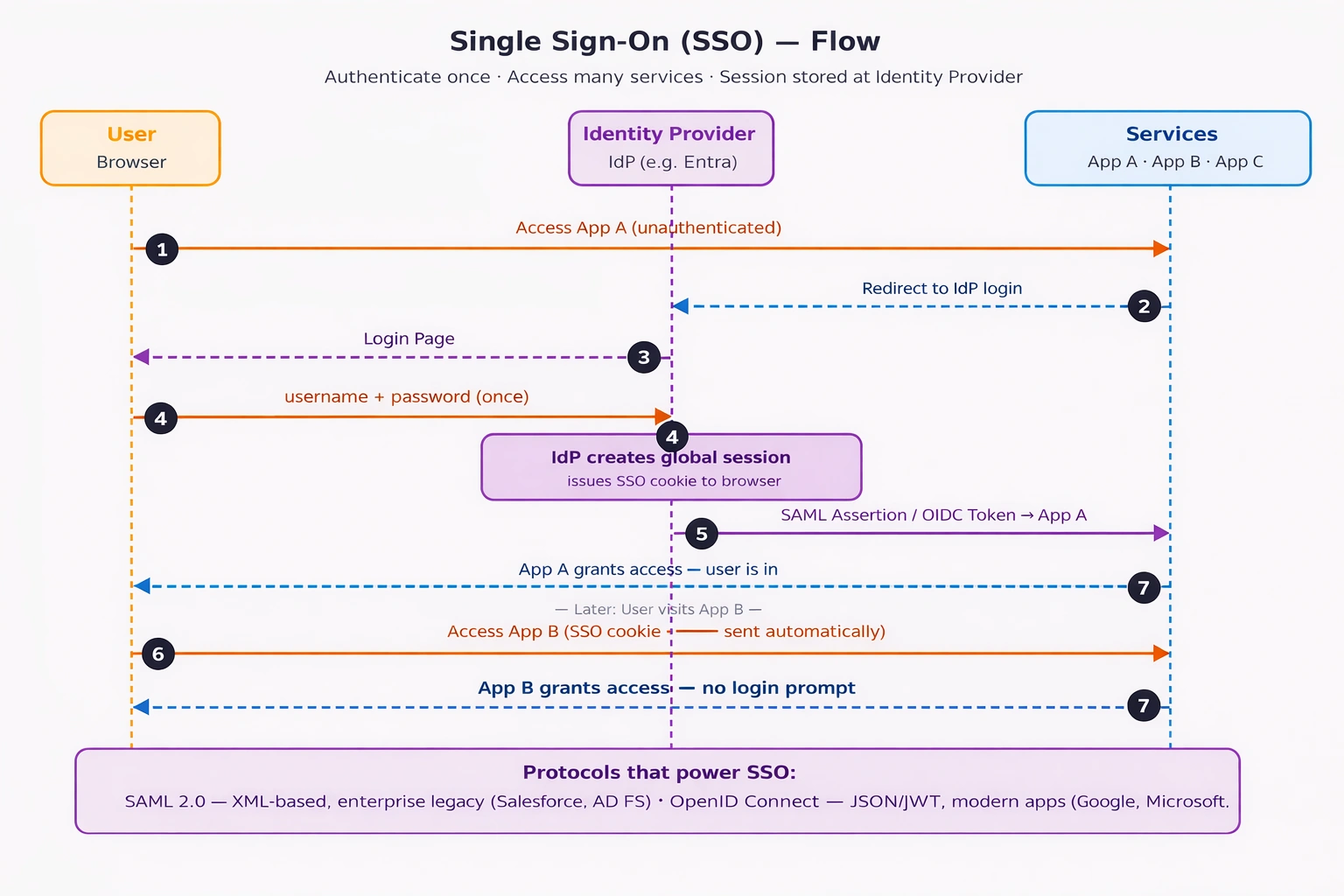
SSO Flow — authenticate once at the IdP, access multiple services without re-login.
| Protocol | Format | Best For |
|---|---|---|
| SAML 2.0 | XML-based assertion | Enterprise / legacy systems (Salesforce, AD FS, corporate dashboards) |
| OIDC | JSON / JWT | Modern web and mobile apps (Google, Microsoft, GitHub) |
mTLS — Service-to-Service Authentication
Mutual TLS (mTLS) is the recommended approach for zero-trust service-to-service authentication in high-security environments. Unlike JWT where only the server presents a certificate, mTLS requires both sides to present and verify certificates simultaneously.
It is typically managed at the infrastructure level by a service mesh (Istio, Linkerd, or Azure Service Fabric) rather than in application code, making it transparent to individual services. Use mTLS when JWT alone is not sufficient for your internal microservice trust boundary.
8. Real-World Use Cases by Domain
Enterprise / Corporate IT
Employee portal with AD integration — OIDC with Microsoft Entra ID. Single login, federated identity, MFA enforcement at the IdP level.
Legacy ERP / Salesforce integration — SAML 2.0. XML-based assertions align with existing enterprise identity infrastructure.
SaaS / B2C Applications
Customer login with social providers — OIDC + Azure AD B2C. Supports Google, Facebook, Apple login with a single integration point.
Multi-tenant SaaS API — JWT with short-lived access tokens + refresh token rotation. Stateless, scales horizontally without shared session state.
Internal APIs & Microservices
Internal admin dashboard — Session-based with Redis. Instant revocation when an admin account is compromised.
Service-to-service in zero-trust network — mTLS via Istio or Azure Service Fabric. No application-level credential management required.
Developer-Facing & IoT
Public REST API for third-party developers — API Key with rate limiting and per-key scope control. Simple to issue, rotate, and revoke per client.
IoT device telemetry — API Key or certificate-based auth. Lightweight with no browser or redirect flow dependency.
9. Choosing the Right Authentication Method
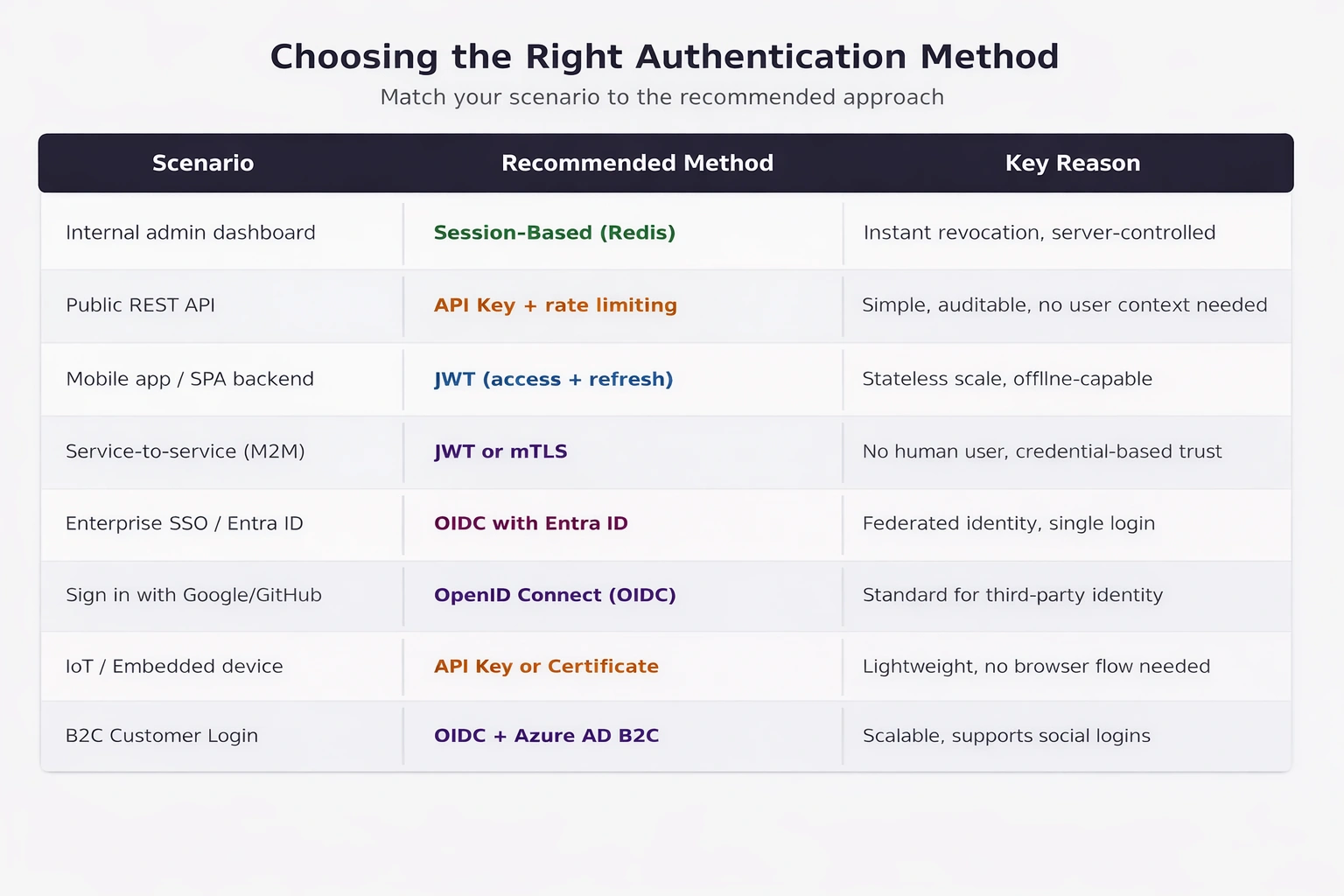
Decision Matrix — map your scenario to the recommended authentication method.
| Scenario | Recommended Method |
|---|---|
| Internal admin dashboard | Session-based (Redis) |
| Public REST API | API Key + rate limiting |
| Mobile app / SPA backend | JWT (short-lived access + refresh token) |
| Microservices (service-to-service) | JWT or mTLS |
| Enterprise SSO / Active Directory | OIDC with Entra ID or SAML |
| Sign in with Google / GitHub | OIDC |
| IoT / embedded devices | API Key or certificate-based |
| B2C customer login | OIDC + Azure AD B2C |
Quick Decision Rules
Need stateless scalability? → JWT with RS256
Need instant revocation? → Session-based or JWT + Redis blocklist
Need third-party delegated access? → OAuth2 Authorization Code + PKCE
Need federated identity / SSO? → OIDC or SAML
Need machine-to-machine? → OAuth2 Client Credentials or API Key
Need zero-trust service mesh? → mTLS
Summary
Authentication is not one-size-fits-all. Basic Auth works for internal scripts. API Keys suit machine-to-machine flows. Sessions power traditional web apps with instant revocation. JWTs enable stateless, horizontally scalable APIs. OAuth2 and OIDC handle delegated and federated identity at enterprise scale. mTLS secures zero-trust service meshes.
The right choice depends on your scale requirements, revocation needs, user experience, and whether you need to establish identity or just permission.
Pick the method that fits the problem — not the one that sounds most modern.
Join the conversation! Your thoughts help the community grow.