
1. The Authentication Problem
Every system that holds data worth protecting must answer one question before anything else: Who is this person, and can I trust them?
That question — authentication — is the front door of your application. Get it wrong and no amount of firewall rules, rate limiting, or encryption will save you. Yet developers frequently mix up authentication methods, misuse token formats, or reach for the most modern solution when a simpler one fits better.
This guide covers every major authentication type — from basic credentials to modern federated identity — explains how each works mechanically, shows working C# / ASP.NET Core examples, and gives you a clear decision framework for choosing the right approach.
One clarification before we begin:
Authentication answers: Who are you? → Verifies identity → Returns
401 Unauthorizedon failureAuthorization answers: What can you do? → Verifies permissions → Returns
403 Forbiddenon failure
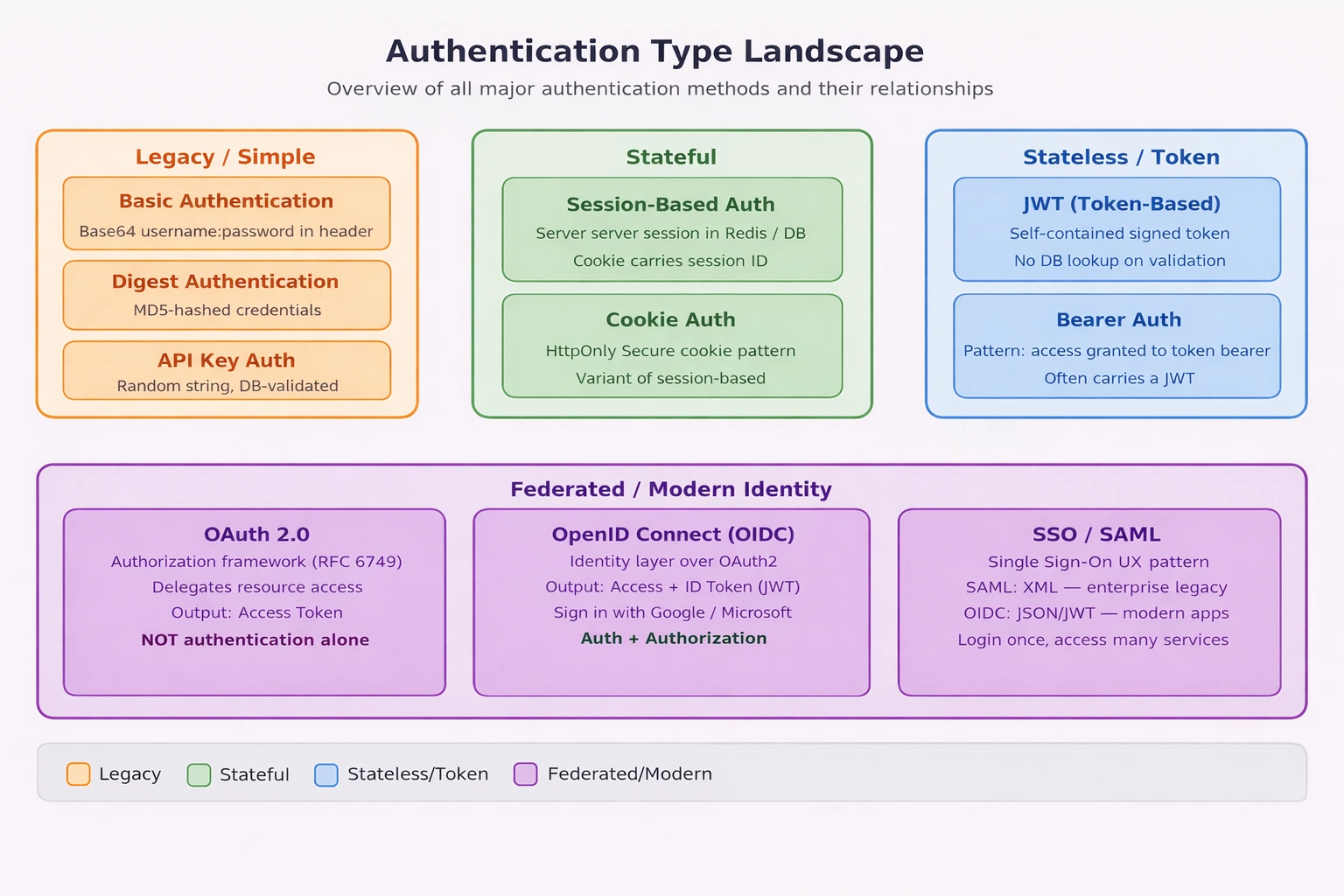
Authentication Type Landscape — visual map of all auth types and their relationships.
2. Clearing the Confusion — Common Misconceptions
Before comparing authentication types, let us eliminate four of the most common misconceptions in the industry:
| Concept | What Developers Think It Is | What It Actually Is |
|---|---|---|
| JWT | An authentication method | A token format (RFC 7519) |
| Bearer Auth | The same as JWT | A pattern — access granted to whoever holds the token |
| OAuth2 | An authentication protocol | An authorization framework (RFC 6749) |
| SSO | A standalone auth method | A UX pattern enabled by identity protocols (SAML, OIDC) |
Understanding these distinctions prevents architectural mistakes — like using OAuth2 alone to verify a user’s identity, or treating a JWT as inherently secure just because it looks like a token.
3. Legacy Methods — Basic & Digest Authentication
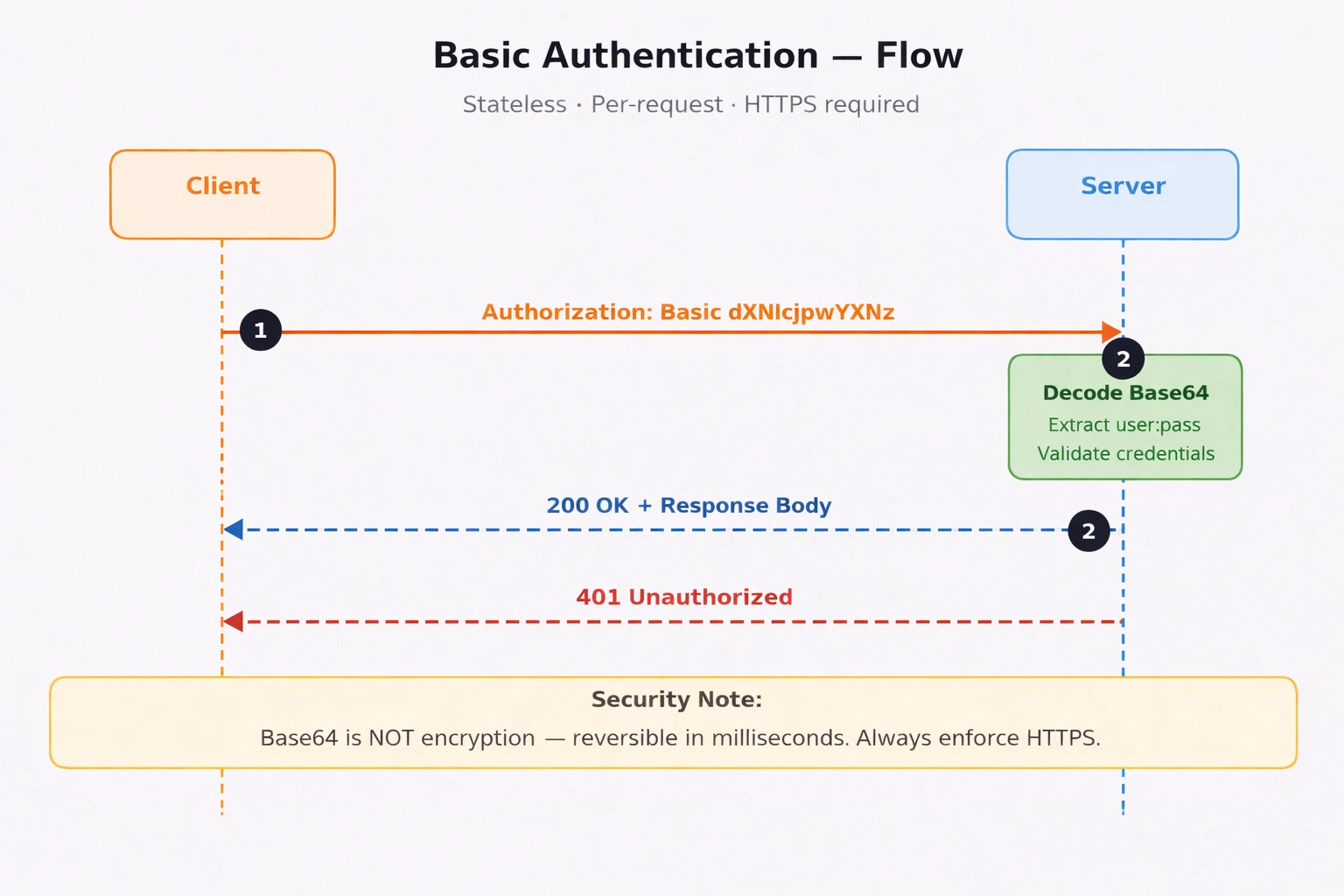
Basic Authentication Flow — per-request credential validation sequence.
Basic Authentication
The client encodes username:password in Base64 and sends it in every request header:
Authorization: Basic dXNlcjpwYXNzd29yZA==Base64 is not encryption — it is trivially reversible in milliseconds. Basic Auth is only acceptable over HTTPS, and strictly for internal tooling or development environments.
// Middleware: Validate Basic Auth header
app.Use(async (context, next) =>
{
    var authHeader = context.Request.Headers["Authorization"].ToString();

    if (authHeader.StartsWith("Basic "))
    {
        var encoded  = authHeader["Basic ".Length..].Trim();
        var decoded  = Encoding.UTF8.GetString(Convert.FromBase64String(encoded));
        var parts    = decoded.Split(':', 2);
        var username = parts[0];
        var password = parts[1];

        // Step 1: Validate against your user store
        // Replace this hardcoded check with IUserService.ValidateAsync() in production
        if (username == "admin" && password == "secret")
        {
            await next(); // Step 2: Allow through
            return;
        }
    }

    // Step 3: Reject with proper WWW-Authenticate challenge header
    context.Response.StatusCode = 401;
    context.Response.Headers["WWW-Authenticate"] = "Basic realm=\"MyApp\"";
});
What the code does:
Reads and decodes the
Authorizationheader on every requestSplits the decoded value into username and password
Validates credentials — replace the hardcoded check with
IUserService.ValidateAsync()in real codeReturns
401with aWWW-Authenticateheader to prompt re-authentication
When to use: Internal admin dashboards, local dev tools, legacy system integrations only.
When NOT to use: Any public-facing endpoint, production APIs, mobile apps.
Digest Authentication
Digest Auth improves on Basic Auth by using MD5 hashing instead of plain Base64. Rather than sending credentials directly, it uses a challenge-response handshake — the server issues a nonce (one-time random value), the client hashes its credentials combined with that nonce, and sends the hash back. The server independently computes the same hash and compares. This prevents replay attacks — intercepting the hash is useless because the nonce changes every request.
// Step 1 — Server sends a 401 challenge with a nonce
HTTP/1.1 401 Unauthorized
WWW-Authenticate: Digest realm="MyApp", nonce="dcd98b7102dd2f0e", algorithm=MD5

// Step 2 — Client hashes credentials + nonce and replies
Authorization: Digest username="admin",
               realm="MyApp",
               nonce="dcd98b7102dd2f0e",
               uri="/api/data",
               response="6629fae49393a05397450978507c4ef1"
               // response = MD5(MD5(user:realm:pass) + ":" + nonce + ":" + MD5(method:uri))

// Step 3 — Server recomputes the same MD5 hash independently
//           If hashes match → 200 OK
//           If hashes differ → 403 Forbidden
How it works in .NET — conceptual flow:
ASP.NET Core has no built-in Digest Auth middleware. It was supported in classic ASP.NET / IIS via Windows Authentication but was not carried forward into the modern pipeline. In practice, you would implement it as custom middleware — but you should not.
// Conceptual flow — how a custom Digest Auth middleware would work in ASP.NET Core
// (Illustrative only — do not implement this in new systems)

app.Use(async (context, next) =>
{
    var authHeader = context.Request.Headers["Authorization"].ToString();

    if (!authHeader.StartsWith("Digest "))
    {
        // Step 1: No Digest header — issue a challenge with a fresh nonce
        var nonce = Convert.ToBase64String(Guid.NewGuid().ToByteArray());
        context.Response.StatusCode = 401;
        context.Response.Headers["WWW-Authenticate"] =
            $"Digest realm=\"MyApp\", nonce=\"{nonce}\", algorithm=MD5";
        return;
    }

    // Step 2: Parse the Digest header fields (username, nonce, response hash, uri)
    var digestParams = ParseDigestHeader(authHeader);

    // Step 3: Retrieve the stored password hash for the username
    var storedPasswordHash = await userStore.GetPasswordHashAsync(digestParams["username"]);

    // Step 4: Recompute the expected MD5 response hash server-side
    // HA1 = MD5(username:realm:password)
    // HA2 = MD5(httpMethod:requestUri)
    // ExpectedResponse = MD5(HA1:nonce:HA2)
    var ha1 = ComputeMD5($"{digestParams["username"]}:MyApp:{storedPasswordHash}");
    var ha2 = ComputeMD5($"{context.Request.Method}:{digestParams["uri"]}");
    var expectedResponse = ComputeMD5($"{ha1}:{digestParams["nonce"]}:{ha2}");

    // Step 5: Compare server-computed hash with client-supplied hash
    if (expectedResponse != digestParams["response"])
    {
        context.Response.StatusCode = 403;
        return;
    }

    await next(); // Step 6: Hashes match — allow through
});
What the flow shows:
The server never sees the plain password — only compares MD5 hashes
The nonce binds the hash to this specific request — replaying the same hash on a new request fails
ASP.NET Core has no native support — any real implementation requires fully custom middleware
MD5 is broken cryptographically — collision attacks are practical, making this unsafe for new systems
Why ASP.NET Core dropped Digest Auth: MD5 was deprecated by NIST in 2011. Modern .NET security guidance (Microsoft and OWASP) recommends JWT, OIDC, or API Keys for all new development. If you are integrating with a legacy system that requires Digest Auth, use an intermediary gateway (e.g., Azure API Management) to handle the handshake rather than implementing it in application code.
When to use: Legacy integrations that explicitly require it — nothing else.
When NOT to use: Any new system. Use JWT or OIDC instead.
4. API Key Authentication
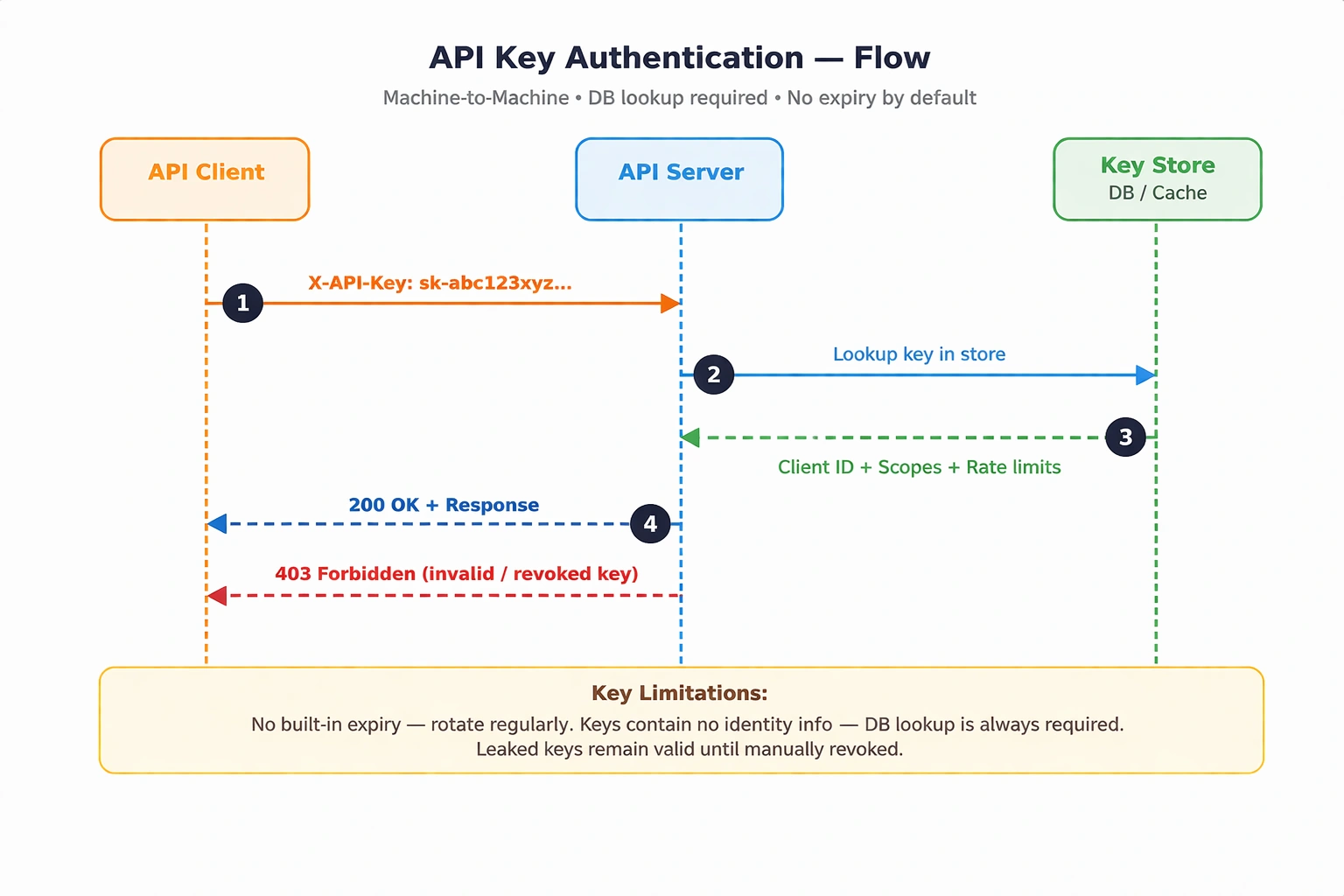
API Key Authentication Flow — database lookup required on every request.
A unique random string is generated per client and sent with each request — either in a custom header or as a query parameter.
X-API-Key: sk-abc123xyz789...Unlike JWTs, API keys contain no embedded information. Every validation requires a database lookup to resolve the key to a client identity and its associated scopes.
Security note: API keys have no built-in expiration. If a key is leaked, it remains valid until manually revoked. Always store only a hash of the key in your database — never the raw value. Use HMACSHA256 or SHA256 when hashing.
Required NuGet package: None — uses standard ASP.NET Core middleware.
// Step 1: Register IApiKeyService in DI container (Program.cs)
builder.Services.AddScoped<IApiKeyService, ApiKeyService>();

// Step 2: Define API Key validation middleware
app.Use(async (context, next) =>
{
    if (!context.Request.Headers.TryGetValue("X-API-Key", out var extractedApiKey))
    {
        context.Response.StatusCode = 401;
        await context.Response.WriteAsync("API Key missing.");
        return;
    }

    // Step 3: Resolve IApiKeyService via DI and validate
    var apiKeyService = context.RequestServices
        .GetRequiredService<IApiKeyService>();
    var isValid = await apiKeyService.ValidateAsync(extractedApiKey!);

    if (!isValid)
    {
        context.Response.StatusCode = 403;
        await context.Response.WriteAsync("Invalid or revoked API Key.");
        return;
    }

    // Step 4: Proceed to next middleware
    await next();
});
What the code does:
Checks for the
X-API-Keyheader — returns401if absentResolves
IApiKeyServicefrom the DI container for clean testabilityValidates the key against your store — returns
403if invalid or revokedCalls
next()only when the key is confirmed valid
When to use: Machine-to-machine communication, public APIs with rate-limiting, webhooks, IoT device auth.
When NOT to use: User-facing login flows, or scenarios requiring granular per-resource permission scopes.
5. Session-Based Authentication (Stateful)
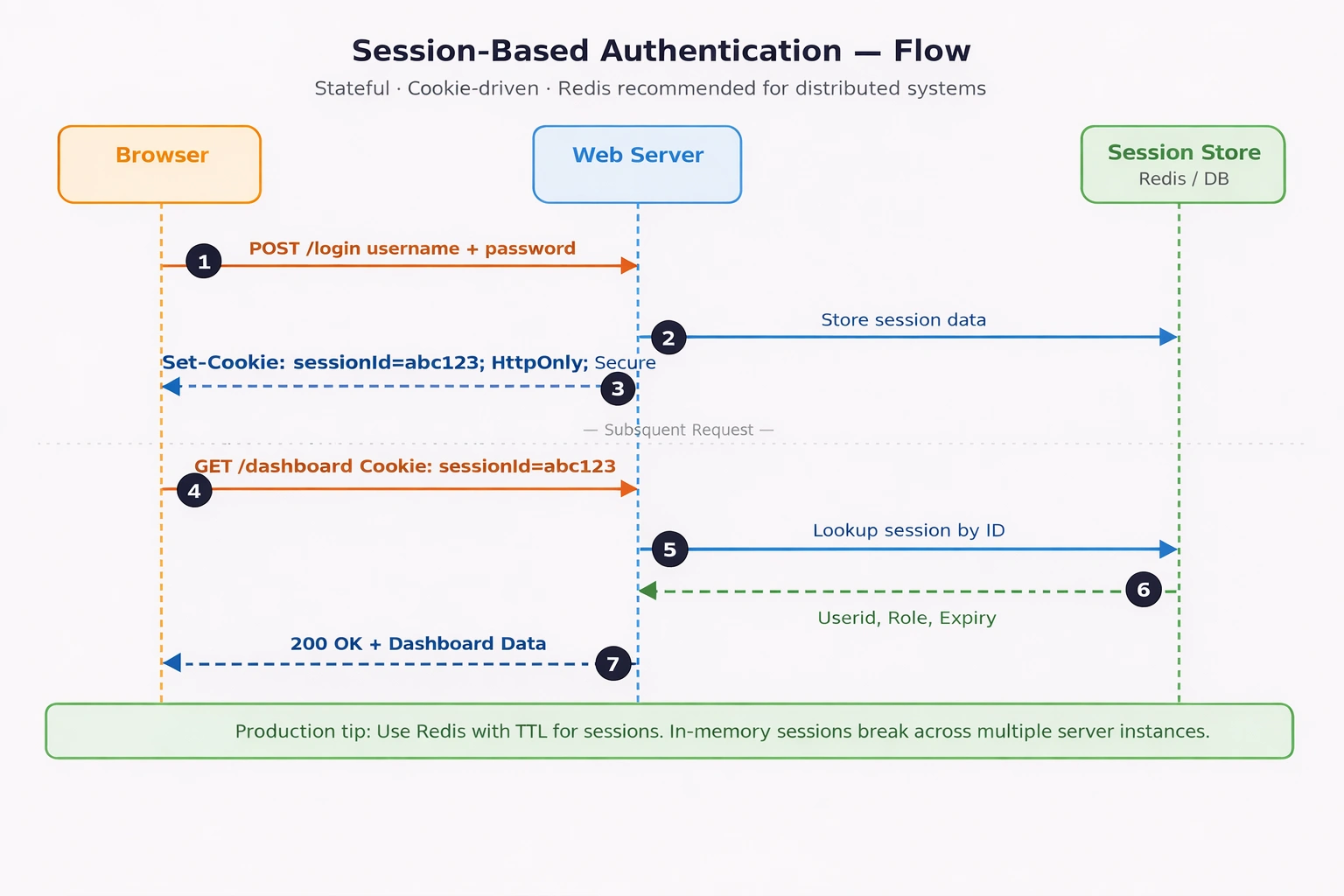
Session-Based Authentication Flow — login, session creation, and per-request validation sequence.
The traditional web authentication model. Upon successful login, the server creates a session record in a store (Redis, SQL, or in-memory) and returns a session ID via a cookie. Every subsequent request carries that cookie, and the server resolves it back to the session.
Set-Cookie: sessionId=abc123; HttpOnly; Secure; SameSite=Strict// Step 1: Register session services in Program.cs
builder.Services.AddScoped<IUserService, UserService>();
builder.Services.AddDistributedMemoryCache(); // use AddStackExchangeRedisCache() in production
builder.Services.AddSession(options =>
{
options.IdleTimeout = TimeSpan.FromMinutes(30);
options.Cookie.HttpOnly = true;
options.Cookie.IsEssential = true;
options.Cookie.SecurePolicy = CookieSecurePolicy.Always;
});
var app = builder.Build();
// Step 2: Register session middleware — must appear before UseAuthentication()
// Omitting app.UseSession() means sessions are registered but silently inactive
app.UseSession();
app.UseAuthentication();
app.UseAuthorization();
// Step 3: Login endpoint — IUserService injected via minimal API DI
app.MapPost("/login", async (HttpContext context, LoginRequest req,
IUserService userService) =>
{
var user = await userService.ValidateAsync(req.Username, req.Password);
if (user is null) return Results.Unauthorized();
// Step 4: Persist identity into session store
context.Session.SetString("UserId", user.Id.ToString());
context.Session.SetString("Role", user.Role);
return Results.Ok("Logged in successfully.");
});
// Step 5: Protected endpoint — read and validate session
app.MapGet("/dashboard", (HttpContext context) =>
{
var userId = context.Session.GetString("UserId");
if (userId is null) return Results.Unauthorized();
return Results.Ok($"Welcome, user {userId}");
});What the code does:
Registers session with
HttpOnly,Secure, and 30-minute idle timeoutapp.UseSession()activates session middleware in the pipeline — this call is mandatory; without it sessions silently do not workLogin endpoint validates via injected
IUserService, storesUserIdandRolein sessionProtected endpoint reads
UserIdfrom session — returns401if missing (expired or not logged in)
Production note: Replace
AddDistributedMemoryCache()withAddStackExchangeRedisCache(). In-memory sessions are node-local — they break silently when running multiple instances or after a pod restart.

When to use: Server-rendered web apps, monolithic architectures, admin portals requiring instant revocation.
When NOT to use: Distributed microservices, mobile apps, public APIs, serverless architectures.
6. Token-Based Authentication — JWT (Stateless)
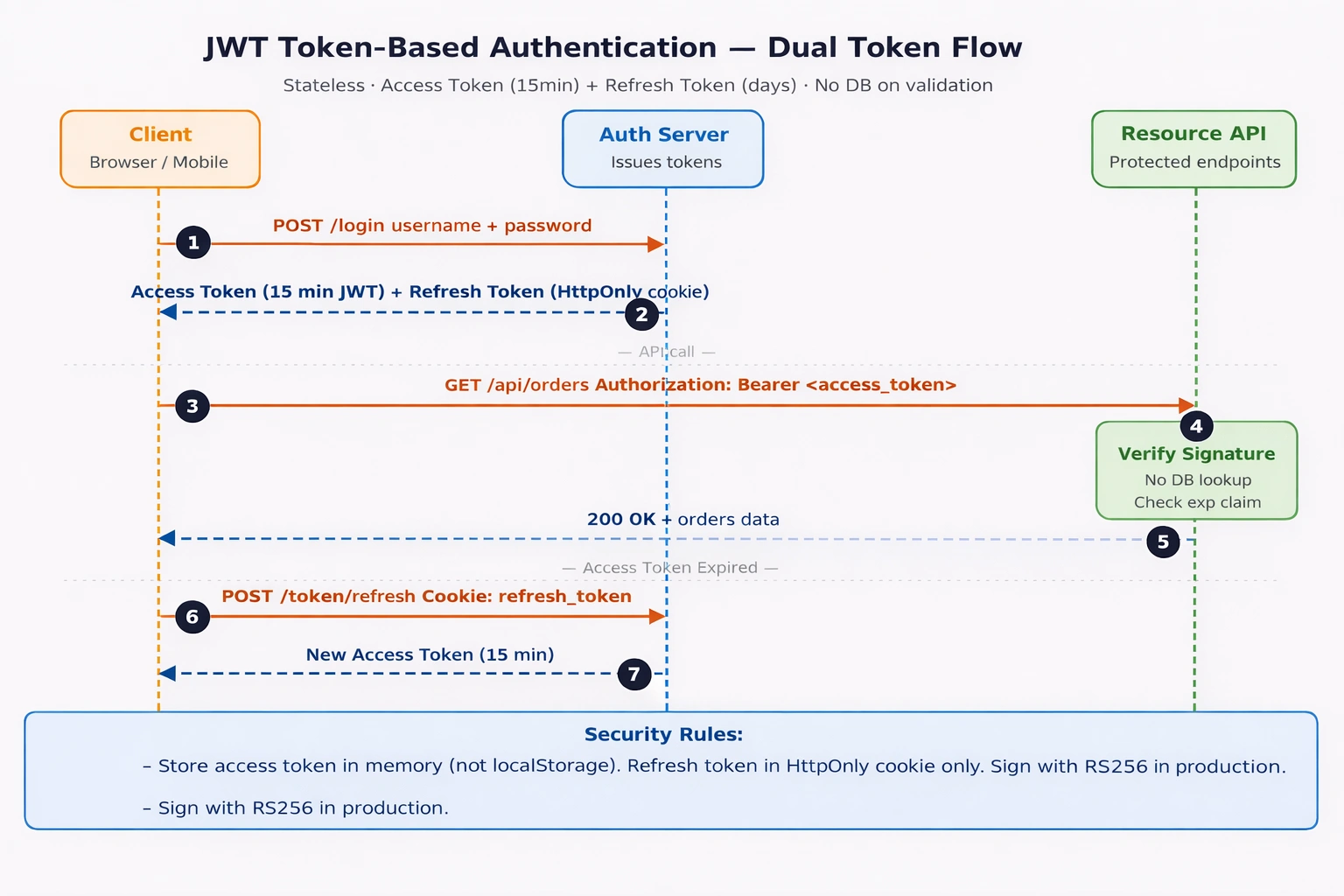
JWT Dual-Token Flow — login, access token usage, expiry, and silent refresh sequence.
JSON Web Tokens (JWT) are self-contained, signed tokens that carry identity claims directly inside them. The server validates the signature locally — no database lookup required. This is the core stateless advantage.
A JWT has three Base64URL-encoded parts separated by dots:
Header.Payload.Signature
eyJhbGciOiJIUzI1NiJ9.eyJzdWIiOiJ1c2VyMSIsInJvbGUiOiJhZG1pbiIsImV4cCI6MTcwMDAwMH0.SflKxwRJSMeKKF2QT4fwpMeJf36P
Header: Algorithm —
HS256(symmetric) orRS256(asymmetric, recommended for production)Payload: Claims —
sub,role,exp,iat,jti(unique token ID for revocation)Signature: Cryptographic proof the token was not tampered with
How signature verification works — no DB needed: The server re-computes the expected signature using its own secret key (or public key for RS256) and compares it to the incoming token’s signature. If they match, the payload is trusted as-is. If the token was modified at all, the signatures will not match and the request is rejected — entirely without a network call.
Join the conversation! Your thoughts help the community grow.