

In this article we are going to learn how to access the HomeGroup location in a Windows Store Application using C#.
Introduction
HomeGroup is one of the known locations that can be suggested to the file picker as a starting location. The file picker will open at the last opened location and not always the suggested location. You can also picki a video from the homegroup, and stream it to a video tag in a Windows Store Application.
HomeGroup will only be available if the PC belongs to a homegroup. You can access the files and folders from the HomeGroup location.
Now, let's begin to create an Windows Store Application using C#.
Step 1
Select a Blank template of Windows Store Application using XAML.
Now to add some capabilities in the application to easily access the network location.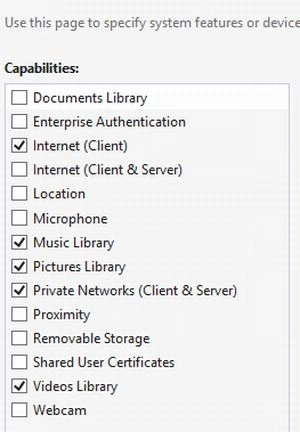
Add a Declaration of a FileOpenPicker Contract and select any file supported as the following image shows: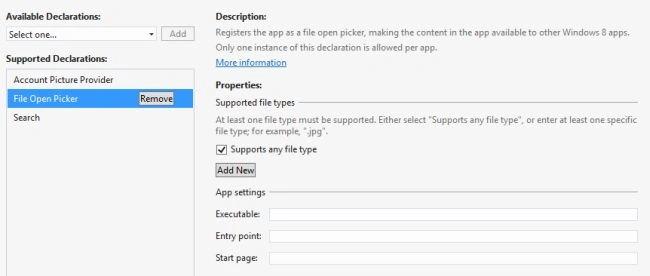
Step 2
In this step I put some UI control in the MainPage.xaml file.
<Page
x:Class="HomeGroup_Location.MainPage"
xmlns="http://schemas.microsoft.com/winfx/2006/xaml/presentation"
xmlns:x="http://schemas.microsoft.com/winfx/2006/xaml"
xmlns:local="using:HomeGroup_Location"
xmlns:d="http://schemas.microsoft.com/expression/blend/2008"
xmlns:mc="http://schemas.openxmlformats.org/markup-compatibility/2006"
mc:Ignorable="d">
<Grid Background="{StaticResource ApplicationPageBackgroundThemeBrush}">
<StackPanel Orientation="Vertical" Margin="0,10,0,0" Grid.Row="1">
<Button x:Name="openPicker" Content="Open picker" Margin="0,0,10,0" Click="OpenPickerButton_Click"/>
<StackPanel Orientation="Horizontal">
<Button x:Name="videoPicker" Content="Pick video" Margin="0,0,10,0" Click="PickVideo_Click"/>
<Grid x:Name="Output" >
Join the conversation! Your thoughts help the community grow.