Introduction
Let us see how to call Microsoft cloud data using Azure Active Directory authentications from SharePoint Framework components.
In my previous article, you have seen setting up Azure Active Directory application for granting the necessary permissions.
In this article, you will see how to make authenticated calls for pulling the SharePoint data from Microsoft graph. The authentications are provided using Azure Active Directory apps, explained in the previous article. These apps provide the necessary permissions to access the Graph data. Multiple sets of APIs are provided with necessary permissions before making the calls.
This will help to access the Microsoft data like O365 emails, events, calendar, user profile data, etc. with the help of Graph APIs.
In the sample, let us try to pull the users from Office 365 tenant using Graph APIs. Here, SPFx web parts are used along with the React Framework in the samples.
Steps Involved
Create the SPFx web part using the following command. Input the necessary details and create the web part.
yo @microsoft/sharepoint
Two functions are used to pull the data. First, we need to get the request token for accessing the graph data. Once the request token is available, we can make necessary calls for getting the data from Office 365 portal using graph API.
In the first function, the necessary Azure client app details are stored. Using the available details, authentication URL is built. This authentication URL will be executed to get the request token from Azure. The page will be redirected, and request token will be available in the redirected page URL.
Note
The client ID in the below code is copied from the app created in the previous article (app id).
- public requestToken() {
- var clientId = 'xxxxxxxx-xxxx-xxxx-xxxx-xxxxxxxxxxxx';
- var replyUrl = 'https://nakkeerann.sharepoint.com/sites/spfx/_layouts/15/workbench.aspx';
- var resource = "https://graph.microsoft.com";
- var authServer = 'https://login.microsoftonline.com/nakkeerann.onmicrosoft.com/oauth2/authorize?';
- var responseType = 'token';
-
- var url = authServer +
- "response_type=" + encodeURI(responseType) + "&" +
- "client_id=" + encodeURI(clientId) + "&" +
- "resource=" + encodeURI(resource) + "&" +
- "redirect_uri=" + encodeURI(replyUrl);
-
- window.location.assign(url);
- }
Once we get the token after page reloading, the token is sent as bearer token in the AJAX call for requesting the Graph data. In the response, necessary data will be sent back. For example, in this case, we are pulling the users' information.
- public getspdata(){
-
- $.ajax({
- url: "https://graph.microsoft.com/v1.0/users",
- type: "GET",
- headers: { "Authorization": "Bearer "+this.token },
- success: function (data) {
- data.value.forEach(element => {
- $("#users")[0].innerHTML += "<li>"+element.displayName+"</li>";
- });
-
- },
- error: function (sender, args) {
- console.log("error");
- }
- });
- }
The whole React logic on SPFx components is shown below.
- export default class Graphdata extends React.Component<IGraphdataProps, void> {
- public token = null;
- public render(): React.ReactElement<IGraphdataProps> {
- this.token = this.getParameterByName('access_token');
- if(this.token == null){
- this.requestToken();
- }
- else{
- this.getspdata();
- }
- return (
- <div className={styles.helloWorld}>
- <ul id="users" className={styles.container}>
-
- </ul>
- </div>
- );
- }
- public getspdata(){
-
- $.ajax({
- url: "https://graph.microsoft.com/v1.0/users",
- type: "GET",
- headers: { "Authorization": "Bearer "+this.token },
- success: function (data) {
- data.value.forEach(element => {
- $("#users")[0].innerHTML += "<li>"+element.displayName+"</li>";
- });
-
- },
- error: function (sender, args) {
- console.log("error");
- }
- });
- }
-
- public getParameterByName(name) {
- var url = window.location.href;
- name = name.replace(/[\[\]]/g, "\\$&");
- var regex = new RegExp("[?&#]" + name + "(=([^&#]*)|&|#|$)"),
- results = regex.exec(url);
- if (!results) return null;
- if (!results[2]) return '';
- return decodeURIComponent(results[2].replace(/\+/g, " "));
- }
-
-
- public requestToken() {
- var clientId = 'xxxxxxxx-xxxx-xxxx-xxxx-xxxxxxxxxxxx';
- var replyUrl = 'https://nakkeerann.sharepoint.com/sites/spfx/_layouts/15/workbench.aspx';
- var resource = "https://graph.microsoft.com";
- var authServer = 'https://login.microsoftonline.com/nakkeerann.onmicrosoft.com/oauth2/authorize?';
- var responseType = 'token';
-
- var url = authServer +
- "response_type=" + encodeURI(responseType) + "&" +
- "client_id=" + encodeURI(clientId) + "&" +
- "resource=" + encodeURI(resource) + "&" +
- "redirect_uri=" + encodeURI(replyUrl);
-
- window.location.assign(url);
- }
- }
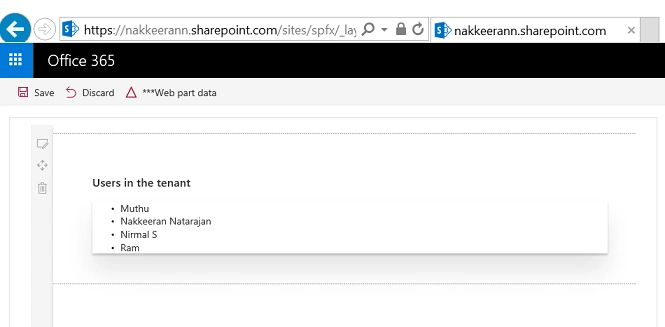
The following snapshot shows the SharePoint page along with the Graph data rendered. This shows the users from the current Office 365 tenant.
SummaryThus, you have seen how to extract the Microsoft cloud data (Office 365 users) from Office 365 using Graph APIs on SharePoint Framework components. Azure Active Directory and Client applications are used for setting the necessary permissions for APIs and authentications, which was explained in the previous article.


Madhan ThuraiPosted Aug 28, 2017, 5:21 AM
Ur Article good no doubt...Bt i did'nt understand anything :(