

Introduction
XRM Toolkit plays an important role for Dynamics CRM Developers to integrate and transfer data from Dynamics CRM and any outside Web Resource developed and implemented in any language including HTML Web Resource: Angular JS: Javascript etc.
In this article, we will be covering steps to consume XRM. For basic steps to create an Angular Application please refer to the previous blog.
Steps
- We need to add the following line of code to “Index.HTML”, as this will add the ClientGlobalContext to the Angular JS component.
<script type="text/javascript" src="../ClientGlobalContext.js.aspx"></script>
- Now we need to download and install the XRM tool libraries to our project, so please open your terminal and execute the below command.
npm install --save @types/xrm
- Now we need to update the tsconfig.app.json file in our project. Need to add the value xrm in the types parameter.

- Now am just doing a simple request to the Dynamics CRM to get the details of the logged-in user.
- On Initialization of Angular JS component, we will first.
- Get the Base URL of the Dynamics CRM Instance
- Using the same, we will be accessing the user settings to get the User Details
- Once the User details are accessed, we will be using the same to access the username and show it as an alert in Dynamics CRM

- On Initialization of Angular JS component, we will first.
- The output of the same is as shown below.
- Once the Lead Form loads, our Angular JS component is loaded and this will trigger the OnInit() method. We will get an alert with a logged-in UserName.

- Once the Lead Form loads, our Angular JS component is loaded and this will trigger the OnInit() method. We will get an alert with a logged-in UserName.
Steps to consume Dynamics CRM – Web API in Dynamics CRM
Now, since we have been able to access the XRM successfully in our Angular JS component, the next step is to access the data from Dynamics CRM to undertake CRUD operations. The simplest way for undertaking this is by accessing the WebAPI.
For the same, need to first install the CRM Rest Builder Solution.
CRM Rest Builder empowers a developer to create Web API requests within a few seconds. This can be used directly in the Angular JS HTML component.

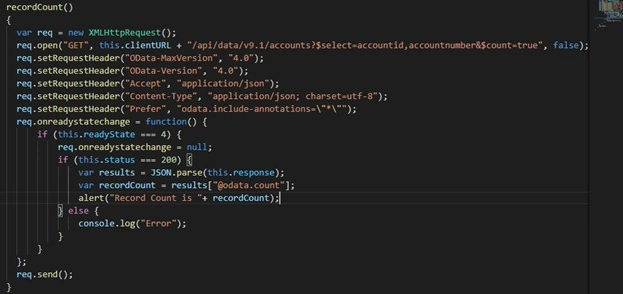
In this example, we will be trying to get the count of Account Records in Dynamics CRM Instance and for the same will be creating a web request
- Adding a <button> tag in app.component.html, on click of this button, we will be calling a method which will be sending out Web API request to Dynamics CRM to get the data.

- Adding a method in the app.component.ts, which will be called on click of a button.
- Bingo: Output

Tirujit BasakPosted Mar 3, 2023, 3:22 PM
How to do the same in case of reactjs?