

Introduction
An Activity is a sub-container within an application container that describes all the UI controls.
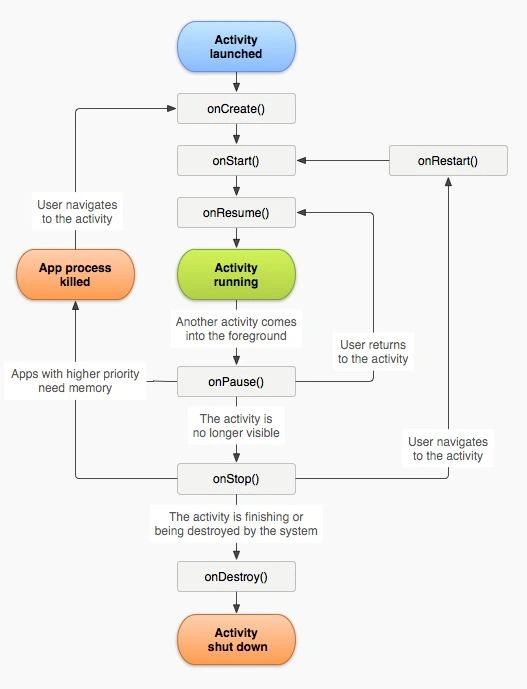
Every Container has a life cycle (methods) that determine the phase's Activity.
To create an Activity in Android we have to extend the Activity class.
How to work with an Activity?
An Image view of an Activity's life cycle:
The following is the source code.
MainActivity.java
- package com.Saving.savingactivity;
- import android.os.Bundle;
- import android.app.Activity;
- //import android.view.Menu;
- import android.widget.Toast;
- public class MainActivity extends Activity {
- @Override
- protected void onRestoreInstanceState(Bundle savedInstanceState) {
- super.onRestoreInstanceState(savedInstanceState);
- Toast.makeText(getBaseContext(), "Restored ", Toast.LENGTH_LONG).show();
- };
- @Override
- protected void onStart() {
- // TODO Auto-generated method stub
- super.onStart();
- Toast.makeText(getBaseContext(), "Started ", Toast.LENGTH_LONG).show();
- }
- @Override
- protected void onResume() {
- // TODO Auto-generated method stub
- super.onResume();
- Toast.makeText(getBaseContext(), "Resumed ", Toast.LENGTH_LONG).show();
- }
- @Override
- protected void onPause() {
- // TODO Auto-generated method stub
- super.onPause();
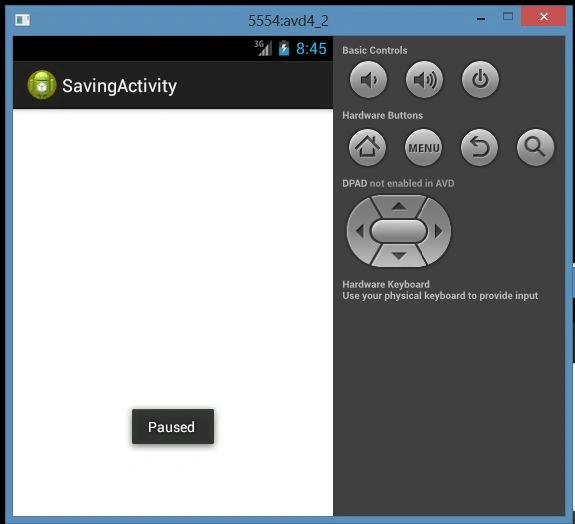
- Toast.makeText(getApplicationContext(), "Paused ", Toast.LENGTH_LONG).show();
- }
- @Override
- protected void onSaveInstanceState(Bundle outState) {
- // TODO Auto-generated method stub
- super.onSaveInstanceState(outState);
- Toast.makeText(getApplicationContext(), "Saved ", Toast.LENGTH_LONG).show();
- }
- @Override
- protected void onStop() {
- // TODO Auto-generated method stub
- super.onStop();
- Toast.makeText(getApplicationContext(), "Stoped ", Toast.LENGTH_LONG).show();
- }
- @Override
- protected void onDestroy() {
- // TODO Auto-generated method stub
- super.onDestroy();
- Toast.makeText(getApplicationContext(),"Destroy ", Toast.LENGTH_LONG).show();
- }
- }




Join the conversation! Your thoughts help the community grow.