

Introduction
This project demonstrates a quick and easy way
to add mapping to a windows desktop application (with an available internet
connection) using Google Maps as the basis and source for the map. The
demonstration application will map a point by either its physical address or its
latitude and longitude. Building the
application does not require any sort of agreement or licensing with Google;
there is no required API to invoke and using this approach it really won't take
more than a few minutes to put a map into your Visual Basic 2005 built desktop
application.

Figure 1: Mapping an Address (
Since the application is based entirely on Google Maps, as an added bonus, the Google Maps site provides all of the view manipulation controls necessary to navigate the map; so with no additional effort you pick up panning and zooming, traffic maps, street maps, raster imagery, and hybrid maps combining street maps with raster. You even get an overview map, the ability to print the map, email it, or link to it at no extra charge.
One could also remove
the interface and feed specific addresses or coordinates directly to equivalent
code and access specific maps directly through a web browser control.
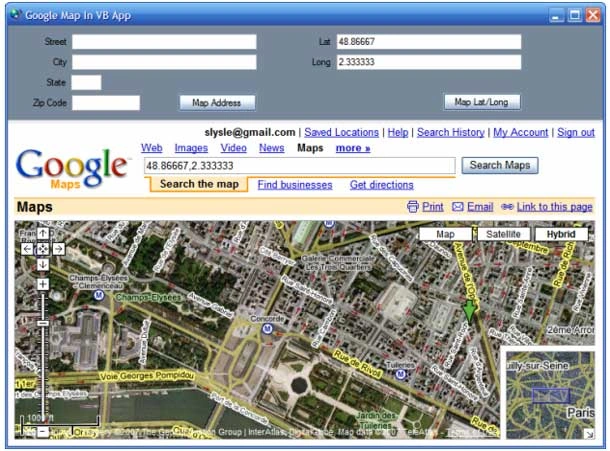
Figure 2: Mapping a
Latitude/Longitude Coordinate Pair (Paris).
Getting Started
The solution contains
a single project for a C# windows desktop application. The
project is called "VB_QuickMap"
and this project contains one form. The form contains all of the controls and
code necessary to request and display a map from the Google Maps site.
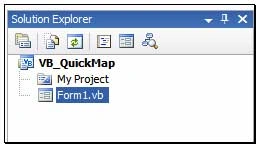
Figure 3: Solution Explorer with
Project Visible.
Form 1 contains a split panel control oriented horizontally; the top pane contains the controls used to enter the search terms. There are two sets of controls in this panel; the first set will collect an address in the form of the street, city, state, and zip code (5 digits). The second set of controls will collect a latitude and longitude. Both sets of controls have buttons; the click event handlers for these buttons are used to construct a query string used to retrieve the map based on either the address or coordinates supplied by the user.
The bottom pane of the control contains a panel with a web browser control docked into it. The query string is appended to the basic URL used to query Google Maps; the combined string is set as the navigation URL property for the web browser control.
Code: Form 1
The form 1 class starts out with the default class declaration. An import statement was added to pull in the System.Text library; this is required to support the use of string builders within the application.
Imports System.Text
Public Class Form1
Following the class declaration, the next bit of code in the class is used to handle the button click event that requests a map of a physical address from Google Maps; that code is as follows:
''' <summary>
''' Map a physical address
''' </summary>
''' <param name="sender"></param>
''' <param name="e"></param>
''' <remarks></remarks>
Private Sub btnMapIt_Click(ByVal sender As System.Object, ByVal e As
System.EventArgs) Handles btnMapIt.Click
Try
Dim street As String = String.Empty
Dim city As String = String.Empty
Dim state As String = String.Empty
Dim zip As String = String.Empty
Dim queryAddress As New StringBuilder()
queryAddress.Append("http://maps.google.com/maps?q=")
' build street part of query string
If txtStreet.Text <> String.Empty Then
street = txtStreet.Text.Replace(" ", "+")
queryAddress.Append(street + "," & "+")
End If
' build city part of query string
If txtCity.Text <> String.Empty Then
city = txtCity.Text.Replace(" ", "+")
queryAddress.Append(city + "," & "+")
End If
' build state part of query string
saquib karimPosted May 15, 2018, 2:42 PM
How to show the route between two cities only in google direction maps?