

Adding Data to a Blank Screen in LightSwitch Visual Studio 2012
In this article I describe how to add data to a blank screen in LightSwitch using Visual Studio 2012.
The following is the procedure for adding data to a blank screen in LightSwitch using Visual Studio 2012.
Step 1
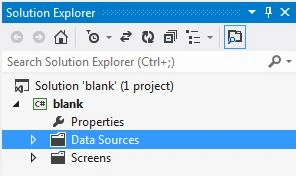
Open Solution Explorer.
Step 2
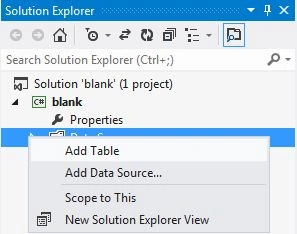
In Solution Explorer, right-click on the data source and choose "Add Table".
Step 3
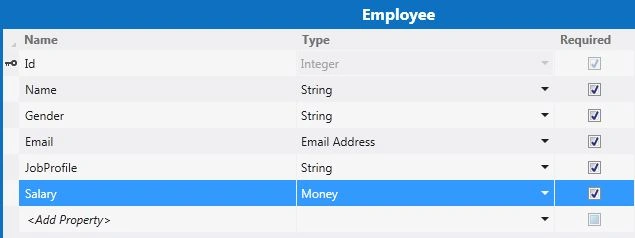
The table appears.
Step 4
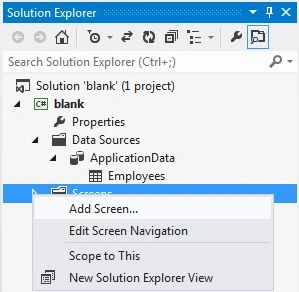
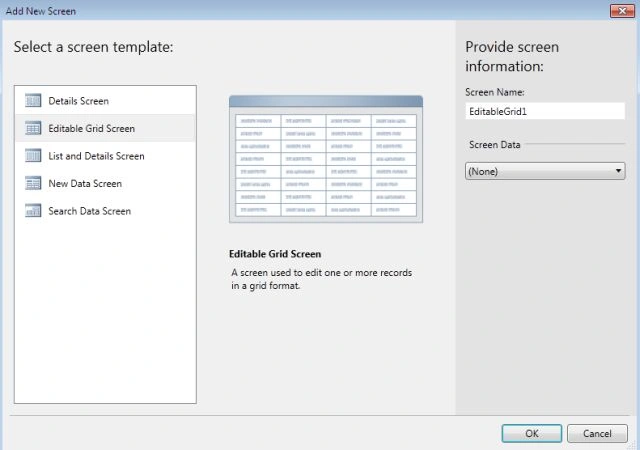
In Solution Explorer, right-click on the Screens and choose "Add Screen".
Step 5
Select the Editable Grid Screen from the Screen Template. Under Screen Information we provide the Screen Name but do not select any Screen Data. Then click "OK".



Join the conversation! Your thoughts help the community grow.