
The ImageList class and ToolBarButton's ImageIndex property are used to load images to toolbar buttons.
First you load images to ImageList. You can even add your images to the ImageList at design time by using Propeties of ImageList control.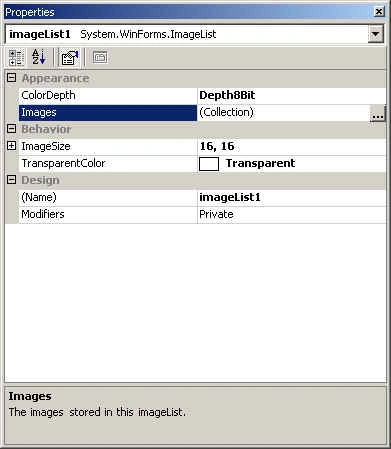
Add and Remove images by using Add and Remove buttons.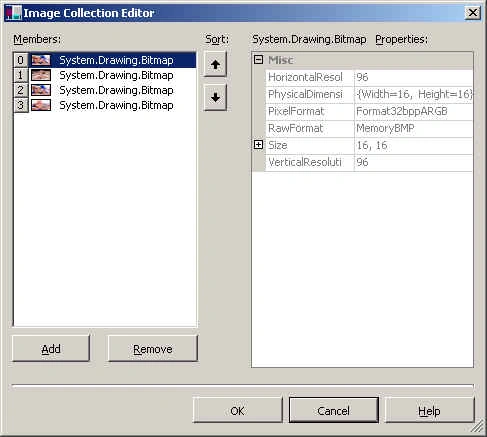
Once images are loaded to the ImageList, you use ToolBarButton class's ImageIndex property to set tollbar button images.
tb1.ImageIndex = 1;
tb2.ImageIndex = 2;
tb3.ImageIndex = 3 ;
Adding ToolTips to the ToolBar Buttons
ToolTipText property of Control class is used to Add ToolTips to ToolBar buttons. If tb1, tb2, tb2 are your ToolBarButton class objects, you can directly call ToolTipText to set tool tip for toolbar buttons.
// adding tooltips to the button
tb2.ToolTipText = tb2.Text ;
tb1.ToolTipText = tb1.Text ;
tb3.ToolTipText = tb3.Text ;

Adding Images to ToolBar Button
Join the conversation! Your thoughts help the community grow.
Sign in to leave a comment
It is the same account you read, post and publish with — and you will come straight back to this page.
Joe WilsonPosted Dec 28, 2015, 2:14 AM
Well, it was one of my questions answer, thank you.
Nipesh JanghelPosted Aug 2, 2015, 2:55 PM
Nice Sir
amaresh mPosted Jun 26, 2010, 6:29 AM
Respected once, hi i'm beginer to asp how to add images to the asp form simple code snipt i need, and also steps is required in detail for me , email id: [email protected]