This article introduces the Entity Framework. In this article, we learn the Entity Framework. This article is for Entity Framework beginners that have already worked with ADO.Net. This article explains the Entity Framework.
- Why we use Entity Framework
- What Entity Framework is
- CRUD (create, read, update and delete) operations using Entity Framework.
1. Why we use Entity Framework
- If you don't want to write ADO.Net code for connecting to the database table.
- Entity Framework code is common for all databases, like SQL, Oracle, and any other database because it's translated at runtime by the specific provider of the database.
- Entity Framework is good if you want to move your database from SQL to Oracle and any other database and then you need to change all the queries that you have written in SQL or another database. If you use Entity Framework in your application then you don't need to worry about database migration because in Entity Framework queries are written in LINQ and translated at runtime.
- Using Entity Framework we can combine tables from different databases and also from a different server.
2. What Entity Framework is
The Entity Framework is a type of Data access layer (DAL). There are many Data Access Layers in the .Net technology.
- ADO.Net
- Entity Framework
- NHibernate
Entity Framework is an Object Relation Mapping (ORM) framework that enables the developer to insert, update, delete and retrieve records from a database without writing much code to access the database.
ORM
This framework allows speeding up your development process and increasing the maintainability of the code. This framework allows interacting with the database using an object.
3. CRUD Operations using Entity Framework
Now I am creating an application in which we learn how to use Entity Framework in ASP.NET and how to use it to do CRUD (
create, read, update and delete) operations in a database.
Creating Database
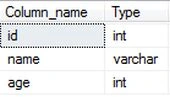
Let's create a table for employees (the name of the table is tblemployee) in the database and we will do CRUD operations on this table.
Adding ADO.Net entity model into the website
Once we select the entity data model to add to our website we will need to choose the model contents.
Here we have two options, one is to generate from an existing database and the second is an empty model.
- Generate from the database: this option means to create an entity model from an existing database schema. If we already have a database ready then we use this option.
- Empty model: using this we can design the model and hook up the model layer to the database.
Here we use Generate from the database after adding this generated entity for tblEmployee:
And also the class form for performing database operations is already created. Now we just need to learn how to use it.
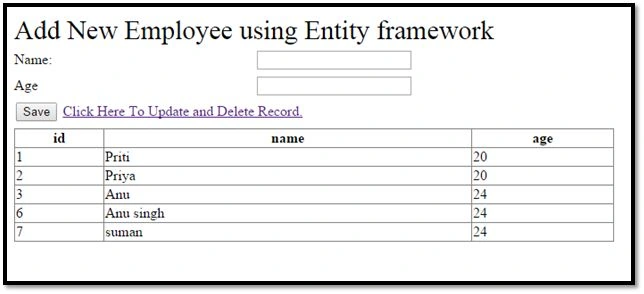
Insert and Display (Retrieve)
Insert a record
Using this screen we can add a new employee to our database table using Entity Framework and display all the employee records. We need to add a line of code for adding records to the database. Add this code on button click event.
-
- TestEntities t = new TestEntities();
- tblEmployee employee = new tblEmployee();
- employee.name = txtname.Text.Trim();
- employee.age =Convert.ToInt16(txtage.Text.Trim());
- t.AddTotblEmployees(employee);
- t.SaveChanges();
- Bindgridview();
Using the AddTotblEmployees method we can add a new record to the database actual operation performed by AddTotblEmployees this method. Here we can also see how to retrieve data from the database table and display it in a girdview.
Retrieve Record
In this method, we need to write code for binding the GridView with employee data.
- private void Bindgridview()
- {
- TestEntities test = new TestEntities();
- gdvEmployeerecord.DataSource = test.tblEmployees;
- gdvEmployeerecord.DataBind();
- }
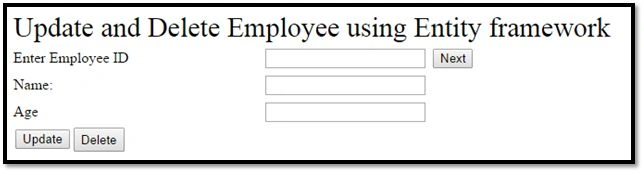
Update and Delete
Using this screen we can update an existing specific employee and delete a specific employee.
At first, we need to retrieve a specific employee record from the database so that we need to use this code for retrieving data from the database. Write this code on the Next button click. This code populates the employee name and age in a TextBox depending on the employee id.
- Int16 empid = Convert.ToInt16(txtEmpId.Text.Trim());
- TestEntities t = new TestEntities();
- tblEmployee emp = t.tblEmployees.FirstOrDefault(p => p.id == empid);
- txtname.Text = emp.name;
- txtage.Text = emp.age.ToString();
Updating a Record
Then we can do changes. If we want to update a record of a specific id then we need to put this code in an update button click.
-
- Int16 empid = Convert.ToInt16(txtEmpId.Text.Trim());
- TestEntities t = new TestEntities();
- tblEmployee emp = t.tblEmployees.FirstOrDefault(p => p.id == empid);
- emp.name = txtname.Text.Trim();
- emp.age = Convert.ToInt16(txtage.Text.Trim());
- t.SaveChanges();
- lblErrormesg.Visible = true;
- lblErrormesg.BackColor = Color.Blue;
- lblErrormesg.Text = "Record Updated.";
Deleting a Record
If we want to delete a specific record then we need to use this code in the delete button click.
-
- Int16 empid = Convert.ToInt16(txtEmpId.Text.Trim());
- TestEntities t = new TestEntities();
- tblEmployee emp = t.tblEmployees.FirstOrDefault(p => p.id == empid);
- t.DeleteObject(emp);
- t.SaveChanges();
- lblErrormesg.Visible = true;
- lblErrormesg.BackColor = Color.Red;
- lblErrormesg.Text = "Record Deleted.";
Thanks for reading my article. Please download the attached file for the complete demo.


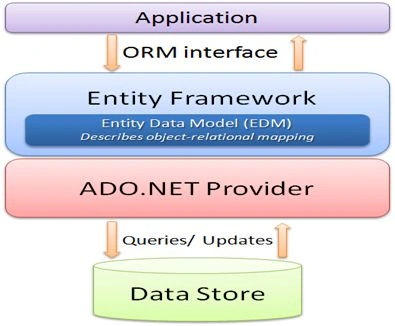 Now I am creating an application in which we learn how to use Entity Framework in ASP.NET and how to use it to do CRUD (create, read, update and delete) operations in a database.
Creating Database
Let's create a table for employees (the name of the table is tblemployee) in the database and we will do CRUD operations on this table.
Now I am creating an application in which we learn how to use Entity Framework in ASP.NET and how to use it to do CRUD (create, read, update and delete) operations in a database.
Creating Database
Let's create a table for employees (the name of the table is tblemployee) in the database and we will do CRUD operations on this table.
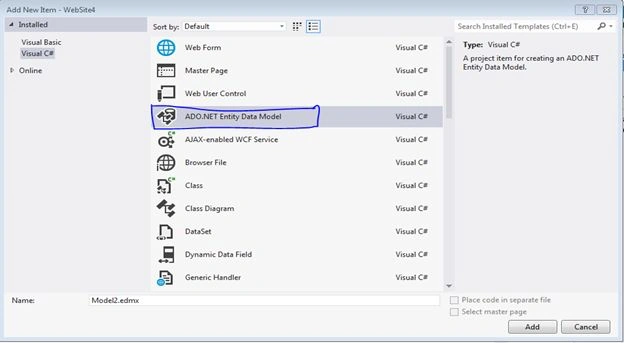 Once we select the entity data model to add to our website we will need to choose the model contents.
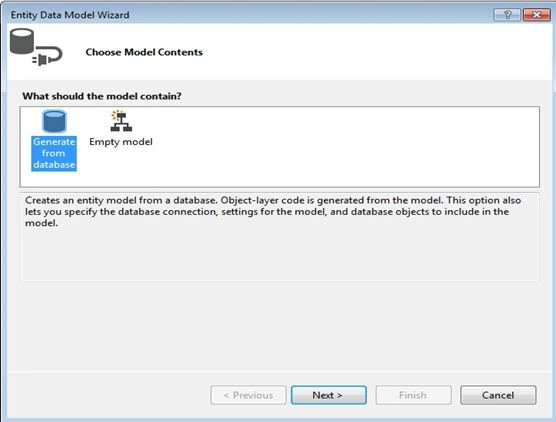 Here we have two options, one is to generate from an existing database and the second is an empty model.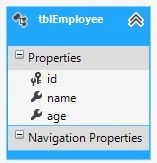
Gowtham RajamanickamPosted May 28, 2015, 10:45 AM
this is great..
sapana sharmaPosted Mar 3, 2015, 6:16 AM
Nice...
amsbarrosPosted Nov 26, 2014, 10:25 AM
I've downloaded the project, but there is only the solution file and none project.
Firoz KhanPosted Oct 11, 2014, 9:27 AM
lol EntityFrameWorkDemo.rar is not having files...........
Vidya Vrat AgarwalPosted Sep 30, 2014, 2:26 PM
Good one Priti Kumari I like that fact that you focused on explaining "Why we use Entity Framework". Keep up the good work.
Mahesh DevikarPosted Sep 29, 2014, 4:50 AM
As usual........Simple..Short...Clear Explanation........Thanks
Mukhtar AhmadPosted Sep 28, 2014, 3:29 AM
Nice....
Vithal WadjePosted Sep 27, 2014, 10:02 AM
super keep it up
Abhishek JaiswalPosted Sep 27, 2014, 8:49 AM
Simple and nice explanation! :)