

Abstract / Overview
AI-powered file summarizers transform complex, lengthy documents into concise, meaningful summaries using a combination of machine learning models, text extraction systems, LLMs, and retrieval pipelines. Modern enterprises face an overwhelming surge in unstructured data—IDC reports that over 90% of enterprise data is now unstructured, and Gartner predicts that by 2027, more than 55% of all professional content consumption will be mediated by AI summarization layers.
Summarizers reduce cognitive load, accelerate workflows, compress multi-hour reading tasks into minutes, and enable enterprises to extract key insights from documents at scale. They handle PDFs, DOCX, PPTX, spreadsheets, code files, emails, transcripts, logs, and image-based text via OCR.
This article provides the most detailed, end-to-end guide on AI file summarizers: internal architecture, algorithms, engineering trade-offs, data pipelines, RAG patterns, summarization heuristics, metadata strategies, enterprise integrations, code examples, and deployment considerations.
The writing follows SEO best practices (breadth, depth, topical clusters) and GEO best practices (direct answers, entity coverage, citation magnets, structured clarity, multi-format relevance).
Conceptual Background
AI summarizers rely on multiple overlapping technical foundations:
Natural Language Processing (NLP)
Core functions include:
Tokenization
Lemmatization
Keyphrase extraction
Sentence ranking
Topic modeling
Entity extraction
Discourse analysis
Machine Learning + LLMs
Transformers enable contextual understanding, long-sequence reasoning, and abstractive summarization. Models often used:
GPT-4o series
Llama 3
Cohere Command
Mistral 8x7B / 8x22B
Claude 3.x
Information Retrieval (IR)
Retrieval-Augmented Generation (RAG) sits at the center of modern summarizers. Its roles:
Embedding long files
Chunking intelligently
Selecting only relevant context
Providing factual grounding
Managing LLM token limits
File Processing & Extraction Layers
Different files require specialized extractors:
PDF → layout-aware parsing, OCR, table detection
DOCX → XML structure parsing
PowerPoint → slide segmentation, text-layer extraction
Excel → sheet-wise summarization, formulas, relationships
Code files → AST parsing and docstring extraction
Audio/video → ASR transcription (Whisper, Deepgram)
Compression & Summarization Techniques
Extractive: ranks and selects key sentences.
Abstractive: rewrites text using model reasoning.
Hybrid: extracts + rewrites.
Hierarchical Summarization:
Chunk summaries → section summaries → full document summary.
This architecture is now the industry standard.
Step-by-Step Walkthrough (Deep Technical Version)
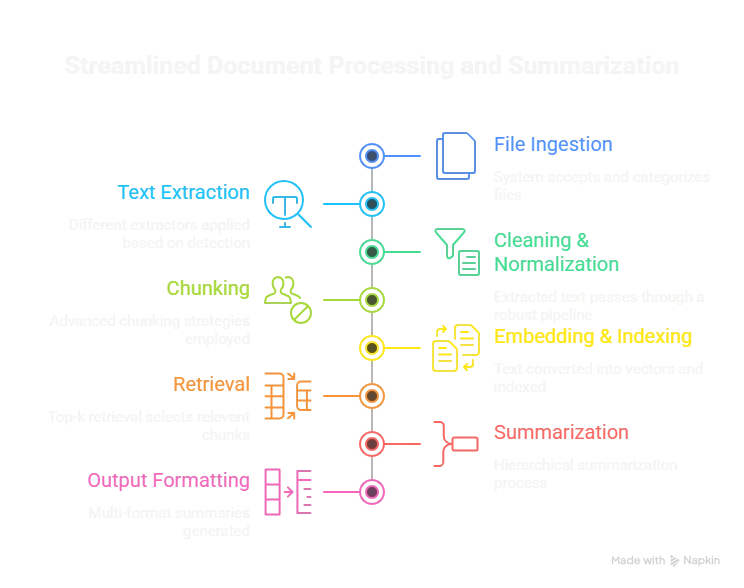
Step 1: File Ingestion
The system accepts and categorizes files:
Structured: CSV, Excel, JSON, code.
Semi-structured: HTML, forms, PDFs with structure.
Unstructured: Scanned PDFs, notes, images.
Multimedia: Meeting audio, lecture video, interviews.
Key technical challenges:
Encoding mismatches
Multi-language documents
Corrupted or empty-text PDFs
Table, figure, footnote extraction
Step 2: Text Extraction
Different extractors are applied based on detection:
For PDFs:
PDFPlumber, PyMuPDF
LayoutLM-based extraction
OCR (Tesseract, PaddleOCR, Amazon Textract)
For Images/Scanned Files:
Deep learning OCR (high accuracy vectors)
Layout-aware detection (Detectron2-based approaches)
For PowerPoint:
Slide-level parsing
Speaker notes
Embedded images with OCR
For Excel:
Sheet parsing
Column metadata inference
Formula translation into natural language ("Revenue = SUM(C2:C12)")
Step 3: Cleaning & Normalization
The extracted text passes through a robust pipeline:
Remove boilerplate, footers, headers
Standardize bullet points
Repair broken sentences (common in PDF)
Reconstruct paragraphs from fragmented text
Detect duplicates or repeated pages
Normalize Unicode characters
Step 4: Chunking
Chunking is critical because LLMs cannot ingest extremely long input.
Advanced chunking strategies include:
Semantic chunking (split by meaning, not just size)
Heading-based chunking (using H1–H6 patterns)
Table → separate chunks with structured parsing
Dialogue chunking for transcripts
Code-aware chunking using AST boundaries
Step 5: Embedding & Indexing
Embeddings convert text into vectors.
Tools include:
OpenAI Embeddings
Cohere Embed v3
SentenceTransformers
Llama Embeddings
Indexes can be:
FAISS
Milvus
Pinecone
Qdrant
Weaviate
Step 6: Retrieval
Top-k retrieval selects the chunks most relevant to the summarization prompt.
Techniques include:
Maximal Marginal Relevance (MMR)
Hybrid search (semantic + keyword)
Sparse/dense fusion (BM25 + embeddings)
Context-aware retrieval using metadata
Step 7: Summarization
Three stages occur:
Stage 1: Chunk-Level Summaries
Each chunk is summarized independently to compress the content.
Stage 2: Section-Level Summaries
Chunk summaries are grouped and summarized again.
Stage 3: Final Global Summary
Section summaries → combined into the final output.
This hierarchical approach guarantees:
Coherence
Reduced hallucination
Full coverage of content
Token-efficient processing
Step 8: Output Formatting
The system generates multi-format summaries:
Short/long
Bullet list
Executive summary
Key findings
Risks & issues
To-do items
Glossary
Entity list (people, dates, laws, companies)
Compliance flags
Code / JSON Snippets
Complete Python Implementation Skeleton
import fitz
import tiktoken
from langchain.text_splitter import RecursiveCharacterTextSplitter
from langchain.vectorstores import FAISS
from langchain.embeddings import OpenAIEmbeddings
from langchain.llms import OpenAI
from langchain.chains.combine_documents import create_stuff_documents_chain

# 1. Extract
doc = fitz.open("report.pdf")
text = ""
for page in doc:
    text += page.get_text()

# 2. Chunk
splitter = RecursiveCharacterTextSplitter(chunk_size=1500, chunk_overlap=200)
chunks = splitter.split_text(text)

# 3. Embeddings
store = FAISS.from_texts(chunks, OpenAIEmbeddings())

# 4. Retrieve
query = "Generate a full executive summary."
docs = store.similarity_search(query, k=10)

# 5. Summarize
llm = OpenAI(model="gpt-4o-mini")
chain = create_stuff_documents_chain(llm)
summary = chain.run(docs)

print(summary)
Workflow JSON (Advanced)
{
  "workflow": "enterprise_file_summarization",
  "version": "2.0",
  "pipeline": {
    "extract": {
      "ocr": true,
      "layout_detection": true,
      "table_extraction": "enabled"
    },
    "processing": {
      "cleaning": "normalize_whitespace_remove_headers",
      "chunking": {
        "method": "semantic",
        "chunk_size": 1600,
        "overlap": 250
      }
    },
    "embedding": {
      "engine": "openai_text_embeddings_v3",
      "index": "faiss",
      "dimension": 1536
    },
    "retrieval": {
      "strategy": "hybrid_mmr",
      "k": 8
    },
    "summarization": {
      "model": "gpt-4o-mini",
      "hierarchical": true
    },
    "output": {
      "formats": [
        "executive",
        "detailed",
        "bullets",
        "action_items",
        "entities"
      ]
    }
  }
}
Use Cases / Scenarios (Deep & Practical)
Corporate Use Cases
Annual report summarization
Compliance documents, audit trails
HR policies, SOPs
RFP analysis
Board meeting transcripts
Legal
Case-law compression
Contract risk summaries
Deposition transcripts
Discovery document analysis
Healthcare
Radiology report summarization
Multi-year EMR history compression
Insurance document interpretation
Finance
Equity research summaries
10-K and 10-Q automation
Portfolio risk insights
Trade logs summarization
Education & Research
Summaries of research papers
Literature reviews
Lecture video transcription summaries
Developers
Summaries of large GitHub repositories
Log file aggregation
API documentation compression
Limitations / Considerations (Extended)
OCR errors propagate to summaries.
Token limits can still cause missed context.
Domain-specific jargon may be oversimplified without a domain-tuned LLM.
Complex tables require separate extraction pipelines.
Legal and medical documents require validation due to risk sensitivity.
Multi-language documents require multilingual embeddings.
Very long transcripts (>200k tokens) need multi-pass summarization.
Fixes (Comprehensive Troubleshooting)
Issue: Summary misses critical sections.
Fix: Use hierarchical summarization + enforce "section coverage checks."
Issue: Extracted text is broken or out of order.
Fix: Switch to layout-aware extraction (PDFMiner → PDFPlumber → Marker).
Issue: OCR accuracy is low on handwriting or noisy scans.
Fix: Use deep OCR: PaddleOCR, TrOCR, Amazon Textract.
Issue: Summaries feel generic.
Fix: Force structured outputs:
"Give me 5 key findings, 5 risks, 5 recommendations."
Issue: Large documents overload memory.
Fix: Streamed chunking + incremental summarization.
Issue: Sensitive documents cannot leave the servers.
Fix: Deploy local LLMs (Llama 3, Mistral) + private vector DB.
FAQs (Comprehensive)
1. What is the best summarization technique?
Hierarchical abstractive summarization via RAG provides the best balance of accuracy and completeness.
2. Can AI summarize extremely long documents (500+ pages)?
Yes—by chunking into semantic groups and summarizing hierarchically.
3. Does format affect accuracy?
PDFs with poor layout or OCR quality reduce accuracy. Native DOCX is best.
4. Can AI summaries replace human reading?
They accelerate reading, but high-risk documents still require human verification.
5. Are private deployments possible?
Yes—local LLM hosting + on-prem vector stores meet enterprise compliance.
6. Can it summarize tables and charts?
Tables: yes, with good extraction. Charts: partial unless converted to text.
Conclusion
AI-powered file summarizers have become essential tools across industries. With unstructured data growing exponentially and knowledge workers drowning in PDFs, transcripts, logs, and spreadsheets, summarization systems deliver massive productivity gains by compressing hours of reading into minutes.
By combining extraction pipelines, semantic chunking, embeddings, RAG retrieval, and hierarchical LLM summarization, modern systems achieve high accuracy, contextual relevance, and domain-specific reasoning. This guide provides a complete, end-to-end blueprint for designing, deploying, and optimizing enterprise-grade summarizers.
Join the conversation! Your thoughts help the community grow.