

There are some easy steps to create Ajax Tab control.
Step1: Create new ajax enabled website and add reference of AjaxControlToolkit.dll in solution explorer.
Step 2: Add some image which are used in CSS.
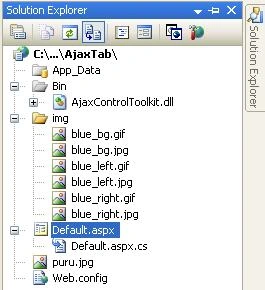
Figure 1: Solution Explorer
Step 3: Use the following style in the tab container.
<style type="text/css">
.fancy .ajax__tab_header
{
font-size:13px;
font-weight:bold;
color:#000000;
font-family:sans-serif;
background:url(img/blue_bg.jpg) repeat-x;
}
.fancy .ajax__tab_active .ajax__tab_outer,
.fancy .ajax__tab_header .ajax__tab_outer,
.fancy .ajax__tab_hover .ajax__tab_outer
{
height:46px;
background:url(img/blue_left.jpg) no-repeat left top;
}
.fancy .ajax__tab_active .ajax__tab_inner,
.fancy .ajax__tab_header .ajax__tab_inner,
.fancy .ajax__tab_hover .ajax__tab_inner
{
height:46px;
margin-left:16px; /* offset the width of the left image */
background:url(img/blue_right.jpg) no-repeat right top;
}
.fancy .ajax__tab_active .ajax__tab_tab,
.fancy .ajax__tab_hover .ajax__tab_tab,
.fancy .ajax__tab_header .ajax__tab_tab
{
margin:16px 16px 0px 0px;
}
.fancy .ajax__tab_hover .ajax__tab_tab,
.fancy .ajax__tab_active .ajax__tab_tab
{
color:#cccccc;
}
.fancy .ajax__tab_body
{
font-family:verdana,tahoma,helvetica;
font-size:10pt;
border:1px solid #999999;
border-top:0;
padding:2px;
background-color:#666666;
}
</style>
Step 4: Drag AjaxToolKit:TabContainer from the toolbox and drop on the page like as follows:
<ajaxToolkit:TabContainer ID="TabContainer1" runat="server" Width="100%" CssClass="fancy"
ActiveTabIndex="0">
<ajaxToolkit:TabPanel ID="TabAboutUs" runat="server" HeaderText="About Me">
<ContentTemplate>
<table cellspacing="2" cellpadding="2" background="img/Bg2.gif" width="100%" height="300">
<tr align="left" valign="top">
<td>
<h3>
Purushottam Rathore</h3>
</td>
</tr>
</table>
</ContentTemplate>
</ajaxToolkit:TabPanel>
<ajaxToolkit:TabPanel ID="TabAddress" runat="server" HeaderText="Address">
<ContentTemplate>
<table cellspacing="2" cellpadding="2" width="100%" background="img/Bg2.gif" height="300">
<tr align="left" valign="top">
<td>
<h3>
Noida</h3>
</td>
</tr>
</table>
</ContentTemplate>
</ajaxToolkit:TabPanel>
<ajaxToolkit:TabPanel ID="TabCountry" runat="server" HeaderText="Country">
<ContentTemplate>
<table cellspacing="2" cellpadding="2" width="100%" height="300" background="img/Bg2.gif">
<tr align="left" valign="top">
<td>
<h3>
India</h3>
</td>
</tr>
</table>
</ContentTemplate>
</ajaxToolkit:TabPanel>
<ajaxToolkit:TabPanel ID="TabPhoto" runat="server" HeaderText="My Photo">
<ContentTemplate>
<table cellspacing="2" cellpadding="2" width="100%" height="300" bgcolor="WhiteSmoke">
<tr align="left" valign="top">
<td>
<img src="puru.jpg" />
</td>
</tr>
</table>
</ContentTemplate>
</ajaxToolkit:TabPanel>
</ajaxToolkit:TabContainer>
OutPut: Here I am using ActiveTabIndex property of tabcontainer is zero as follows:
<ajaxToolkit:TabContainer ID="TabContainer1" runat="server" Width="100%" CssClass="fancy"
ActiveTabIndex="0">
So the first tab is selected by default.
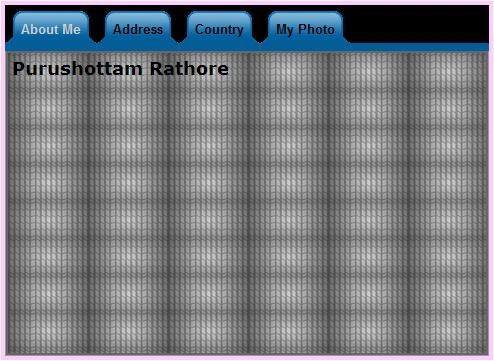
Figure 2: By default First tab is selected because I set ActiveTabIndex="0".
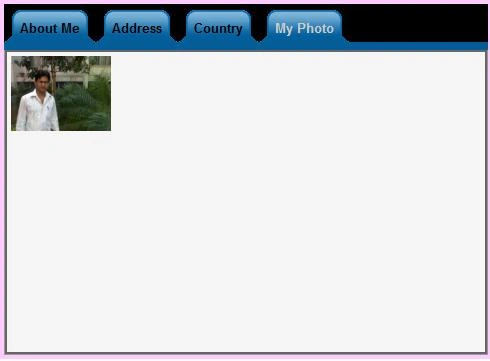
Figure 3:
Patricio TelloPosted Jan 4, 2012, 3:56 PM
I really needed this information, thanks Purushottam
srinivas dudamPosted Jul 4, 2011, 9:46 AM
Thank You Purushottam.. I got exactly what I was looking for. After struggling for 4 hours. Thank You So Much
Ayesha balooshiPosted Apr 13, 2010, 7:11 AM
good day, i've used the same steps to create my tabs using the tab container .. however am just getting a blank page. can you help me in it?
Roger CochraneeditedPosted Feb 11, 2010, 12:52 PMEdited Feb 11, 2010, 12:54 PM
Hello Purushottam, I wonder if you can suggest how I can change the selected tab from another window in the tab container. This is my aspx code: <asp:UpdatePanel ID="UpdatePanel1" UpdateMode="Conditional" runat="server"> <ContentTemplate><div> <tabctrl:TabContainer ID="TabContainer1" runat="server" ActiveTabIndex="0" Width="1250px" ScrollBars="None"><tabctrl:TabPanel ID="TabPanelMap" runat="server" HeaderText="Map"> And here is the codebehind I am using: AjaxControlToolkit.TabContainer container = (AjaxControlToolkit.TabContainer)TabContainer1; container.ActiveTabIndex = 2; I get the error that the 'TabContainer1' does not exist in this context. Do you have any thoughts? Thank you.