

What's in this article?
- Introduction
- An overview of generics
- Why generic class and methods?
- Creating Generic Class
- Code Explanation
- Futures Of Generic Classes
- Generic Parameters Type
- Guideline For Naming Type Parameter
- Constraints On Type Parameter
- Why Constraints?
- Inheritance
- Generic Interface
- Generic Methods
- Generic Delegates
- Default keyword in Generic Code
- Generic At Runtime
Introduction
In this article some content is taken from the MSDN. Using this article we will learn all about generics in C#.
Overview
Generics are supported by .Net since release of .Net 2.0, in other words Visual Studio 2005. Generics can be used in any kind of .Net application (Console, Windows, Web or Service also). This means that generics
are not only a part of C#, it is also deeply integrated with the Intermediate Language (IL). A .Net predefined class library provides the namespace System.Collection.Generic that provides several new generic based classes. Microsoft recommendeds use of generic classes instead of older non-generic collection classes, such as ArrayList.
Why Generic Classes and Methods?
Generic classes are especially useful for creating algorithms and for reusability, type safety and for the efficiency of your programs that cannot be done by non-generic collection classes. The limitation of non-generic collection classes can be proved by smaller programs that use a non-generic collection class ArrayList. ArrayList can be used without modifyion to store any reference or value type. Actually ArrayList uses the Object class internally to store the value collection. That means any values stored in ArrayList will be implicitly boxed (cast) into an Object type. This mean that if you are storing a value type in an ArrayList then the values must be boxed and when you retrieve a value you must also unbox the value.
A generic class contains operations that are not specific to a particular data type, the most common use of generic classes is with a collection, like linked list, queues, trees, stack, hash table and so on.
We know tht boxing and unboxing causes a loss of performance. So there is the first limitation for using non-generic types of collection classes.
Another drawback is type safety. Since we now know that an ArrayList stores all its values as an Object and all values are type cast into an Object type for storing that value, it is not possible to prevent a user form storing various kinds of values in an ArrayList as in the following:

Now, retrieve a value from the ArrayList and print it in the Console using the following code:
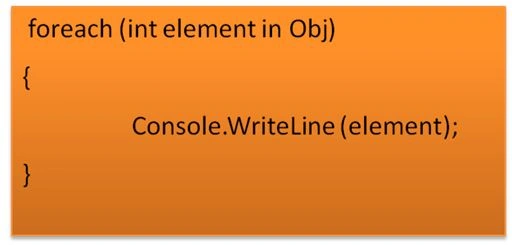
The code above will throw an exception InvalidCastException {"Specified cast is not valid."}.
Because, while retrieving data from the ArrayList, we use an int type of variable element in the foreach loop whereas the ArrayList has string values.
Ok, let's see another example:
using System;
using System.Collections;
using System.Collections.Generic;
using System.Linq;
using System.Text;
using System.Threading.Tasks;
namespace NonGeneric
{
public class LinkedListNode
{
public LinkedListNode(object _Value)
{
this.Value = _Value;
}
public object Value
{
get;
internal set;
}
public LinkedListNode Next
{
get;
internal set;
}
public LinkedListNode Last
{
get;
internal set;
}
}
public class LinkedList : IEnumerable
{
public LinkedListNode First
{
get;
private set;
}
public LinkedListNode Last
{
get;
private set;
}
public void AddList(object Node)
{
LinkedListNode NewNode = new LinkedListNode(Node);
if (First == null)
{
First = NewNode;
Last = First;
}
else
{
Last.Next = NewNode;
Last = NewNode;
}
}
public IEnumerator GetEnumerator()
{
LinkedListNode current = First;
while (current != null)
{
yield return current.Value;
current = current.Next;
}
}
}
class Program
{
static void Main(string[] args)
{
LinkedList List1 = new LinkedList();
List1.AddList(2);
List1.AddList("2");
foreach (int i in List1)
{
Console.WriteLine(i);
}
}
}
}
In the above program you will get the same exception as what I said above. That means that if you create a heterogeneous collection, combining string and int in a single non-generic as an ArrayList class, you are more likely to create a programming error, and this error can be detected only at run time. But you can also avoid this problem in VS 1.0 & 1.1 only by writing your own type specific collection but in such condition that class cannot be reusable for multiple data types and you need to write 2 different programs for different types.
So what we need is we need to write a single program that can be reusable for a heterogeneous type collection (on a per type instance basis) and also make it possible for the compiler to check for type safety.
Note:
Here in the program above, I used the IEnumerator interface, GetEnumerator () Method and yield statement.
1. Enumeration: actually what happened is that whenever you use a foreach statement for navigation in a collection without knowing the number of elements, foreach uses an enumerator. The array or collection implements the IEnumerable interface with the GetEnumerator() method. The GetEnumerator() method returns an enumerator implementing the IEnumerator interface. The interface IEnumerator is used by the foreach statement to iterate through the collection.
Note: the foreach doesn't really need to implement the IEnumerable interface. It's enough to have a method with the name GetEnumerator() that returns an object implementing the IEnumerator interface.
2. Yield statement: the yield return statement returns one element of a collection and moves the position to the next element, the yield breaks the statement to stop the iteration.
So at this point, I hope you now understad why we use generics.
You can also create your own custom type of generic class for your problem that will be type safe and efficient. First what we need here is to eliminate the need for a type cast and also make it possible for the compiler to check for the type. That means the preceding program needs a type parameter that will be possible using generics like LinkedListNode<T> as in the following:

Now have a look at a generic collection class example:
- Creating Generic Class
While creating your own generic class, you need to keep something in mind:
- Which types to generalize into the type parameter
You can use one or more than one type parameter to generalize your program but this can cause a readability problem.
- If you want to restrict the client from instantiating your generic class then you can use constraints.
We will discuss constraints in details further in this article.
- Whether to implement one or more generic interface.
There may sometimes be a requirement to implement an interface such as IEnumerable<T> that can be used for navigating the data from a list.
using System;
using System.Collections.Generic;
using System.Linq;
using System.Text;
using System.Threading.Tasks;
namespace Generic_Implemention
{
public class LinkedListNode<T>
{
public LinkedListNode(T _Value)
{
this.Value = _Value;
}
T Data;
public T Value
{
get
{
return Data;
}
internal set
{
Data = value;
}
}
public LinkedListNode<T> Next
{
get;
internal set;
}
public LinkedListNode<T> Last
{
get;
internal set;
}
}
public class LinkedList<T> : IEnumerable<T>
{
public LinkedListNode<T> First
{
get;
private set;
}
public LinkedListNode<T> Last
{
get;
private set;
}
// As i told you, ArrayList use object class to store value same as i take
//parameter Node of object type.
public void AddList(T Node)
{
LinkedListNode<T> NewNode = new LinkedListNode<T>(Node);
if (First == null)
{
First = NewNode;
Last = First;
}
else
{
Last.Next = NewNode;
Last = NewNode;
}
}
public IEnumerator<T> GetEnumerator()
{
LinkedListNode<T> current = First;
while (current != null)
{
yield return current.Value;
current = current.Next;
}
}
System.Collections.IEnumerator System.Collections.IEnumerable.GetEnumerator()
{
return GetEnumerator();
}
}
class Program
{
public static void Main()
{
LinkedList<int> List1 = new LinkedList<int>();
List1.AddList(2);
List1.AddList(3);
List1.AddList(5);
// List1.AddList("4");
foreach (int i in List1)
{
Console.WriteLine(i);
}
LinkedList<string> List2 = new LinkedList<string>();
List2.AddList("2");
List2.AddList("3");
List2.AddList("5");
foreach (string i in List2)
{
Console.WriteLine(i);
}
}
}
}
The preceding program will compile and execute successfully but if you uncomment // List1.AddList ("4"); from the above program then it will throw a compiler error as not possible with a non-generic class.
In the preceding program, the client can store any type of values, Value or Reference Type, on a per instance basis. Since we store here two types of values, the first one is an int (Value Type) and the second one is string (Reference Type).
But if you want to restrict the user from storing only a value type then you can use constraints. We will discuss this later in this article.
Code Explanation

As we know, with a linked list one element can reference the next element and can also reference the previous element as explained using the image above. So I just created a class LinkedListNode<T>. This class just holds some auto-implemented property, like Value, Prev, Next. Where the Value property assigns a value for the LinkedListNode<T> class and the Prev and Next properties hold the previous and next LinkedListNode<T> object. Every time you call the AddList () method, it generates the object for the LinkedListNode<T> class. And using Conditional constructs it assigns objects to the Next values. You can notice one thing, I never used the Prev property. So you can also assign a value to the Prev property. So here, I think it's enough for you to understand what actually happened with that program.Generic Futures
Using generics we can create a collection that is type safe at compile time. As we see above if we will use a non-generic collection that uses an Object for storing values. We cannot prevent the user from storing a different type of value (value type or reference type) and it also needs boxing and unboxing that causes a loss of performance. So in such a condition we need to create a generic type of collection that works on a per instance basis.Generic Parameters Type
When a client instantiates a variable of generic type, the client must specify a type argument for the generic collection class as in the following:
The type argument of this particular generic collection class can be anything recognized by the compiler. Here in this code above every object (obj1, obj2, and obj3) will be substituted at runtime with a specific type. Actually here what happens internally is, .Net uses JIT to generate specific native code at run time for high efficiency so when we instantiate a generic collection class with a different argument, JIT creates 2 different classes with a specific type since we pass a type argument for the generic class and instantiate it.
Guidelines for type arguments
Where you can provide any name as a type parameter but for increasing readability and to create a meaningful program Microsoft recommends the following:
If there is a single parameter then you can use T as:
publicinterface IApp<TApp> { }
publicclass LinkList<T> { }If there is more then one parameter tehn you can use any name but use T as a prefix to indicate you need to pass a type there.
publicdelegate TOut Con<TIn, TOut>(TIn from);
Constraints On Type Parameter
First we needed to learn what a constraint is:
You can also restrict the client from instantiating a generic collection class with only a specific type of parameter. If the client instantiates that generic collection class with a type parameter that is not allowed then that causes a compile time error, this restriction is known as a constraint.
There are 6 types of constraints that can be use to restrict the user from instantiating a generic class with a specific type parameter.
Property Description where T : new() The type argument must have a public parameterless constructor. When used together with other constraints, the new () constraint must be specified last. where T : <interface name> Type argument must be or must implement the specified interface. The constraining interface can be generic and multiple interface constraining can be specified to follow multiple inheritances. where T : X The type argument supplied for T must be or derive from the argument supplied for X. where T : <base class name> Type argument must be derived from the specific base class where T: struct The type argument must be a value type. Any value type except null-able can be specified. where T : class Type argument must be a reference type
Why Constraints?
As I said, if you want to restrict the user to passing only a limited and specific type parameter then you can use Constraints. So let's look at the following example:
using System;
using System.Collections;
using System.Collections.Generic;
using System.Linq;
using System.Text;
using System.Threading.Tasks;
namespace Generic_Implemention
{
public class LinkedListNode<T>
{
public LinkedListNode(T _Value)
{
this.Value = _Value;
}
T Data;
public T Value
{
get
{
return Data;
}
internal set
{
Data = value;
}
}
public LinkedListNode<T> Next
{
get;
internal set;
}
public LinkedListNode<T> Last
{
get;
internal set;
}
}
public class LinkedList<T> : IEnumerable<T> where T : struct
{
public LinkedListNode<T> First
{
get;
private set;
}
public LinkedListNode<T> Last
{
get;
private set;
}
// As i told you, ArrayList use object class to store value same as i take
//parameter Node of object type.
public void AddList(T Node)
{
LinkedListNode<T> NewNode = new LinkedListNode<T>(Node);
if (First == null)
{
First = NewNode;
Last = First;
}
else
{
Last.Next = NewNode;
Last = NewNode;
}
}
public IEnumerator<T> GetEnumerator()
{
LinkedListNode<T> current = First;
while (current != null)
vijayakumarPosted Feb 20, 2015, 6:05 AM
Good one
Caco TopiaPosted Sep 28, 2013, 5:23 AM
Thanks
Sam HobbsPosted Jul 20, 2013, 1:35 PM
Note that function pointers are type safe.
Dinesh BeniwalPosted Jul 20, 2013, 8:25 AM
Thanks for Noitce Sandeep, We edit it.