

Introduction
As we know JavaScript is used for mainly client-side validations. Here in this article, I have completed almost all JavaScript validations that we need during our project.
Textbox should not be blank
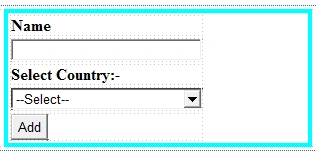
- <body>
- <form id="form1" runat="server">
- <div style="margin-left:200px; border:solid; border-color:aqua; width:300px;">
- <table>
- <tr>
- <td>
- <b>Name</b>
- </td>
- </tr>
- <tr>
- <td>
- <asp:TextBox ID="txt_name" runat="server" Width="183px"></asp:TextBox>
- </td>
- </tr>
- <tr>
- <td>
- <b>Select Country:-</b>
- </td>
- </tr>
- <tr>
- <td>
- <asp:DropDownList ID="DropDownList1" runat="server" Height="16px" Width="191px">
- <asp:ListItem>--Select--</asp:ListItem>
- <asp:ListItem>India</asp:ListItem>
- <asp:ListItem>Pakistan</asp:ListItem>
- <asp:ListItem>Kenya</asp:ListItem>
- <asp:ListItem>SriLanka</asp:ListItem>
- </asp:DropDownList>
- </td>
- </tr>
- <tr>
- <td>
- <asp:Button runat="server" ID="btn_save" Text="Add" OnClientClick="return validate()" />
- </td>
- </tr>
- </table>
- </div>
Here is the script to add validations:
- <head runat="server">
- <title></title>
- <script type="text/javascript">
- function validate() {
- if (document.getElementById("<%=txt_name.ClientID%>").value == "") {
- alert('!!!!!!! Name should not be blank');
- document.getElementById("<%=txt_name.ClientID%>").focus();
- return false;
- }
- return true;
- }
- </script>
- </head>
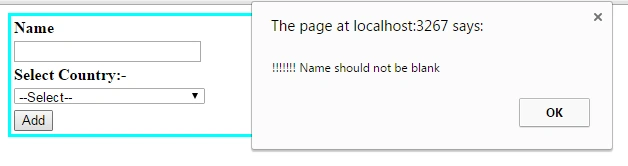
Dropdown list should not be blank
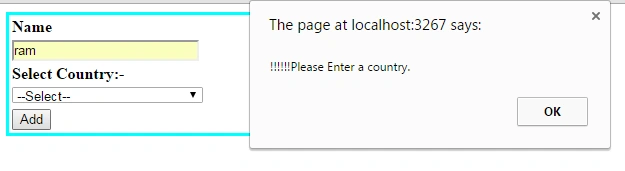
In this, I have explained how to restrict a user to select the dropdownlist.
Here I have the same for:
Here's the code for my DropDownList.
- <tr>
- <td>
- <b>Select Country:-</b>
- </td>
- </tr>
- <tr>
- <td>
- <asp:DropDownList ID="ddl_country" runat="server" Height="16px" Width="191px">
- <asp:ListItem>--Select--</asp:ListItem>
- <asp:ListItem>India</asp:ListItem>
- <asp:ListItem>Pakistan</asp:ListItem>
- <asp:ListItem>Kenya</asp:ListItem>
- <asp:ListItem>SriLanka</asp:ListItem>
- </asp:DropDownList>
- </td>
- </tr>
- <tr>
- <td>
- <asp:Button runat="server" ID="btn_save" Text="Add" OnClientClick="return validate()" />
- </td>
- </tr>
And here is my javascript function to validate the dropdown.
- <script type="text/javascript">
- function validate() {
- if (document.getElementById("<%=ddl_country.ClientID%>").value == "--Select--") {
- alert('!!!!!!Please Enter a country.');
- document.getElementById("<%=ddl_country.ClientID%>").focus();
- return false;
- }
- return true;
- }
- </script>
Allow the Only character in a TextBox
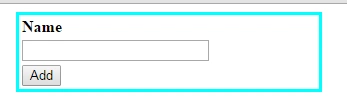
- <body>
- <form id="form1" runat="server">
- <div style="margin-left:200px; border:solid; border-color:aqua; width:300px;">
- <table>
- <tr>
- <td>
- <b>Name</b>
- </td>
- </tr>
- <tr>
- <td>
- <asp:TextBox ID="txt_name" runat="server" Width="183px" onkeyup=" Ischar (this)"></asp:TextBox>
- </td>
- </tr>
- <tr>
- <td>
- <asp:Button runat="server" ID="btn_save" Text="Add" />
- </td>
- </tr>
- </table>
- </div>
- </form>
- </body>
And here is my javascript to validate the textbox.
- <script type="text/javascript">
- function Ischar(field) {
- var re = /^[’A-Z’’a-z’]*$/;
- if (!re.test(field.value)) {
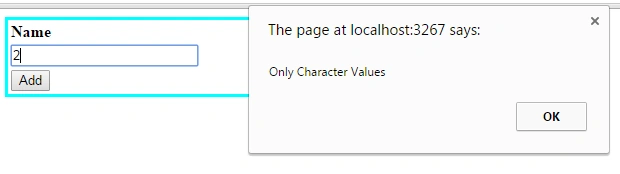
- alert('Only Character Values');
- field.value = field.value.replace(/[^’A-Z’’a-z’]/g, "");
- return false;
- }
- return true;
- }
- </script>
I will get the following error message like this if I entered any number to the textbox.
Allow Only Numeric In TextBox
- <body>
- <form id="form1" runat="server">
- <div style="margin-left:200px; border:solid; border-color:aqua; width:300px;">
- <table>
- <tr>
- <td>
- <b>Name</b>
- </td>
- </tr>
- <tr>
- <td>
- <asp:TextBox ID="txt_name" runat="server" Width="183px" onkeyup=" Isnumber (this)"></asp:TextBox>
- </td>
- </tr>
- <tr>
- <td>
- <asp:Button runat="server" ID="btn_save" Text="Add" />
- </td>
- </tr>
- </table>
- </div>
- </form>
- </body>
And here is my JavaScript.
- <script type="text/javascript">
- function Isnumber(field) {
- var re = /^[’0-9’’0-9’]*$/;
- if (!re.test(field.value)) {
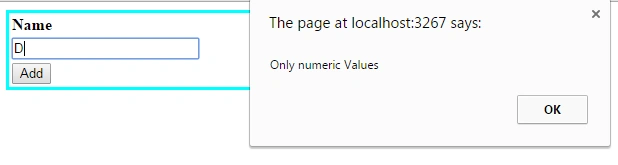
- alert('Only numeric Values');
- field.value = field.value.replace(/[^’0-9’’0-9’]/g, "");
- return false;
- }
- return true;
- }
- </script>
It will give the following error message when you enter any character.
Phone number validation
- <body>
- <form id="form1" runat="server">
- <div style="margin-left:200px; border:solid; border-color:aqua; width:300px;">
- <table>
- <tr>
- <td>
- <b>Name</b>
- </td>
- </tr>
- <tr>
- <td>
- <asp:TextBox ID="txtphone" runat="server" Width="183px"></asp:TextBox>
- </td>
- </tr>
- <tr>
- <td>
- <asp:Button runat="server" ID="btn_save" Text="Add" OnClientClick="return validate()" />
- </td>
- </tr>
- </table>
- </div>
- </form>
- </body>
- <script type="text/javascript">
- function validate() {
- var a = document.getElementById("<%=txtphone.ClientID %>").value;
- if (a == "Ex: 08018070777") {
- alert("Mobile no Should Not be Blank");
- document.getElementById("<%=txtphone.ClientID %>").focus();
- return false;
- }
- if (isNaN(a)) {
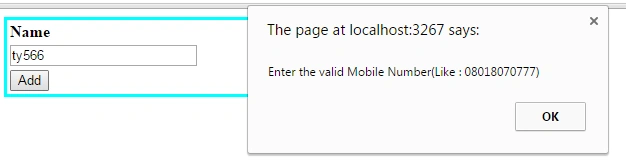
- alert("Enter the valid Mobile Number(Like : 08018070777)");
- document.getElementById("<%=txtphone.ClientID %>").focus();
- return false;
- }
- if (a.length < 11) {
- alert(" Your Mobile Number must 11 Integers(Like :08018070777)");
- document.getElementById("<%=txtphone.ClientID %>").focus();
- return false;
- }
- }
- </script>
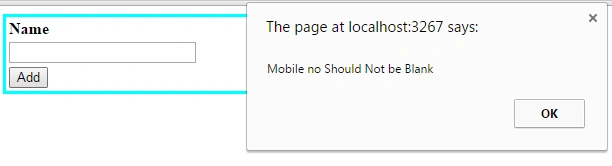
It will give this error if your number is less than 11 digits.
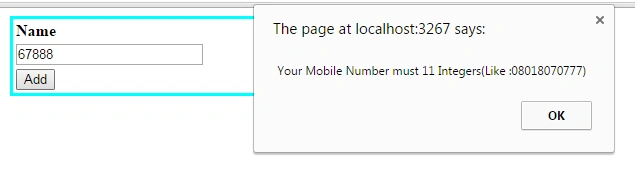
It will give this if you enter any character.
Email Id Validation
- <body>
- <form id="form1" runat="server">
- <div style="margin-left:200px; border:solid; border-color:aqua; width:300px;">
- <table>
- <tr>
- <td>
- <b>Email</b>
- </td>
- </tr>
- <tr>
- <td>
- <asp:TextBox ID="TxtEmail" runat="server" Width="183px"></asp:TextBox>
- </td>
- </tr>
- <tr>
- <td>
- <asp:Button runat="server" ID="btn_save" Text="Add" OnClientClick="return validate()" />
- </td>
- </tr>
- </table>
- </div>
- </form>
- </body>
And here is my JavaScript for email validation.
- <script type="text/javascript">
- function validate() {
- if (document.getElementById("<%=TxtEmail.ClientID%>").value == "") {
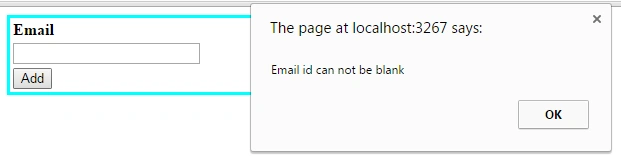
- alert("Email id can not be blank");
- document.getElementById("<%=TxtEmail.ClientID%>").focus();
- return false;
- }
- var emailPat = /^(\".*\"|[A-Za-z]\w*)@(\[\d{1,3}(\.\d{1,3}){3}]|[A-Za-z]\w*(\.[A-Za-z]\w*)+)$/;
- var emailid = document.getElementById("<%=TxtEmail.ClientID%>").value;
- var matchArray = emailid.match(emailPat);
- if (matchArray == null) {
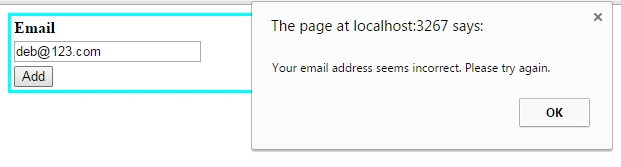
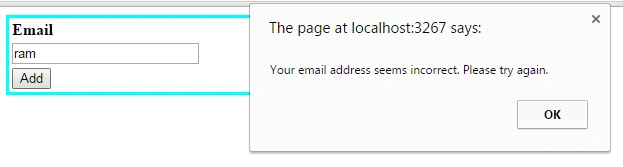
- alert("Your email address seems incorrect. Please try again.");
- document.getElementById("<%=TxtEmail.ClientID%>").focus();
- return false;
- }
- }
- </script>
You will get the following error if you enter wrong email id
Thus in this way, we can implement all JavaScript validations.
Santhakumar MunuswamyPosted Oct 18, 2015, 3:06 AM
Good one
Humayun Kabir MamunPosted Oct 15, 2015, 12:47 AM
Nice...
Ankit BansalPosted Oct 15, 2015, 12:46 AM
nice..thanks for sharing
Priyaranjan K SPosted Oct 14, 2015, 12:23 PM
Nice Share..
Suman VermaPosted Oct 14, 2015, 9:27 AM
Good one
Harshad PansuriyaPosted Oct 14, 2015, 8:21 AM
Nice one
Nilesh JadavPosted Oct 14, 2015, 5:47 AM
Good Article sir !!
Rajeesh MenothPosted Oct 14, 2015, 4:05 AM
Thanks for sharing!