

I am showing this functionality by creating an ASP.Net MVC 4 application (R- An Image Gallery Application In MVC 4).
The following is my SQL Server Data Table structure: (Album_Details).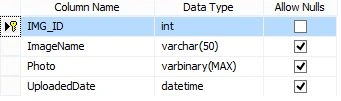
Image 1.
Now open Visual Studio and select "File" -> "New" -> "Project...":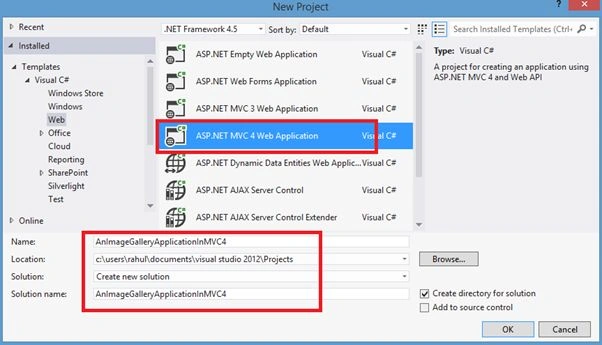
Image 2.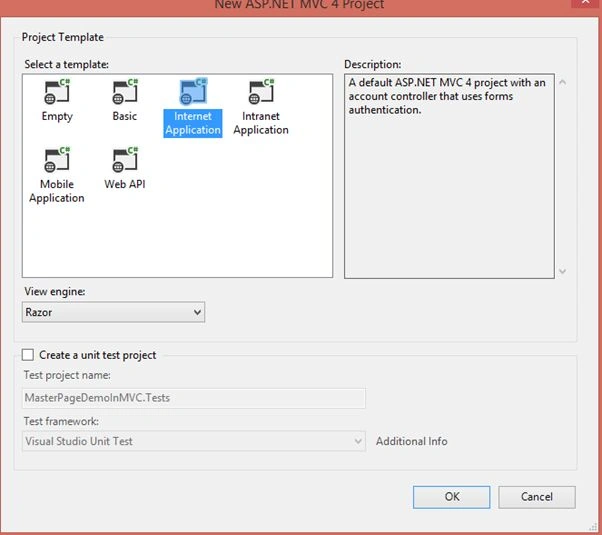
Image 3.
Now right-click on the Model Folder Add New Item -> Add New Class (ImageInfo):
- using System;
- using System.Collections.Generic;
- using System.Linq;
- using System.Web;
- namespace AnImageGalleryApplicationInMVC4.Models
- {
- public class ImageInfo
- {
- public int Image_Id { get; set; }
- public string Image_Name { get; set; }
- public byte[] Image { get; set; }
- public string Image_UploadedDate { get; set; }
- }
- }
- using System;
- using System.Collections.Generic;
- using System.Linq;
- using System.Web;
- using System.Data;
- using System.Data.SqlClient;
- using System.Configuration;
- using System.IO;
- namespace AnImageGalleryApplicationInMVC4.Models
- {
- public class RAlbumService
- {
- public IList<ImageInfo> GetAllImages()
- {
- List<ImageInfo> objImgInfo = new List<ImageInfo>();
- SqlDataAdapter da;
- DataSet ds = new DataSet();
- SqlConnection con = new SqlConnection();
- con.ConnectionString = @"Data Source=MYPC\SqlServer2k8;Integrated Security=true;Initial Catalog=R-ImageGallery";
- SqlCommand cmd = new SqlCommand("SELECT * FROM Album_Details", con);
- da = new SqlDataAdapter(cmd);
- da.Fill(ds);
- con.Open();
- cmd.ExecuteNonQuery();
- con.Close();
- if (!object.Equals(ds.Tables[0], null))
- {
- if (ds.Tables[0].Rows.Count > 0)
- {
- for (int i = 0; i < ds.Tables[0].Rows.Count; i++)
- {
- ImageInfo objThisIMGInfo = new ImageInfo();
- objThisIMGInfo.Image_Id = Convert.ToInt32(ds.Tables[0].Rows[i]["IMG_ID"]);
- objThisIMGInfo.Image_Name = ds.Tables[0].Rows[i]["ImageName"].ToString();
- objThisIMGInfo.Image = (byte[])ds.Tables[0].Rows[i]["Photo"];
- objThisIMGInfo.Image_UploadedDate = ds.Tables[0].Rows[i]["UploadedDate"].ToString().Split(' ')[0];
- objImgInfo.Add(objThisIMGInfo);
- }
- }
- }
- return objImgInfo.ToList();
- }
- public byte[] GetImageDetails(int id)
- {
- SqlConnection con = new SqlConnection(@"Data Source=MYPC\SqlServer2k8;Integrated Security=true;Initial Catalog=R-ImageGallery");
- using (SqlCommand cmd = new SqlCommand())
- {
- cmd.Connection = con;
- cmd.CommandType = CommandType.Text;
- cmd.CommandText = "SELECT Photo FROM Album_Details where IMG_ID=@ImageId";
- cmd.Parameters.AddWithValue("@ImageId", id);
- con.Open();
- SqlDataReader dr = cmd.ExecuteReader();
- ImageInfo objImageInfo = new ImageInfo();
- while (dr.Read())
- {
- objImageInfo.Image = (byte[])dr["Photo"];
- }
- return objImageInfo.Image;
- }
- }
- public int UploadImage(ImageInfo objImageInfo)
- {
- SqlConnection con = new SqlConnection(@"Data Source=MYPC\SqlServer2k8;Integrated Security=true;Initial Catalog=R-ImageGallery");
- using (SqlCommand cmd = new SqlCommand())
- {
- cmd.Connection = con;
- cmd.CommandType = CommandType.Text;
- cmd.CommandText = "INSERT INTO Album_Details(ImageName,Photo) VALUES(@ImageName,@Photo)";
- cmd.Parameters.AddWithValue("@ImageName", objImageInfo.Image_Name);
- cmd.Parameters.AddWithValue("@Photo", objImageInfo.Image);
- con.Open();
- int result = cmd.ExecuteNonQuery();
- con.Close();
- return result;
- }
- }
- }
- }
- using System;
- using System.Collections.Generic;
- using System.Linq;
- using System.Web;
- using System.Web.Mvc;
- using AnImageGalleryApplicationInMVC4.Models;
- using System.IO;
- namespace AnImageGalleryApplicationInMVC4.Controllers
- {
- public class AlbumsController : Controller
- {
- RAlbumService objAlbumModelService = new RAlbumService();
- [HttpGet]
- public ActionResult Index()
- {
- ViewBag.total = objAlbumModelService.GetAllImages().ToList().Count;
- return View(objAlbumModelService.GetAllImages().ToList());
- }
- public ActionResult GetImgInformation(int id)
- {
- byte[] cover = objAlbumModelService.GetImageDetails(id);
- if (cover != null)
- {
- return File(cover, "image/jpg");
- }
- else
- {
- return null;
- }
- }
- [HttpPost]
- public ActionResult Index(FormCollection collection)
- {
- HttpPostedFileBase file = Request.Files["ImageData"];
- ImageInfo objAlbumMaster = new ImageInfo();
- objAlbumMaster.Image_Name = collection["ImageName"].ToString();
- objAlbumMaster.Image = ConvertToBytes(file);
- objAlbumModelService.UploadImage(objAlbumMaster);
- return View(objAlbumModelService.GetAllImages().ToList());
- }
- public byte[] ConvertToBytes(HttpPostedFileBase image)
- {
- byte[] imageBytes = null;
- BinaryReader reader = new BinaryReader(image.InputStream);
- imageBytes = reader.ReadBytes((int)image.ContentLength);
- return imageBytes;
- }
- }
- }
- @model IList<AnImageGalleryApplicationInMVC4.Models.ImageInfo>
- @{
- ViewBag.Title = "An Image Gallery Application In MVC 4";
- }
- <table>
- <tr>
- <td style="vertical-align: top; width: 15%;">
- <table style="border: solid 2px Red; padding: 5px; width: 100%;">
- <tr>
- <td style="background-color: skyblue; color: red; text-align: center; font-weight: bold;">Upload Image
- </td>
- </tr>
- <tr>
- <td>
- @using (Html.BeginForm("Index", "Albums", FormMethod.Post, new { enctype = "multipart/form-data" }))
- {
- @Html.AntiForgeryToken()
- <table style="width: 100%;">
- <tr>
- <td style="padding-left: 10px;">Name :
- </td>
- <td>@Html.TextBox("ImageName", "", new { style = "width:200px" })
- </td>
- </tr>
- <tr>
- <td style="padding-left: 10px;">Image :
- </td>
- <td>
- <input type="file" name="ImageData" id="ImageData" />
- </td>
- </tr>
- <tr>
- <td></td>
- <td>
- <input type="submit" name="submit" value="Upload" />
- </td>
- </tr>
- </table>
- }
- </td>
- </tr>
- </table>
- </td>
- <td style="vertical-align:top;">
- <table style="border: solid 2px Green; padding: 5px; width: 100%;">
- <tr>
- <td colspan="4" style="background-color: skyblue; color: red; text-align: center; font-weight: bold;">All Uploaded Images
- </td>
- </tr>
- <tr>
- <td>
- <table>
- @{
- const int ShowColumn = 3;
- int OldRecords = 0;
- var items = Model.Skip(OldRecords).Take(ShowColumn);
- while (items.Count() > 0)
- {
- <tr>
- @foreach (var item in items)
- {
- <td style="padding-left: 5px;">
- <table>
- <tr>
- <td style="text-align: center;">
- <img src="/Albums/GetImgInformation/@item.Image_Id" width="140" />
- </td>
- </tr>
- <tr>
- <td style="text-align: center; font-weight: bold; color: Teal">@item.Image_Name | @item.Image_UploadedDate
- </td>
- </tr>
- </table>
- </td>
- }
- </tr>
- OldRecords += ShowColumn;
- items = Model.Skip(OldRecords).Take(ShowColumn);
- }
- }
- </table>
- </td>
- </tr>
- </table>
- </td>
- </tr>
- </table>
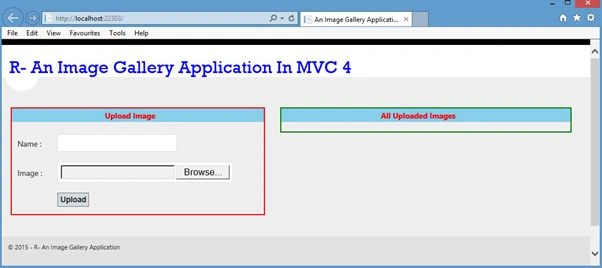
Image 4.
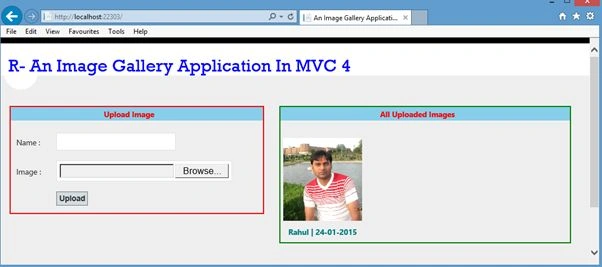
Image 5.
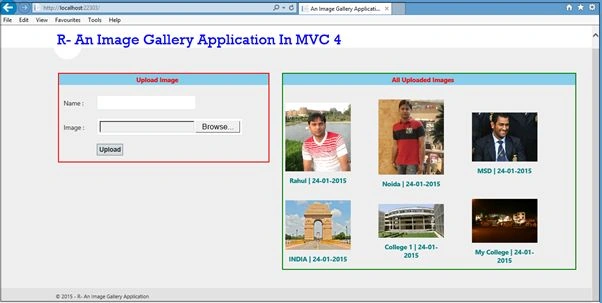
Image 6.
Rahul Kumar SaxenaPosted Jun 5, 2015, 6:15 AM
Thanks Abolfazl RoshanZamir...
Arweb AroshanzamirPosted Jun 5, 2015, 3:57 AM
Nice article Rahul Saxena ...thanks for share\
Rahul Kumar SaxenaPosted May 31, 2015, 12:41 AM
Thanks Ravi Kumar...
Ravi KumarPosted May 30, 2015, 5:04 AM
Nice one Rahul
Rahul Kumar SaxenaPosted Feb 26, 2015, 4:39 AM
Thanks Atul Rawat...
Rahul Kumar SaxenaPosted Feb 26, 2015, 4:39 AM
Thanks Jitendra Kumar...
Atul RawatPosted Jan 26, 2015, 11:06 PM
nice article sir
Jitendra KumarPosted Jan 25, 2015, 2:58 AM
Good one..