

Introduction
My Previous Articles on Bot Framework
Note: Here I am giving My Project link because In this article I will use Real-Time Bot Project Using Microsoft Bot Framework article and I will add LUIS in this project.
What is LUIS?
According to luis.ai, LUIS is a Language Understanding Intelligent Service, which offers a fast and effective way of adding language understanding to applications. With LUIS, you can use pre-existing, world-class, pre-built models from Bing and Cortana whenever they suit your purposes and when you need specialized models, LUIS guides you through the process of quickly building them. LUIS is a part of Microsoft Cognitive Service.
Let's Understand LUIS with an example:
Example 1:
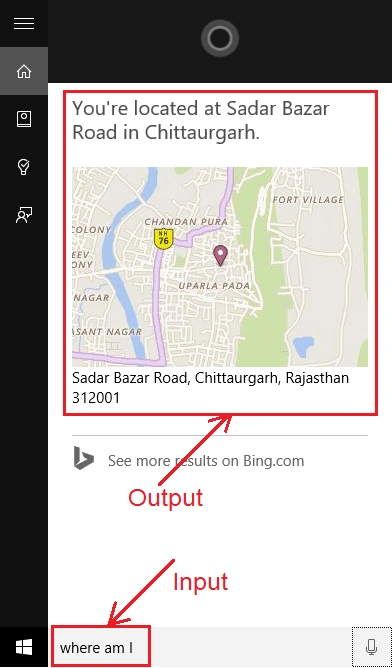
Suppose I search in my Windows 10 PC or Windows phone through Cortana like "Where am I," then I will get a map and my current location. However I am not saying to Cortana to search for a location, I am just saying "Where am I", And Cortana is understanding what am I looking for and this is happening because of LUIS.
Example 2: Suppose I search like Email to [email protected] then Cortana recognizes my command using LUIS and give me result like as follows:
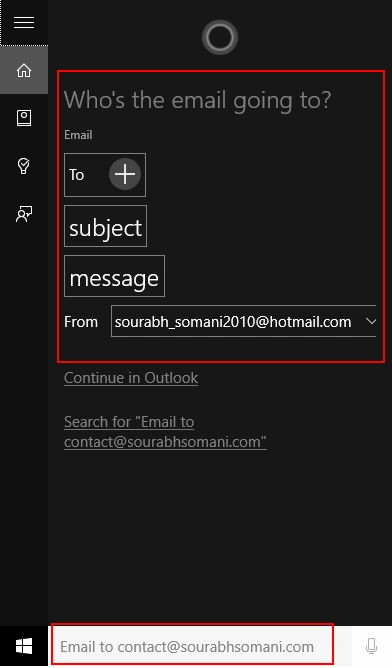
So in the above examples, you can see there is more interaction.
Let's look at my previous example
In my previous article, I created a Real-Time Bot Application where I was searching for the stock price by a stock symbol like as the following figure.
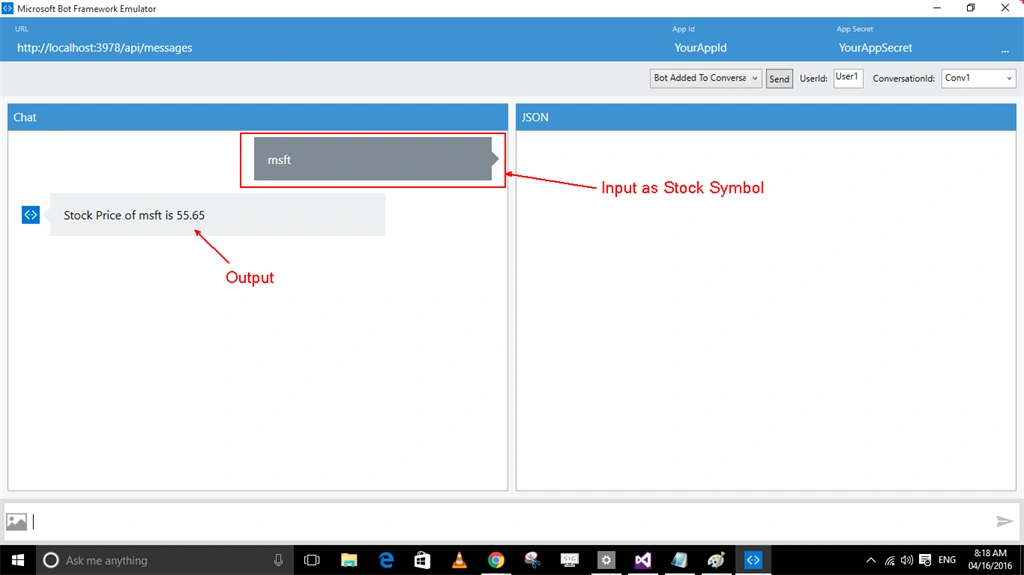
In the above figure you can see that message is not more conversational I am just sending input as msft and getting result but for our users, it will not be more interactive.
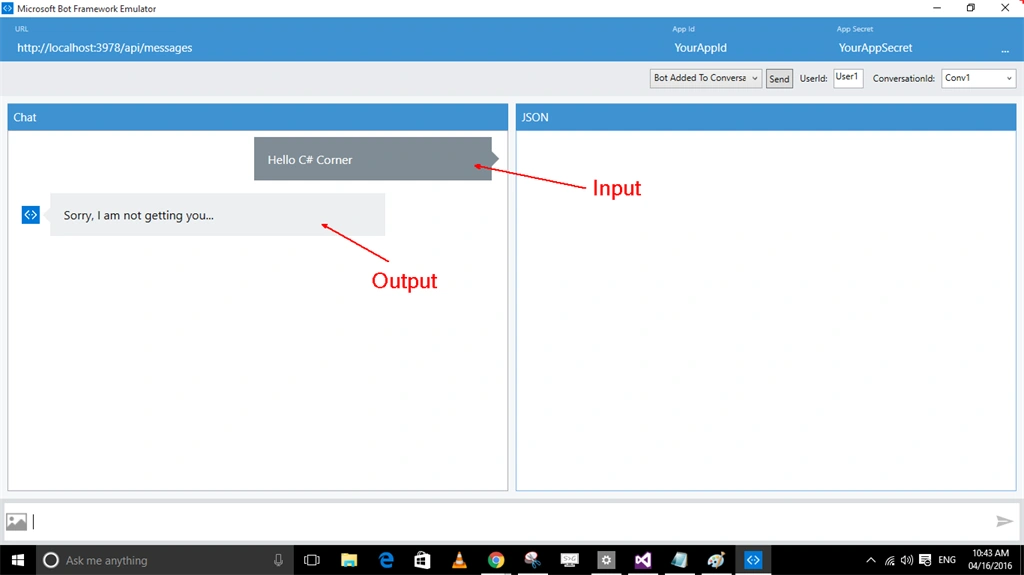
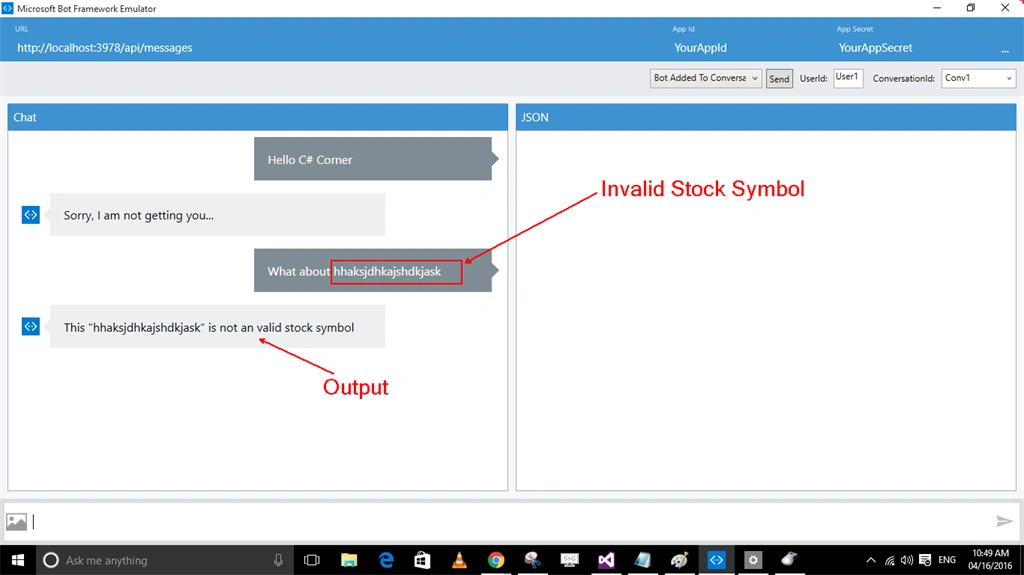
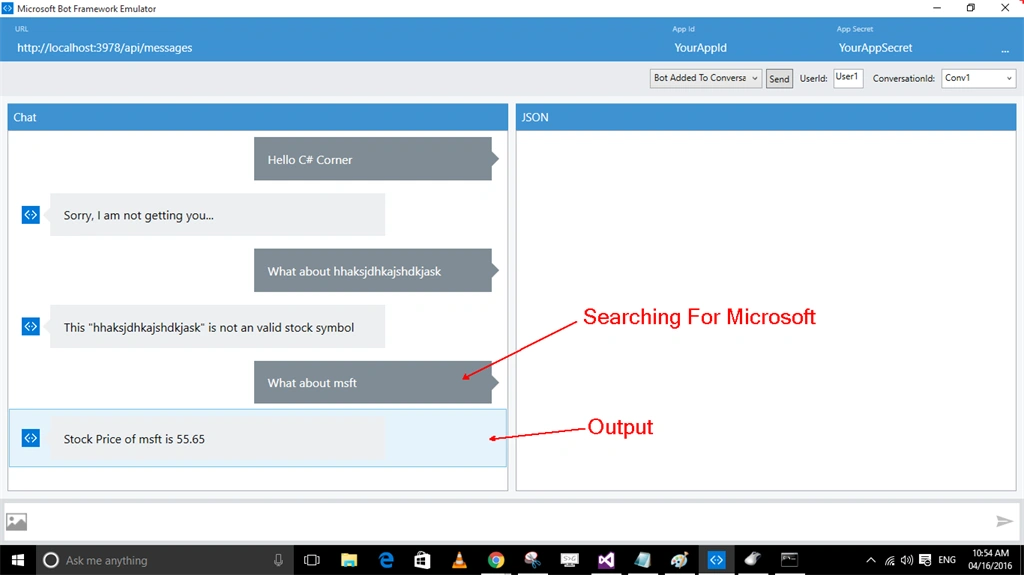
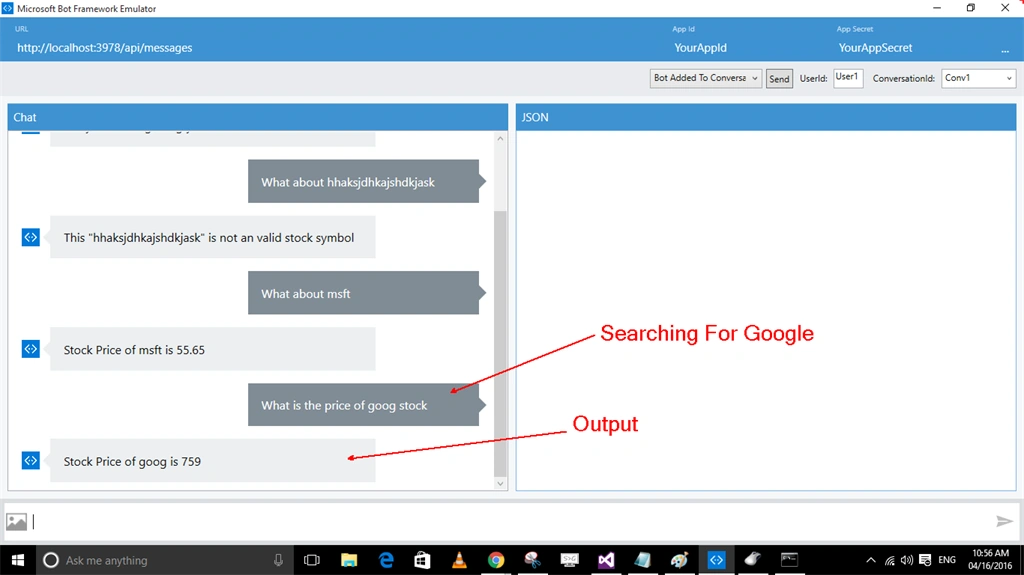
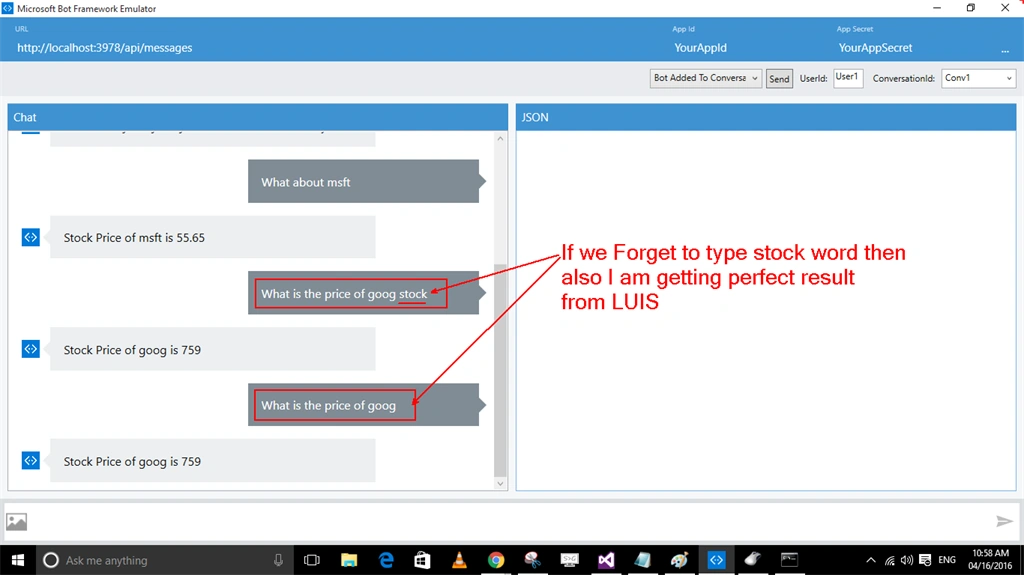
In this article, I will explain to you how can we make our Bot more interactive. Like my input will be "What about msft" or "What is the price of orcl stock", Like as the following figure:
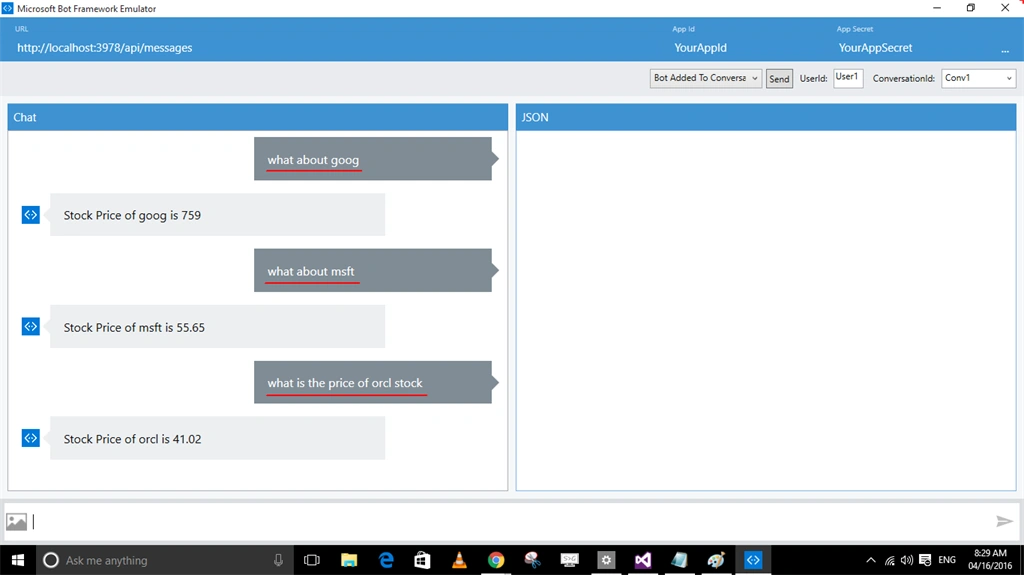
The above conversation is more interactive, and this can be done by using LUIS.
Let's create an application step by step
Step 1:
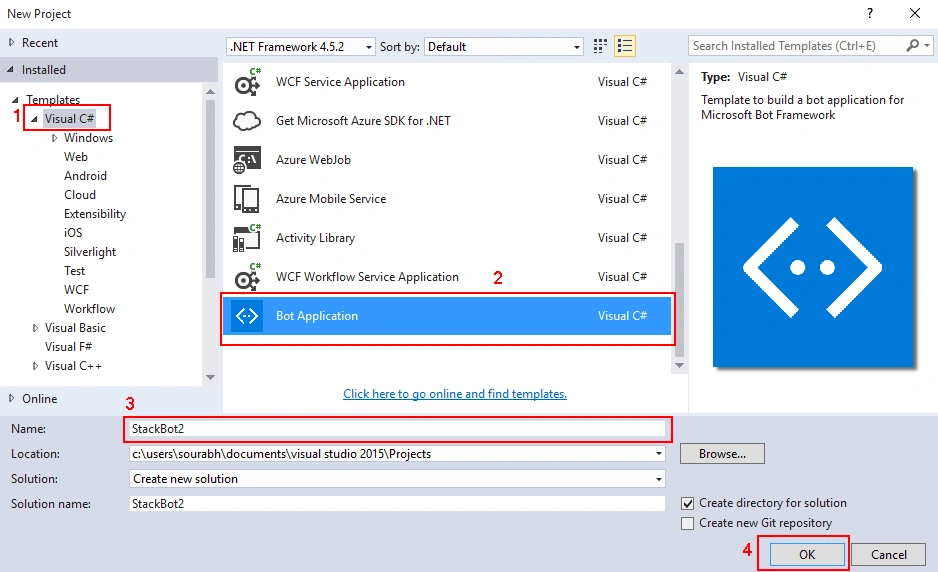
Firstly open visual studio, and create a bot application with any name. Follow the following steps to create a Bot application:
- File > New > Project or just Press CTRL + SHIFT + N.
- Now for Visual C# template select Bot Application then give the name of the application and then click OK button to create the application.
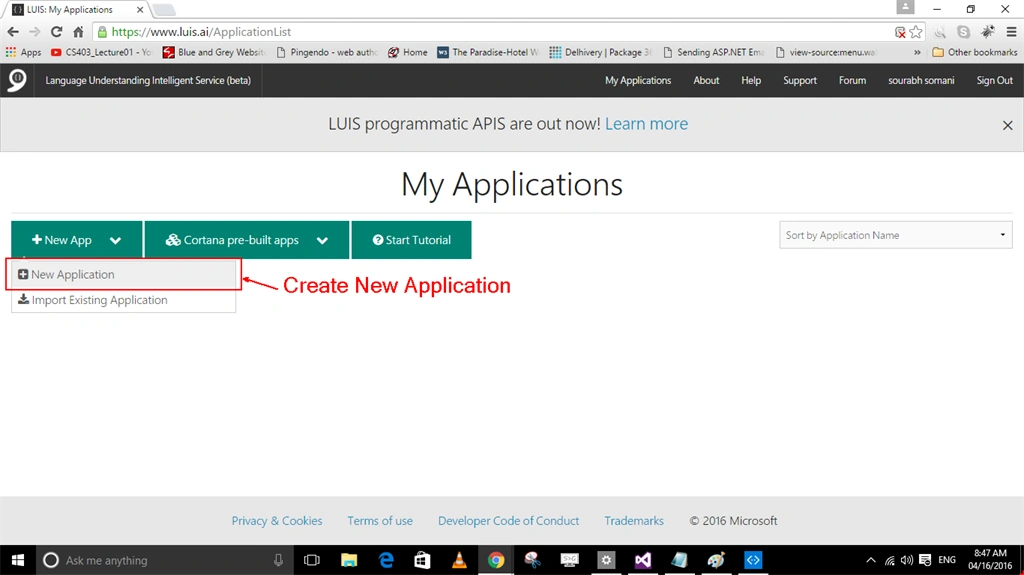
Step 2: Now go to LUIS Website, then login to your account or register there. Then After creating a new application.
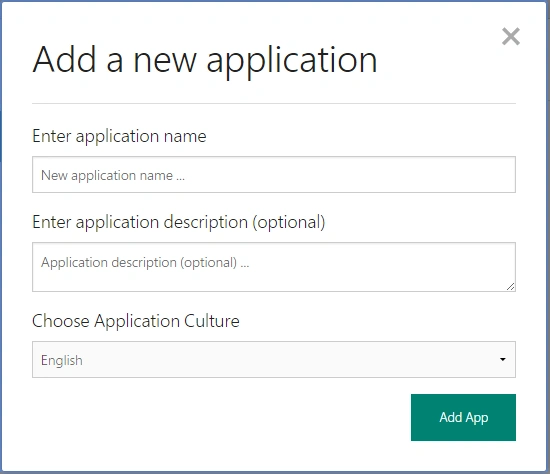
Step 3: Now one dialog box will be open; provide Application Name, Description, and Application Culture and then click on Add App Button.
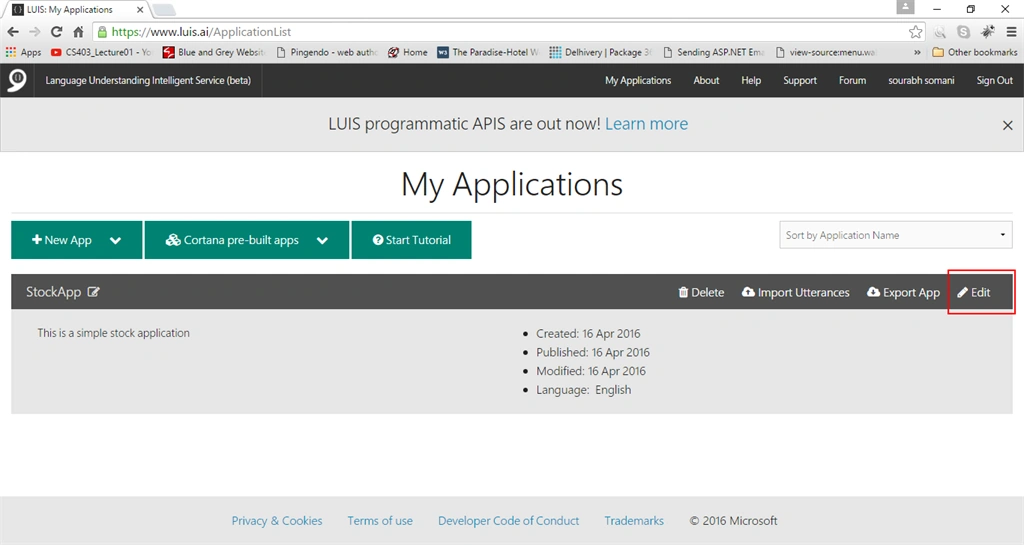
I have created my app by name StockApp.
Step 4: Now edit your application by clicking on the Edit button.
Step 5:
On the left-hand panel, you will see an option to add entities. So quickly add an Entity with Name StockSymbol. Follow the following figure to add an entity.
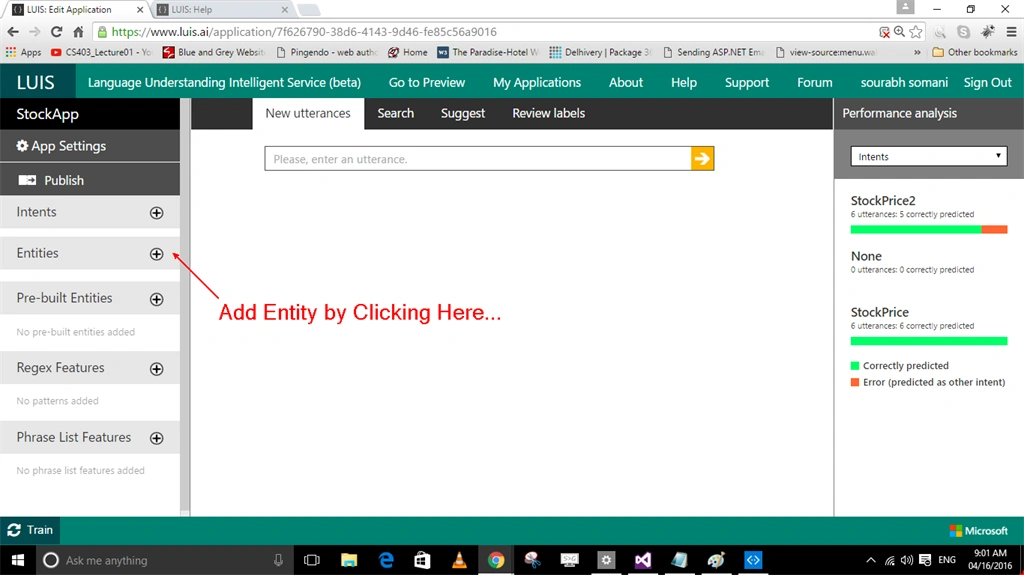
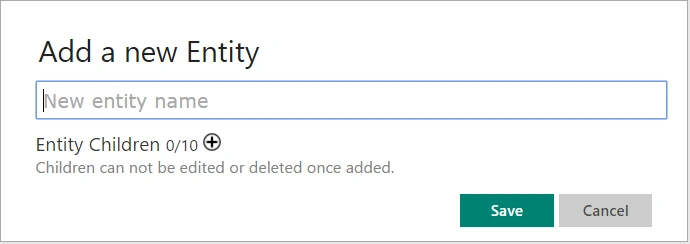
Step 6:
On the left-hand panel, you will see an option to Add Intents. So let's Quickly add Some intents. Give the name of the intents and example of utterance and Save.
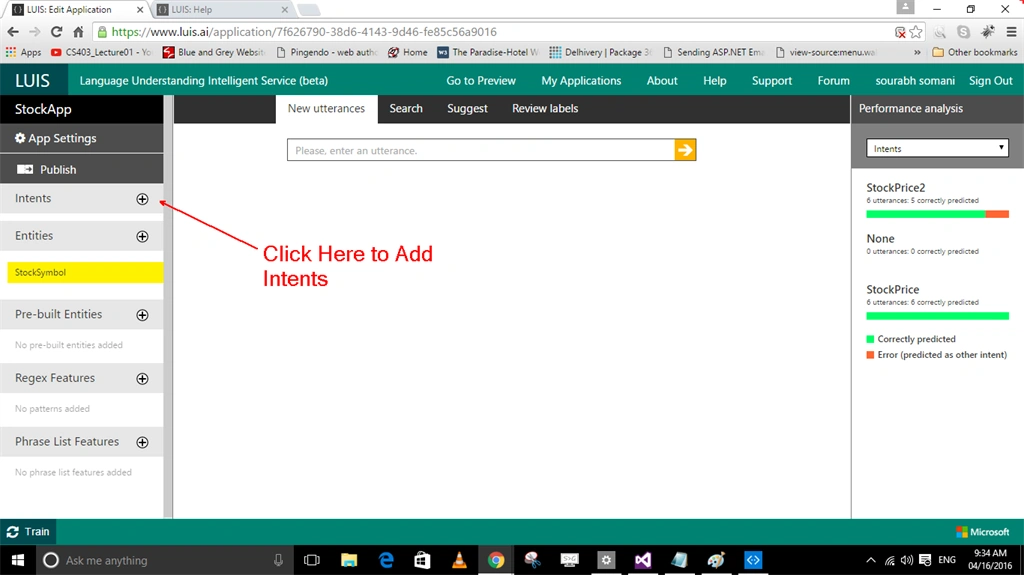
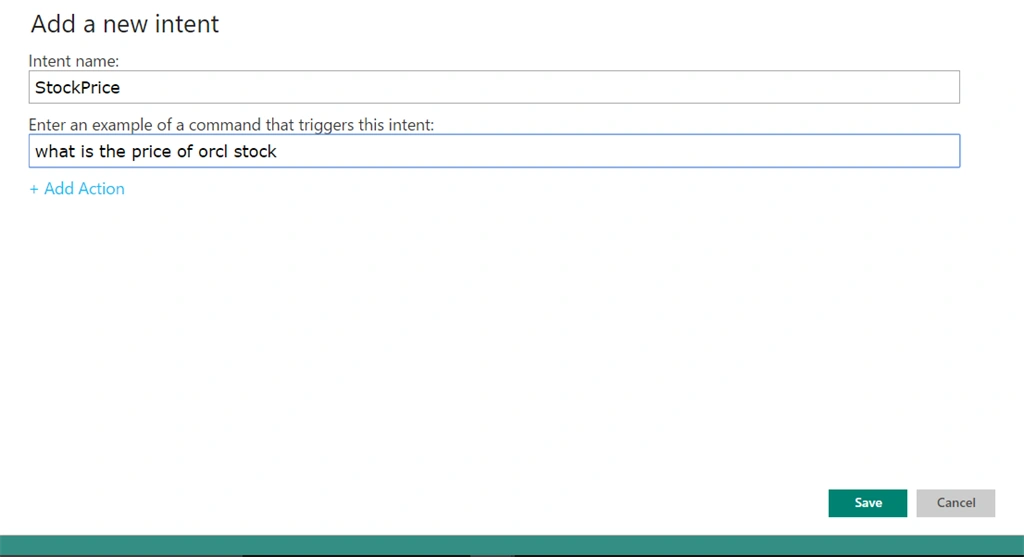
I have added two intents StockPrice and StockPrice2.
What are Intents? :
Intent means just what we desire and what is our intention so my intention is I would like to ask my Bot "what about msft" or "what is the price of msft stock".
What are utterances:
How will I search will be my statements. So I have added 4-5 statements. But after 4-5 LUIS will automatically detect what we want.
Step 7: Now add some utterances like as following.
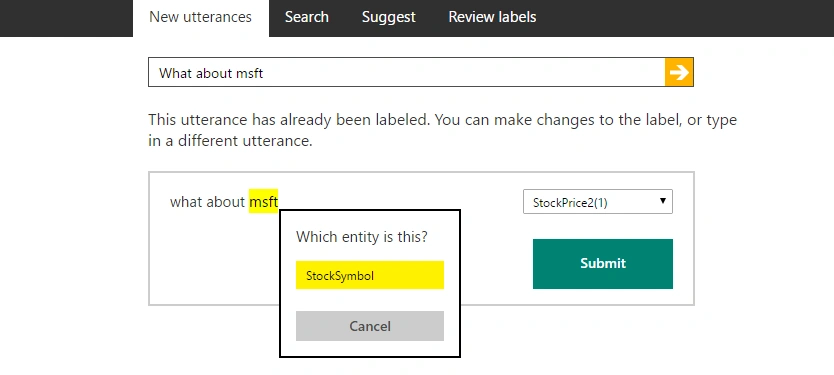
Here you have to define StockSymbol, After doing this for 4-5 LUIS will automatically detect what is our entity.
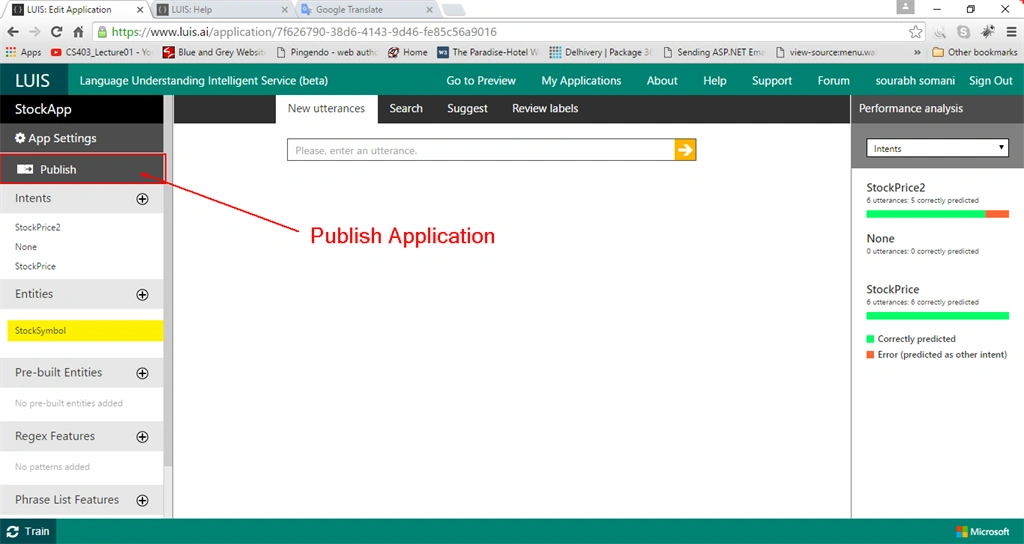
Step 8: Publish your application by clicking on the publish button.
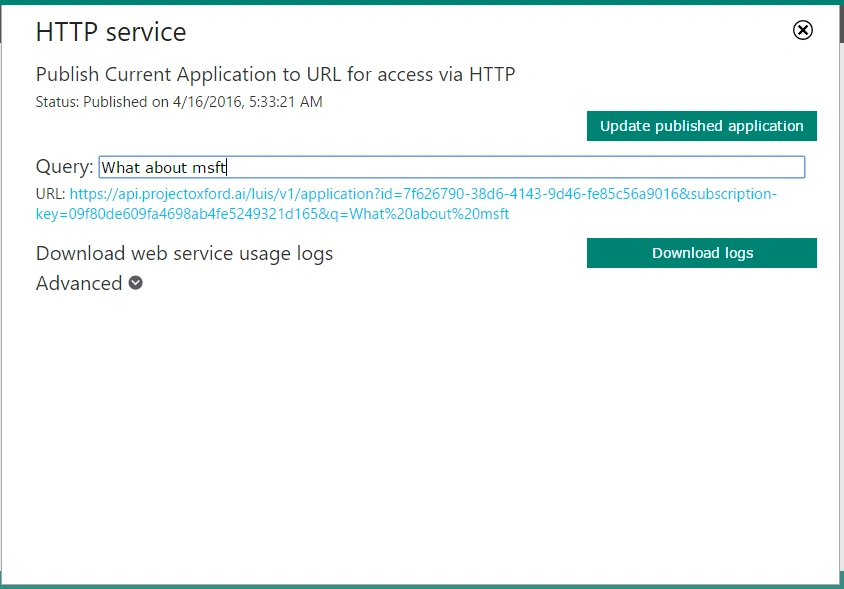
Step 9: Now one dialog box will open search there for your query.
Step 10: Hit Enter and you will get JSON format result.
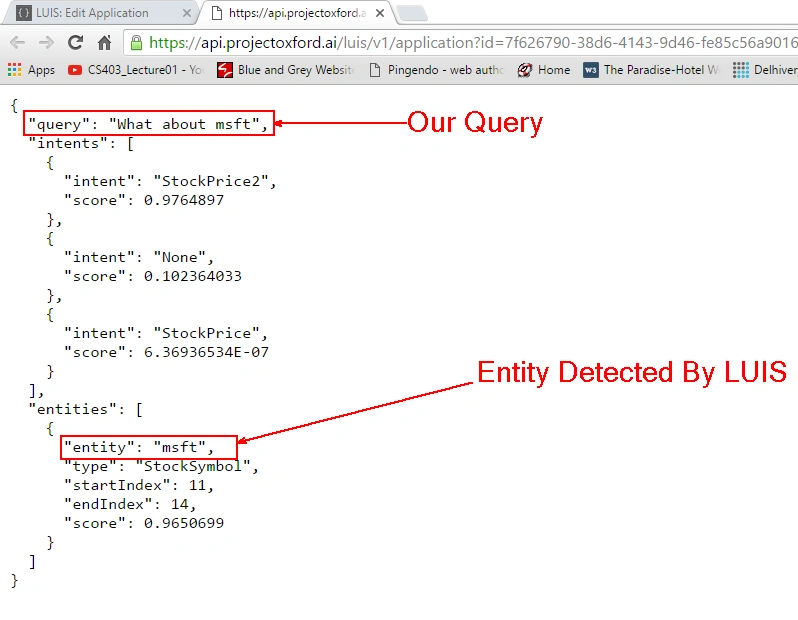
Step 11:
Now again flip to visual studio and create a class file for this JSON result. I am adding a few of the classes for this JSON result. Class code is given below in the figure.
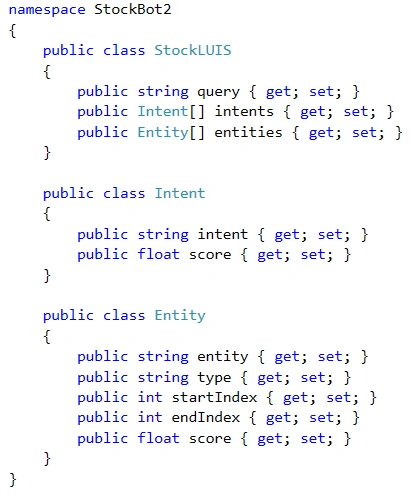
Well, I have just generated this class code using JSON. By Copy and Paste JSON as Classes. Learn How can you paste JSON as Classes.
Step 12:
Now create a class in your project with any name. I am giving Name as YahooBot, Which class Yahoo Finance API to get Stock Information, I am writing the following code inside it.
AMIT BISHTPosted Jan 25, 2021, 8:54 AM
Hi, I am getting the error "POST401directline/conversations/<conversationId>/activities" on emulator. I wanted to know, where to put the APP ID of my LUIS bot created in luisa.ai ? Also, the URL; string RequestURI = "https://api.projectoxford.ai/luis/v1/application?id=7f626790-38d6-4143-9d46-fe85c56a9016&subscription-key=09f80de609fa4698ab4fe5249321d165&q=" + Query; what should be for my case, or should I leave it as it is? Please help.
Deepak SelvarajPosted Aug 16, 2018, 1:32 AM
SS Enabled is true in my VS.. but it still shows this error.. Am i missing out anything?? { "error": { "code": "ServiceError", "message": "request to https://localhost:3978/api/messages failed, reason: net::ERR_SSL_PROTOCOL_ERROR" } }
Easwaran ParamasivamPosted Jul 26, 2018, 9:16 AM
Great one! Thanks!!
Dhanashri VaityPosted Jul 28, 2017, 8:46 AM
How can we recognized composite entity in node js?
Dhanashri VaityPosted Jul 21, 2017, 7:08 AM
Can you please tell me how to develop this same app but in node js?
ankish sainiPosted Jun 28, 2017, 3:08 AM
Thanks! Great article easy to implement...
Amit GobarePosted Jun 27, 2017, 1:45 AM
Hi...How can we store chat into azure table storage and once it stored how can we retrived it when User come again for chat after some period of time?
Sara TuringPosted Jun 25, 2017, 4:20 PM
What is StockLUIS class? I don't see it above
Sushodhan VaishampayanPosted Jun 14, 2017, 7:47 AM
Hi Sourabh. How can we handle the bot or rather chat with the bot using voice ?
Mahesh GorlePosted May 10, 2017, 5:01 AM
Hi Sourabh,Can we run chat bot locally by deploying in my local server. If yes, have any web supported emulators, instead of using bot-framework emulator.
Vaijinath HarbakPosted Apr 5, 2017, 6:37 AM
I have created my LUIS app as shown above, but while testing it I am getting itents but not entities, Please suggest what could be the wrong.
Vaijinath HarbakPosted Apr 5, 2017, 6:35 AM
Hi Sourabh, It really helpful article, Thanks
jinraj jainPosted Mar 23, 2017, 10:50 AM
If I access the link from URL it is working but when i use in code like await client.GetAsync(RequestURI); it just say 500 error
sudheer tiwariPosted Feb 24, 2017, 1:46 PM
Good Article Sourabh, in next post include about form dialog and prompt feature of bot framework.
chint sPosted Feb 2, 2017, 7:10 AM
Nice article Sourabh. can we using microsoft bot to remotely trigger i.e start / stop a bot ?
Ishan TiwariPosted Jan 5, 2017, 8:50 AM
Hi, please let me know that why this application is not running in emulator
Dean HuPosted Nov 22, 2016, 8:39 PM
Cool tutorial! Thanks for the effort!
Srinivas PotnuruPosted Jul 28, 2016, 5:31 AM
Hi Sourabh, I have two questions on microsoft bot 1) Is it possible to communicate our own bot via microsoft open communicator, Cisco jabber etc...? 2) Can our bot be hosted on private cloud instead of public cloud?
Srinivas PotnuruPosted Jul 27, 2016, 3:00 AM
Got it we have to use MIME type as in IIS "application/vnd.openxmlformats-officedocument.wordprocessingml.document" for the document to send via bot.
Srinivas PotnuruPosted Jul 27, 2016, 2:10 AM
Hi Sourabh, I tried sending documents through bot but it is accepting only images where as for text files,documents i passed content type as "file/txt","file/docx" which is not working and for image as "image/png".Am i sending the contentype correctly in case of text files or documents ..?
Srinivas PotnuruPosted Jul 26, 2016, 3:18 AM
Hi Sourabh, It is a great article.I have a doubt here basically you have utterances for "msft" and specified that "msft" as entity "stocksymbol" while adding , but if i have thousands of stocksymbols on my application like "yahoo","Google",etc... should i add all the utterances and specifying entity?
mallela prakashPosted Jul 1, 2016, 11:38 AM
Hi Sourabh, Having some doubts in the given code. I will give an example of my scenario. Please correct me if i am wrong. This function public async Task<Message> Post([FromBody]Message message) is used to get the data from user and send the reply to user right. Here my question is, if i enter SharePoint access i need to send the query to my luis Uri and based upon the result send the output to the user. Can you give me a chuck of code for achieving this
Prasanna MuraliPosted Jun 24, 2016, 1:18 AM
Nice one....
Bhuvanesh MohankumarPosted May 22, 2016, 12:29 PM
Great article Sourabh Somani
Bhuvanesh MohankumarPosted May 22, 2016, 12:29 PM
That's a good info to know Mahesh Chand, It would be great if you share an article of how it will be benefited :)
Mahesh ChandPosted May 22, 2016, 9:42 AM
Good once Saurabh. We plan to implement Bot technology in new C# Corner Universal app.
Prasanna MuraliPosted May 20, 2016, 10:47 AM
Nice one...
Bhuvanesh MohankumarPosted May 3, 2016, 12:46 PM
Great to know
Kuppurasu NagarajPosted Apr 17, 2016, 4:12 AM
Nice Sharing..
Shakti Singh DulawatPosted Apr 17, 2016, 3:55 AM
Wonderful details article
Vignesh ManiPosted Apr 17, 2016, 3:22 AM
Good
Rahul Kumar SaxenaPosted Apr 16, 2016, 9:06 PM
Good Work Sourabh Somani