

It is common these days to see every company maintain record of every visitor and to keep the information online, in other words who visits the company, what was his/her purpose to visit, whom he/she wants to meet and so on.
Now I am explaining my project.
Here I developed this project using Visual Studio 2012 and SQL Server 2008 R2.
The following are the table details used in this project.
Employee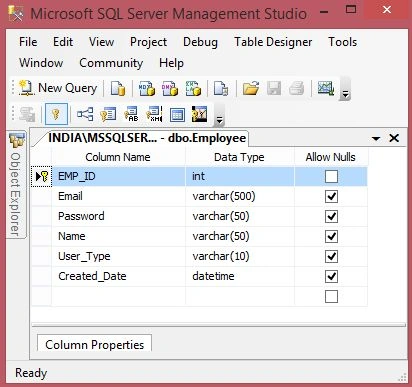
Image 1.
The following is the script of my table :
- CREATETABLE [dbo].[Employee](
- [EMP_ID] [int] IDENTITY(1,1)NOTNULL,
- [Email] [varchar](500)NULL,
- [Password] [varchar](50)NULL,
- [Name] [varchar](50)NULL,
- [User_Type] [varchar](10)NULL,
- [Created_Date] [datetime] NULL,
- CONSTRAINT [PK_Employee] PRIMARYKEYCLUSTERED
- (
- [EMP_ID] ASC
- )WITH (PAD_INDEX=OFF,STATISTICS_NORECOMPUTE=OFF,IGNORE_DUP_KEY=OFF,ALLOW_ROW_LOCKS=ON,ALLOW_PAGE_LOCKS=ON)ON [PRIMARY]
- )ON [PRIMARY]
- GO
- SETANSI_PADDINGOFF
- GO
- ALTERTABLE [dbo].[Employee] ADDCONSTRAINT [DF_Employee_Created_Date] DEFAULT (getdate())FOR [Created_Date]
- GO
Visitors: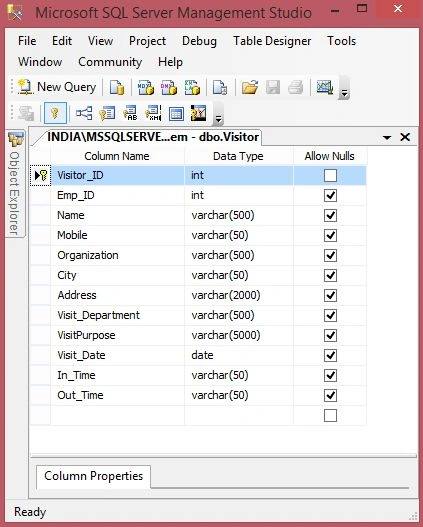
Image 2.
The following is the script of my table:
- CREATETABLE [dbo].[Visitor](
- [Visitor_ID] [int] IDENTITY(1,1)NOTNULL,
- [Emp_ID] [int] NULL,
- [Name] [varchar](500)NULL,
- [Mobile] [varchar](50)NULL,
- [Organization] [varchar](500)NULL,
- [City] [varchar](50)NULL,
- [Address] [varchar](2000)NULL,
- [Visit_Department] [varchar](500)NULL,
- [VisitPurpose] [varchar](5000)NULL,
- [Visit_Date] [date] NULL,
- [In_Time] [varchar](50)NULL,
- [Out_Time] [varchar](50)NULL,
- CONSTRAINT [PK_Visitor] PRIMARYKEYCLUSTERED
- (
- [Visitor_ID] ASC
- )WITH (PAD_INDEX=OFF,STATISTICS_NORECOMPUTE=OFF,IGNORE_DUP_KEY=OFF,ALLOW_ROW_LOCKS=ON,ALLOW_PAGE_LOCKS=ON)ON [PRIMARY]
- )ON [PRIMARY]
- GO
- SETANSI_PADDINGOFF
- GO
- ALTERTABLE [dbo].[Visitor] ADDCONSTRAINT [DF_Visitor_Visit_Date] DEFAULT (getdate())FOR [Visit_Date]
- GO
Now in the following figure I am trying to explain how my project works: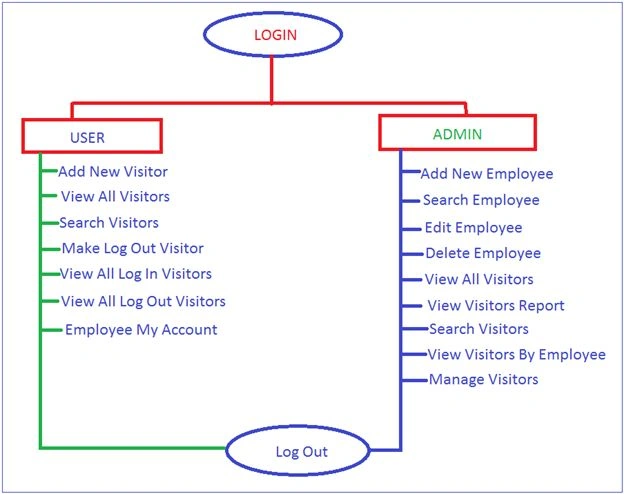
Image 3.
Now run the application:
Here I have 2 types of users, one is Admin and the second one is User:
Image 4.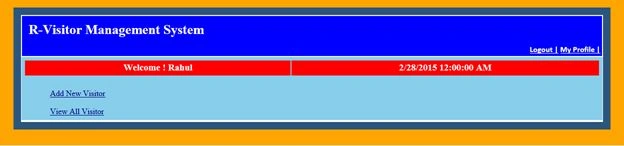
Image 5.
Now click on the "Add New Visitor" link: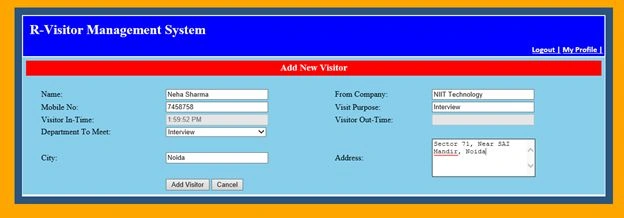
Image 6.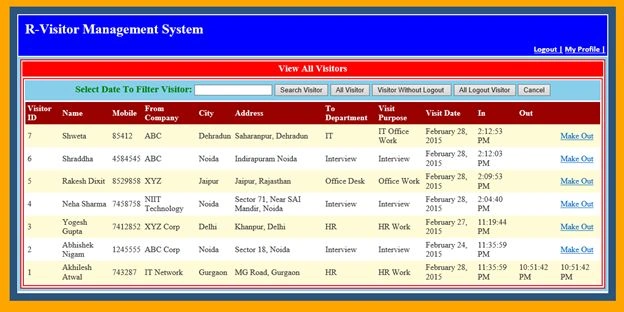
Image 7.
From here an employee can search for any visitor and can manually log him out. 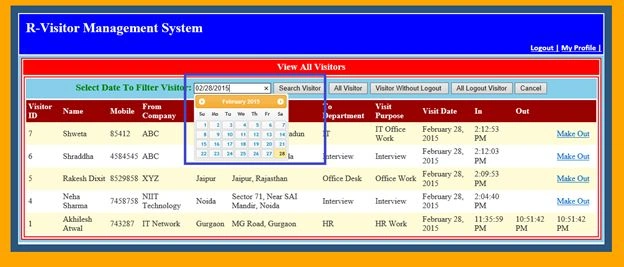
Image 8.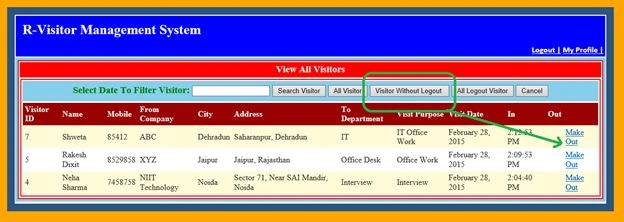
Image 9.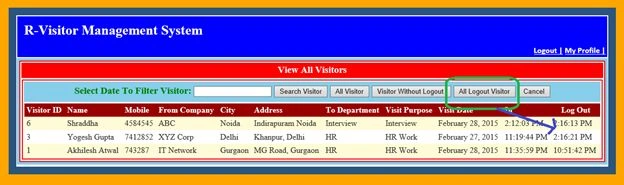
Image 10.
Now login as ADMIN: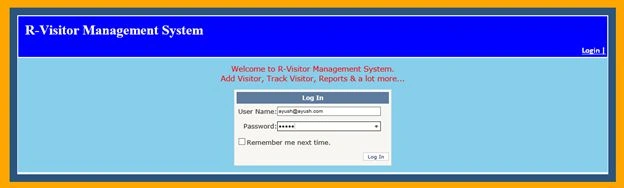
Image 11.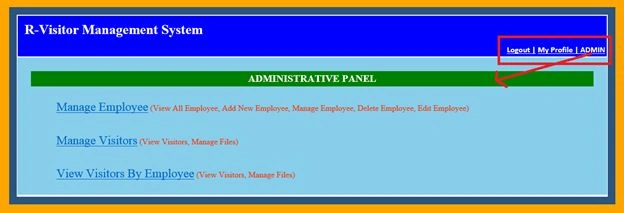
Image 12.
Now click the "Manage Employee" link: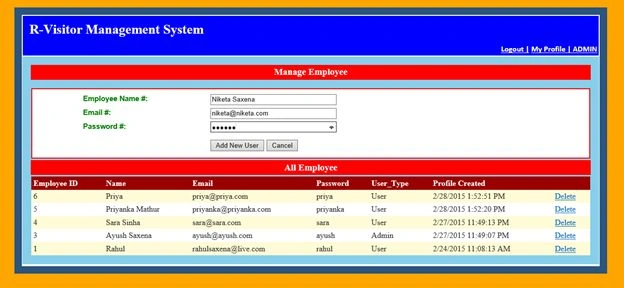
Image 13.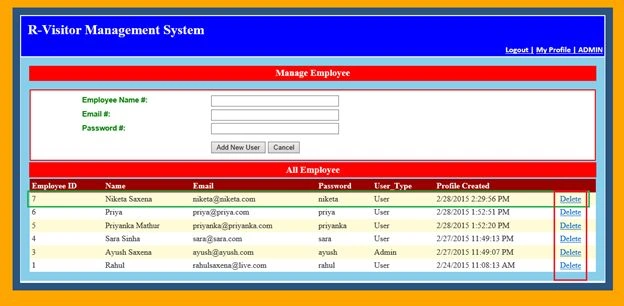
Image 14.
Now again click on the ADMIN link and click on the "Manage Visitors" link.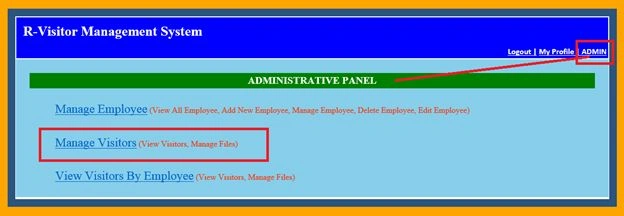
Image 15.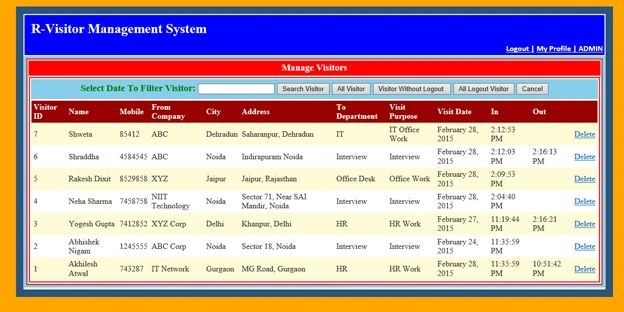
Image 16.
An Admin can search visitors and can delete any visitor from here.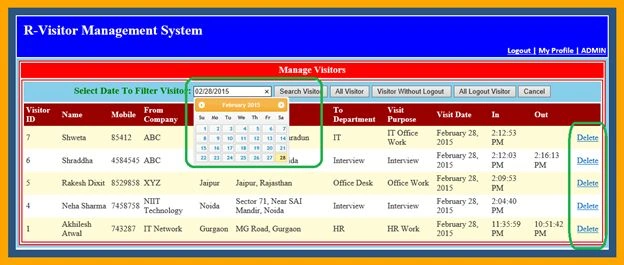
Image 17.
Now again click on the ADMIN link, then click on "View visitors By Employee".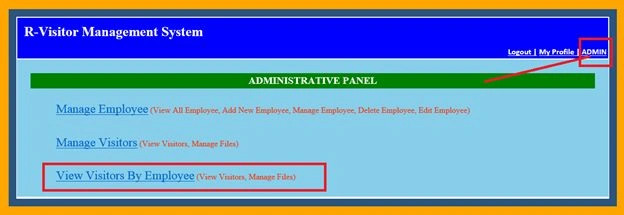
Image 18.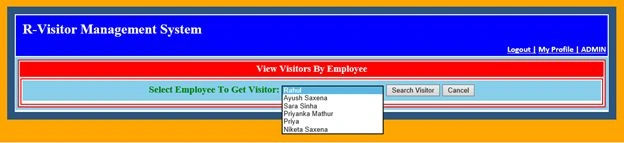
Image 19.
Select Employee and click on the Search visitor button: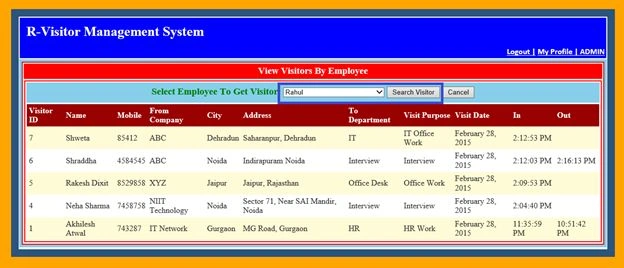
Image 20.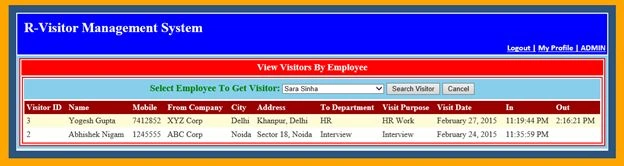
Image 21.
Enjoy my project. Happy Coding!
mohit guptaPosted Sep 13, 2021, 8:41 AM
Thanks , How can we get Data base thsi? Please share on my emailid : [email protected]
RAJANIKANTH YERAMANCHIPosted Aug 17, 2021, 9:32 AM
Give me one clarity full picture from start to end video for this available please provide us tq
RAJANIKANTH YERAMANCHIPosted Aug 17, 2021, 9:31 AM
That .sln solution file is not opening in visualstudio2019 version
Vinay SPosted Aug 3, 2019, 5:20 AM
I hosted the website properly in IIS but there is no database. Please suggest.
AMAN DUDEJAPosted Jun 11, 2018, 9:33 PM
How to run the project ?
avant gardePosted Apr 24, 2018, 7:42 AM
USE [VisitorManagementSystem]GO /****** Object: Table [dbo].[Employee] Script Date: 04/24/2018 18:11:10 ******/ SET ANSI_NULLS ON GO SET QUOTED_IDENTIFIER ON GO SET ANSI_PADDING OFF GO CREATE TABLE [dbo].[Employee]( [EMP_ID] [int] NOT NULL, [Email] [varchar](500) NULL, [Password] [varchar](50) NULL, [Name] [varchar](50) NULL, [User_Type] [varchar](10) NULL, [Created_Date] [datetime] NULL, CONSTRAINT [PK_Employee] PRIMARY KEY CLUSTERED ( [EMP_ID] ASC )WITH (PAD_INDEX = OFF, STATISTICS_NORECOMPUTE = OFF, IGNORE_DUP_KEY = OFF, ALLOW_ROW_LOCKS = ON, ALLOW_PAGE_LOCKS = ON) ON [PRIMARY] ) ON [PRIMARY] GO SET ANSI_PADDING OFF GO ALTER TABLE [dbo].[Employee] ADD CONSTRAINT [DF_Employee_Created_Date] DEFAULT (getdate()) FOR [Created_Date] GO
Tom SlaterPosted Nov 18, 2017, 6:49 AM
Nice application, is there a way to host this locally??
Zartab MiyaPosted Mar 4, 2017, 1:35 AM
Hi, do we have a provision to book a visitor for future visit. E.g: i want to book a slot 10am-11am for Mr.X with Visitor Y on ABC date @ CD department. Is this possible. Once the booking is done , the system should trigger a mail to the user and a reminder of the same should be made on his or her calendar.
veer singhPosted May 31, 2016, 8:22 AM
very nice sir
liangshen ngPosted Mar 31, 2016, 2:07 AM
I dont see empoyee table pls show
liangshen ngPosted Mar 31, 2016, 2:06 AM
I can find the database username n password too
Rajendrasinh JadejaPosted Jan 5, 2016, 12:46 AM
i cant find database in zip fine any one help where can i find username and password for log in?
Rahul Kumar SaxenaPosted Apr 24, 2015, 9:01 AM
Thanks Ratnesh Singh
Ratnesh SinghPosted Apr 24, 2015, 3:19 AM
nice work
Rahul Kumar SaxenaPosted Apr 21, 2015, 10:36 PM
Thanks. Krishnanand Sivaraj
Krishnanand SivarajPosted Apr 21, 2015, 10:05 PM
Thanks for sharing
Rahul Kumar SaxenaPosted Apr 14, 2015, 2:28 PM
Thanks 2 All...
Rahul Kumar SaxenaPosted Apr 14, 2015, 2:28 PM
Thanks Upendra ...
Upendra Pratap ShahiPosted Apr 14, 2015, 3:28 AM
very nice and easy article sir...
Rahul Kumar SaxenaPosted Apr 4, 2015, 5:34 PM
Hi anil kumar in data base there is a table employee see any record there Read user id and password from there n login
Anil KumarPosted Apr 3, 2015, 2:14 PM
please help me Rahul Saxena sie
Anil KumarPosted Apr 3, 2015, 2:14 PM
,please tell me how can i register on this project , i have connected with my database , but unabe to login
Anil KumarPosted Apr 3, 2015, 2:12 PM
when i run this project , asked for Username and password
Rahul Kumar SaxenaPosted Mar 11, 2015, 2:03 PM
Thank u Gowtham Rajamanickam
Gowtham RajamanickamPosted Mar 11, 2015, 9:49 AM
good one....
Rahul Kumar SaxenaPosted Mar 4, 2015, 11:42 PM
Thanks Danish Ahmed...
Rahul Kumar SaxenaPosted Mar 4, 2015, 11:42 PM
Thanks Sachin Sharma
Rahul Kumar SaxenaPosted Mar 4, 2015, 11:42 PM
Thanks Kitimbo Daniel...
Rahul Kumar SaxenaPosted Mar 4, 2015, 11:42 PM
Thanks Meer Rizwan Ali Talpur...
Rahul Kumar SaxenaPosted Mar 4, 2015, 11:41 PM
Thanks Vithal Wadje...
Rahul Kumar SaxenaPosted Mar 4, 2015, 11:41 PM
Thanks Humayun Kabir Mamun...
Vithal WadjePosted Mar 4, 2015, 12:23 PM
very useful for student,thanks for sharing
Humayun Kabir MamunPosted Mar 4, 2015, 2:08 AM
Nice...
Rahul Kumar SaxenaPosted Mar 4, 2015, 12:10 AM
Thanks a lot Mayank Dhulekar
Rahul Kumar SaxenaPosted Mar 4, 2015, 12:10 AM
Thank u Abiather Hore...
Mayank DhulekarPosted Mar 3, 2015, 5:06 PM
Good job and Nice project Rahul...
Abiather HorePosted Mar 3, 2015, 2:59 PM
Tremendous. Thanx!
Rahul Kumar SaxenaPosted Mar 3, 2015, 12:55 PM
Thanks a lot Shri Narayan Dubey...
Shri Narayan DubeyPosted Mar 3, 2015, 12:50 PM
Great work sir..
Rahul Kumar SaxenaPosted Mar 3, 2015, 12:50 PM
Thanks sourabh somani...
Sourabh SomaniPosted Mar 3, 2015, 2:47 AM
Nice Rahul Saxena waiting for next R-? project...
Rahul Kumar SaxenaPosted Mar 2, 2015, 12:54 PM
Thank u Shaili Sashora...
Shaili DashoraPosted Mar 2, 2015, 12:43 PM
nice work sir..
Rahul Kumar SaxenaPosted Mar 2, 2015, 9:19 AM
Thanks Hari Shanker...
Hari ShankerPosted Mar 2, 2015, 8:48 AM
nice work Rahul
NitinPosted Mar 2, 2015, 8:36 AM
Welcome Rahul Saxena :)
Rahul Kumar SaxenaPosted Mar 2, 2015, 8:29 AM
Thanks Nitin Tyagi...
Rahul Kumar SaxenaPosted Mar 2, 2015, 8:29 AM
Thanks Prasham Sabadra...
NitinPosted Mar 2, 2015, 8:19 AM
excellent work
Prasham SabadraPosted Mar 2, 2015, 8:16 AM
Nice one Rahul. Thanks for sharing!
Rahul Kumar SaxenaPosted Mar 2, 2015, 8:08 AM
Thanks danish Ahmed...
Rahul Kumar SaxenaPosted Mar 2, 2015, 7:19 AM
Thank u ... Khargesh Rajput
Khargesh RajputPosted Mar 2, 2015, 6:43 AM
again nice project sir