

In this article, we are going to learn about Strings and Ranges in Kotlin with string methods.
StringsKotlin provides different string methods which help us to write our programs faster and in an efficient way.
- equals() method
In Kotlin, to compare two strings, we use equals() methods.For example:
- /**
- * equals method
- */
- var name: String = "Kishor"
- if (name.equals("kishor")) {
- println("They are equal")
- } else {
- println("They are not equal")
- }
- //Output: They are not equal.
It is case sensitive so strings “Kishor” and “kishor” are not equal.
If we want to compare without taking case sensitive into consideration, then we can pass "true" as a parameter in equals method like:
- if (name.equals("kishor", true)) {
- println("They are equal")
- } else {
- println("They are not equal")
- }
- //Output: They are equal.
- toInt() method
In Kotlin, we can convert String into integer using toInt() method.
For example:
- /**
- * String to Integer
- */
- var a: String = "4"
- print(a.toInt());
- //Output: 4
- substring() method
We can get the substring of String. We can print the first name using substring method. For example:- /**
- *Substring
- */
- var myName: String = "Kishor Bikram Oli"
- println(myName.substring(0..5)) //this means 0 to 5
- //Output: Kishor
- String templates
In Java, we can print the name like below:- /**
- * String template
- */
- var name: String = "Kishor"
- println("My name is " + name) //Java
But in Kotlin, we can use String using String templates like:
println("My name is $name") //Kotlin
- contains() method
In Kotlin, if we want to check if some character is present in the string, then we can use contains() methods.For example:
- /**
- * Contains method
- */
- var a1: String = "Hello"
- var a2: String = "World"
- if (a1.contains('e')) {
- println("true")
- } else {
- println("false")
- }
- //Output: true
- replace() method
In Kotlin, replace() method replaces the old char with the new char.For example:
- /**
- * replace method
- */
- var b1: String = "apple"
- println(b1.replace("pp", "tt"))
- //Output: attle
- replaceAfter() method
In Kotlin, replaceAfter() method replaces part of the string after the given character with the new given string.
For example:
- /**
- * replaceAfter method
- */
- var b2: String = "elephant"
- println(b2.replaceAfter('p', "rr"))
- //Output: eleprr
Here, there is ‘hant’ after ‘p’ and it is replaced by ‘rr’, so it becomes ‘eleprr’
- replaceAfterLast() method
In Kotlin, replaceAfterLast() method replaces part of the string after the occurrence of last given character with the new given string.For example:
- /**
- * replaceAfterLast method
- */
- var b3: String = "androidkotlin "
- println(b3.replaceAfter('o', "yyyy"))
- //Output: androidkoyyyy
Here, there is ‘tlin after last ‘o’ and it is replaced by ‘yyyy’, so it becomes ‘androidkoyyyy’
- replaceBefore() method
In Kotlin, replaceBefore() method replaces part of the string before the given character with the new given string.For example:
- /**
- * replaceBefore method
- */
- var b2: String = "elephant"
- println(b2.replaceBefore('p', "rrr"))
- //Output: rrrphant
Here, there is ‘ele’ before ‘p’ and it is replaced by given ‘rrr’, so it becomes ‘rrrphant’
- replaceBeforeLast() method
In Kotlin, replaceBeforeLast() method replaces part of the string before the occurrence of last given character with the new given string.For example:
- /**
- * replaceAfterLast method
- */
- var b2: String = "androidkotlin "
- println(b2.replaceBeforeLast('o', "yyyy"))
- //Output: yyyyotlin
Here, there is ‘androidk’ before last ‘o’ and it is replaced by ‘yyyy’, so it becomes ‘yyyyotlin’
- reversed() method
In Kotlin, reversed() method gives the string in reversed format.
For example:- /**
- * reversed method
- */
- var d1: String "android"
- println(d1.reversed())
- //Output: diordna
- startsWith() method
In Kotlin, startsWith() method returns true if the string starts with the given prefix.
For example:- /**
- * startsWith method
- */
- var d2: String = "android"
- if (d2.startsWith("an")) {
- println("true")
- } else {
- println("false")
- }
- //Output: true
- endsWith() method
In Kotlin, endsWith() method returns true if the string ends with the given prefix.
For example:- /**
- * endsWith method
- */
- var d3: String = "android"
- if (d3.startsWith("id")) {
- println("true")
- } else {
- println("false")
- }
- //Output: true
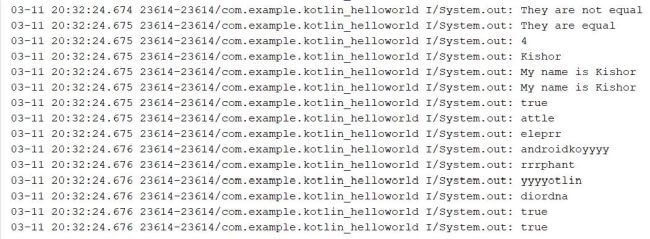
Complete code snippet for Strings
Join the conversation! Your thoughts help the community grow.