

Let’s see what this project is all about. This project is a basic gym project which has 2 modules in it.
- Admin end
- User end
Admin end
Let’s start with the Admin end first. In this part, the admin has all the rights of the application's master, such as adding Users, Role, Scheme, Plan, and various reports, such as month-wise and year-wise income reports, all member reports, and also, it has a renewal report which shows how many renewals are there for the period the admin chooses.
User end
If you look at the User end, a user is a person who does the work of registering new members and collecting payments. The user has limited access, such as a user can register a new member and renew membership and see payment details of the member along with renewal date.
The project has 3 parts.
- Angular CLI which is on top of node.js
- NET Core for APIs
- SQL Server for database parts
Platform Used
Angular Version 7 is used.
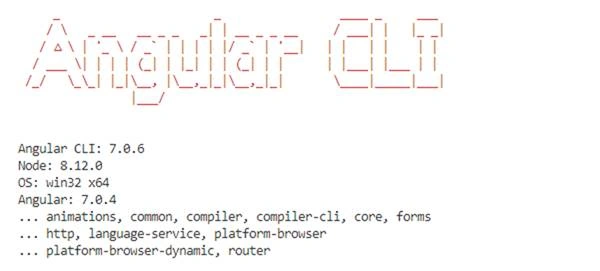
Microsoft Visual Studio Community 2017
The link to download Microsoft Visual Studio Community 2017 is here.
Microsoft SQL Server 2012
Link to download SQL Server Express is here.
Visual Studio Code
Link to download Visual Studio code is here.
JWT Token for Authentication of APIs

Image is referenced from here.
External packages which are used in .NET Core Project
- JWT Token for Authentication of APIS
- Dapper ORM
- AutoMapper
- Linq.Dynamic.Core
External packages which are used in Angular Project
- @angular/material
- @ngx-bootstrap/datepicker
Let’s start with database tables first.
Database
For this application, I have used SQL Server database. You can download the entire script of this database and use it.
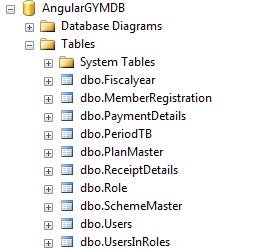
Let us explore the tables of this database one by one so that you will have a clear idea of which table is used for which purpose.
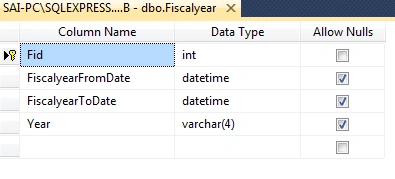
Fiscal year
This table contains the financial year details.
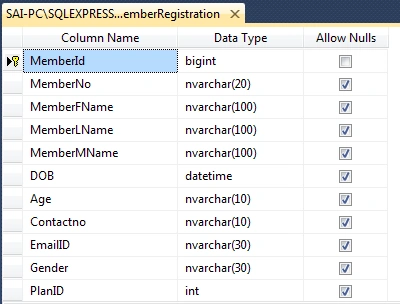
Member Details
Whenever a new member takes a subscription, all member details are stored in this database.
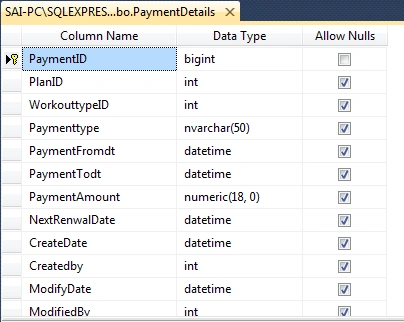
Payment Details
Whenever a new member takes a subscription, all payment details are stored in this database.
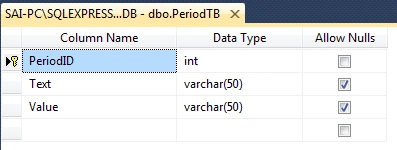
PeriodTB
This table contains periods, such as 3 months, 6 months, and 1 year.
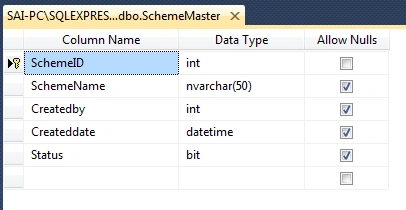
SchemeMaster
This table contains Schemes.
Example: - GYM+CARDIO1, GYM
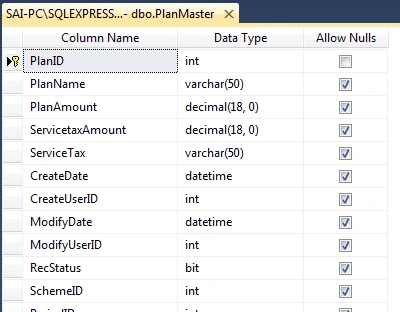
Plan Master
This table contains plans along with the plan amount and Service Tax. For one scheme, there can be multiple plans.
Example: - plan names are Quarterly, Half Yearly, Yearly, Men Special Plan, Women Special Plan.
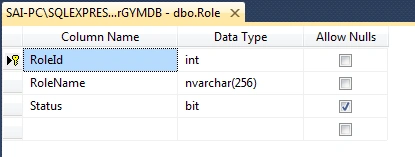
Role
This table contains Roles.
Example: - Admin, User.
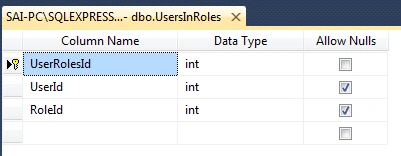
UsersInRoles
This table contains UserID and roleID means a role assigned to the user is stored in this table.
Example: - Admin, User.
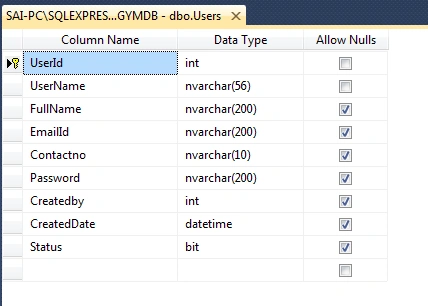
Users
This table contains the user login credentials.
After understanding the table structure, let’s move forward to understand the API application structure.
API Project Structure
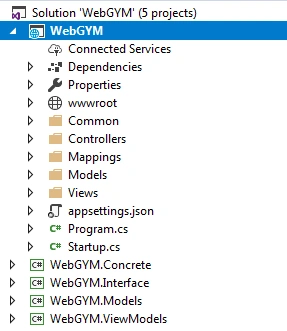
In this part, we are going to have a look at the API project in detail. API Project Name is WebGYM which is developed in ASP.NET CORE Framework version 2.1.
The project structure is a simple and clean repository pattern with ASP.NET Core built-in dependency injection framework.
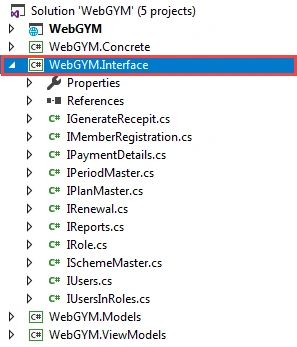
Let’s start from Model class library. This class library contains all Models which are used in the application and which are similar to database entities. In the same way, you can see ViewModels; these models are used for taking requests and displaying the response of APIs. Further, we are having a view into Interface Class library which contains all the interfaces of the application used for loose coupling of applications. These interfaces are implemented in the concrete class library. This layer directly interacts with your database. In this project, I have used Entity Framework Core and Dapper ORM to access the database.
Added ASP.NET MVC Core Web Project.
WebGYM
Next, we are going to have a look at WebGYM.Models Class Library.
WebGYM.Models
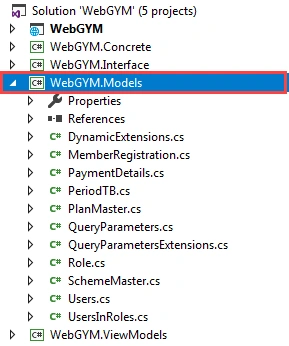
Next, we are going to have a look at WebGYM.ViewModels Class Library.
WebGYM.ViewModels
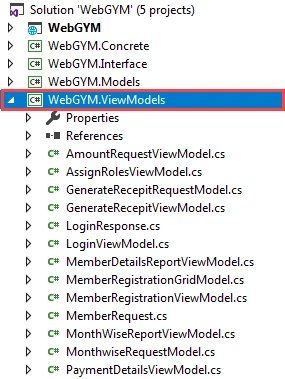
After having a look at View Models Class library, next, let’s have a look into Interface Class library.
This Class Library contains all Interfaces in which we have declared methods. This interface is going to implement a concrete class (WebGYM.Concrete).
WebGYM.Interface
WebGYM.Concrete
The WebGYM.Concrete Class Library contains all the classes which are using Entity Framework Core ORM for accessing the database including the DatabaseContext class, the main class for interacting with the database. I have also used Dapper ORMrm for some database operations.
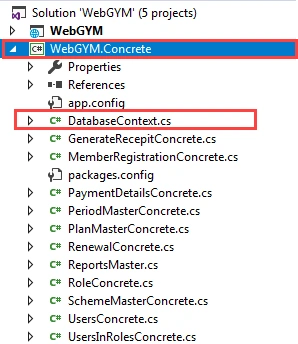
After viewing the class library, next, we are going to view the API Controller Structure.
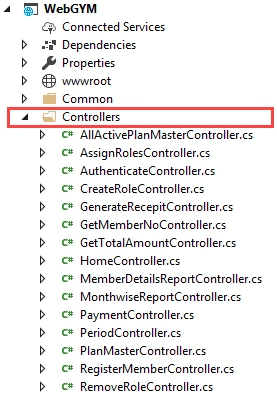
Controllers
The Controllers folder contains all API controllers created in this application.
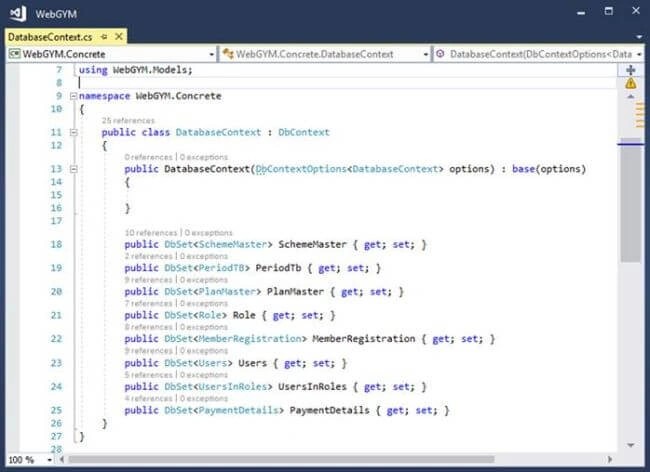
DbContext (we are using Entity Framework core in this project)
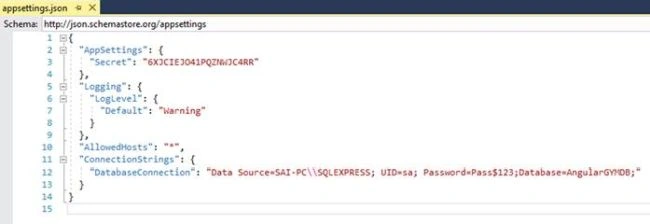
Appsettings.json file
In the appsettings.json file, we store all application settings in a key-value pair. Here, we have stored the connection string of database.
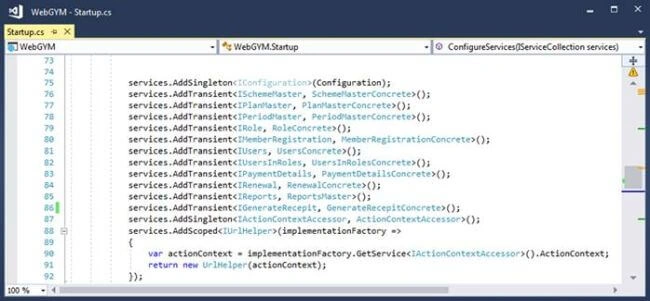
Setting Dependence injection in Startup.cs class
Filters and Encryption library
For the authentication of APIs, I have Used JSON Web Tokens and for error logging, I have created “CustomExceptionFilterAttribute” which is registered as a filter in ConfigureServices Method in start-up Class.
You can see the error log folder which contains text files where generated errors in the application are stored. For the encryption of password, I have used Advanced Encryption Standard (AES) Algorithm.
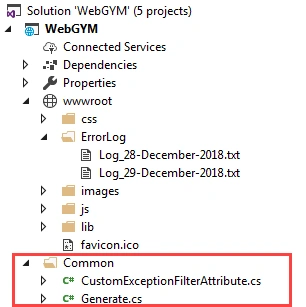
The above shows how the directory and folder structures look. Now, let's check out the application screens.
After having a view of completed API application screens, next, we are going to view Angular Application Project Structure.
Angular Application Project Structure
Below is a complete view of Angular Application project structure. If you see the below snapshot you will see all folders with proper naming which tells which folder contains which Component in it.
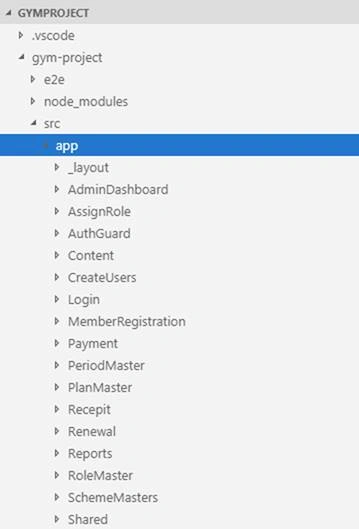
Next let’s view some folders to know how we are maintaining Services, Models, Component and Html Views.
Let’s Expand RoleMaster Folder. If you see in that folder we have 2 folders; one is Models folder and another is Service Folder.
Model Folder contains Class which is used with Views and API to Post, Get Request and Response.
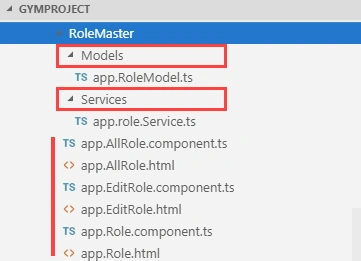
Let’s have look at the completed flow of role module and you will get a good idea of how the application is designed.
app.RoleModel.ts
This is a model which is used on role HTML template for model binding.
- export class RoleModel
- {
- public RoleName: string;
- public Status: boolean;
- public RoleId : number;
- }
app.Role.component.ts
Role Component, which is going to render role template.
- import { Component } from '@angular/core';
- import { RoleModel } from './Models/app.RoleModel';
- import { RoleService } from './Services/app.role.Service';
- import { Router } from '@angular/router';
- @Component({
- templateUrl : './app.Role.html',
- styleUrls: ['../Content/vendor/bootstrap/css/bootstrap.min.css',
- '../Content/vendor/metisMenu/metisMenu.min.css',
- '../Content/dist/css/sb-admin-2.css',
- '../Content/vendor/font-awesome/css/font-awesome.min.css'
- ]
- })
- export class RoleComponent
- {
- private _roleService;
- RoleModel : RoleModel = new RoleModel();
- output: any;
- constructor(private _Route: Router, roleService :RoleService ){
- this._roleService = roleService;
- }
- onSubmit()
- {
- this._roleService.AddRole(this.RoleModel).subscribe(
- response => {
- this.output = response
- if (this.output.StatusCode == "409") {
- alert('Role Already Exists');
- }
- else if (this.output.StatusCode == "200") {
- alert('Role Saved Successfully');
- this._Route.navigate(['/Role/All']);
- }
- else {
- alert('Something Went Wrong');
- }
- });
- }
- }
Moving forward you can see the Services folder; in this folder we are consuming Web API Services.
Role.Service
In this class, we use HttpClient to call API services and along with that we also send JWT token which is used for authentication. If you see Role.Service class you will find all kind of Http Method get, post, put, delete.
- import { Injectable } from '@angular/core';
- import { Observable, throwError } from 'rxjs'
- import { catchError, tap } from 'rxjs/operators'
- import { HttpClient, HttpErrorResponse, HttpHeaders, HttpResponse } from '@angular/common/http';
- import { RoleModel } from '../Models/app.RoleModel';
- import { environment } from 'src/app/Shared/environment';
- @Injectable({
- providedIn: 'root'
- })
- export class RoleService {
- private data: any;
- private apiUrl = environment.apiEndpoint + "/api/CreateRole/";
- token: any;
- username: any;
- constructor(private http: HttpClient) {
- this.data = JSON.parse(localStorage.getItem('AdminUser'));
- this.token = this.data.token;
- }
- public AddRole(rolemodel: RoleModel) {
- let headers = new HttpHeaders({ 'Content-Type': 'application/json' });
- headers = headers.append('Authorization', 'Bearer ' + `${this.token}`);
- return this.http.post<any>(this.apiUrl, rolemodel, { headers: headers })
- .pipe(
- catchError(this.handleError)
- );
- }
- // Get All Role
- public GetAllRole() {
- let headers = new HttpHeaders({ 'Content-Type': 'application/json' });
- headers = headers.append('Authorization', 'Bearer ' + `${this.token}`);
- return this.http.get<RoleModel[]>(this.apiUrl, { headers: headers }).pipe(tap(data => data),
- catchError(this.handleError)
- );
- }
- // Get All Role By ID
- public GetRoleById(RoleId) {
- var editUrl = this.apiUrl + '/' + RoleId;
- let headers = new HttpHeaders({ 'Content-Type': 'application/json' });
- headers = headers.append('Authorization', 'Bearer ' + `${this.token}`);
- return this.http.get<RoleModel>(editUrl, { headers: headers }).pipe(tap(data => data),
- catchError(this.handleError)
- );
- }
- // Update Role
- public UpdateRole(rolemodel: RoleModel) {
- var putUrl = this.apiUrl + '/' + rolemodel.RoleId;
- let headers = new HttpHeaders({ 'Content-Type': 'application/json' });
- headers = headers.append('Authorization', 'Bearer ' + `${this.token}`);
- return this.http.put<any>(putUrl, rolemodel, { headers: headers })
- .pipe(
- catchError(this.handleError)
- );
- }
- public DeleteRole(RoleId) {
- var deleteUrl = this.apiUrl + '/' + RoleId;
- let headers = new HttpHeaders({ 'Content-Type': 'application/json' });
- headers = headers.append('Authorization', 'Bearer ' + `${this.token}`);
- return this.http.delete<any>(deleteUrl, { headers: headers })
- .pipe(
- catchError(this.handleError)
- );
- }
- private handleError(error: HttpErrorResponse) {
- if (error.error instanceof ErrorEvent) {
- // A client-side or network error occurred. Handle it accordingly.
- console.error('An error occurred:', error.error.message);
- } else {
- // The backend returned an unsuccessful response code.
- // The response body may contain clues as to what went wrong,
- console.error(`Backend returned code ${error.status}, ` + `body was: ${error.error}`);
- }
- // return an observable with a user-facing error message
- return throwError('Something bad happened; please try again later.');
- };
- }
After we have viewed Services folder, next let’s view Html Templates of Role Module.
app.Role.html template
app.Role.html Template which is been used as templateUrl in app.Role.component.ts class.
- <h4>Add Role</h4>
- <hr>
- <div class="panel panel-default">
- <div class="panel-heading">Add Role</div>
- <div class="panel-body">
- <form #f="ngForm" novalidate (ngSubmit)="onSubmit()">
- <div class="row">
- <div class="col-md-4">
- <label for="name">RoleName</label>
- <input type="text" class="form-control" name="RoleName" [(ngModel)]="RoleModel.RoleName" maxlength="50"
- #refRoleName="ngModel" id="RoleName" required>
- <div *ngIf="!refRoleName.valid && (refRoleName.dirty || refRoleName.touched)" class="alert alert-danger">
- <div [hidden]="!refRoleName.errors.required">
- RoleName is required
- </div>
- </div>
- </div>
- <div class="col-md-4">
- <label for="name">Status</label>
- <input type="checkbox" name="Status" [(ngModel)]="RoleModel.Status" maxlength="50" #refStatus="ngModel"
- id="Status" required>
- <div *ngIf="!refStatus.valid && (refStatus.dirty || refStatus.touched)" class="alert alert-danger">
- <div [hidden]="!refStatus.errors.required">
- Status is required
- </div>
- </div>
- </div>
- <div class="col-md-4">
- <button type="submit" style="margin-top: 10px" [disabled]="!f.form.valid" class="btn btn-success">Submit</button>
- <a style="margin-left: 10px; margin-top:7px;" class="btn btn-info" [routerLink]="['/Role/All']">
- All Roles </a>
- </div>
- </div>
- </form>
- </div>
- </div>
package.json
Package json contains all packages which are used in this project.
- {
- "name": "gym-project",
- "version": "0.0.0",
- "scripts": {
- "ng": "ng",
- "start": "ng serve",
- "build": "ng build",
- "test": "ng test",
- "lint": "ng lint",
- "e2e": "ng e2e"
- },
- "private": true,
- "dependencies": {
- "@angular/animations": "^7.0.4",
- "@angular/cdk": "^7.1.1",
- "@angular/common": "~7.0.0",
- "@angular/compiler": "~7.0.0",
- "@angular/core": "~7.0.0",
- "@angular/forms": "~7.0.0",
- "@angular/http": "~7.0.0",
- "@angular/material": "^7.1.1",
- "@angular/platform-browser": "~7.0.0",
- "@angular/platform-browser-dynamic": "~7.0.0",
- "@angular/router": "~7.0.0",
- "core-js": "^2.5.4",
- "hammerjs": "^2.0.8",
- "html2canvas": "^1.0.0-alpha.12",
- "jspdf": "^1.5.2",
- "ngx-bootstrap": "^3.1.2",
- "rxjs": "~6.3.3",
- "xlsx": "^0.14.1",
- "zone.js": "~0.8.26"
- },
- "devDependencies": {
- "@angular-devkit/build-angular": "~0.10.0",
- "@angular/cli": "~7.0.6",
- "@angular/compiler-cli": "~7.0.0",
- "@angular/language-service": "~7.0.0",
- "@types/node": "~8.9.4",
- "@types/jasmine": "~2.8.8",
- "@types/jasminewd2": "~2.0.3",
- "codelyzer": "~4.5.0",
- "jasmine-core": "~2.99.1",
- "jasmine-spec-reporter": "~4.2.1",
- "karma": "~3.0.0",
- "karma-chrome-launcher": "~2.2.0",
- "karma-coverage-istanbul-reporter": "~2.0.1",
- "karma-jasmine": "~1.1.2",
- "karma-jasmine-html-reporter": "^0.2.2",
- "protractor": "~5.4.0",
- "ts-node": "~7.0.0",
- "tslint": "~5.11.0",
- "typescript": "~3.1.6"
- }
- }
After we have completed single module next, we are going to have a look on all admin screens of applications.
Admin Application Screens
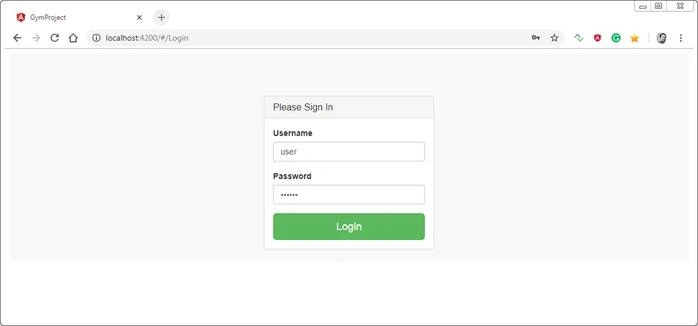
Login is common for Admin and User.
We are going to log into the application with admin credentials.
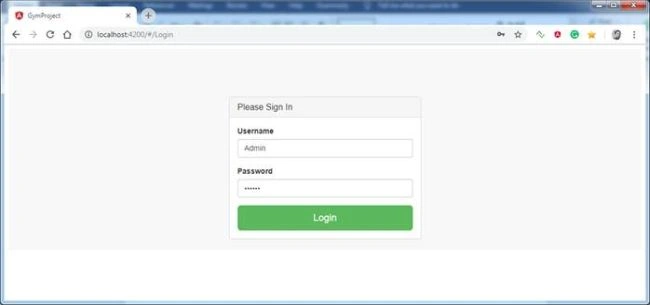
After logging into the application the first screen which appears is your dashboard.
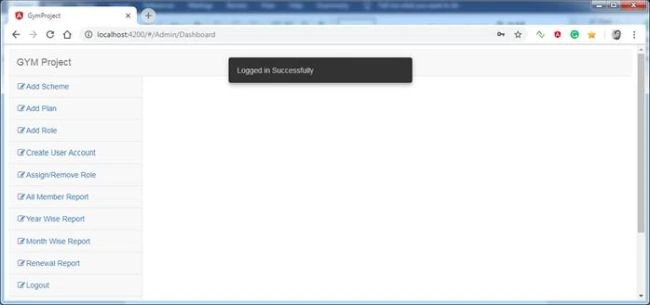
After logging into the application, we are first going to view Add Scheme.
Add Scheme
In this part, we are going to Add a New Scheme.
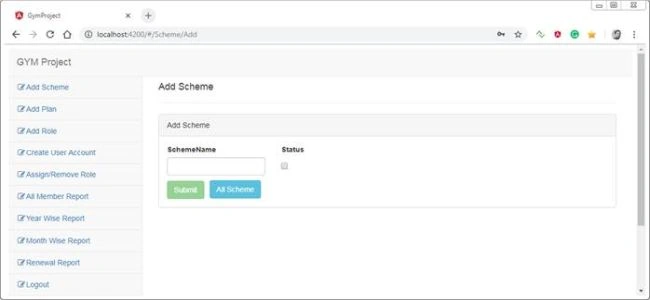
All Scheme
Displays all schemes which are added.
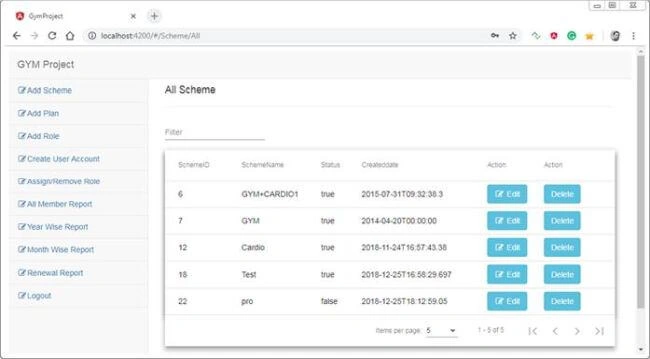
Edit Scheme
In this part, we can just edit the status of the scheme. If you want to change the name then you can delete and add a new scheme.
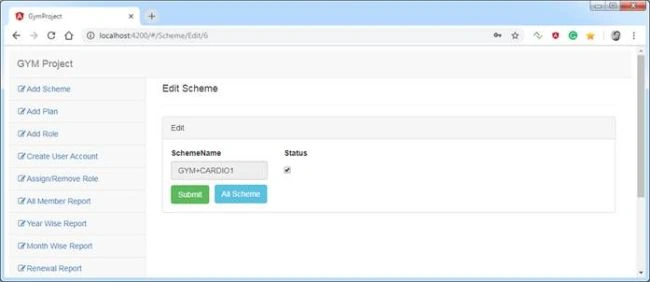
Add Plan
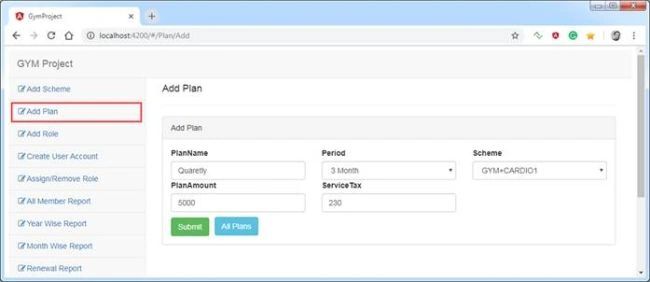
In this part, we are going to add the plan and while adding we are going to select Period and Scheme. Also enter Plan amount and required service tax for it.
All Plan
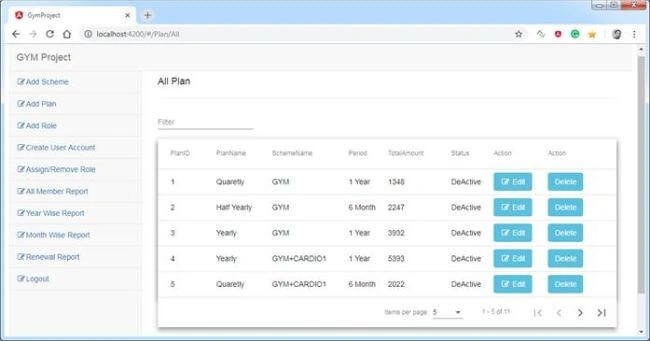
Displays all Plans which are added.
Edit Plan
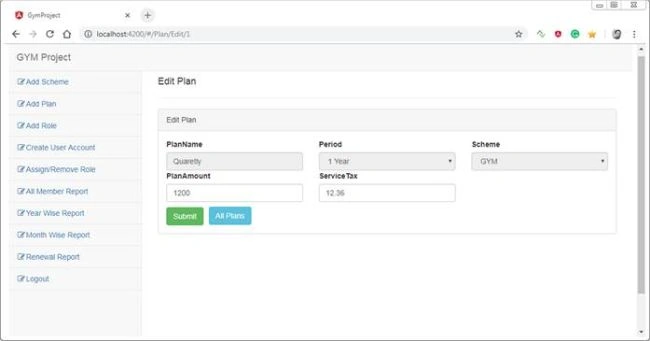
In this part, we can Edit Plan which we have added.
Add Role
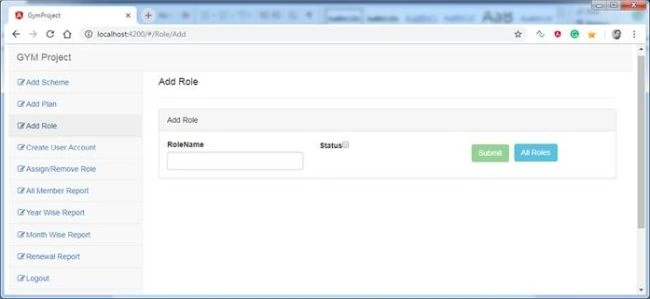
In this part, we are going to add new roles
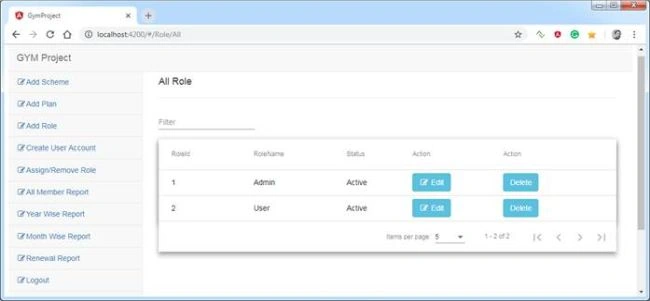
All Role
Displays all roles which are added.
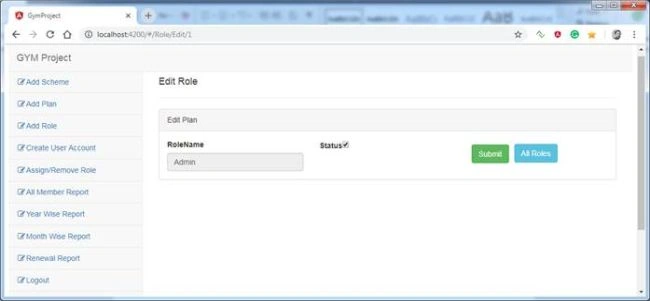
Edit Role
In this part, we are going to edit and update role status.
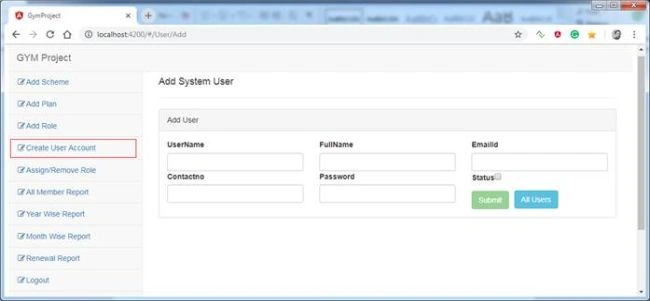
Create New User
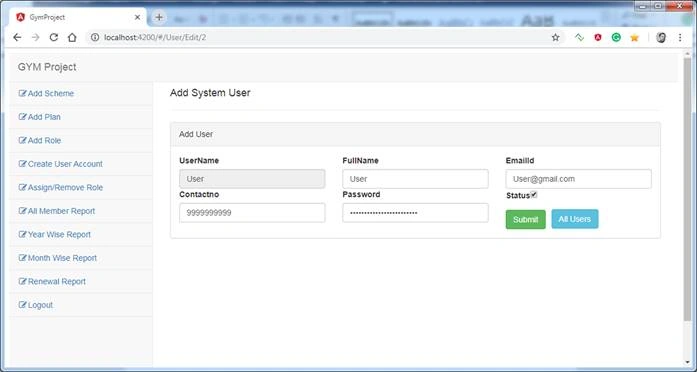
In this part, we are going to add new user/admin who is going to use this application.
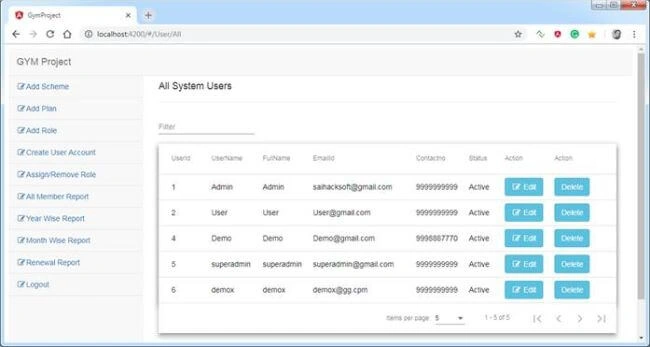
All Users
Displays all Users which are added.
Edit Users
In this part, we can Edit User Details which we have added such as User Email or Phone and Password.
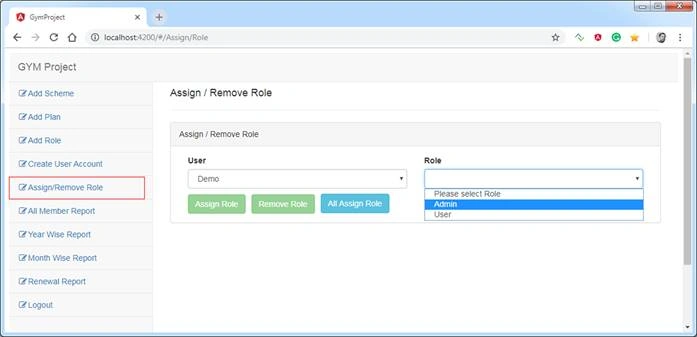
Assign / Remove Role
In this part, we are going to assign and remove roles to the user which we have created.
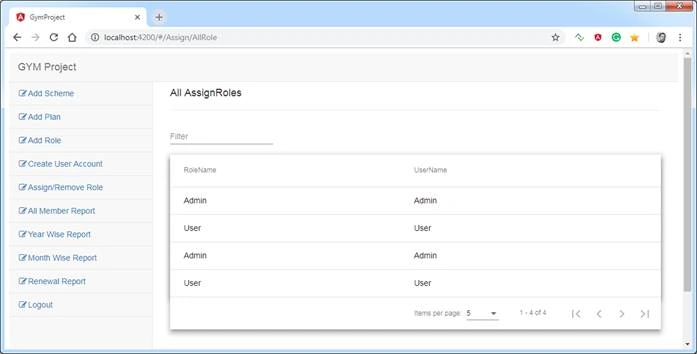
All Assigned Roles
In this part, we are going to assign and remove roles to the user which we have created.
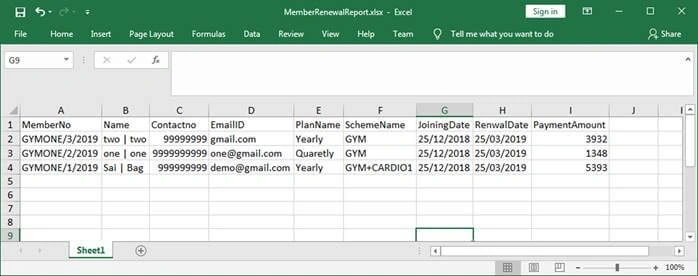
All Member Report
In this part, admin can export all member data for reporting.
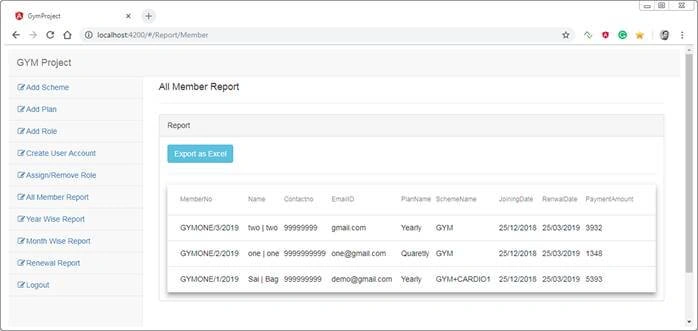
Exported all Member Report in Excel
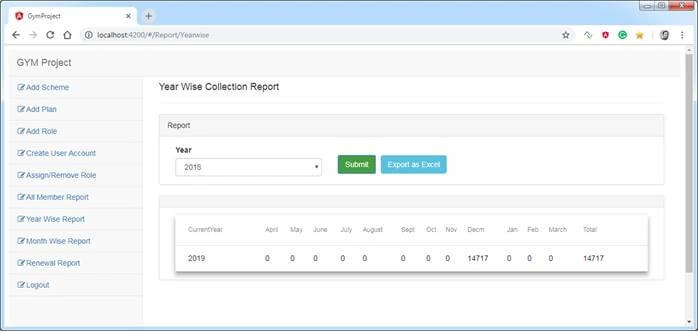
Year wise Collection Report
In this part, the admin will select the year and click on the submit button to generate a report and also can export it.
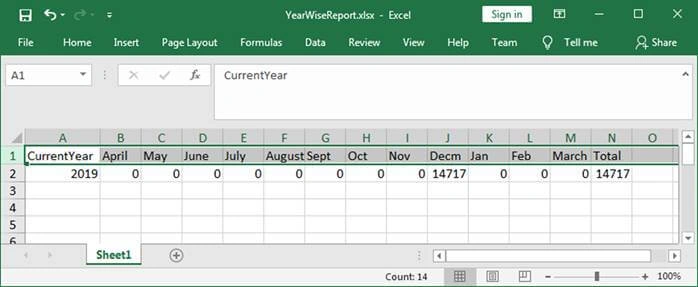
Exported Year Wise Collection Report in Excel
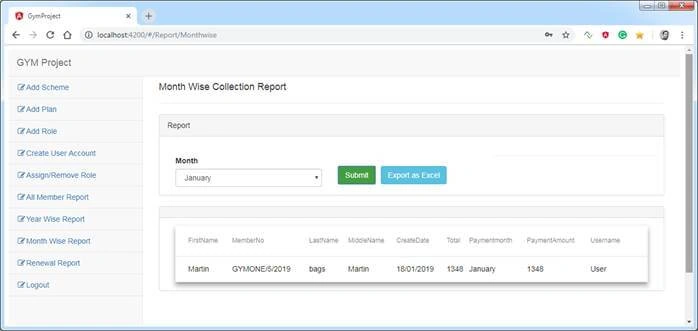
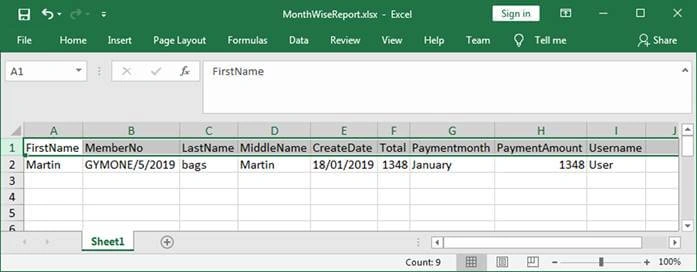
Month-wise Collection Report
In this part, the admin will select Month and click on the submit button to generate and export report.
Exported Month Wise Collection Report in Excel
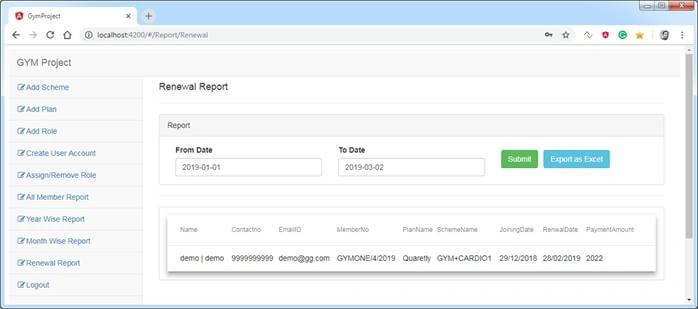
Renewal Report
In this part the admin just needs to choose dates and submit to get all renewal Member details.
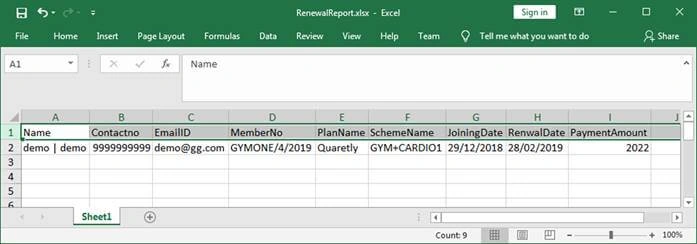
Exported Renewal Report in Excel
User Application Screens
We are going to log in to the application with User credentials.
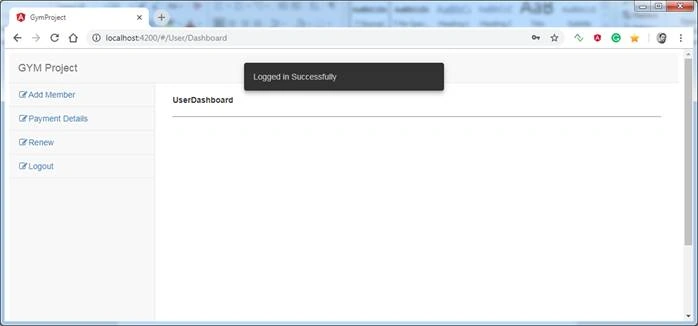
User Dashboard
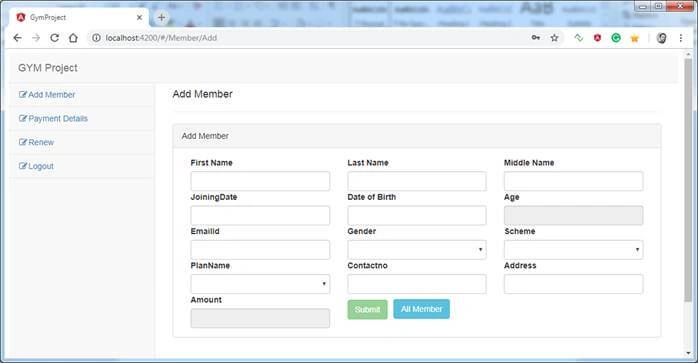
Add Member
From this view, we are going to register new members and also, we will select a scheme and plan here. According to the plan we choose it will show the amount the member needs to pay.
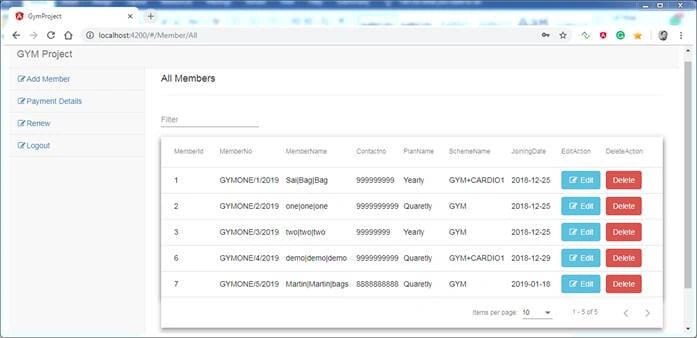
All Member
Display all Members who got a membership.
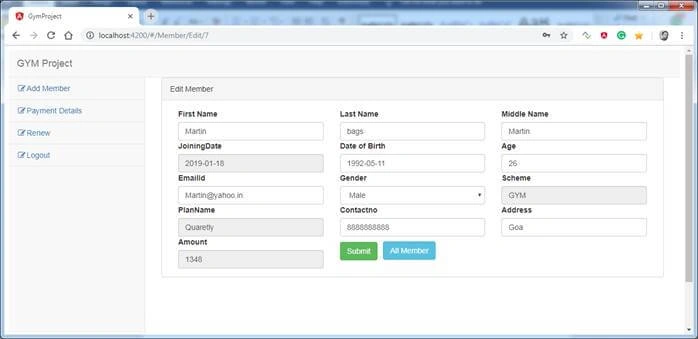
Edit Member
In the edit part, we can edit some Member details but we cannot change the plan of members. If something is wrong then we need to delete the member again and create a new one.
All Payment Details
All the payment details are displayed in this View.
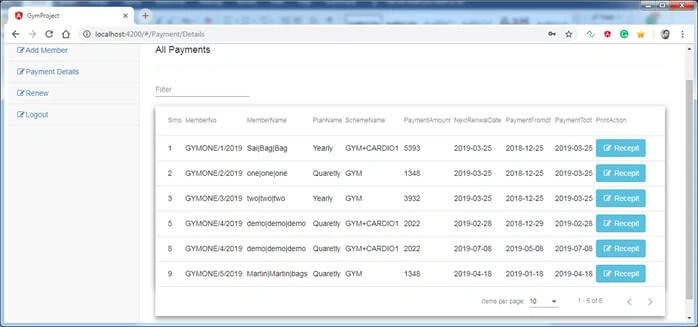
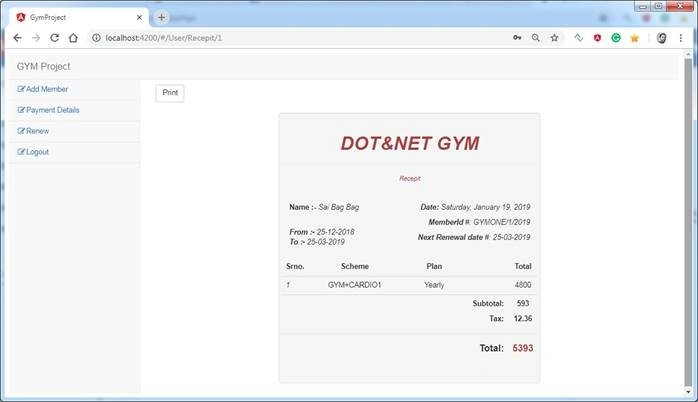
Receipt
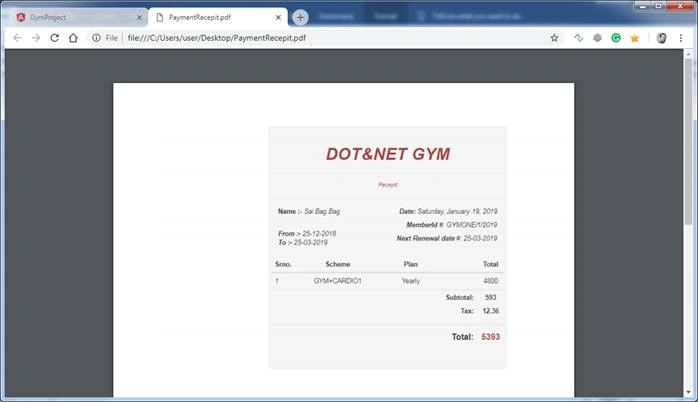
In this part, we need to provide a receipt to a member who registered for the membership. On-grid, we have Receipt button. Just clicking on it will show you a receipt of the particular member. On the receipt page, we have a Print button to generate the PDF.
PDF format of the receipt
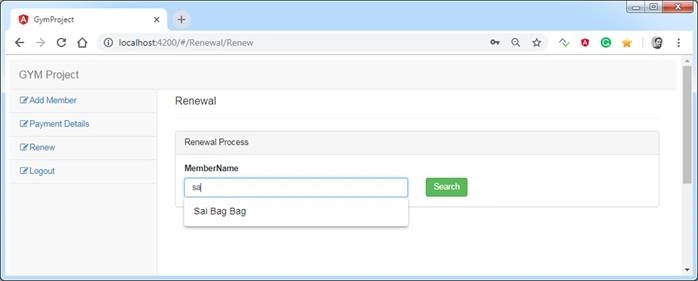
Renewal of Membership
In this part, we are going to renew the membership of members. The page is simple; we just need to search the member name which is an autocomplete feature and after choosing a name, it will get all his/her details. Here, we can change the Member Scheme and Plan if he wants and we can choose New Membership Date for renewal.
After searching the Member, click on Member name and all the details are displayed.
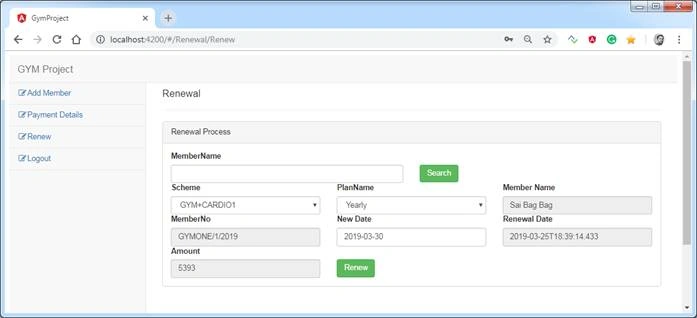
Choose a date to renew and click on the Renew button to renew membership.
Wow, finally, we have completely gone through the application. You can download the entire application and database and play with it. Also, try to make this application better by contributing to it on GitHub.
Francis BandaPosted Jul 9, 2021, 2:53 PM
And Sir, what are the processes of publish these types of projects ASP.NET CORE with SQL, and Angular- am new and am really swimming into this. like am trying to publish similar project but am keep on getting error: uncaught typeerror: cannot read property 'length' of null at object.acquirecontext (chart.min.js:7) at ni.construct (chart.min.js:7) at new ni (chart.min.js:7) maybe someone can assist me thanks in advance.
Francis BandaPosted Jul 9, 2021, 2:17 PM
You are still a big boss!!!! thank you
ashiqur rahamanPosted May 13, 2021, 9:51 PM
I need the SQL DB file at [email protected]. I have made a payment from SBI account today at 14052021 at 3.20 am and the amount is Rs 200.
Janardhana Rao KotagiriPosted Feb 23, 2021, 8:20 AM
Excellent article. But the Database script is not open, it showing an error to open
jubula samalPosted Feb 19, 2021, 1:15 PM
You are superb. Excellent article. API is awesome.
lyes yacinePosted Dec 19, 2020, 2:46 PM
One of the best article i have been seen. Could you please share the DB script to my email [email protected]
Dang tvPosted Aug 29, 2020, 4:40 AM
Could you please share the DB script to my email: [email protected]. Thanks you so much!
Hamid KhanPosted Aug 25, 2020, 8:23 AM
It's so useful article. Thank you so much for your sharing...............
zohra khanPosted Jul 12, 2020, 3:27 AM
Hi Sir how can i get all codes which will help me [email protected] plse it will help
Sagar ChowdhuryPosted Jun 24, 2020, 3:38 PM
How can we create that AngularCoreGym layer as a class library to that project. Did you created that Angular project separately and then from your local drive you have used that project as a class library OR you have created that project starting from an empty application in visual studio ?
Sachin PatwardhanPosted Jun 22, 2020, 3:02 PM
Made sucessful payment but how to get DB script?
Monish NaikPosted May 31, 2020, 11:17 PM
One of the best article i have been seen. Could you please share the DB script to my email [email protected]
Walter TorresPosted May 21, 2020, 10:52 AM
Good morning, could you tell me what is the password used to log into the application? It is in encrypted form and I would like to run it to see how it works. Thank you Best regards,
Vikas GoelPosted Apr 29, 2020, 5:04 AM
Could you please let know , what's the password used to login into the application. It's in encrypted form.
ad sdfPosted Apr 26, 2020, 12:25 PM
Can Someone send the script to my email [email protected]
Ravi ShanmugamPosted Feb 22, 2020, 8:40 AM
Hi sir thanks for this article , Database script file is corrupted can you please send me the script to this email : [email protected]
Anitha PGPosted Feb 14, 2020, 2:33 AM
I have been using ur code but showing error How can i build the angular solution. installed nod.js and angular cli its there but y its showing error An unhandled exception occurred: Cannot find module '@angular-devkit/build-angular/package.json'Require
RAJEEV KUMARPosted Feb 13, 2020, 6:40 AM
Plz share the db script
Jay MabioPosted Feb 6, 2020, 1:31 PM
Hi Bageri,this is wonderful implementation .well thought and cleancode.Would you please share the dbscripts @[email protected] will highly appreciate your help in this regard
Jay MabioPosted Feb 6, 2020, 1:29 PM
Hi Bageri,
Yogender PuniaPosted Dec 20, 2019, 12:15 PM
Thanku for this article. It is very helpful. Can you please share the DB scripts @ [email protected]
Happy ChandigaraPosted Dec 10, 2019, 2:02 AM
Database script file is corrupted can you please send me its script [email protected]
Happy ChandigaraPosted Dec 10, 2019, 2:01 AM
Database script file is corrupted can you please send me its script
Eren AvciPosted Dec 2, 2019, 4:08 PM
Thanks for sharing sir.. Can you send me database file through [email protected]
sanjai vermaPosted Nov 29, 2019, 12:21 AM
Can you share db in my mail id [email protected]
Ramzanali MominPosted Nov 20, 2019, 8:27 AM
Please share the user and admin type password
karim abobakrPosted Nov 6, 2019, 4:15 AM
Thanks for this tutorial , i want to ask if there is an ability to convert the end user app to be native application using any frame works like cordova , ionic etc
Ramzanali MominPosted Nov 5, 2019, 8:52 AM
1 Upload and download excel file in separate folder. 2 Email Notification 3 facebook and twitter notifications 4 upload images : image should be stored on web server and img path will store on database. 5 forget password. 6 cascading dropdownlist 7 checked all checkbox 8 client side server side validation 9 CURD operation 10 search functionality 11 Dynamic menu with asp. Net core and angular 12 Print Pdf on web by print button . 13 convert word document to pdf and give read functionality with download and upload functionality
Ramzanali MominPosted Nov 5, 2019, 8:22 AM
Thanks, sir, your all articles are very useful for me. please write the article for the dynamic menu with angular and web API core .
DeepanPosted Oct 2, 2019, 1:09 AM
Thanks for sharing
Hamid KhanPosted Sep 23, 2019, 8:06 AM
Very good explanation thanks for your effort...……...
utthira balajiPosted Sep 23, 2019, 7:39 AM
Can you send me database file through [email protected]
utthira balajiPosted Sep 23, 2019, 7:38 AM
Where i get database file . DatabaseScript.rar is corrupted
Mohd AslamPosted Aug 23, 2019, 8:18 AM
Why have u mentioned
Mohd AslamPosted Aug 23, 2019, 8:18 AM
DatabaseScript.rar is corrupted
tauk tunPosted Aug 12, 2019, 12:47 PM
Thanks you for sharing the clean architecture project.
Harshal KalePosted Aug 12, 2019, 4:39 AM
How you added vendor/jquery/jquery.min.js
Dashang MakwanaPosted Aug 6, 2019, 12:30 PM
Why JWT is used , any particular reason or for .net core JWT is good?
Satish kumarPosted Jul 7, 2019, 12:26 AM
I am not able to find database file in the project. Could you please help me out to find the database file
my corePosted Jul 1, 2019, 5:36 AM
Hi Saineshwar Bageri, Its Good for looking this project and Sharing your knowledge thanks for it. Can you share or explain how to understand .net core web api (WebGym) architecture. Thanks & Regards SPR
Ramzanali MominPosted Jul 1, 2019, 5:30 AM
Thanks a lot for sharing real life project ...
Adhi VenkateshPosted Jun 6, 2019, 1:24 PM
Dear Sai, Nice to see the project , did you use any global error handling with or without interceptor for this?
Parag bhangalePosted May 15, 2019, 11:41 AM
When I am running the application from visual studio it is showing swagger page. Please let me know how can I go to login page
Salome MarquezPosted Apr 25, 2019, 9:09 AM
Hi dear Saineshwar, I thing this project in Angular 7 is very nice. Im new one in coding Angular with .Net Core 2.1. I have one cuestion, the first is how to can i config or setting or where is this configuration in the page app.Login.html is the first one than opening? Thanks and congratulation for your project.
Tushar BeniwalPosted Mar 31, 2019, 11:38 AM
What is password of admin user what encryption used for storing password for users in dbo.users table
Rahul ShuklaPosted Mar 30, 2019, 5:44 AM
Hi Saineshwar, where should we keep our scripts and css files for optimization purpose?
First LastPosted Mar 1, 2019, 3:49 PM
For the renewal of membership, I type in the member name, the autocomplete responds, I then select a name. The 'member no' appears in the input control. Should the 'member name' appear instead? I can't figure out how to get the 'member name' to appear.
First LastPosted Feb 28, 2019, 11:00 AM
I can't figure out what is wrong. Receipt print in captureScreen() of GenerateRecepitComponent.ts does not work. In the console, I see I get to the pdf.addimage(..) and then get:core.js:12501 ERROR Error: Uncaught (in promise): TypeError: pdf.addImage is not a function TypeError: pdf.addImage is not a function. I see that the import statements for jsPDF and html2canvas have ... (ellipses) after the 'from' indicating a problem. I barely was able to see them. It indicates that it could not find a declaration file for module jspdf or html2canvas. How do I solve that? Note: in the GenerateRecepit.Service.ts, I had to change the api call as it was pointing to /api/Payment/ instead of /api/GenerateReceipt/.
sujit shuklPosted Feb 28, 2019, 12:47 AM
Hi saineshwar i facing error while compiling UI code error is : Cannot find module 'webpack-core/lib/Template'
First LastPosted Feb 27, 2019, 5:30 PM
For the Renewal report, It was passing in the year not the RenewalRequestModel so I fixed that. I verified that the model is valid - contains the 2 dates. I modified both the client-side and server-side report view models to reflect the number and type of columns being returned from the stored procedure. The dates from the ReportService: Paymentfromdate: Mon Mar 25 2019 11:59:48 GMT-0400 (Eastern Daylight Time) and Paymentfromto: Sun Mar 31 2019 11:59:48 GMT-0400 (Eastern Daylight Time). Running the Usp_GetAllRenwalRecordsFromBetweenDate stored procedure in SSMS passing in the dates above, I get: Error converting data type varchar to datetime. However, it still returns data to the application. How is that possible?
First LastPosted Feb 27, 2019, 4:07 PM
In the web api, in the concrete project, in the UsersInrolesConcrete.cs, the GetAssignRoles() method. The select is incorrect as it is assigning the UserName and UserId to the RoleName and RoleId respectively, Should be assigning the users FullName and UserId.
First LastPosted Feb 27, 2019, 11:20 AM
I solved this one....User 'edit' does not work. It calls the userService.UpdateUser passing in the model. I verified that the model is valid - contains the rows data. Yet I get: ERROR Server-side error status: 404 Message: Http failure response for http://localhost:49749/Errorview/Error: 404 Not Found. Body was: null. ---->; I changed the web api - Mapping\MappingProfile.cs: opt.MapFrom(src => src.Id) to opt.MapFrom(src => src.UserId) - I changed the web api - ViewModels\UsersViewModel.cs: opt.MapFrom(src => src.Id) to opt.MapFrom(src => src.UserId)
JosephsPosted Feb 26, 2019, 5:08 AM
Where i setting port ? i canot find environment.ts . can you share snapshot
JosephsPosted Feb 25, 2019, 4:14 AM
How to run your project? When i run this Web API Project which returns only API Listing page , how to move login page?
JosephsPosted Feb 24, 2019, 11:22 PM
Web API Project which returns only API Listing page , how to move login page
JosephsPosted Feb 24, 2019, 11:22 PM
Web API Project which returns only API Listing page
Muthu KumarPosted Feb 24, 2019, 11:18 PM
Thank you, Really very useful.
JosephsPosted Feb 24, 2019, 11:15 PM
Hi Saineshwar Bageri , your project only navigate webapi page only i tried #/login it will goes there webapi syntax page like index.html page only how to move login page ?
JosephsPosted Feb 24, 2019, 11:14 PM
Hi Saineshwar Bageri
Candy PPosted Feb 23, 2019, 12:48 PM
Thank you, really you did great job!.. this is very good useful article.
siddhanath nikamPosted Feb 22, 2019, 5:25 AM
Could you please tell me the default Username and Password
Hamid KhanPosted Feb 15, 2019, 5:18 AM
Thanks a lot, you did great job.......
Inder Jeet SinghPosted Feb 15, 2019, 2:54 AM
Sir thnks for sharing knowledge and I have download the project but there is a error in Dependency folder and SDK Folder showing warning symbol(Yellow mark) in WEBGYM Project restore problem in VS 2017. Please help me out.
First LastPosted Feb 12, 2019, 9:16 AM
When you created the 4 other projects in VS 2107 - WebGYM.Concrete, WebGYM.Interface, WebGYM.Models, WebGYM.ViewModels, what project template did you use that give the Properties and References folders along with an app.config? I can't seem to find one.
Jay MabiopkegPosted Feb 10, 2019, 2:00 PM
Been trying to find the views as shown above but cant seem to find them.am i missing something obvious?
Jay MabiopkegPosted Feb 10, 2019, 1:58 PM
Hi Saineshwar,am voting this as the best article 2019 so far.Well done sir.
Sachin vermaPosted Feb 10, 2019, 6:06 AM
Hi Saineshwar Bageri, Please check database file attached along with the post, it is not opening and giving message that it is corrupt
Sachin vermaPosted Feb 10, 2019, 6:05 AM
Hi Saineshwar Bageri, Please check database file attached along with the post
Sachin vermaPosted Feb 10, 2019, 6:05 AM
Hi Datbase file attached is currupt
Sachin vermaPosted Feb 10, 2019, 6:04 AM
Hi Saineshwar Bageri,
Sachin vermaPosted Feb 10, 2019, 6:04 AM
Hi Saineshwar Bageri,
Jay MabioPosted Feb 10, 2019, 3:20 AM
Such a brilliant insightful article.Thanks Bro
Abdul NasirPosted Feb 9, 2019, 5:02 PM
Nice work sir
Mukund Narayan JhaPosted Feb 9, 2019, 12:54 AM
How to access data in swagger.i am getting unauthorized error.
Dasun LakshanPosted Feb 7, 2019, 11:43 AM
What is the password
sreenivasa kPosted Feb 7, 2019, 8:44 AM
EXcellent article . thanks for sharing such a wonderful learning article
First LastPosted Feb 7, 2019, 8:42 AM
Can you include a text file for the database scripts as I cannot open the .rar file.
Farhan AhmedPosted Feb 7, 2019, 6:49 AM
It is just Wow........
Arvind SinghPosted Feb 7, 2019, 5:33 AM
Very nice article and project...
Smi10 KalathiyaPosted Feb 7, 2019, 12:13 AM
Hello Saineshwar Bakery , it's very interesting article i need full source code of this project may i get this one. i really appreciate if you give me.
vivek kumarPosted Feb 6, 2019, 11:13 PM
Hi saineshwar,can you suggest web api project based on ado.net with Crud function
Muthu KumarPosted Feb 6, 2019, 10:49 PM
Very nice. Thanks for sharing..
Mahesh VermaPosted Feb 6, 2019, 9:11 PM
Great effort, really nice. Thanks for sharing.
Ano MepaniPosted Feb 6, 2019, 4:59 PM
Very helpful application and kind of boilerplate sample application for asp. Net core and angular 7. While doing this project if you mention trouble shooting for faced issue or challnges (most common) which you have resolved it would be great to find at one place.
First LastPosted Feb 6, 2019, 1:41 PM
Nice job..however you left out the "details" about how you actually used Visual studio and Angular CLI in creating all this. Without a simple explanation of the steps, this is not helpful to a beginner.
Mohamed IbrahimPosted Feb 6, 2019, 12:39 PM
Thanks a lot for this project you help me tooo much
onyekachi chilePosted Feb 6, 2019, 12:22 PM
Good project always look forward to reading an article from you. What is the password used in the project
Mukesh ChaudharyPosted Feb 6, 2019, 11:12 AM
Superb project thanks a lot.
Hamid KhanPosted Feb 6, 2019, 11:01 AM
It is really great effort. Thanks a lot for your great work..........
Sarathlal SaseendranPosted Feb 6, 2019, 10:32 AM
Really awesome project. I have downloaded the source code and configured and executed in my system. It really gives me new ideas. Really appreciate your hard work.