

ANGULAR FORMS
User INPUT data are collected using Angular forms.
There are two approaches by which we can create forms in angular.
- Template Driven Forms
- Model Driven Forms
1. TEMPLATE DRIVEN FORMS
First, we build a simple Contact form. The ngForm directive will convert it to the Template-driven form and create the top-level FormGroup control.\
Next, we use the ngModel directive to create the FormControl instance for each of the HTML form elements.
<form #contactForm="ngForm" (ngSubmit)="onSubmit(contactForm)">
  <h1 class="text-center"> <strong> ANGULAR TEMPLATE DRIVEN FORM DEMO</strong></h1>
  <br>
  <div class="container">
    <div class="row">
      <div class="col-md-6">
        <div class="mb-1">
          <label class="form-label" for="firstname">First Name</label>
          <div class="input-group">
            <input type="text" class="form-control" name="firstname" ngModel>
          </div>
        </div>
        <div class="mb-1">
          <label class="form-label" for="lastname">Last Name</label>
          <div class="input-group">
            <input type="text"  class="form-control" name="lastname" ngModel>
          </div>
        </div>
        <div class="mb-1">
          <label class="form-label" for="email">Email </label>
          <div class="input-group">
            <input type="text" class="form-control" id="email" name="email" ngModel>
          </div>
        </div>
        <div class="mb-1">
          <label class="form-label" for="gender">Geneder</label>
          <div class="input-group">
            <input type="radio" value="male" name="gender" ngModel> Male
            <input type="radio" value="female" name="gender" ngModel> Female
          </div>
        </div>
        <div class="mb-1">
          <label class="form-label" for="isMarried">Married</label>
          <div class="input-group">
            <input type="checkbox" name="isMarried" ngModel>
          </div>
        </div>
        <div class="mb-1">
          <label class="form-label" for="country">Country</label>

          <div class="input-group">
            <select name="country"  class="form-control" ngModel>
              <option [ngValue]="c.id" *ngFor="let c of countryList">
                {{c.name}}
              </option>
            </select>
          </div>
        </div>
        <div ngModelGroup="address">
          <div class="mb-1">
            <label class="form-label" for="city">City</label>
            <div class="input-group">
              <input type="text" class="form-control" name="city" ngModel>
            </div>
          </div>
          <div class="mb-1">
            <label class="form-label" for="street">Street</label>
            <div class="input-group">
              <input type="text" class="form-control" name="street" ngModel>
            </div>
          </div>
          <div class="mb-1">
            <label class="form-label" for="pincode">Pin Code</label>
            <div class="input-group">
              <input class="form-label" class="form-control" type="text" name="pincode" ngModel>
            </div>
          </div>
          <div class="mb-1">
            <div class="input-group">
              <button class="btn btn-primary" type="submit">Submit</button>
            </div>
          </div>

      </div>
      </div>
      <div class="col-md-6">
        <pre>Value : {{contactForm.value | json }} </pre>
        <pre>Valid : {{contactForm.valid}} </pre>
        <pre>Touched : {{contactForm.touched  }} </pre>
        <pre>Submitted : {{contactForm.submitted  }} </pre>
      </div>
    </div>
  </div>
  </form>
Next, we will submit the form data to the component class.
import { Component, OnInit } from '@angular/core';
export class country {
  id:string;
  name:string;

  constructor(id:string, name:string) {
    this.id=id;
    this.name=name;
  }
}
@Component({
  selector: 'app-templatedrivenform',
  templateUrl: './templatedrivenform.component.html',
  styleUrls: ['./templatedrivenform.component.css']
})
export class TemplatedrivenformComponent implements OnInit {

  constructor() { }

  ngOnInit(): void {
  }
  countryList:country[] = [
    new country("1", "India"),
    new country('2', 'USA'),
    new country('3', 'England')
  ];
  onSubmit(contactForm: { value: any; }) {
    console.log(contactForm.value);
  }

}
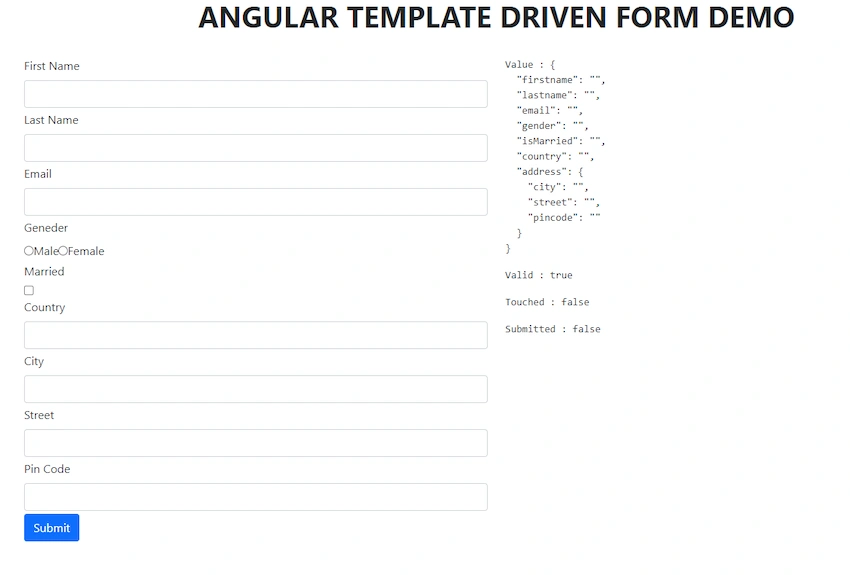
OUTPUT
2. MODEL DRIVEN FORMS (REACTIVE FORMS)
In Reactive forms we define the structure of the form in the component class. i.e. We define the form model with Form Groups, Form Control and Form Arrays. And then we define validation rules in the component class. And finally, we bind it to the HTML form in the template.
How to use Reactive Forms
- Import
ReactiveFormsModule - Defining Form Model in the component
- Create the HTML Form uses the Form Model properties.Bind the HTML Form to the Form Model
1. Import ReactiveFormsModule
import { FormsModule, ReactiveFormsModule } from '@angular/forms';

 imports: [

     //  Angular Form Modules
    FormsModule,
    ReactiveFormsModule
  ],
2. Defining Form Model in the component
FormGroup Represents a collection of form controls. It can also contain other Form Groups and FormArrays. In fact, an angular form is a FormGroup.
Join the conversation! Your thoughts help the community grow.