

I have used the following technologies in the article:
- AngularJS
- jQuery
This image contains my solution explorer.
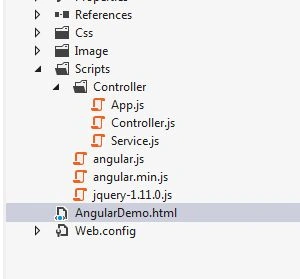
AngularDemo.html file
- ng-app is an application name in angular which is unique in project.
- <html xmlns="http://www.w3.org/1999/xhtml" ng-app="AngularApp">
App.js file
- Here we can integrate angular project name in app.js.
- var app = angular.module('AngularApp', []);
AngularDemo.html file
- ng-controller is a specific controller for my project which I define in my body tag.
- <body ng-controller="AngularController">
Controller.js
- Here I used controller as an intermediate between service.js and app.js.
- The following GET method is used for getting all the records from service.
- app.controller('AngularController', ['$scope', '$http', 'AngularService', function ($scope, $http, AngularService) {
- $scope.formdata = {};
- //load data
- AngularService.get().success(function (response) {
- $scope.Products = JSON.parse(response.d);
- });
Service.js
- Below i declared get service for fetching records from service.
- WCF Service URL is taken from my previous article.
- So you can download my service from there and used here.
- app.factory('AngularService', ['$http', function ($http) {
- return {
- //load data service
- get: function () {
- return $http({
- method: 'POST',
- headers: {
- 'Content-Type': 'application/json; charset=utf-8'
- },
- url: 'http://www.wcfdemo.somee.com/ProductService.svc/LoadAllProductDetail',
- data: {}
- });
- }
- };
- }]);
AngularDemo.html file
- ng-repeat is a working like for, foreach loop in angular
- ng-click is like onclick event in javascript.
- {{ }} is a syntax for displaying data.
- <table class='table table-bordered'>
- <tbody>
- <tr>
- <th>Name</th>
- <th>Description</th>
- <th colspan="2">Action</th>
- </tr>
- <tr ng-repeat="Product in Products">
- <td>{{ Product.ProductName}}</td>
- <td>{{ Product.ProductDescription}}</td>
- <td><span><a href="javascript:void(0);" ng-click="edit(Product);">
- <img width="16" height="16" alt="Close" src="Image/Edit.jpg" /></a></span></td>
- <td><span><a href="javascript:void(0);" ng-click="delete(Product.Id);">
- <img width="16" height="16" alt="Close" src="Image/close.png" /></a></span></td>
- </tr>
- </tbody>
- </table>
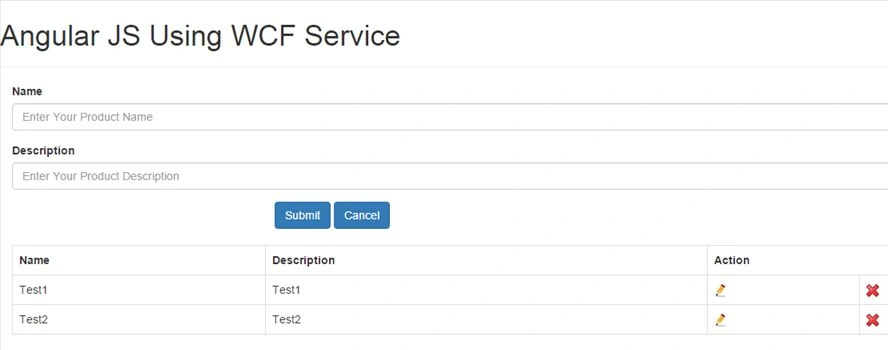
Output
Raunak GuptaPosted Apr 28, 2017, 1:16 AM
Can you upload this code in Zip format. i need that code as urgent basis
Stefvanus KusyantoPosted Dec 13, 2016, 1:40 AM
What it's output format url http://www.wcfdemo.somee.com/ProductService.svc/LoadAllProductDetail?
ATEEQ REHMANPosted Jun 16, 2016, 1:52 AM
Thanku sir :)
Kunal PatelPosted Oct 6, 2015, 2:27 AM
Thanks to all.
Santhakumar MunuswamyPosted Oct 5, 2015, 11:49 PM
Nice Share
sreenivasa kPosted Oct 5, 2015, 11:39 PM
excellent
RakeshPosted Oct 5, 2015, 1:23 PM
Good sharing
Ankit BansalPosted Oct 5, 2015, 5:55 AM
Nice..thanks for sharing with us..
Nilesh JadavPosted Oct 5, 2015, 5:42 AM
Nice one sir