

Introduction
The article is related to managing data table CRUD operations in AngularJS using a SQL database table and ASP.NET MVC web API. This tutorial is for beginners or students.
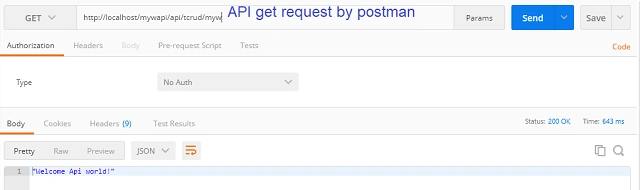
We created a CRUD functionality in AngularJS. Managing the datatable is easy. Also, we will learn how to publish it on a server to access the web API. Furthermore, we will learn how to test the web API with the Postman client. Finally, we explained all data operations in one page of coding. I hope that it will be helpful for you to manage data tables in your program with advanced mode.
Angular JS code point
- ng-app - This directive is used to bootstrap the application. Normally, it is put in top-level elements like HTML or body tag.
- ng-controller - This is the main component of AngularJS, which contains the state and logic both. It acts as a bridge between services and views.
- $scope - Provides a link between the data and views. It holds all the required data for the views and used within the HTML template.
- {{expression}} - It is called expressions and JavaScript-like code can be written inside. It should be used for mainly small operations in an HTML page.
- ng-init - This directive provides us a way to initialize a variable on the page. ng-repeat-It actually repeats the element on which it is used based on the provided list of data. In our example, persons is a JSON object which contains a list of people.
- $http-It enables you to initiate the AJAX request to the server and get the response. This is a core angular service.
Example ScreenShot
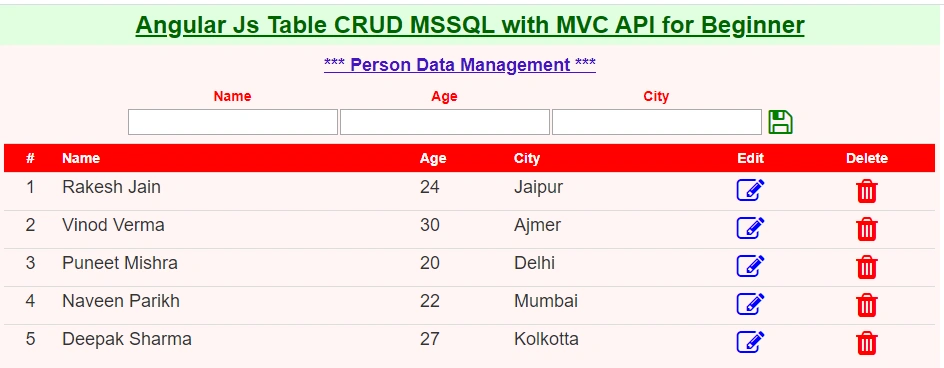
Section 1
Section 1 shows a short view of the code part. We create ng-app myApp and in the body part we create ng-controller myTableCtrl. Both ng-app and ng-controller are the two main parts of AngularJS. In the header tag, we include angular.min.js and link bootstrap.min.css, font-awesome.css to run angular js functionality and design css. Also, we added a custom design class to create a good-looking output. In HTML, we add code to get an Angular app by using angular.module() function, so that we can access the controller by using "appName".controller() function. Next, we created an empty json object array named persons to fill the table. Also, add three functions named Save(),RecEdit() and RecDel() to manage the table record.
- <html ng-app="myApp">
- <head>
- <link href="bootstrap.min.css" rel="stylesheet" />
- <link href="fontawesome/css/font-awesome.css" rel="stylesheet"/>
- <script src="angular.min.js"></script>
- <title>My Data Table</title>
- <style>
- .container {text-align: center;background-color: rgb(255, 244, 244);}
- .container h2{margin:0px;background-color: rgb(224, 255, 224);color:darkgreen;}
- .row {text-align: center;}
- .row h4 {color:rgb(67, 21, 192);}
- .row table{margin: auto;}
- .row table tr th{color:red;}
- .row table #row_header th{color:white;background-color:red;}
- .row table #row_header #th1,#th5,#th6{text-align: center;}
- .row table tr #td1,#td5,#td6{text-align: center;}
- .row table tr #td1,#td2,#td3,#td4 {font-size:large;}
- </style>
- <script>
- var myApp = angular.module('myApp', []);
- myApp.controller('myTableCtrl',function($scope,$http){
- var mykey=0;
- // create empty json object array.
- $scope.persons=[];
- // get all records, local function not related to scope
- GetRecords = function (sqry) {/*code below*/ }
- // save or update record, local function not related to scope
- SaveRecords=function(sqry){/*code below*/ }
- // get record data to update by key.
- $scope.RecEdit = function (per) {/*code below*/}
- // delete record by key
- $scope.RecDel = function (PersonId) {/*code below*/}
- // save or update record
- $scope.Save = function () {/*code below*/ }
- // default load record if available.
- GetRecords("{'StrQry':'SELECT * FROM [TblPerson]'}");
- });
- </script>
- </head>
- <body ng-controller="myTableCtrl">
- <div class="container"><h2><u>Angular Js Table CRUD MSSQL with MVC API for Beginner</u></h2>
- <div class="container" ng-init="per={}"></div>
- <div class="container"></div>
- </body>
- </html>
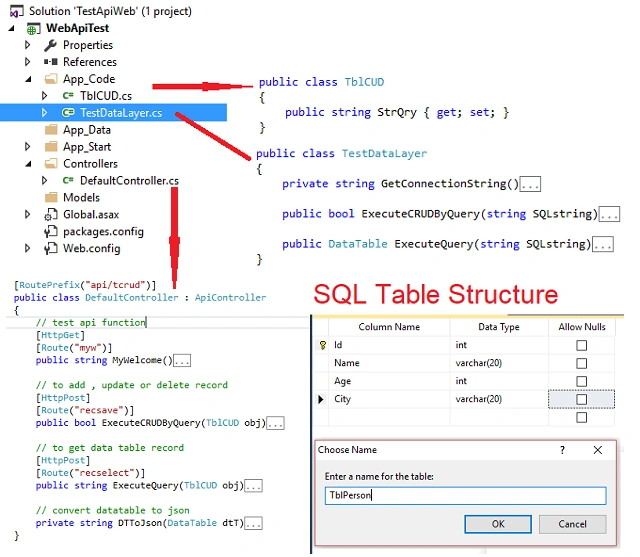
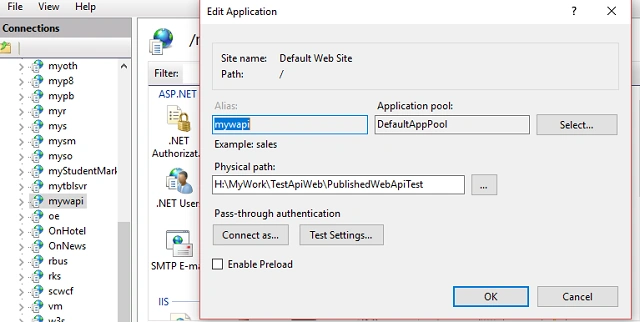
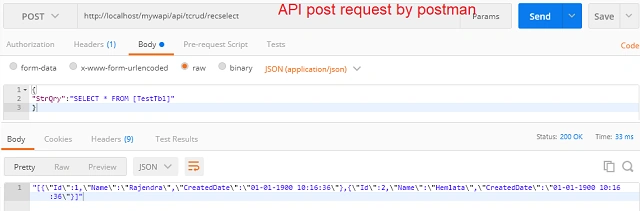
Here, we create an empty JSON object array named persons=[]. Also, we added two new functions to call the API, which is named GetRecords() and SaveRecords() which receives a parameter JSON object. Both functions have $http request with post method and call the web API URL for reading or saving table data. In our case, we used iis server localhost. The application's name is mywapi.
- // get all records, local function not related to scope
- GetRecords = function (sqry) {
- $http({
- method: 'POST',
- url: 'http://localhost/mywapi/api/tcrud/recselect',
- data: sqry
- }).then(function mySuccess(response) {
- if (response.status == 200) {
- var data = response.data;
- data = JSON.parse(data);
- if (data.length > 0)
- $scope.persons = data;
- else
- alert("No record found.");
- } else
- alert("Server error...");
- })
- }
- // save or update record, local function not related to scope
- SaveRecords=function(sqry){
- $http({
- method: 'POST',
- url: 'http://localhost/mywapi/api/tcrud/recsave',
- data: sqry
- }).then(function mySuccess(response) {
- if (response.status == 200)
- GetRecords("{'StrQry':'SELECT * FROM [TblPerson]'}");
- else
- alert("Server error...");
- })
- }
You have seen that in AngularJS, to access any function or variable we can use $scope. But the functions GetRecords() and SaveRecords() are not related to $scope, because it is local function used to call the web API. The function parameter in JSON is {"StrQry":"Query String"}. Example: "{'StrQry':'SELECT * FROM [TblPerson]'}". We are going to explain the functions Save(), RecEdit() and RecDel(). The function Save() checks the key of row. If bigger than 0, then it updates the record. Otherwise, it adds a new record in the data table using web API functionality. Here, $scope.per is a single JSON object. This empty JSON object is part of ng-controller, which is available in person form ng-init='per={}' shows in the red-colored rectangle.
- // get record data to update by key.
- $scope.RecEdit = function (per) {
- $scope.per.Name = per.Name;
- $scope.per.Age = per.Age;
- $scope.per.City = per.City;
- mykey = per.Id;
- }
- // delete record by key
- $scope.RecDel = function (PersonId) {
- var sqry = { "StrQry": "DELETE FROM [TblPerson] WHERE [Id]='" + PersonId + "'" };
- SaveRecords(sqry);
- }
- // save or update record
- $scope.Save = function () {
- //default new record save query
- var sqry = { "StrQry": "INSERT INTO [TblPerson] ([Name],[Age],[City]) VALUES('" + $scope.per.Name + "','" + $scope.per.Age + "','" + $scope.per.City + "')" }
- if(mykey>0){
- sqry = { "StrQry": "UPDATE [TblPerson] SET [Name] = '" + $scope.per.Name + "',[Age] = '" + $scope.per.Age + "',[City] = '" + $scope.per.City + "' WHERE [Id]='" + mykey + "'" }
- }
- SaveRecords(sqry);
- mykey = 0;
- $scope.per.Name = ''; $scope.per.Age = ''; $scope.per.City = '';
- }
For the HTML code, three div are available in this section. The first div tag is to show page header title, the second div tag show form of person, and the third div tag shows the table part. In the second div tag, we initialize the empty json object by using the AngularJS directive ng-init='per={}', which shows in the red-colored rectangular. Next, in for we use ng-model directive in input control in the form, and ng-click to get button event in angular js. Now finally, we are going to talk about the main data table in AngularJS. ng-repeat directive is used to show items in json object array. ng-repeat directive is like a loop. Using ng-repeat displays all items in an array in tabular format.
Join the conversation! Your thoughts help the community grow.