

When we imagine a website, the following things come to our mind.
- Some cool header with a company logo and title along with a welcome message.
- Some footer with copyright messages.
- Some dynamic content making the website really useful.
Did we miss anything? Something more important and useful? Yes, the menu items. Menu items let us navigate between different content (or pages) of an application. A web application without navigation is not an application.
Angular is a popular framework used for creating a single page application. Let’s start our discussion with understanding what a Single Page Application or SPA is.
Single page application (SPA)
A single-page application (SPA) is an approach in which we create a website design where each new page is not served from the server but generated dynamically through JavaScript's ability to manipulate the DOM elements on the existing page itself.
Routing
Considering you have the basic knowledge on Angular, I believe you know that Angular helps to create UI as the combination of compatible and reusable web components. So, when we say navigation in an Angular application, it simply means navigating between those components. It can be achieved by implementing routing.
Routing is a simple mechanism in a web application by which the requests are routed to the code that handles them. A framework is instructed with the help of some code for what code to be executed when a request is received with some URL.
In Angular, routing can be achieved using an Angular module called “RouterModule”. It is defined inside “@angular/router”.
Case 1: url: localhost/login Case 2: localhost/home
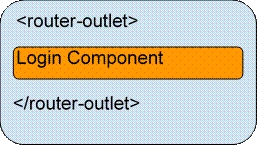
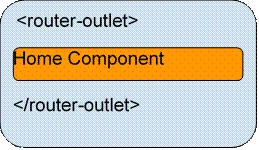
The Router Outlet
The Navigation Directive
The Angular Router provides two directives for navigation. The routerLink directive replaces the href attribute of anchor(<a>) tags to create links and routerLinkActive is used for making the active link.
For example.
- <a [routerLink]="/products" [routerLinkActive]="/products">Products</a>
Note
Please note that Routing has nothing to do with menus. It is simply about URL and code to be executed. To a framework, how the request is made is not countable.
Enough theory. Let's start with a simple example and understand it in more details.
- Fundamental knowledge of TypeScript, HTML, and Angular.
- Make sure the Angular CLI is installed in the machine.
STEP 1 - Create an Angular project
Now, let us create one project called RoutingExample.
> ng n RoutingExampleSTEP 2 - Make three components for the application
Create one directory inside src >> app folder called components.
Generate three components inside the components directory.
After generating components,the app.module.ts file should look like this.
- import { NgModule } from '@angular/core';
- import { BrowserModule } from '@angular/platform-browser';
- import { AppComponent } from './app.component';
- import { HomeComponent } from './components/home/home.component';
- import { AboutComponent } from './components/about/about.component';
- import { LoginComponent } from './components/login/login.component';
- @NgModule({
- imports: [ BrowserModule ],
- declarations: [ AppComponent,
- AboutComponent,
- HomeComponent,
- LoginComponent ],
- bootstrap: [ AppComponent ]
- })
- export class AppModule { }
- <!-- app.component.html -->
- <div style="text-align:center">
- <h1>
- Welcome to Just Compile!!
- </h1>
- <home></home>
- <about></about>
- <login></login>
- </div>
Let us check the output by executing the ng serve command.
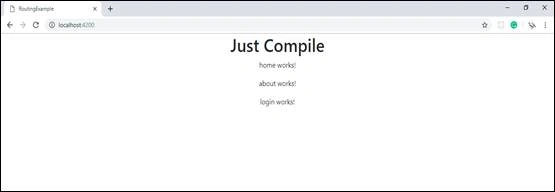

Now, this is not a SPA. Our target is to display only one component at a time with a menu at the top for navigating. The next step is to create a menu component.
Create a menu component in src>>app directory.
> ng g c MenuBefore creating the menu, let us import bootstrap in our application for a better design.
Go to index.html file and paste the below links.
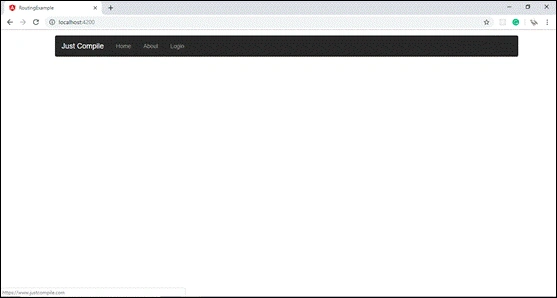
Sukesh MarlaPosted Apr 4, 2019, 1:51 PM
God work. Keep going.