

Introduction
In order to build an application in Angular, we need to know the fundamentals of Typescript. In this article, I'm going to explain the fundamentals of Typescript and object-oriented programing principles.
I'll cover the following topics in this article,
- Type Annotations.
- Arrow Functions.
- Interfaces.
- Classes.
- Constructors.
- Access Modifiers
- Modules
What is Typescript?
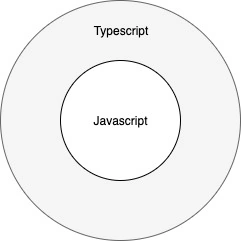
Typescript is the superset of javascript. That means any valid javascript code is also a valid typescript code. Typescript brings some object-oriented features that we missed in javascript. We have concepts of classes, interfaces, access modifiers, etc in typescript.
Type Annotation
We cannot specify the type of the variable such as boolean, string, number in javascript. But in typescript, we can specify the type of the variable. It helps the compiler in checking the type of the variable and avoids the run time errors. Typescript will give you a compilation error if we do the wrong assignment of value to the variable. For example, you declare var "age" and assign number 5 to it. Later assign some text. it will give a compilation error.
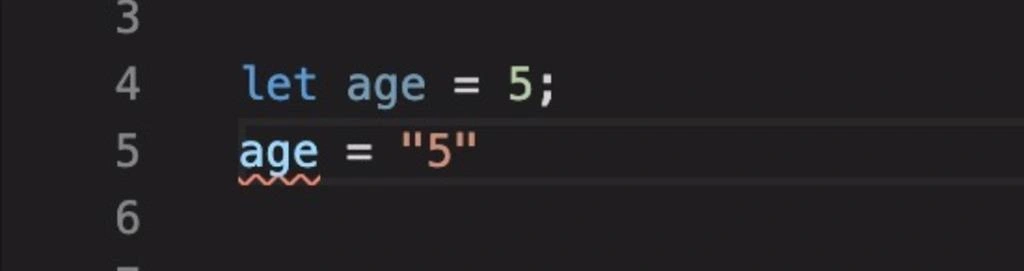
We need to use type annotations. We can specify the type by using a colon (:) after the variable name.
Syntax - var variablename - type
- let a: number;
- let b: string;
- let c: boolean;
- let d: any;
- let e: any[];
Arrow Functions
Arrow functions also works like normal functions but it shortens the syntax. Its also called Lambda functions. If we use arrow notation, no need to use the function keyword. Parameters are passed in brackets and the function expression is enclosed in curly brackets.
Syntax
(para1, para2... paraN) => { expression }
- let normfunc = function(parameter){
- console.log(parameter);
- }
- let arrowfunc = (parameter)=>{
- console.log(parameter);
- }
Interfaces
Interfaces contain only declaration but no implementation. When typescript compiler compiles to javascript, the interface will disappear from the javascript file. Thus, it's only for development purposes only.
Syntax
- interface interface_name
- {
- //variable declaration
- }
For example, without using interface,
- let pinMap =(loc:{lat:number,long:number})=>{
- }
- pinMap({lat:232434,long:09897});
Sourav Kumar DasPosted Dec 26, 2019, 12:48 AM
Nice and useful article. Thanks for sharing.