

I am here to continue the discussion around AngularJS. Today, we will discuss about the form data binding with Angular JS. Also in case you have not had a look at our previous articles of this series, go through the following links:
- Learn AngularJS From Beginning: Basic - Part One
- Learn AngularJS From Beginning: Filter - Part Two
- Learn AngularJS From Beginning: Service - Part Three
- Learn AngularJS From Beginning: Directive - Part Four
In this article, we will discuss how to perform AngularJS data binding technique with the HTML form elements or controls.
Using Data Binding Directives
The first category of built-in directives is responsible for performing data binding, which is one of the features that elevates AngularJS from a template package into a full-fledged application development framework. Data binding uses values from the model and inserts into the HTML elements.
Directive | Applied | As Description |
ng-bind | Attribute, class | Binds the innerText property of an HTML element. |
ng-bind-html | Attribute, class | Creates data bindings using the innerHTML property of an HTML element. This is potentially dangerous because it means that the browser will interpret the content as HTML, rather than content. |
ng-bind-template | Attribute, class | Similar to the ng-bind directive but allows for multiple template expressions to be specified in the attribute value. |
ng-model | Attribute, class | Creates a two-way data binding. |
One way Binding
AngularJS supports two kinds of data binding. The first, one-way binding, means a value is taken from the data model and inserted into an HTML element. AngularJS bindings are live, which means that when the value associated with the binding is changed in the data model, the HTML element will be updated to display the new value. The ng-bind directive is responsible for creating one-way data bindings, but it is rarely used directly because AngularJS will also create this kind of binding whenever it encounters the {{ and }} characters in the HTML document. For demonstrating the one way binding concept, please check the below example.
- var testApp = angular.module('TestApp', []);
- <!DOCTYPE html>
- <html ng-app="TestApp">
- <head>
- <title>AngularJS One Way Binding</title>
- <script src="angular.js"></script>
- <link href="../../RefStyle/bootstrap.min.css" rel="stylesheet" />
- <script src="app.js"></script>
- <script src="OneWayBind.js"></script>
- </head>
- <body ng-controller="OneWayCtrl">
- <div id="todoPanel" class="panel">
- <h3 class="panel-header">To Do List</h3>
- <div>There are {{todos.length}} items</div>
- <div>
- There are <span ng-bind="todos.length"></span> items
- </div>
- <div ng-bind-template="First: {{todos[0].action}}. Second: {{todos[1].action}}">
- </div>
- <div ng-non-bindable>
- AngularJS uses {{ and }} characters for templates
- </div>
- </div>
- </body>
- </html>
- testApp.controller("OneWayCtrl", function ($scope) {
- $scope.todos = [
- { action: "Get groceries", complete: false },
- { action: "Call plumber", complete: false },
- { action: "Buy running shoes", complete: true },
- { action: "Buy flowers", complete: false },
- { action: "Call family", complete: false }];
- });
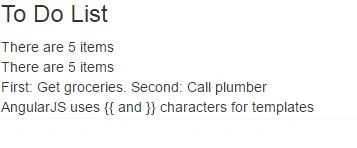
Two-Way Data Bindings
Two-way data bindings tracks changes in both directions, allowing elements that gather data from the user to modify the state of the application. Two-way bindings are created with the ng-model directive, and a single data model property can be used for both one- and two-way bindings. For demonstrating this concept, below code works great:
- <!DOCTYPE html>
- <html ng-app="TestApp">
- <head>
- <title>AngularJS Two Way Binding</title>
- <script src="angular.js"></script>
- <link href="../../RefStyle/bootstrap.min.css" rel="stylesheet" />
- <script src="app.js"></script>
- <script src="TwoWayBind.js"></script>
- </head>
- <body ng-controller="TwoWayCtrl">
- <div id="todoPanel" class="panel">
- <h3 class="panel-header">To Do List</h3>
- <div class="well">
- <div>The first item is: {{todos[0].action}}</div>
- </div>
- <div class="form-group well">
- <label for="firstItem">Set First Item:</label>
- <input name="firstItem" class="form-control" ng-model="todos[0].action" />
- </div>
- </div>
- </body>
- </html>
- testApp.controller("TwoWayCtrl", function ($scope) {
- $scope.todos = [
- { action: "Get groceries", complete: false },
- { action: "Call plumber", complete: false },
- { action: "Buy running shoes", complete: true },
- { action: "Buy flowers", complete: false },
- { action: "Call family", complete: false }];
- });
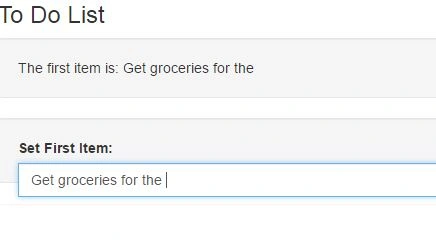
Using the Template Directives
Data bindings are the core feature of AngularJS views, but on their own they are pretty limited. Web applications—or any kind of application for that matter—tend to operate on collections of similar data objects and vary the view they present to the user based on different data values. Fortunately, AngularJS includes a set of directives that can be used to generate HTML elements using templates, making it easy to work with data collections and to add basic logic to a template that responds to the state of the data. I have summarized the template directives as below –
Directive | Applied | As Description |
ng-cloak | Attribute, class | Applies a CSS style that hides inline binding expressions, which can be briefly visible when the document first loads |
ng-include | Element, attribute, class | Loads, processes, and inserts a fragment of HTML into the Document Object Model |
ng-repeat | Attribute, class | Generates new copies of a single element and its contents for each object in an array or property on an object |
ng-switch | Element, attribute | Changes the elements in the Document Object Model based on the value of data bindings |
ng-if | Attribute | Adds and removes elements from the DOM |
ng-class | Attribute, class | Sets the class attribute for an element |
ng-class-even | Attribute, class | Sets the class attribute for even-numbered elements generated within the ng-repeat directive |
ng-class-odd | Attribute, class | Sets the class attribute for odd-numbered elements generated within the ng-repeat directive |
ng-hide | Attribute, class | Shows and hides elements in the DOM |
ng-show | Attribute, class | Shows and hides elements in the DOM |
ng-style | Attribute, class | Sets one or more CSS properties |
Html file code
- <!DOCTYPE html>
- <html ng-app="TestApp">
- <head>
- <title>AngularJS Ng Class</title>
- <script src="angular.js"></script>
- <link href="../../RefStyle/bootstrap.min.css" rel="stylesheet" />
- <script src="app.js"></script>
- <script src="OtherBind.js"></script>
- <style>
- .odd {
- background-color: lightcoral;
- }
- .even {
- background-color: lavenderblush;
- }
- </style>
- </head>
- <body ng-controller="OtherBindCtrl">
- <div id="todoPanel" class="panel">
- <h3 class="panel-header">To Do List</h3>
- <table class="table">
- <thead>
- <tr>
- <th>Srl No</th>
- <th>Action</th>
- <th>Done</th>
- </tr>
- </thead>
- <tbody>
- <tr ng-repeat="item in todos" ng-class="$odd ? 'odd' : 'even'">
- <td>{{$index + 1}}</td>
- <td>{{item.action}}</td>
- <td>{{item.complete}}</td>
- </tr>
- </tbody>
- </table>
- </div>
- </body>
- </html>
- testApp.controller("OtherBindCtrl", function ($scope) {
- $scope.todos = [
- { action: "Get groceries", complete: false },
- { action: "Call plumber", complete: false },
- { action: "Buy running shoes", complete: true },
- { action: "Buy flowers", complete: false },
- { action: "Call family", complete: false }];
- });
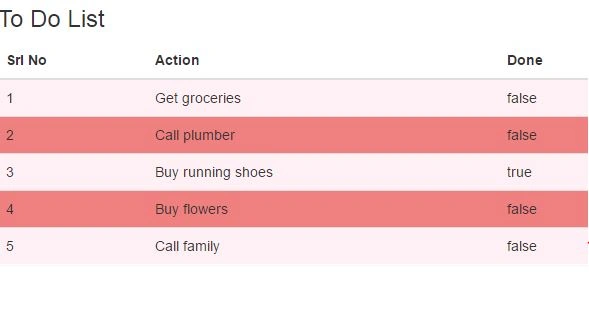
- <!DOCTYPE html>
- <html ng-app="TestApp">
- <head>
- <title>AngularJS ngInclude</title>
- <script src="angular.js"></script>
- <link href="../../RefStyle/bootstrap.min.css" rel="stylesheet" />
- <script src="app.js"></script>
- <script src="OtherBind2.js"></script>
- </head>
- <body ng-controller="OtherBindCtrl">
- <div id="todoPanel" class="panel">
- <h3 class="panel-header">To Do List</h3>
- <div class="well">
- <div class="checkbox">
- <label>
- <input type="checkbox" ng-model="showList">
- Use the list view
- </label>
- </div>
- </div>
- <ng-include src="viewFile()"></ng-include>
- </div>
- </body>
- </html>
- testApp.controller("OtherBindCtrl", function ($scope) {
- $scope.todos = [
- { action: "Get groceries", complete: false },
- { action: "Call plumber", complete: false },
- { action: "Buy running shoes", complete: true },
- { action: "Buy flowers", complete: false },
- { action: "Call family", complete: false }];
- $scope.viewFile = function () {
- return $scope.showList ? "list.html" : "table.html";
- };
- });
- <ol>
- <li ng-repeat="item in todos">
- {{item.action}}
- <span ng-if="item.complete"> (Done)</span>
- </li>
- </ol>
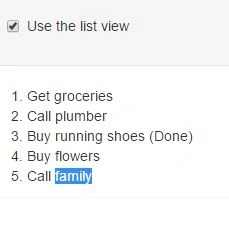
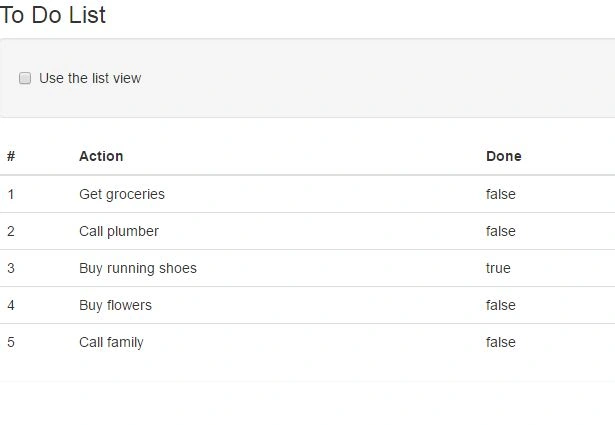
- <table class="table">
- <thead>
- <tr>
- <th>#</th>
- <th>Action</th>
- <th>Done</th>
- </tr>
- </thead>
- <tr ng-repeat="item in todos" ng-class="$odd ? 'odd' : 'even'">
- <td>{{$index + 1}}</td>
- <td ng-repeat="prop in item">{{prop}}</td>
- </tr>
- </table>
- <!DOCTYPE html>
- <html ng-app="TestApp">
- <head>
- <title>AngularJS ngSwitch</title>
- <script src="angular.js"></script>
- <link href="../../RefStyle/bootstrap.min.css" rel="stylesheet" />
- <script src="app.js"></script>
- <script src="OtherBind3.js"></script>
- </head>
- <body ng-controller="OtherBindCtrl">
- <div id="todoPanel" class="panel">
- <h3 class="panel-header">To Do List</h3>
- <div class="well">
- <div class="radio" ng-repeat="button in ['None', 'Table', 'List']">
- <label>
- <input type="radio" ng-model="data.mode" value="{{button}}" ng-checked="$first" />
- {{button}}
- </label>
- </div>
- </div>
- <div ng-switch on="data.mode">
- <div ng-switch-when="Table">
- <table class="table">
- <thead>
- <tr><th>#</th><th>Action</th><th>Done</th></tr>
- </thead>
- <tr ng-repeat="item in todos" ng-class="$odd ? 'odd' : 'even'">
- <td>{{$index + 1}}</td>
- <td ng-repeat="prop in item">{{prop}}</td>
- </tr>
- </table>
- </div>
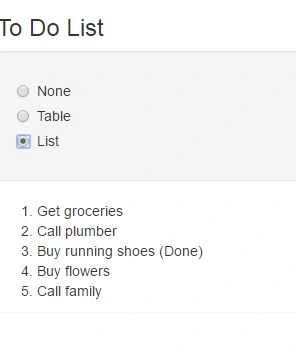
- <div ng-switch-when="List">
- <ol>
- <li ng-repeat="item in todos">
- {{item.action}}<span ng-if="item.complete"> (Done)</span>
- </li>
- </ol>
- </div>
- <div ng-switch-default>
- Select another option to display a layout
- </div>
- </div>
- </div>
- </body>
- </html>
- testApp.controller("OtherBindCtrl", function ($scope) {
- $scope.data = {};
- $scope.todos = [
- { action: "Get groceries", complete: false },
- { action: "Call plumber", complete: false },
- { action: "Buy running shoes", complete: true },
- { action: "Buy flowers", complete: false },
- { action: "Call family", complete: false }];
- $scope.viewFile = function () {
- return $scope.showList ? "list.html" : "table.html";
- };
- });
- <!DOCTYPE html>
- <html ng-app="TestApp">
- <head>
- <title>AngularJS ngClass and ngStyle</title>
- <script src="angular.js"></script>
- <link href="../../RefStyle/bootstrap.min.css" rel="stylesheet" />
- <script src="app.js"></script>
- <script src="OtherBind4.js"></script>
- <style>
- tr.Red {
- background-color: lightcoral;
- }
- tr.Green {
- background-color: lightgreen;
- }
- tr.Blue {
- background-color: lightblue;
- }
- </style>
- </head>
- <body ng-controller="OtherBindCtrl">
- <div id="todoPanel" class="panel">
- <h3 class="panel-header">To Do List</h3>
- <div class="row well">
- <div class="col-xs-6" ng-repeat="(key, val) in settings">
- <h4>{{key}}</h4>
- <div class="radio" ng-repeat="button in buttonNames">
- <label>
- <input type="radio" ng-model="settings[key]"
- value="{{button}}">{{button}}
- </label>
- </div>
- </div>
- </div>
- <table class="table">
- <thead>
- <tr><th>#</th><th>Action</th><th>Done</th></tr>
- </thead>
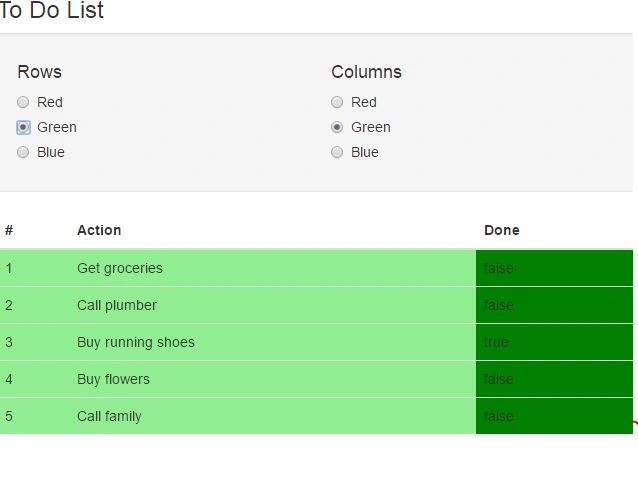
- <tr ng-repeat="item in todos" ng-class="settings.Rows">
- <td>{{$index + 1}}</td>
- <td>{{item.action}}</td>
- <td ng-style="{'background-color': settings.Columns}">
- {{item.complete}}
- </td>
- </tr>
- </table>
- </div>
- </body>
- </html>
- testApp.controller("OtherBindCtrl", function ($scope) {
- $scope.todos = [
- { action: "Get groceries", complete: false },
- { action: "Call plumber", complete: false },
- { action: "Buy running shoes", complete: true },
- { action: "Buy flowers", complete: false },
- { action: "Call family", complete: false }];
- $scope.buttonNames = ["Red", "Green", "Blue"];
- $scope.settings = {
- Rows: "Red",
- Columns: "Green"
- };
- });
- <!DOCTYPE html>
- <html ng-app="TestApp">
- <head>
- <title>AngularJS Forms</title>
- <script src="angular.js"></script>
- <link href="../../RefStyle/bootstrap.min.css" rel="stylesheet" />
- <script src="app.js"></script>
- <script src="Forms.js"></script>
- </head>
- <body ng-controller="FormsCtrl">
- <div id="todoPanel" class="panel">
- <h3>
- To Do List -
- <span class="label label-info">
- {{ (todos | filter: {complete: 'false'}).length}}
- </span>
- </h3>
- <br />
- <div class="row">
- <div class="col-xs-6">
- <div class="well">
- <div class="form-group row">
- <label for="actionText">Action:</label>
- <input id="actionText" class="form-control" ng-model="newTodo.action">
- </div>
- <div class="form-group row">
- <label for="actionLocation">Location:</label>
- <select id="actionLocation" class="form-control" ng-model="newTodo.location">
- <option>Home</option>
- <option>Office</option>
- <option>Mall</option>
- </select>
- </div>
- <button class="btn btn-primary btn-block"
- ng-click="addNewItem(newTodo)">
- Add
- </button>
- </div>
- </div>
- <div class="col-xs-6">
- <table class="table">
- <thead>
- <tr><th>#</th><th>Action</th><th>Done</th></tr>
- </thead>
- <tr ng-repeat="item in todos">
- <td>{{$index + 1}}</td>
- <td>{{item.action}}</td>
- <td>
- <input type="checkbox" ng-model="item.complete">
- </td>
- </tr>
- </table>
- </div>
- </div>
- </div>
- </body>
- </html>
- testApp.controller("FormsCtrl", function ($scope) {
- $scope.todos = [
- { action: "Get groceries", complete: false },
- { action: "Call plumber", complete: false },
- { action: "Buy running shoes", complete: true },
- { action: "Buy flowers", complete: false },
- { action: "Call family", complete: false }];
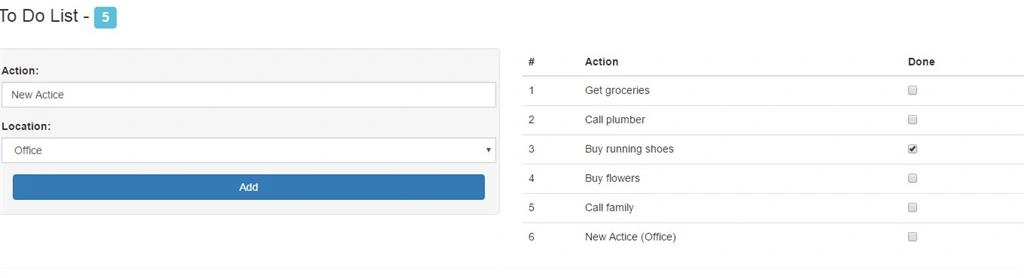
- $scope.addNewItem = function (newItem) {
- $scope.todos.push({
- action: newItem.action + " (" + newItem.location + ")",
- complete: false
- });
- };
- });
Asad AliPosted Jun 18, 2016, 10:36 AM
Good one
farooq smdPosted May 25, 2016, 9:33 AM
nice
Jaipal ReddyPosted May 12, 2016, 11:19 PM
good series. .
Neeraj KumarPosted May 12, 2016, 3:10 PM
Nice
Sonu ChaudharyPosted May 12, 2016, 11:29 AM
good one
Kuppurasu NagarajPosted May 11, 2016, 9:12 AM
Nice Sharing..
Thiruppathi RPosted May 11, 2016, 4:41 AM
Nice ex..tnx